Your campaign can be configured correctly inside every advertising platform and still produce a measurement mess. The ad attracts an interaction, the tag records an event, analytics classifies it differently, and the bidding system optimizes toward something nobody intended.
The fix is not another dashboard or another tag. You need one traceable chain from the format a person sees to the business outcome you want, with a clear role and a test at every handoff.
Key takeaways
Define each conversion in business terms before configuring it in Google, Meta, Google Tag Manager, or an analytics property.
Give ad formats, tagging, measurement, and automation separate jobs and separate acceptance tests.
Treat every new ad format as a new measurement surface, especially when one unit presents several locations or choices.
Reuse an established data layer through official platform templates where supported, but verify mappings and duplicate events before publishing.
Do not increase spend until you can trace one test action from the page or app through the tag, platform, report, and optimization setting.
Build one conversion contract before touching platform settings
Advertising platforms encourage you to start with their menus: choose an objective, install a tag, select an event, and launch. That sequence is convenient, but it lets each platform define your measurement model. The same customer action can then become a primary conversion in one account, a secondary event in another, and an analytics event with a third meaning.
Start with a conversion contract instead. This is a short specification for what happened, why it matters, and how every system should represent it. For each event, record:
If European search contributes meaningful traffic, leads, subscriptions, or sales to your business, the main risk isn’t missing the EU’s announcement. It is discovering a performance change later and having no reliable baseline to explain what moved, where it moved, or whether the ruling had anything to do with it.
The ruling, the remedy, and the search change are different events
A regulatory finding does not automatically tell you what a search results page will look like, when Google will alter a system, or how users will respond. Those are separate stages. Treating them as a single event is how teams end up attributing every ranking, cost, and traffic fluctuation to regulation.
Work with three distinct clocks:
The legal clock: What the Commission decides, which conduct it addresses, what remedies it requires, and when any obligations take effect.
The product clock: What Google actually changes in search presentation, ad delivery, ranking systems, pricing mechanics, reporting, or access for competing services.
The performance clock: When those changes become visible in impressions, clicks, costs, conversions, referrals, citations, or revenue.
Do not start the product or performance clock merely because a headline appears. First confirm that the final decision requires an operational change relevant to your market. Then confirm that a change has been deployed. Only after that should you test whether your data moved in a related way.
Create an internal tracking record now. Keep confirmed facts, outside demands, possible outcomes, observed Google changes, and measured business effects in separate fields. That small distinction will prevent speculation from hardening into an unsupported performance explanation.
Watch four search surfaces, not one ranking chart
A conventional rank tracker can tell you that a URL changed position. It cannot, by itself, show whether the page gained usable visibility, whether a new search feature displaced it, whether paid inventory changed above it, or whether an AI-generated answer absorbed the click. Your monitoring needs to cover the whole search experience.
Surface
Baseline to preserve now
Signal worth investigating
First response
Organic search
Query group, landing page, country, language, device, impressions, clicks, click-through rate, average position, and visible result features
A sustained EU-specific change across related queries, pages, or result types rather than an isolated ranking movement
Inspect the actual results pages and identify which element gained, lost, or changed placement before editing content
Paid search
Campaign, country, device, query class, impressions, click volume, cost per click, impression share, conversion rate, and cost per acquisition or return on ad spend
Costs or delivery patterns moving in affected EU segments while comparable segments remain relatively stable
Check auction, placement, demand, budget, and conversion-quality signals before changing bids
AI Overviews and publisher visibility
Feature presence on a fixed query sample, cited domains, cited URLs, brand mentions, organic clicks, and publisher referrals
A repeatable change in feature frequency, source selection, citation prominence, or downstream traffic
Separate changes in AI presentation from ordinary blue-link ranking changes and record both
New or expanded discovery paths producing qualified visits or conversions
Validate traffic quality and attribution before reallocating acquisition resources
The Commission is also examining Google’s use of AI Overviews and its ranking of news publishers. Keep that scrutiny on a separate line in your change log. It may overlap with the same search ecosystem, but you should not assume every AI Overview or publisher-visibility change is part of the pending DMA decision.
This distinction matters for diagnosis. If ordinary rankings remain stable but citations inside AI-generated results change, you have a source-selection or presentation question. If ad costs move while organic layouts remain stable, you have an auction or demand question. If impressions remain steady but clicks fall after a result-page change, you have a click-distribution question. Each pattern calls for different evidence and a different response.
Build an EU search baseline before you need one
A useful baseline is not a single export labeled “Europe.” EU markets differ by language, query demand, competition, device use, campaign structure, and commercial importance. Aggregate reporting can hide a serious movement in one market behind stability in another.
Define the affected business scope. List the EU countries, languages, domains, subdirectories, storefronts, publications, and campaigns that matter to you. Assign an owner to each material segment.
Freeze meaningful cohorts. Preserve groups for branded and non-branded queries, informational and commercial intent, product or service families, news content where relevant, and the landing pages that generate business outcomes. Do not rebuild the groups after performance changes.
Add comparison segments. Use comparable non-EU markets, stable query groups, or unaffected product lines as diagnostic references. A comparison is not proof of causation; it helps show whether a movement is localized or part of a wider change.
Record the visible search environment. For a fixed query sample, capture date, country, language, device, result order, ad presence, Google-owned modules, competing services, AI-generated features, citations, and other elements that can alter attention or clicks.
Connect visibility to outcomes. Pair rankings and impressions with clicks, qualified sessions, conversions, revenue, subscription starts, lead quality, and paid acquisition costs. A visibility change with no business effect deserves a different response from a revenue change.
Log confounding events. Record site migrations, content releases, schema changes, consent changes, campaign edits, promotions, outages, seasonality, and unrelated Google updates. Without this log, a regulatory explanation can become the default simply because it is prominent.
Keep raw exports or snapshots as well as dashboards. A dashboard can be reconfigured, filtered incorrectly, or lose historical dimensions. Your preserved data should let another analyst reconstruct what users could see and what the business measured before any compliance-related rollout.
Do not rewrite your JSON-LD in anticipation of an unknown remedy. Structured data should continue to describe the page’s real entities, offers, authorship, organization, products, articles, and relationships accurately. A regulatory change to distribution or presentation does not make inaccurate schema useful. If Google later publishes new eligibility or implementation requirements, evaluate those documented requirements against your existing markup and change only what the page supports.
Apply the same discipline to AEO and GEO work. Clear answers, explicit entity relationships, attributable claims, and crawlable supporting detail remain useful, but they are not a workaround for a platform-level compliance change. Measure traditional Google visibility, AI-generated search visibility, and citations in other answer engines separately so a gain in one channel does not conceal a loss in another.
Prepare for scenarios without pretending to know the remedy
Your plan should cover plausible operational outcomes without presenting any of them as the expected verdict. The goal is not to forecast Brussels. It is to know which evidence would trigger which action.
A penalty arrives without an immediate visible search change
A financial penalty can dominate coverage while producing no immediate change that users or advertisers can see. In that scenario, annotate the decision date but leave content, bids, and technical implementation alone unless the data or the remedy gives you a reason to act. Continue monitoring for a later rollout rather than forcing a same-day explanation onto normal volatility.
A remedy changes result presentation or access
If a remedy affects how Google presents its own services, rival services, publishers, or other result types, position alone will be an incomplete metric. Compare the same queries before and after deployment. Record which modules appear, how much prominence they receive, which destinations win the click, and whether the new traffic converts.
Do not immediately rewrite pages that lose clicks while retaining rank. First determine whether the content became less competitive or whether another interface element intercepted attention. Content changes address the first problem; measurement, distribution, and channel changes may be needed for the second.
Ad serving, ranking, or pricing mechanics change
The pending decision could affect ad serving, ranking, or pricing dynamics, but the direction and size of any effect are not known. Paid search teams should preserve campaign-level and market-level baselines now, including the relationship between cost, placement, demand, conversion quality, and revenue.
If costs move, do not assume the compliance decision caused them merely because the dates are close. Check whether demand, competitors, match behavior, budgets, creatives, landing pages, tracking, or conversion mix changed at the same time. When financial exposure is material, use capped and reversible bid or budget adjustments while you investigate. A sweeping change can create additional cost and destroy the comparison you need.
AI Overview or news-publisher action moves on a separate track
A change involving AI Overviews or publisher ranking may be important without being the remedy in the core DMA search case. Label the responsible proceeding or product update whenever you can confirm it. If you cannot, describe the observation plainly – such as a change in citation frequency or publisher clicks – and leave the cause unassigned.
That restraint improves your decisions. It also keeps executive reporting credible when several regulatory investigations, product releases, and market shifts are unfolding in the same ecosystem.
Key takeaways and the response plan to use
The EU decision, Google’s implementation, and the resulting performance effect should be tracked as separate events.
A fine or demanded remedy is not evidence that a visible search change has already happened.
Segment EU performance by country, language, device, query type, page group, and paid or organic channel before relying on an aggregate trend.
Monitor search-result composition, AI citations, ad delivery, costs, clicks, and business outcomes – not rankings alone.
Keep AI Overview and news-publisher scrutiny separate from the core DMA case unless the final decision explicitly connects them.
Preserve accurate structured data and content facts; do not make speculative technical changes for an unknown remedy.
Use reversible commercial adjustments until multiple related signals support the same diagnosis.
When the decision is published
Read beyond the headline. Obtain the official decision or authoritative summary and identify the finding, conduct in scope, required remedies, geographic scope, covered services, effective dates, and unresolved points.
Write a short decision brief. Separate confirmed obligations from possible product implications. Include an explicit “unknown” section so assumptions remain visible.
Map each remedy to an observable surface. Assign organic search, paid search, analytics, publisher, AI visibility, legal, and product owners only where their systems are genuinely affected.
Annotate your measurement systems. Record the decision date, announced implementation dates, and first observed rollout separately. Do not use one generic marker for all of them.
Compare against the preserved baseline. Look for related movements across geography, device, query groups, search features, clicks, costs, and conversions. An isolated metric is a prompt to investigate, not a conclusion.
Choose the smallest reversible response. Adjust monitoring, experiments, bids, distribution, or content only to the degree supported by evidence. Preserve a comparison group wherever the business can safely do so.
Report causality carefully. Use “coincided with” or “followed” until you can connect the legal requirement, the deployed product change, and the measured effect. Timing alone does not establish cause.
If the ruling creates legal obligations for your own company, counsel should interpret those obligations. For the search and marketing teams, the immediate job is operational: preserve evidence, identify the actual implementation, and protect performance without making speculative changes.
You do not need a confident prediction to be ready. You need a clean EU baseline, named owners, a record of what changed, and a rule that no irreversible action happens before the evidence identifies the affected surface. Put those pieces in place while the decision is still pending, and the eventual verdict becomes a manageable measurement event rather than a scramble.
Your Meta campaign can hit its media-spend target and still exceed the amount finance expected to pay. From July 1, ads aimed at several European markets carry an additional charge of 2%, 3% or 5%, before any VAT.
If you advertise across borders, your company’s address won’t protect the budget. The rate follows the location targeted by the ad, so you need to revise forecasts, performance metrics and client billing at the market level.
The surcharge follows the audience, not your billing address
Under Meta’s announced digital-services-tax policy, the advertiser pays a location-specific surcharge beginning July 1. France, Italy and Spain carry a 3% rate; Austria and Turkey carry 5%; and the UK carries 2%.
The practical rule is simple: look at where the campaign targets people, not where the ad account, agency or company is based. A US business targeting France is exposed to France’s 3% rate. A UK business targeting Austria is exposed to Austria’s 5% rate.
Target location
Surcharge
Cost of $100 in media, before VAT
France
3%
$103
Italy
3%
$103
Spain
3%
$103
Austria
5%
$105
Turkey
5%
$105
UK
2%
$102
The table shows why a media budget and a payable budget can no longer be treated as the same number. Meta’s own example is a $100 ad targeting Italy: the advertiser pays $103, excluding VAT. VAT remains separate, so $103 should not automatically be treated as the final invoice total.
For campaigns covering several countries, don’t apply one country’s rate to the whole plan. Allocate spend by target market, multiply each amount by the applicable rate, and add the results. If delivery shifts toward a 5% market, the total charge rises even when aggregate media spend stays unchanged.
For locations outside the listed schedule, don’t invent a planning rate. Check the billing notice for that market before approving the budget. The absence of a country from this table is not evidence about every other tax or platform fee that might apply.
Choose which budget number must stay fixed
You can’t preserve the same media delivery, the same total cash outlay and the same return ratio simultaneously when a new cost is added. Decide which constraint matters before changing campaign budgets.
Keep media spend fixed. Use this when reach, traffic or conversion volume matters more than the existing cash ceiling. A $100 Italy media plan remains $100 in media, but its pre-VAT cost becomes $103.
Keep total cash outlay fixed. Reduce allowable media spend so the media plus surcharge fits the approved total. For a $100 pre-VAT cap in a 3% market, allowable media spend is approximately $97.09, because $97.09 multiplied by 1.03 is about $100.
Keep an economic return threshold fixed. Continue funding markets only while revenue or contribution margin supports the all-in cost. This may produce different budget decisions in two countries even when their in-platform conversion performance looks identical.
Use two formulas in your planning sheet:
Expected pre-VAT cost = media spend x (1 + surcharge rate).
Allowable media spend = fixed pre-VAT cash cap / (1 + surcharge rate).
Do not respond by cutting every European campaign 5%. That would overcorrect UK campaigns, which carry a 2% rate, and the 3% markets. It would also confuse a finance constraint with a performance decision. Apply the actual target-location rate first; then decide whether the resulting economics still meet your threshold.
The same distinction matters in annual and quarterly plans. If your existing budget authorization covers media only, add a separate surcharge line. If it is an all-in cash ceiling, calculate how much media remains available after the charge. Write that assumption into the plan so the campaign manager and finance team don’t each interpret the same number differently.
Measure all-in CPA and ROAS, not just platform performance
A billing surcharge can create a reporting split. The advertising view may focus on media spend and auction performance, while the ledger records the higher amount actually paid. Unless your reporting layer imports the surcharge, both views can be internally correct and still lead to different decisions.
Keep the media metrics for campaign diagnosis. They tell you whether targeting, creative, bids or conversion volume changed. Add all-in metrics for budget and profitability decisions:
Media CPA = media spend / conversions.
All-in CPA = media spend plus the surcharge / conversions.
Media ROAS = attributed revenue / media spend.
All-in ROAS = attributed revenue / media spend plus the surcharge.
All-in CPM = media spend plus the surcharge, divided by impressions, multiplied by 1,000.
Suppose an Italy campaign produces the same impressions, conversions and revenue after July 1 as it did before. Its media performance has not deteriorated. Its economic performance has: every $100 of media now creates $103 of pre-VAT cost. If you compare the old media-only ROAS with the new all-in ROAS without labeling the methodology, the apparent decline can be mistaken for an auction or creative problem.
Preserve both columns rather than rewriting history. Label one set as media metrics and the other as all-in metrics, then mark July 1 as a change in cost methodology. This gives operators a stable campaign diagnostic while giving finance and leadership the number that reflects actual cost.
VAT needs its own treatment. Whether VAT belongs in a profitability model can depend on the business, jurisdiction and recoverability. Have the finance or tax owner decide that treatment; don’t make a universal VAT assumption inside the advertising dashboard.
Build a market-level control sheet before approving spend
A single blended percentage is acceptable for a rough scenario, but it is weak operational control. The country mix can change, and the difference between 2% and 5% is large enough to distort forecasts when spend is concentrated in the higher-rate markets.
Your control sheet should contain one row per target market and these fields:
Target country and reporting currency.
Planned media spend.
Applicable surcharge rate.
Expected surcharge amount.
Expected total before VAT.
Approved cash ceiling and whether it includes the surcharge.
Conversions and attributed revenue.
Media CPA and ROAS.
All-in CPA and ROAS.
Invoice variance and the person responsible for resolving it.
Then work through the change in this order:
Inventory active and scheduled campaigns. Identify every campaign that targets France, Italy, Spain, Austria, Turkey or the UK, including campaigns run from accounts based elsewhere.
Map spend to the correct rate. Avoid applying a company-wide rate when campaigns deliver into countries with different percentages.
Declare the fixed constraint. Record whether the approved number is media spend, pre-VAT cash outlay or a return target.
Update forecasts and purchase approvals. Add the charge as a visible line instead of hiding it in a miscellaneous variance allowance.
Update performance reporting. Add all-in CPA, ROAS and CPM while keeping media-only metrics available for diagnosis.
Reconcile the first affected invoice. Compare the charged amounts with spend delivered into each covered location. Investigate differences instead of silently absorbing them into campaign variance.
You don’t necessarily need to split every multi-country campaign. Separate markets when country-level budget control, margin differences, client ownership or invoice reconciliation justify the added structure. Keep them consolidated when a unified campaign is operationally preferable, but calculate the expected surcharge as a spend-weighted amount rather than using the highest or lowest rate.
Agencies also need a contract check. Don’t add a generic 5% client fee to all European activity: the listed rates differ, and the charge follows the target location. Confirm whether taxes and platform surcharges are included in the existing fee arrangement or passed through separately. If the contract is unclear, get legal or finance review before changing a client’s invoice.
Key takeaways for your July 1 plan
Meta’s surcharge is determined by the ad’s target location, not the advertiser’s home country.
The listed rates are 3% for France, Italy and Spain; 5% for Austria and Turkey; and 2% for the UK.
A $100 Italy ad becomes $103 before VAT, so media spend and total payable cost are different numbers.
If the cash ceiling cannot rise, divide that ceiling by 1 plus the applicable rate to find the allowable media spend.
Use media-only metrics to diagnose campaigns and all-in CPA, ROAS and CPM to judge economic performance.
Forecast and reconcile by market, especially when one campaign covers countries with different rates.
Before the next Europe-focused budget is approved, add the country, rate and all-in cost fields to the planning sheet and make one person responsible for the first invoice reconciliation. The surcharge itself isn’t optional for covered delivery; the decision you control is whether it becomes a planned cost or an unexplained miss.
I’ve been following the latest updates from OpenAI, and they recently made some significant changes to their privacy policy, especially with the introduction of ads in ChatGPT. These updates are designed to allow advertisers to run personalized ads while ensuring that our chats remain private and secure.
OpenAI shared these updates with ChatGPT users, detailing how ads will function within the platform and clarifying what data is accessible to advertisers. It’s a refreshing assurance that our personal interactions remain confidential.
Why this matters to me. Privacy is paramount, and OpenAI emphasizes that personal chats and histories remain shielded from advertisers. They utilize anonymized engagement signals for ad personalization, ensuring advertisers can target relevant users without accessing sensitive information.
This method allows advertisers to evaluate the performance of their ads within a privacy-first framework, fostering user trust.
Ads in ChatGPT For users like me on Free and Go plans, ads might start appearing, but if you opt for paid tiers like Plus, Pro, Enterprise, Business, and Education, you can enjoy an ad-free experience. OpenAI promises clear labeling and separation of ads from chatbot responses.
Importantly, the content generated by ChatGPT remains unbiased and unaffected by these advertisements.
How ad targeting is handled. OpenAI uses in-platform signals such as ad interactions to personalize ads, but advertisers do not get access to our conversations, chat histories, or personal information.
Advertisers receive only aggregated metrics like total views or clicks, ensuring our personal data stays protected.
Additional privacy updates A new feature allows for optional contact syncing, helping us connect with friends who also use OpenAI services. It’s up to us whether to enable this feature.
They also provided more transparency on data storage durations, processing methods, and user control options, helping us understand our data management better.
Safety and product enhancements. The update encompasses new safety tools and age prediction systems aimed at ensuring a safer environment for teenagers. Documentation for new features like Atlas, Sora 2, and parental controls for teen accounts has also been included.
The bottom line. With the expansion of advertising in ChatGPT, OpenAI is committed to maintaining strict boundaries concerning user privacy, offering advertisers valuable insights without infringing on personal conversations or data.
This update was first spotted by Paid Media expert Arpan Banerjee, who shared insights on LinkedIn. It’s a promising move towards privacy-centric advertising in AI-powered platforms.
I’ve been keeping an eye on the latest developments in AI advertising, and it’s time to prepare for something big: ChatGPT ads are on the horizon. As consumers shift towards shopping through AI prompts, ChatGPT could potentially rival search as a powerful demand-capture channel, leading to a redirection of ad budgets.
Recently, OpenAI began testing ads in ChatGPT for a limited group of U.S. users, clearly marking these placements as sponsored content. Based on the platform’s internal dynamics, it won’t be long before this feature becomes widely available.
As advertisers, we have a unique opportunity to tap into a fresh demand-capture channel. However, it’s crucial to approach this space with clear expectations and understanding.
For ChatGPT advertising to truly succeed, consumer behaviors will need to evolve. And even if they do, remember that ChatGPT won’t expand the market but rather, redistribute it.
Why ChatGPT is Embracing Ads
It’s no shock that ChatGPT is moving towards advertising. Running an LLM query is estimated to be ten times the cost of a simple search query. With users generating 2.5 billion prompts daily, expenses pile up swiftly.
The core difference here isn’t just a model shift; it’s the data landscape. Over the years, users have fed personal information into ChatGPT, giving it insights unmatched by traditional advertising tools. The burning question is how ChatGPT will use this data to target its users effectively.
Advertisements have traditionally relied on repetition to generate demand, whereas search meets buyers with intent. ChatGPT might forge a similar path, equipped with more user context.
Imagine this: asking which security camera works with a certain system and receiving an informed answer and purchase link because the platform already knows about your existing setup.
Should this happen, ChatGPT could be the first new demand-capture channel since Google’s PPC ads launched two decades ago. Yet, obstacles remain.
Today’s AI queries largely lack buying intent, serving more informational needs. When buying happens, the conversion tracking might fall short due to users completing purchases on platforms like Amazon or Google after doing their research on ChatGPT.
Don’t be discouraged; such challenges are surmountable. Google’s journey from a homework help tool to shopping powerhouse wasn’t overnight. Likewise, ChatGPT will need time to educate consumers about shopping through AI.
While a brand-new demand-capture platform is exciting, have realistic expectations about its potential.
Market Share Reality Check
Despite the capabilities of AI, it won’t expand the advertising marketplace. ChatGPT ads won’t magically bring a wave of new consumers.
Instead, it will capture pieces of the existing market shared by Google, Meta, and Amazon. It’s more about shifting budgets rather than expanding them.
Competition will be fierce, particularly with Google’s AI platform, Gemini, presenting a formidable challenge. Market consolidation seems inevitable as AI races towards profitability.
The Differentiator: Hyper-Personalization
AI’s true edge might be in hyper-personalization. With their vast knowledge of user preferences, these platforms can deliver perfectly tailored recommendations.
This feature could make AI incomparable, offering personalized results seamlessly. However, this comes with risk, as hyper-personalization might feel invasive to some users.
If AI can maintain trust and avoid crossing privacy boundaries, its personalized convenience will likely be favored by most.
Steps to Take Now
While widespread ChatGPT advertising is still on the horizon, preparation is key. Here’s how to get ahead:
Align on Measurement: Consider research-heavy metrics and assisted conversions.
Optimize Mobile UX: Ensure a smooth, fast purchasing experience to avoid loss in demand capture.
Plan Early Tests: Testing carries risks but can provide an early competitive edge.
Being strategic now will set the stage for success when ChatGPT advertising becomes fully operational.
If you manage a Google Ads account, the EU political advertising declaration can look like a routine yes-or-no setting. The real risk sits behind that setting: you can choose the wrong answer, apply the right answer at the wrong scope, or let a future campaign inherit a declaration that no longer fits.
Treat the declaration as a classification decision
The declaration applies across active campaigns, including campaigns you believe are obviously commercial. You cannot satisfy the requirement merely by deciding that political advertising is not part of your usual strategy. Google is asking for a recorded campaign status, so silence is not a substitute for selecting an answer.
Start by separating two questions. The first is whether a campaign should be classified as an EU political ad. The second is where you should record that classification in Google Ads. The platform gives you tools for the second question, but a setting does not resolve a genuinely uncertain legal classification.
Review the actual campaign rather than its name or internal purpose. Look at the ads, landing pages, intended audience, geographic reach, sponsor, and subject matter. If those facts leave reasonable uncertainty about whether a campaign is political advertising, route the decision to the person responsible for legal or regulatory compliance. Your marketing team can assemble the evidence, but it should not improvise a legal conclusion just to clear an account notification.
Submitting the Google field addresses the platform’s declaration request. It does not, by itself, prove that the campaign satisfies every legal obligation that may apply to political advertising in the EU. Treat the declaration as one compliance control, not as a complete legal review.
Choose the declaration scope that matches your account
Google provides three ways to record the answer. The right route depends on whether your campaigns share the same classification and whether you have a reliable review step for future launches.
Declaration route
Where you use it
When it fits
Main control risk
Campaign level
Open the individual campaign’s settings and use the EU political ads option
One campaign needs review, or the account contains mixed campaign types
Reviewers may apply inconsistent answers across similar campaigns
Multiple campaigns
Open the Campaigns tab and use the EU political ads option for the selected campaigns
Several reviewed campaigns require the same answer
An incorrect selection can spread the answer to campaigns that were not meant to be included
Account level
Confirm once for existing and new campaigns
The entire account is known not to contain EU political ads and future launches are controlled
A later campaign can inherit the account-level No even when it needs separate treatment
If all existing campaigns are non-political and your organization does not run political advertising, an account-level No is usually the cleanest option. It covers existing and new campaigns, reducing repetitive work. Google also allows that choice to be overridden later.
Do not use account-level No merely because most campaigns are commercial. A mixed account needs campaign-level decisions. The bulk tool is useful when many campaigns have already received the same classification, but it should be the final application step rather than a shortcut around reviewing them.
Build a record you can defend and update
The interface records an answer, but your internal file should explain why that answer was chosen. This matters when another administrator changes the account, an agency takes over, or someone later asks whether a campaign was included in the review.
Create a list of every active campaign in the account. Do not review only the campaigns currently spending the most.
Collect the facts needed for classification: ad creative, landing pages, targeting, geographic reach, sponsor, and subject matter.
Mark each campaign Yes, No, or Unresolved in an internal worksheet or ticket. Unresolved is a temporary review state, not the answer you submit to Google.
Send unresolved classifications to your legal or compliance owner before applying a bulk or account-level declaration. If the answer could create legal exposure, obtain advice appropriate to the campaign and jurisdiction rather than relying on a general checklist.
Select the narrowest Google Ads scope that accurately reflects the reviewed campaigns. Use the account-level option only when one answer genuinely fits the whole account and its launch process.
Record the submission date, account ID, campaigns covered, reviewer, final answer, and basis for the decision. Retain a screenshot or export showing the state you submitted.
This record is not paperwork for its own sake. It lets you distinguish a reasoned decision from an accidental default. It also makes correction faster: you can identify which campaigns were covered without reconstructing the account as it existed when the declaration was made.
Stop future campaigns from inheriting the wrong answer
The efficiency of an account-level No creates its main weakness. Because the choice applies to new campaigns as well as existing ones, a later campaign can enter the account under an answer selected for an earlier portfolio.
Add the EU political ads decision to your campaign launch approval. The person creating a campaign should not have to interpret the law alone, but they should have to identify whether the campaign needs compliance review.
Require a recorded EU political ads status before campaign activation.
Route every Yes or Unresolved status to the designated compliance owner.
Override the account-level answer when a reviewed campaign requires different treatment.
Recheck the declaration when creative, landing pages, geographic reach, sponsorship, or subject matter changes materially.
Include the setting in account handovers so a new agency or administrator understands the inherited default.
Ownership should be explicit. A paid media operator can maintain the setting, a campaign owner can provide the facts, and a legal or compliance specialist can resolve difficult classifications. If everyone assumes someone else owns the declaration, it becomes an account notification that gets cleared without a defensible decision.
EU political ads declaration FAQ
Does an account-level No cover campaigns created later?
Yes. Google’s account-level confirmation applies to existing and new campaigns. That makes it efficient for an account that does not run EU political ads, but it also means you need a pre-launch check in case the account’s campaign mix changes.
Can you change the declaration after submitting it?
Yes. Google allows the account-level choice to be overridden. Correct a known error promptly, then update your internal record with the new answer, the date, the affected campaigns, and the reason for the change. Do not leave conflicting screenshots or worksheets that make the current decision unclear.
What should you do if you missed March 31, 2026?
Open the account and inspect the current declaration state, campaign settings, and account notifications. If the relevant control remains available, submit an accurate answer after reviewing the campaigns. If a declaration is already present, verify whether it is correct rather than assuming another administrator handled it properly. Escalate a blocked interface through the platform’s support route, and send uncertain legal classifications to qualified counsel or your compliance team.
A missed deadline creates a compliance gap, but it does not tell you by itself what enforcement action has occurred. Verify the account instead of speculating. Your next concrete move is to assign an owner, inventory the active campaigns, and record the correct declaration at the appropriate scope.
As someone passionate about video advertising, I’ve noticed how easily videos can now be distributed across platforms like YouTube, paid social media, and connected TV. It’s an immense opportunity for exposure.
However, I often find myself questioning the real effectiveness of these videos. Campaigns sometimes show impressive metrics, but lack in tangible business impact due to strategic missteps.
The issue isn’t so much about targeting or budget; it’s about focusing more on outputs—views, impressions—rather than crucial outcomes like attention and persuasion. That’s where most video strategies falter.
Misunderstanding Attention: A Common Pitfall in Video Ads
Many video ads operate under the assumption that they’re just like TV commercials, but that’s a misunderstanding of how attention works today.
In past meetings, we’ve defined success by views and impressions, not realizing these metrics don’t always translate to engagement or conversion.
True success lies in transforming impressions into meaningful actions, and that requires a drastic shift in strategy.
I’ve learned that the opening seconds of a video ad are critical. Initially, I assumed upfront branding mattered most, but ads that opened with engagement hooks performed better.
View-through rates don’t equate to persuasion. Real impact happens before the viewer can skip the ad.
An effective hook makes all the difference, whether it’s striking visuals or compelling questions. That initial grab of attention sets the stage for success.
Scrappy Ads Often Outperform Polished Productions
It’s surprising how often simple videos outperform higher quality productions. Authenticity resonates more with audiences than polished, overtly professional content.
Audiences and algorithms favor content that feels genuine over what looks like an ad. It’s about fitting in with the platform’s native content style.
Through experience, I’ve realized that the optimal length for an ad depends on the message itself. Sometimes a longer duration with a well-crafted story outperforms shorter clips.
A well-paced narrative keeps viewers engaged, making them more receptive to the brand’s message, regardless of duration.
Understanding Metrics: Decoding Signals, Not Outcomes
The abundance of data can be misleading, with metrics often misinterpreted as outcomes. I’ve seen campaigns with high completion rates fail to drive any business impact.
The true measure of success is how video metrics correlate with real-world actions and conversions.
Aligning Briefs with Creative Outcomes
A common issue is poorly defined briefs leading to lackluster creative. Clear objectives and a deep understanding of the target audience guide more effective video strategies.
Knowing precisely who you’re speaking to and what action you desire them to take results in more intentional and impactful creative.
Creative and Distribution: An Inseparable Duo
Strategically planning how and where ads are distributed is just as crucial as content creation. I’ve witnessed great ideas fall flat due to mismatched platform contexts.
Designing ads tailored for specific platforms ensures they resonate and are effective in their intended environment.
Insight-Driven Testing: Beyond Mere Variance Generation
Effective testing focuses on key elements that engage audiences. Hypothesis-driven testing yields insights far more valuable than superficial variant testing.
Ultimately, I’m looking for tools that prove reliable in predicting real-world outcomes, enhancing creative confidence well before any campaign goes live.
Despite evolving platforms and algorithms, I’m convinced that the core elements of attention, curiosity, and trust remain constantly human.
The most successful video ads I’ve been part of focused on relevance, respecting viewers’ time, and delivering valuable content. That’s what truly captivates audiences.
Success in video advertising comes from understanding people—not just appealing to platform metrics.
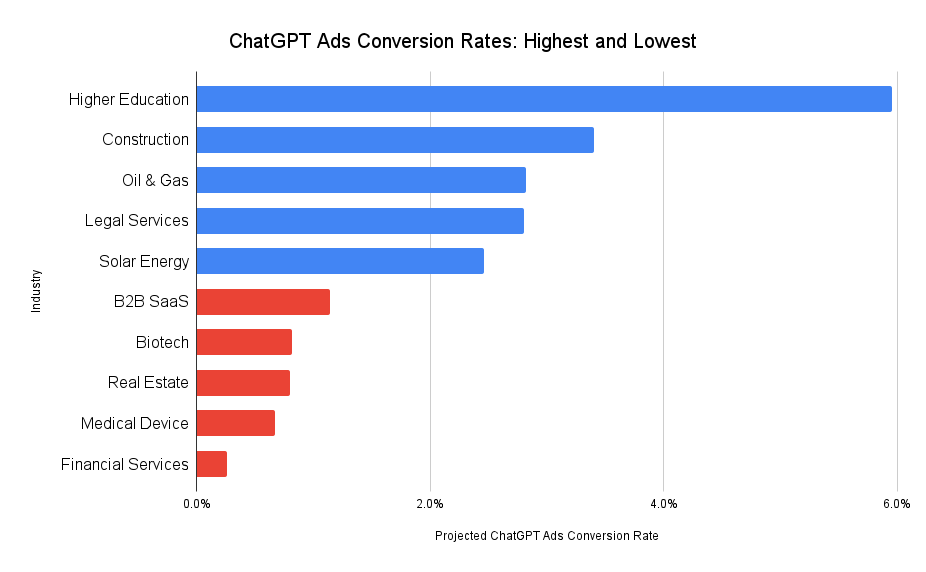
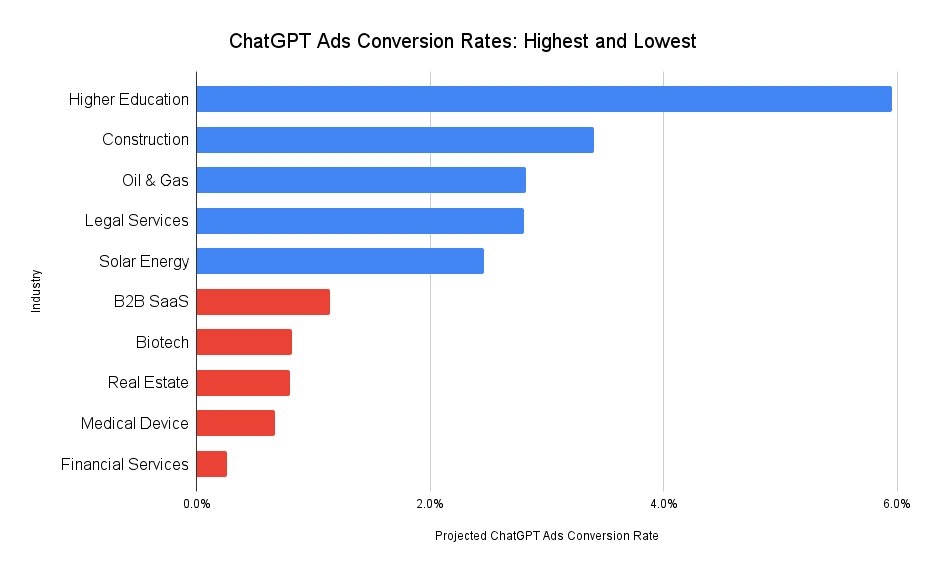
As I delve into the world of ChatGPT Ads, I’ve noticed that OpenAI has started experimenting with these ads in the U.S. However, we’re still in the early stages and concrete data about advertiser outcomes is sparse. To bridge this gap, I’ve projected conversion rates for ChatGPT ads by analyzing existing differences in conversion rates between organic and paid channels. My insights draw from our detailed reports on PPC vs. SEO Conversion Rates and Organic ChatGPT Conversion Rates. Below, you’ll find a table presenting these projections.
Right now, ChatGPT Ads are visible only to adult users in the U.S. who are logged in and using either the Free or Go subscription tiers. As OpenAI expands its advertising reach, I anticipate several shifts in user behavior worth noting:
Power users of ChatGPT, those on Plus, Pro, Business, or Enterprise plans, might see these ads if OpenAI extends to paid tiers. However, I foresee lower conversion rates in these cases since such users often utilize ChatGPT for tasks like code generation, data analysis, or marketing copywriting rather than searching for products or services.
Initial advertising rates should be fairly low to capture a wide user base, fostering dependency. But, just like Google, Meta, and LinkedIn ads experienced, I expect costs to rise as more adopters join in.
With advancements in agentic AI, advertising could broaden to include sponsored alternatives or upsells. Imagine users planning travel on ChatGPT receiving suggestions for sponsored destinations as extras.
Further Reading & Requesting a Copy of This Report
If you’re a business owner or marketer aiming to better allocate your marketing budget in anticipation of broader ChatGPT advertising, explore these insightful articles:
Your immediate task isn’t to remove ad schedules. It is to separate two decisions that may have been hiding inside one setting: when the campaign should run and how much it may spend during the month. Once you calculate those controls separately, you can keep the schedule you need without leaving the monthly cost to an outdated assumption.
Your schedule controls eligibility, not a fixed monthly spend
Under the earlier pacing behavior, campaigns with limited schedules tended to spend less because Google paced their budgets around active days. A campaign scheduled only for weekends could therefore appear to have a predictable monthly cost even when its average daily budget was much higher than the monthly target would normally support.
Average daily budget: establishes the budget Google uses for pacing and the 30.4x monthly billing limit. It is not a promise that spend will equal that amount on every active day.
Ad schedule: determines the days and hours when the campaign is eligible to serve. The pacing change does not authorize delivery outside those periods.
Budget pacing: determines how aggressively Google can use the available budget inside the eligible periods.
This is why a schedule that remains visually unchanged can produce a higher bill. The campaign has not gained more serving hours, and its displayed average daily budget has not increased. More of the permitted spend is simply being compressed into fewer active windows.
If an ad schedule exists mainly as a cost-control device, it is no longer a dependable substitute for setting the right budget. Keep schedules that reflect real operating constraints, such as the hours when your team can handle inquiries, but make the budget itself reflect the amount you are prepared to spend.
Calculate a schedule-aware spend ceiling
You can estimate the campaign’s maximum exposure from the two unchanged limits. This calculation is most useful for a full month in which the average daily budget stays constant.
Use these variables:
D = the campaign’s average daily budget.
N = the number of calendar dates on which the campaign is scheduled to be active during the month.
M = the maximum monthly amount you are willing to expose to spend.
Then calculate both constraints:
Monthly billing ceiling: 30.4 x D.
Schedule-side ceiling: 2 x N x D.
Schedule-aware planning ceiling: the lower of 30.4 x D and 2 x N x D.
In compact form, the planning ceiling is min(30.4 x D, 2 x N x D). This is a ceiling based on the stated budget rules, not a spend forecast. Available traffic, auction conditions, bids, targeting and the length of each scheduled window can all leave actual spend below it.
Count active dates, not schedule rows. If a campaign has a morning window and an afternoon window on the same date, that is still one active date for this calculation because the 2x rule applies to the day’s budget, not separately to each time block.
The formula also exposes an important threshold. At least 16 active dates are necessary for the campaign to have enough daily capacity to reach the full 30.4x monthly limit: 15 active dates provide at most 30 x D, while 16 provide up to 32 x D. Sixteen active dates do not guarantee full delivery, but fewer than 16 cannot supply 30.4 daily-budget units under the 2x-per-day limit.
If M is a hard monthly ceiling, a ceiling-first starting budget is:
D = M / min(30.4, 2 x N)
Use that equation for risk control, not as a guarantee that the campaign will spend M. If M is merely a desired spend target, you still need to judge whether the schedule contains enough demand and whether the resulting traffic meets your performance objective.
The $100 weekend-only example
Consider a simplified month with eight weekend dates and a $100 average daily budget. Under the earlier behavior, the campaign might have spent about $100 on each active date, producing an approximately $800 month. Under the new pacing approach, the unchanged daily rule allows as much as $200 on each of those eight dates.
Monthly billing ceiling: 30.4 x $100 = $3,040.
Schedule-side ceiling: 2 x 8 x $100 = $1,600.
Schedule-aware ceiling: $1,600, because it is lower than $3,040.
If $800 is a hard ceiling rather than a loose target, divide it by the binding coefficient of 16. That produces a $50 average daily budget. With eight active dates, the campaign could then spend up to $100 per date and $800 across those dates. Its 30.4x monthly limit would be $1,520, but the tighter eight-date schedule-side ceiling would remain $800.
Do not reuse the eight-date assumption for every month. Count the actual eligible dates in the month you are planning, recalculate N, and then reset D. A fixed $50 budget tied to an eight-date example will not preserve the same ceiling when the schedule contains a different number of active dates.
Audit affected campaigns without making blanket budget cuts
Confirm the notification’s scope. Locate the direct Google notice and record which account or campaigns it covers. If the scope is unclear, preserve the notice with your audit notes rather than assuming every scheduled campaign changed at once.
Inventory scheduled campaigns. For each one, record its average daily budget, eligible days and hours, number of active dates in the month, intended monthly ceiling and current spend. Include paused campaigns that may be reactivated under an old budget.
Identify the schedule’s real purpose. If it protects response times, staffing coverage or another operational limit, keep it. If it was primarily expected to reduce monthly spend, move that responsibility to the budget calculation.
Calculate both ceilings. Compare 30.4 x D with 2 x N x D. Use the lower number as the schedule-aware exposure ceiling.
Compare exposure with approval. If the calculated ceiling exceeds the amount the business is prepared to spend, lower the average daily budget before the next eligible window. Expanding or removing the schedule is a separate operating decision and should not be used merely to make a budget formula work.
Record the intervention. Save the previous budget, new budget, effective date, active-date count and calculation. Without that record, a later spend change can be misread as a bidding, demand or performance issue.
Monitor concentration as well as the monthly total
A monthly total can hide the behavior that creates the risk. Review each eligible date after it runs and track:
Actual spend for the active date compared with D and the 2 x D daily ceiling.
Cumulative monthly spend compared with your internal maximum and the 30.4 x D billing limit.
Whether delivery remained inside the configured schedule.
Conversions or other business outcomes, so higher spend is not mistaken for better performance.
If the budget and schedule stayed unchanged but spend moved closer to 2 x D on eligible dates after a direct notification, the pattern is consistent with more aggressive pacing. It does not prove that pacing is the only cause. Changes in demand, bids, targeting or auction conditions can also move spend. If ads appear outside the configured hours, however, that is not explained by this pacing change because scheduled hours are supposed to remain in force.
Do not raise D automatically when a campaign falls short of a desired target. The ceiling formula shows what Google may be allowed to spend; it does not establish that suitable traffic exists or that additional spend will be productive. Resolve a hard overspend risk first, then evaluate delivery and performance as a separate decision.
Key takeaways
For affected campaigns, ad scheduling still controls when ads can run, but it may no longer reduce monthly spend in the way your historical results implied.
The 2x active-day rule and the 30.4x monthly billing limit remain unchanged; the change is how Google paces budget within scheduled windows.
Use min(30.4 x D, 2 x N x D) to calculate a schedule-aware planning ceiling for a full month with a constant budget.
A $100 campaign with eight active dates has a $1,600 schedule-side ceiling, even if its earlier spend was around $800.
Only directly notified advertisers were identified as affected during the gradual rollout, so confirm scope before changing unrelated campaigns.
Treat a calculated ceiling as cost exposure, not a delivery promise. Monitor outcomes separately from spend.
Open each notified scheduled campaign before its next active window. Count the month’s eligible dates, calculate both ceilings, and tie the average daily budget to the amount you are actually authorized to expose. That one calculation lets the schedule keep doing its operational job without quietly making your spending decision for you.
Your paid search ad can be relevant, accurate, and polished yet disappear into a row of near-identical promises. When every advertiser uses the category term, a broad benefit, and Learn more, the problem is not grammar. It is contrast.
If you are deciding what to change, stop judging each headline in a spreadsheet. The useful unit of review is the complete ad as it appears beside competing ads. That shift turns copywriting from wordsmithing into a practical positioning exercise.
Start with the search results, not a blank document
Choose the queries that represent the clearest commercial intent in the campaign. For each query, record what the visible ads actually communicate. You are looking for patterns, not trying to imitate individual phrases.
Intent match: What product, service, or problem does the ad name?
Main promise: What outcome is the advertiser leading with?
Proof: Does the ad use a number, award, named recognition, or another verifiable detail?
Effort: Does it explain how quickly or easily the customer can act?
Commercial offer: Is there a free trial, free quote, or visible price?
Qualification: Does the message specify a location, price level, audience, or other boundary?
Call to action: What does the advertiser ask the searcher to do next?
Now mark the ideas that recur across the result. If every visible ad leads with the category name and a vague claim about simplicity, another variation of those words will not create a meaningful difference. Keep the category term where it helps confirm intent, but use the remaining space for a reason to choose you.
Do not confuse different wording with different positioning. Fast setup, get started quickly, and easy onboarding may all occupy the same competitive territory. A genuine differentiator changes the decision: verified adoption, a named award, a real completion time, an accessible starting offer, a clear price, or specific local availability.
For every proposed differentiator, ask three questions: Can you prove it? Does it answer a concern that matters at this point in the search? Is it meaningfully different from what appears around it? If the answer to any of those questions is no, the line is not ready.
Build responsive search ads as a message system
A Responsive Search Ad gives you room for 15 headline options and four descriptions. Filling every field is not the same as creating a versatile ad. If most assets repeat the same noun and benefit, the platform has many combinations but very little real choice.
Assign every asset a job before you write it:
Intent anchor: Confirms what the product or service is.
Outcome: Names what the customer can accomplish.
Proof: Supports the promise with something verifiable.
Effort reducer: Addresses time, complexity, or inconvenience.
Offer: Gives the searcher a low-friction next step.
Qualifier: Uses price, location, or another useful boundary to attract a better fit.
Action: Tells the searcher what to do next.
This role-based structure makes combinations easier to inspect. An intent anchor can sit beside proof and an action without sounding repetitive. Three assets that all say the product is easy will compete for the same job and may appear together as a weak, monotonous message.
Read plausible headline and description combinations as complete ads. Check for repeated claims, awkward transitions, contradictory qualifiers, and calls to action that do not match the landing page. An asset can be strong by itself and still create a poor ad when paired with another asset.
When several headlines are alternatives for the same role, you can pin them to the same position. That allows those alternatives to rotate without appearing beside one another. Pinning can reduce the platform’s ad-strength rating, so use it deliberately when it protects meaning, prevents repetition, or preserves an approved message. The rating is feedback; a coherent customer-facing ad is the goal.
Replace broad claims with proof, effort, and useful boundaries
Competitive copy does not become persuasive by choosing a louder adjective. A claim such as Best Local Contractor asks the searcher to accept your opinion. Attaching that claim to named, verifiable recognition gives the person a reason to believe it.
Run each important claim through the appropriate check:
Superiority: Replace an unsupported claim such as best with the specific evidence behind it. If there is no evidence, choose a benefit you can defend.
Speed and ease: Describe a real action and a real timeframe. Open an account in 10 minutes is useful only when the customer can reasonably expect that experience.
Free offer: State what is free. A free trial and a free quote solve different kinds of hesitation, so do not reduce both to a vague mention of savings.
Pricing: Show price when it helps someone compare or qualify themselves. A higher price can also filter out poorly matched prospects, provided the amount and any necessary qualification are accurate.
Location: Name the actual place served in a regional campaign. A relevant county, city, or service area is more useful than a generic claim about being local.
Action: Name the next meaningful step, such as requesting a quote, starting a trial, or scheduling an appointment.
Before publishing, compare every promise with the landing page and the operating reality behind it. Can the business fulfill the stated timeframe? Is the recognition named correctly? Does the free offer have a scope the ad should clarify? Does a displayed price need a starting qualifier? If the destination cannot confirm the promise immediately, revise the ad or the page before paying for traffic.
The most useful copy often does two jobs at once: it attracts the right person and gives the wrong person enough information to opt out. Price, geography, availability, and the exact nature of an offer can reduce raw appeal while improving message fit. That is not a copy failure. It is qualification.
Use AI to widen the options without surrendering control
AI is useful for exploring angles, spotting repetition, and producing alternative wording. It should work from an approved fact set, not fill gaps with plausible claims. Treat AI-generated assets as drafts that require human review.
A practical prompt starts with the competitor message map and a fact bank. Ask for headline and description options grouped by role: intent, outcome, proof, effort, offer, price, location, and action. Tell the model to use only the supplied facts, keep necessary qualifiers, avoid unsupported rankings, and make each group communicate a genuinely different idea.
Review the output with a stricter standard than fluency:
Delete numbers, awards, rankings, and time claims that are not in the approved fact set.
Reject assets that restate an existing claim with synonyms.
Restore any eligibility, pricing, availability, or geographic qualifier the draft omitted.
Check the wording against brand voice and relevant industry requirements.
Render the assets in combinations and read them as a searcher would.
Confirm that every call to action leads to a page where that action is available.
Account-level automation needs the same ownership. If every message and link must pass an accuracy or compliance review, disable automatically generated assets rather than allowing unapproved copy or destinations to appear. Automation can help assemble and vary approved material; it cannot take responsibility for whether a claim is true.
Test the competitive idea, not just the wording
Do not let an ad-strength score decide which copy deserves to run. A high rating may indicate that the platform has a varied asset inventory, but it does not answer the strategic question: does your ad give this searcher a credible reason to choose you over the alternatives?
Write a test hypothesis before changing the assets. It should name the competitive problem and the proposed answer. For example: an independently verifiable proof point will create a clearer reason to choose the brand than an unsupported superiority claim. That is more useful than testing whether one adjective beats another.
Choose one message dimension. Test proof, effort, offer, price, location, or action without rebuilding every part of the ad at once.
Protect the comparison. Keep unrelated messaging stable where the setup permits, and prevent duplicate or conflicting assets from muddying the test.
Inspect combinations before launch. Make sure the intended contrast survives assembly and the landing page fulfills both versions.
Judge the business outcome. Use the campaign result that reflects the action you actually value, not an interface score alone.
Return to the result page. Performance data tells you what happened inside the campaign; a fresh competitive review shows whether the message is still distinctive in context.
Record the decision. Keep the query, competitive pattern, hypothesis, assets, outcome, and next action together so the campaign does not drift back toward generic copy.
Key takeaways
Review paid search copy beside competitor ads, because distinctiveness cannot be judged in isolation.
Give every Responsive Search Ad asset a defined role instead of filling the inventory with paraphrases.
Support superiority claims with evidence, and use truthful details about effort, offers, price, and location to help people decide.
Pin alternative assets when necessary to prevent repetition or protect an approved message.
Use AI to explore approved facts, then review every claim, qualifier, link, and assembled combination.
Test a competitive proposition with a written hypothesis, not merely a different set of words.
Start with one commercially important query and one live ad. Map the competing promises, remove assets that do the same job, and strengthen the least-supported claim. Your next test will then have a clear reason to exist and a result you can use.