Category: News

  • Enhance Your Data Strategy with Server-Side Tagging Solutions

    Enhance Your Data Strategy with Server-Side Tagging Solutions

    I’ve been noticing the rapid transformation in how brands are tracking user behavior online. With privacy laws tightening and browser extensions increasingly blocking data, the demand for cleaner data from ad platforms is higher than ever. This change urged me to explore server-side tagging as a solution.

    By implementing server-side tagging, I’ve managed to reduce data loss while collecting cleaner, privacy-compliant data. This approach is invaluable, especially considering the experiences I’ve had with providers like Elevar and Littledata.

    So, what exactly is server-side tagging, and in which situations does it really shine? Let’s dive into the details!

    What is server-side tagging?

    Traditionally, tracking scripts ran directly in the browser. However, with server-side tagging, these scripts operate on a server I control, giving me more control over data processing.

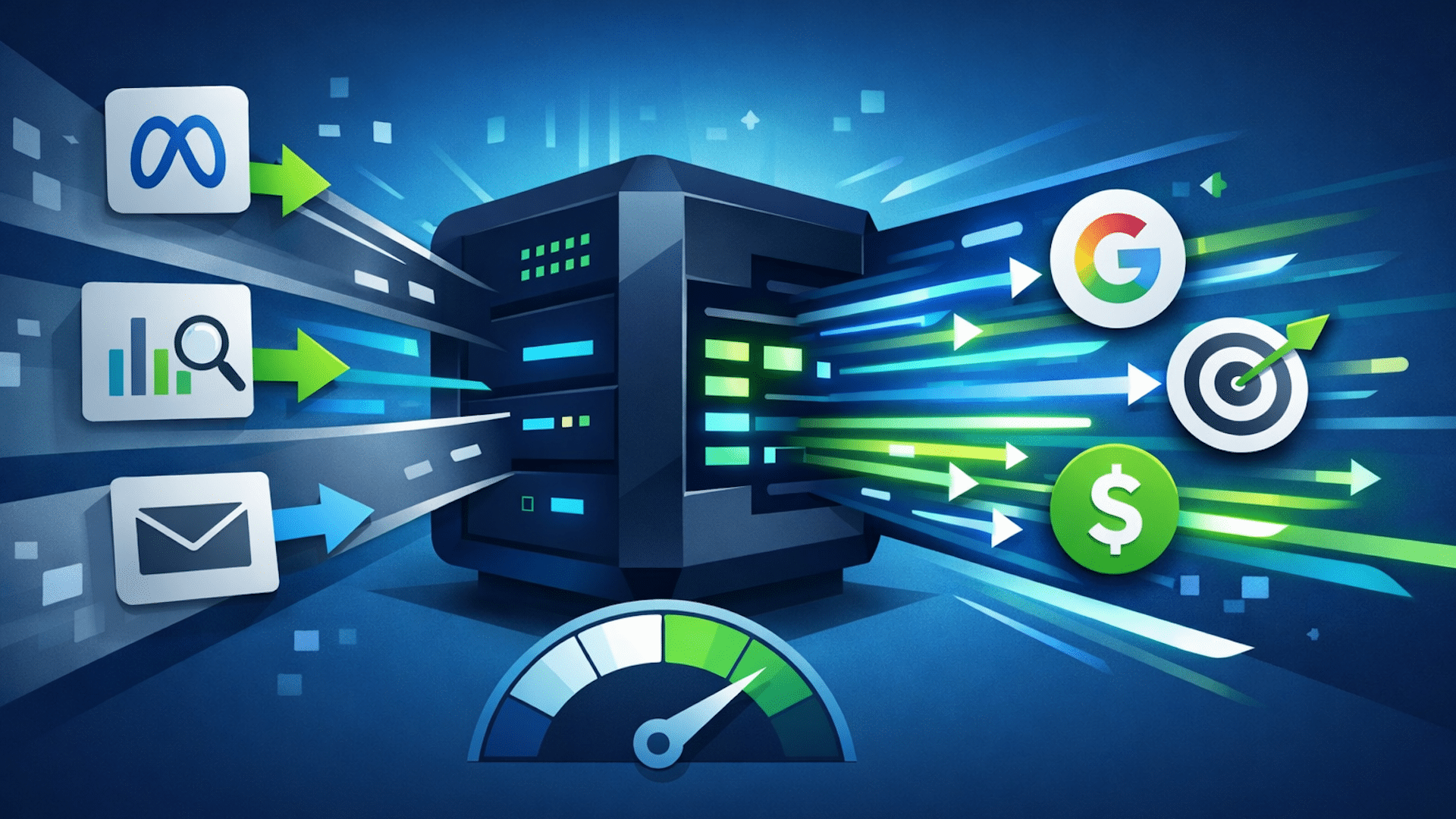
    Here’s how it works: instead of sending data straight to multiple third parties from the browser, events are sent to a first-party server endpoint, often using a Google Tag Manager server-side container. The server then processes, enriches, and forwards this data to tools like Meta and Google Analytics.

    This setup provides benefits such as more data control, a cleaner page performance, and better compliance with privacy laws.

    Moreover, server-side tagging grants me the flexibility to enrich and transform data before it reaches ad platforms, standardizing event names, filtering out low-quality events, and adding custom parameters for better audience segmentation.

    Is server-side tagging right for you?

    While server-side tagging isn’t a one-size-fits-all solution, many brands find it essential, particularly if you:

    You need to meet strict privacy or compliance requirements

    Server-side setups allow for greater control over how data is processed and shared, supporting compliance with regulations like GDPR and CCPA.

    ```json
{
  "alt": "The CapmatchOne logo with a gradient circle and bold text.",
  "caption": "Discover innovation with the CapmatchOne logo, featuring sleek typography and a modern gradient circle.",
  "description": "The CapmatchOne logo features bold, modern typography coupled with a gradient circle, symbolizing connection and innovation. The sleek design conveys a sense of progress and creativity. This image can be used for branding or promotional purposes, appealing to audiences interested in innovative solutions and forward-thinking designs."
}
```

    You want faster website performance

    In my experience, client-side tracking can slow your page down, but server-side tagging shifts data processing to the server, resulting in faster websites.

    You want more accurate tracking (despite ad blockers)

    Ad blockers can hinder client-side scripts, but server-side tagging circumvents many of these restrictions, making your data collection more reliable.

    You’re investing heavily in paid media

    For those heavily invested in platforms like Meta and Google Ads, achieving better data accuracy can significantly impact return on ad spend.

    How to implement server-side tagging

    When it comes to implementing server-side tagging, you have two main options: building it internally or using a service provider.

    Option 1: Internal setup

    Choosing an internal setup gives me complete control but requires technical expertise and ongoing maintenance. This involves setting up a GTM server-side container and adding logic for data processing.

    Option 2: Use a server-side tagging service

    Platforms like Elevar and Littledata offer turnkey solutions that integrate seamlessly with existing tools, allowing me to focus on strategy rather than technicalities.

    Our direct experience: Littledata vs. Elevar

    In my experience with Littledata and Elevar, each caters to different needs. Littledata is ideal for emerging brands with simpler tech stacks, while Elevar is suitable for those outgrowing entry-level solutions.

    Investing in server-side tagging has transformed how I handle data, ensuring that I remain compliant with privacy laws while boosting site performance and data reliability across all my platforms.


    Inspired by this post on Search Engine Land.


    crushpress.ai community screenshot
  • HubSpot’s Bold Move: Unbound by Traditional Marketing Frameworks

    HubSpot’s Bold Move: Unbound by Traditional Marketing Frameworks

    I recently discovered that HubSpot has decided to shake things up by rebranding their annual conference, taking it from ‘Inbound’ to the innovative ‘Unbound’. This change is certainly a nod to the evolving landscape of marketing and strategy.

    If you’ve tucked away your inbound strategy tools over the past year, maybe it’s time to do the same with those ‘Inbound’ conference mugs and swag as well. It’s a fresh start.

    This coming September, HubSpot’s annual gathering in Boston will reflect this transition. As noted on their event site, the reasoning behind this shift is clear:

    “This evolution is our response to that reality. INBOUND is becoming UNBOUND because growth no longer fits within a single framework or function. Today, it covers marketing, sales, service, and operations across the full customer journey in an AI-driven environment. UNBOUND reflects that expanded reality and the mindset required to lead through it.”

    It’s fascinating to consider how HubSpot, the pioneers of inbound marketing, are now expanding beyond what they once set in motion—using content and search rankings for attracting and converting visitors.

    I’ve also noted that recent changes in Google’s algorithm seem to have affected the HubSpot blog, possibly as a result of content drifting away from core topics like CRM, sales, and marketing.

    It’s clear that the traditional inbound strategy has lessened in impact as platforms like Google shift towards AI models such as ChatGPT, affecting website traffic and clicks.

    Back in 2025, HubSpot introduced their Loop marketing strategy, aiming to educate consumers in this rapidly advancing AI world.

    The move to ‘Unbound’ acknowledges that no singular approach is sufficient in today’s dynamic marketing environment. It’s a brave new shift, one that reflects a deeper understanding of the expansive realities we’re working within.


    Inspired by this post on Search Engine Land.


    crushpress.ai community screenshot
  • AI Bots Triple Traffic, Threaten Publisher Revenue: Report

    AI Bots Triple Traffic, Threaten Publisher Revenue: Report

    Recently, I read an eye-opening report stating that AI bot activity skyrocketed by 300% in 2025. As someone deeply interested in digital publishing, I couldn’t help but feel the strain it puts on media and publishing industries.

    AI bot traffic surge

    Why this matters to me. I’m increasingly aware of how AI bots are revolutionizing content discovery and consumption. They’ve shifted the dynamics by directing users from traditional search clicks to direct answers via chat interfaces. For publishers like us, this means fewer organic visits and a lack of attribution in AI-generated responses, which undermines revenue from ads and subscriptions.

    The threat we face. In our publishing niche, we’re confronted with two significant AI bot threats:

    – Training bots that are fed our content models.

    – Fetcher bots that extract our real-time content to provide instant answers, posing a severe risk by capturing the value as soon as it’s created.

    The impact I notice. It’s disheartening to see page views sink while operational costs escalate. Scraping bots consume our server and CDN resources without adding revenue, decreasing brand visibility.

    – AI chatbot referrals result in about 96% less traffic compared to traditional search.

    – Only about 1% of users click on sources cited in AI-generated answers.

    Our solutions. As a proactive step, I see publishers like us leaning toward nuanced controls instead of outright banning AI bots. We adapt by:

    – Monitoring and categorizing bot traffic efficiently.

    – Selectively blocking malicious scrapers or slowing them down using techniques like tarpitting.

    – Authorizing bots that are linked to licensing deals or partnerships.

    In their words. As per Akamai’s insights:

    – “These bots are more than just a security issue; they pose a profound business challenge that threatens the sustainability of quality journalism in a zero-click search and AI-generated content era.”

    – “Publishing faces an existential crisis… Readers still appreciate genuine content, but they seek instant answers via AI-driven platforms like ChatGPT and Gemini rather than search results.”

    What’s ahead? There’s talk about a “pay-per-crawl” model. Tools such as identity verification (Know Your Agent) and platforms like TollBit are aiming to authenticate bots and charge for real-time access.

    – The aim is to convert scraping into a manageable and monetizable transaction.

    About the data. The Akamai report scrutinized bot management data from July to December 2025, which included application-layer traffic across websites, apps, and APIs.

    Dive deeper into the report. Check out the SOTI Security Insight Series: Navigating the AI Bot Era (you’ll need to register).


    Inspired by this post on Search Engine Land.


    crushpress.ai community screenshot
  • Explore Google’s New Developer Hub for Ad Tools and Insights

    Explore Google’s New Developer Hub for Ad Tools and Insights

    I’ve recently discovered some exciting news from Google that’s perfect for those of us who rely on their ad tools and measurement resources. Google has just launched a developer hub that’s set to make our tech-driven advertising tasks a lot smoother.

    The new Developer Hub centralizes everything into one easy-to-navigate destination, which promises to simplify our experience when building, automating, and scaling ad campaigns.

    What’s Happening. Google is introducing the Advertising and Measurement Developers Hub. This centralized site is designed to give us seamless access to an array of tools and resources across their ad ecosystem. Say goodbye to hunting for documentation in multiple places!

    The Hub organizes resources for products like the Google Ads API, Google Analytics, and publisher tools such as AdMob and Google Ad Manager into convenient categories including advertising, tagging, and measurement.

    How It Works. It features a streamlined homepage where I can quickly access documentation, blog updates, and community channels. Plus, there are dedicated sections to explore products, connect with support, and engage with Google’s developer relations team.

    Why We Care. For anyone deep into using Google’s tools, like me, this is a game-changer. The ease of access to advanced tools for automation, tracking, and optimizing campaigns can really boost efficiency. This new hub makes it nearly effortless to take advantage of Google’s robust ad tech ecosystem.

    The Big Picture. As our advertising efforts increasingly lean on automation and APIs, Google is bolstering the infrastructure to support developers and technical users managing complex integrations.

    Zoom In. New features I think are worth noting include a ‘meet the team’ section, a centralized support page with links to Discord and GitHub resources, and a media hub featuring content like Ads DevCast.

    What to Watch. It’ll be interesting to see if this hub becomes the go-to entry point for developers across Google’s ad products, especially as more AI and measurement tools roll out.

    Bottom Line. Google is betting big on developer support with this hub, anticipating that it will drive innovation and adoption within its ad tech ecosystem.

    Dig Deeper. For more details, check out the full story on the Google blog: Introducing the Google Advertising and Measurement Developers Hub!


    Inspired by this post on Search Engine Land.


    crushpress.ai community screenshot
  • Explore Google’s New Swipeable Location Carousel in Ads

    Explore Google’s New Swipeable Location Carousel in Ads

    I recently stumbled upon an exciting development from Google that’s set to transform how we view local search ads. They’re experimenting with a swipeable location carousel, designed to make results more interactive and competitive, especially for advertisers with multiple locations.

    The key change lies in how Google is planning to make local search ads more engaging. By grouping multiple business locations into a horizontal carousel, they allow users to swipe through different options right from the ad unit. Imagine being able to compare options without leaving the search results page. This feature could potentially change how advertisers capture nearby demand.

    What’s Happening: This new format for Google Ads aims to consolidate business locations into a swipeable carousel. It promises a richer browsing experience for users, who can now view multiple locations directly within the ad.

    How It Works: Instead of displaying each location separately, the carousel groups them together. Each location includes business details such as ratings and proximity, all easily accessible by swiping.

    Zoom In: The move from static, stacked listings to a more dynamic experience is notable. It consolidates multiple location listings into one elegant, swipeable unit.

    ```json
{
  "alt": "Google search results for 'bedsore lawyer near by' with highlighted sponsored results.",
  "caption": "Looking for a bedsore lawyer nearby? This image shows Google search results, emphasizing sponsored options for immediate legal assistance.",
  "description": "This image displays a Google search result for 'bedsore lawyer near by,' showcasing sponsored listings for personal injury attorneys. The search interface includes options for online appointments within a 0.2 mile radius. Featured results include law firms specializing in bed sore negligence and personal injury. An arrow highlights a specific sponsored result, offering users quick access to relevant legal services in Philadelphia."
}
```

    Why We Care: For advertisers, this could mean increased visibility in a single ad, while users enjoy a faster way to compare options nearby. It’s a win-win.

    Between the Lines: While this could boost engagement with location-based ads, it might also heighten competition within the carousel as businesses compete for user attention.

    What to Watch: I’m eager to see if this feature rolls out more widely and the impact it will have on click-through rates and overall local ad performance.

    First Spotted: This intriguing update was first noticed by Anthony Higman, Founder of Adsquire, who shared his discovery on LinkedIn.


    Inspired by this post on Search Engine Land.

    crushpress.ai community screenshot
  • Effortless Meta Pixel Setup with New GTM Template

    Effortless Meta Pixel Setup with New GTM Template

    As someone who manages ad campaigns across various platforms, I’m thrilled to share that Meta has launched a new template for Google Tag Manager! This makes setting up the Pixel incredibly simple, ensuring smoother cross-platform tracking with more consistency for advertisers like us.

    Meta Platforms is committed to reducing the technical challenges we face, especially when juggling campaigns on different platforms. This new update is a step towards minimizing those hurdles.

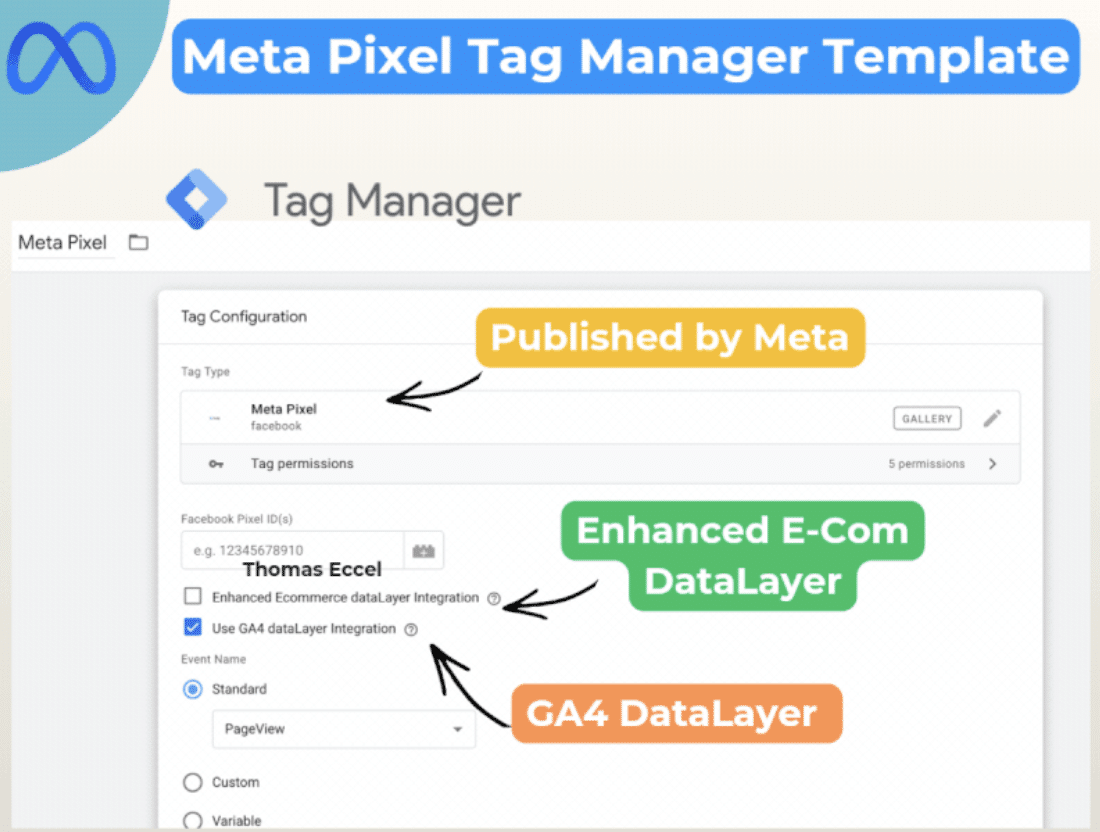
    What’s happening. Meta has unveiled an official Pixel template within Google Tag Manager. This effectively replaces the need to rely on third-party or community-generated solutions.

    Meta GTM template

    How it works. This template takes advantage of our existing GA4 dataLayer, allowing us to utilize pre-configured events for Google Analytics 4 without needing to rebuild our tracking systems. It also makes mapping enhanced e-commerce events automatic, such as purchases and add-to-cart actions, which means we don’t have to worry about redundant tagging.

    Why we care. The simplified setup reduces the time we spend implementing these systems while lowering the risk of tracking errors. This ensures our campaigns run smoothly across Google and Meta platforms.

    ```json
{
  "alt": "Meta Pixel Tag Manager Template with configuration details and DataLayer options for GA4 and Enhanced E-Commerce.",
  "caption": "Discover how the Meta Pixel Tag Manager Template simplifies your data tracking with options for Enhanced E-Commerce and GA4 DataLayer integrations.",
  "description": "This image showcases the Meta Pixel Tag Manager Template interface, highlighting its features for configuring tag types and data tracking. The template offers options for Enhanced E-Commerce DataLayer and GA4 DataLayer integrations. Published by Meta, it provides a streamlined approach for managing Facebook Pixel IDs and event tracking, crucial for optimizing digital marketing strategies. Keywords: Meta Pixel, Tag Manager, GA4, Enhanced E-Commerce, DataLayer."
}
```

    What to watch. I’m curious to see if this user-friendly setup encourages more advertisers to adopt Meta Pixel tracking and whether it will lead to similar integrations in the future.

    Bottom line. By removing one of the biggest pain points in ad tracking, Meta is making it quicker and simpler for us to gain reliable insights across various platforms.

    First seen. This update was discovered by Paid Media expert Thomas Eccel, who highlighted it on LinkedIn.


    Inspired by this post on Search Engine Land.

    crushpress.ai community screenshot
  • Discover Google’s New Universal Commerce Protocol Guide!

    Discover Google’s New Universal Commerce Protocol Guide!

    I’m thrilled to share that Google has launched a groundbreaking onboarding guide for its Universal Commerce Protocol (UCP). This new system marks a significant shift towards integrating seamless checkout experiences directly within search. It’s a game-changer for advertisers and merchants alike.

    Google is setting the stage for what they call ‘agentic commerce,’ where I can see purchases happening right in the AI-driven search moments. It’s all about making the buying process smoother and more intuitive for users like me.

    What’s happening. Google has unveiled a detailed onboarding guide for the Universal Commerce Protocol (UCP) in Merchant Center. This guide shows merchants how to integrate with UCP, which allows checkout directly from product listings in AI Mode and Gemini. I find this incredibly useful in streamlining my customer journey.

    The big picture. With AI search evolving into transaction facilitation, Google aims to keep users like me engaged by embedding shopping and checkout into conversational experiences. It’s all about keeping us within their ecosystem.

    How it works. Before jumping in, merchants need to complete a technical integration and submit an interest form. After getting approval, they can access onboarding tools in Google Merchant Center. This includes a testing sandbox, identity linking, and checkout APIs — tools that I find essential for successful integration.

    Why we care. Google’s move of aligning search closer to transactions means that I, as a user, might complete my purchases directly inside AI interactions rather than visiting separate websites. This could redefine how we measure, attribute, and optimize our advertising performance. Early adopters of the Universal Commerce Protocol could gain a competitive advantage as shopping becomes more integrated into AI tools like Gemini.

    Zoom in. The protocol acts as an open standard, connecting product data, user identity, and payment flows. I’m excited about making seamless purchases without any redirection to external sites.

    What to watch: The rollout is gradual and currently limited to the U.S. I should keep an eye out for a dedicated UCP integration tab appearing in Merchant Center accounts in the coming months.

    Bottom line. If widely adopted, the Universal Commerce Protocol could transform online shopping, making search a complete, AI-powered checkout experience. I hope to see this fully integrated soon.

    Dig deeper. To find out more about onboarding to the Universal Commerce Protocol, check out this guide in Merchant Center.


    Inspired by this post on Search Engine Land.


    crushpress.ai community screenshot
  • Mastering Audience Engineering: Elevate Your Paid Media Strategy

    Mastering Audience Engineering: Elevate Your Paid Media Strategy

    Audience engineering
    Embrace audience engineering to influence AI decisions, manage ad spend wisely, and connect with high-value customers through creativity and data.

    I’m witnessing a significant transformation in the paid media landscape as platforms shift from manual targeting to AI-driven audience discovery. This change is redefining how we approach advertising, with automation tools consolidating campaigns, obscuring data, and favoring prediction algorithms over manual selection.

    This transition requires me to innovate by mastering the art of audience engineering. By doing so, I ensure I’m equipped with strategies to thrive in this evolving landscape.

    The End of Manual Targeting as I Knew It

    Previously, I depended on detailed keyword lists and demographic filters to pinpoint my ideal audience. I directed platforms about where to focus and paid to access the desired market.

    However, these options are now outdated:

    • Google has transitioned to Performance Max, which eliminates keyword-specific targeting in favor of more fluid groups and signals.
    • Meta’s Advantage+ automates demographic focus, turning my role into that of a signal provider instead of an audience selector.
    • Microsoft’s inclusion of this model confirms this is an industry-wide evolution.

    While traditional targeting seems to have vanished, it has merely moved to the internal structures of the platforms where algorithms dictate the direction based on their indigenous data.

    The Rise of Audience Engineering

    My role shifts from targeting to engineering as it becomes more about guiding algorithms than manually selecting audiences.

    From Targeting to Teaching

    The distinction is crucial. Traditionally, targeting emphasized choosing audiences, but now it’s about educating AI with comprehensive conversion data, targeted creativity, and insightful first-party data.

    Previously, I might have targeted CFOs with job filters, but now I feed the AI robust data (e.g., “deal closed” signals) to characterize valuable prospects and devise creative content tailored to their needs.

    The New Competitive Discipline

    Embracing this transformation gives me an edge. By finetuning conversion signals, honing creative content, and fortifying data systems, I ensure our performance remains robust.

    The performance gap now relies on the quality of signals, making audience engineering pivotal for success.

    The Three Levers that Now Drive Targeting

    I focus on optimizing these three crucial AI inputs to ensure effective audience segmentation:

    1. Conversion Signal Quality

    By providing the algorithm with relevant business outcomes rather than superficial metrics, I encourage it to find results that truly matter.

    Using tools like Offline Conversion Imports (OCI) and the Conversions API (CAPI), I ensure our data highlights genuine sales by leveraging value-based bidding techniques.

    2. Creative as a Targeting Mechanism

    With no demographic filters, my creative content now acts as the primary targeting tool, filtering users through its message.

    If my creative targets niche pain points, the AI connects with users aligned with that perspective, even without traditional filters.

    3. First-Party Data as Competitive Moat

    Our customer lists and engagement signals become core learning elements for the algorithm, replacing third-party signals and offering a competitive edge.

    Essentially, I’m arming the AI with a guide to discover the most profitable audiences.

    How This Plays Out in Real Campaigns

    The journey to AI-led targeting isn’t just theoretical. Within our agency, managing over $215 million in media spend annually, we have evaluated this approach across different platforms, witnessing its power firsthand.

    Advantage+ Audiences in Practice

    One long-standing client had a specific perception of their audience based on a vast history of accurate data. Initially, our campaigns ran with tightly controlled targeting to maintain efficiency.

    Transitioning to Advantage+ allowed for data-driven optimization, revealing an unexpectedly lucrative older demographic, improving their click-through rates by 37% and conversion rates immensely.

    Broader AI-optimized targeting cut costs and raised revenue — outperforming past manual methods.

    By aligning goals with data and creative, we found valuable segments conventional targeting schemes previously overlooked.

    Microsoft PMax Placement Transparency and Advanced Audience Signal Targeting

    Another client benefited from a Microsoft PMax test, effectively targeting high-intent prospects using internal data across several Microsoft networks, seeing notable increases in performance metrics each month.

    This trial highlighted the importance of combining strategic oversight with smart AI deployment, enhancing the algorithm’s reach while maintaining disciplined campaign direction.

    The balance between scale and strategic input preserved efficiency and bolstered overall performance.

    The Risks Nobody is Talking Enough About 

    While automated targeting offers significant advantages, it’s essential to understand its limitations. Here’s what I strive to avoid:

    Garbage In, Garbage Out

    Poorly defined conversion objectives, weak data quality, or junk data hinder performance and mislead the algorithm. Feeding it quality information and focused outcomes is crucial.

    An overly broad goal without distinct signals results in quantity over quality, which doesn’t necessarily translate to business success.

    The Self-Reinforcement Trap

    If the seed data has biases, the AI will continuously optimize for those biases, possibly neglecting valuable audience segments.

    These underrecognized biases present inherent risks in leveraging automated systems without mindfulness.

    Automation Without Oversight

    Platforms promote broad automation, but I recognize the need for continued oversight to realign campaigns with business goals.

    Constant monitoring is essential to ensure objectives are met, avoiding a passive management style.

    Creative Complacency

    As automation advances, creative strategy becomes a crucial differentiator and shouldn’t be neglected.

    Crafting compelling creative that addresses core customer issues is vital in distinctively standing out.

    How to Put Audience Engineering into Practice

    Here’s how I integrate audience engineering into everyday operations:

    • Audit Conversion Events: Ensure conversion signals mirror authentic business achievements, prioritizing revenues.
    • Restructure Creative: Focus on intent signals, addressing what beliefs inspire conversion.
    • Predefine Guardrails: Establish performance boundaries before unleashing the algorithm, allowing for better campaign control.

    The Future Belongs to Audience Engineers

    The era of manual targeting is closing, but precision remains crucial. Audience engineering acts as an invaluable skill, unlocking AI’s full potential to achieve maximum results in this dynamic landscape.


    Inspired by this post on Search Engine Land.

    crushpress.ai community screenshot
  • Boost Your Ad Campaigns with Google’s AI Text Rule Cloning

    Boost Your Ad Campaigns with Google’s AI Text Rule Cloning

    I’m excited to share some fantastic news for advertisers using Google Ads! They’ve introduced a new feature that lets us scale AI-generated ads quickly while keeping our brand’s voice consistent and under our creative control.

    Google is granting us more influence over AI-generated ad copy, paving the way for us to expand our campaigns efficiently without compromising our brand consistency.

    What’s happening: Google Ads is testing a beta feature where we can reuse text guidelines from existing campaigns. This means we don’t have to start from scratch each time, simplifying the process of maintaining brand rules.

    How it works: With just one click, I can apply the approved tone, style, and messaging rules from one campaign to another, keeping AI-generated ads on-brand and cutting down on setup time.

    Why we care: This feature is a game-changer, allowing me to launch campaigns faster while ensuring brand consistency across various accounts with multiple campaigns running at once.

    ```json
{
  "alt": "Screenshot of Google AI text guidelines with an arrow pointing to 'Copy guidelines from existing campaign'.",
  "caption": "Guide your Google AI with existing campaign rules. Click 'Copy guidelines from existing campaign' to streamline your process effortlessly.",
  "description": "This image is a screenshot of Google AI's text guidelines feature. It highlights an option labeled 'Copy guidelines from existing campaign,' emphasized with a red arrow. This function allows users to apply previous campaign rules to new AI-generated content, ensuring consistency. Keywords include Google AI, text guidelines, and campaign management."
}
```

    Between the lines: It’s clear there’s an increasing demand among us marketers to “train” AI systems. This shift allows us to turn brand guidelines into reusable inputs, steering automation with more precision.

    Bottom line: AI is accelerating the ad creation process, but what sets us apart is maintaining control, and Google is starting to return more of that control to us advertisers.

    First spotted: This update first came to my attention through Paid Media expert Arpan Banerjee, who shared his find on LinkedIn.


    Inspired by this post on Search Engine Land.


    crushpress.ai community screenshot
  • Google Search to Transform into Your Personal Task Manager

    Google Search to Transform into Your Personal Task Manager

    I’ve been intrigued by how Google Search is set to transform. Sundar Pichai, the CEO of Alphabet, recently shared on the Cheeky Pint podcast that search is moving away from just providing information and answers. Instead, it’s evolving into a dynamic system that can complete tasks for us.

    Why this matters to us: This shift marks Google’s transition from being a tool for information retrieval to becoming an assistant in task execution, which I’m sure will enhance our web interactions significantly.

    Search’s agentic evolution: Sundar Pichai illustrates that our traditional way of searching is already seeing changes, and it’s only going to continue evolving.

    He mentioned, “If I fast-forward, a lot of what are just information-seeking queries will be agentic in Search. You’ll be completing tasks. You’ll have many threads running.”

    Pichai envisions a future where Google Search serves more as an agent manager, coordinating various actions for us. It’s like having multiple agents accomplishing different tasks, allowing us to get so much more done efficiently.

    The CEO notes, “Search would be an agent manager in which you’re doing a lot of things. I think in some ways, I use Antigravity today, and you have a bunch of agents doing stuff. I can see search doing versions of those things, and you’re getting a bunch of stuff done.”

    AI Mode’s impact: Pichai highlights that users are adapting their search behavior with Google’s AI functionalities. Even now, people perform deep research queries that redefine traditional search activities, implying that we’re already on a path to using search for more complex, long-running tasks.

    He explains, “But today in AI Mode in Search, people do deep research queries. That doesn’t quite fit the definition of what you’re saying. But people adapted to that. I think people will do long-running tasks.”

    Search and Gemini coexistence: Despite the introduction of Gemini, Sundar assures us that Google Search isn’t going anywhere. Instead, both will coexist and evolve together, balancing between some areas of overlap and profound divergence. This dual strategy aims to enhance how we utilize these technologies daily.

    “We are doing both Search and Gemini. They will overlap in certain ways. They will profoundly diverge in certain ways. I think it’s good to have both and embrace it,” he shared.

    The full interview: For more insights, you might want to watch The history and future of AI at Google, with Sundar Pichai on YouTube.


    Inspired by this post on Search Engine Land.

    crushpress.ai community screenshot