
As a passionate follower of SEO developments, I find Google

Inspired by this post on Search Engine Land.


Your AI legal risk probably isn’t sitting in an experimental lab. It’s in ordinary work: a marketer pastes customer information into a model, an editor publishes an unsupported product claim, or a team promises exclusive ownership of material that a machine largely produced.
You can find much of that exposure before it becomes a dispute. The practical job is to map each AI workflow, identify what enters and leaves it, assign a human decision-maker, and retain enough evidence to explain what happened. This is an operational risk framework, not a legal opinion. If an AI use could affect contractual rights, regulatory duties, intellectual property, or an individual’s interests, have qualified counsel assess the specific facts and jurisdiction.

A list of approved tools is useful, but it isn’t an exposure audit. The same model might be used for harmless brainstorming, confidential document analysis, public product claims, or automated customer responses. Those uses don’t carry the same consequences.
AI is accelerating familiar legal risks involving intellectual property, privacy, consumer protection, misinformation, and liability. That is good news for your first review: you don’t have to predict an entirely new field of law. You have to locate where AI touches obligations the business already has.
Build the inventory around use cases. Give each recurring workflow its own row, even when several rows use the same vendor. Record:
That last point matters because AI features change. Recording only the vendor name may not let you reconstruct a decision later. Capture the actual product or feature closely enough that the workflow owner can explain which system handled the information.
| AI workflow | Exposure to examine | Evidence to retain |
|---|---|---|
| Marketing copy, SEO content, and schema markup | Unsupported claims, copied expression, unclear ownership | Claim sources, human revisions, reviewer approval |
| Customer-facing chatbot | Incorrect answers, misleading representations, personal-data handling | Approved answer set, test results, escalation rules, retention decision |
| Internal document summarization | Personal, confidential, or licensed material sent to a provider | Permitted data class, access controls, provider settings, deletion terms |
| Generated design, image, or code | Third-party rights, license restrictions, protectability, promised ownership | Input provenance, similarity or license checks, material human changes |
Flag a workflow for deeper review when it publishes externally, processes personal or confidential data, makes a consequential recommendation, creates something the business expects to own, or acts without a human approval step. These are screening signals, not legal conclusions. Their purpose is to keep a risky use from disappearing inside a generic label such as “content assistance.”
Teams often compress every intellectual-property question into “Can we use AI for this?” That question is too broad to answer. Break it into three decisions: whether you may submit the input, whether you may use the output, and whether anyone can claim enforceable ownership of the finished work.
Permission to read or possess a file does not automatically settle whether it may be uploaded to an external system. A customer brief, licensed image library, unpublished manuscript, source-code repository, or partner document may be governed by a contract, confidentiality term, or access restriction.
Before submission, identify who supplied the material, what rights the business received, whether the provider may retain or use it, and whether the workflow exposes it to anyone who was not already authorized. If the answer depends on contract language, stop and have counsel interpret that language. Guessing can compromise confidentiality or create a breach that cannot be fixed by deleting the eventual output.
A polished answer is not proof of clean provenance. AI output can unintentionally incorporate protected material, creating a practical infringement risk even when the user never requested a copy. Review distinctive text, images, code, characters, slogans, and other recognizable elements before release. For code, inspect dependencies and license implications rather than relying only on a general plagiarism check.
Give the reviewer the prompt, known source material, and intended channel. Asking whether an output merely “looks original” is too subjective. Ask whether its important elements can be traced, whether suspicious passages require a targeted search, and whether the business could defend its permission to use them.
The U.S. Copyright Office position reflected in the available guidance is that purely AI-generated work is not protected and human creativity must materially shape the work for protection to become possible. Typing a prompt and accepting the first result is therefore a weak foundation for an ownership promise.
Preserve evidence of the human work that made the final result distinct: the original brief, independently created structure, source selection, rewritten sections, editorial judgments, discarded drafts, compositional decisions, and final approval. The aim isn’t to save meaningless activity. It is to show where a person exercised creative control.
This distinction belongs in client and contractor workflows. Don’t promise that a customer will receive exclusive, fully protectable rights merely because your contract uses the word “deliverable.” Align the promise with the provider’s terms, third-party licenses, the human contribution, and counsel’s view of the governing law.
Patent questions need separate treatment. Revised U.S. Patent and Trademark Office guidance has left practical questions about human-conceived inventions developed with AI. If AI materially contributed during invention or development, preserve the chronology and involve patent counsel before making inventorship or filing decisions.
A disclaimer that content was “AI assisted” does not make a false statement accurate. Once your business publishes an output, customers, regulators, partners, and search systems encounter it as a representation made under your brand.
The dangerous errors are not limited to obvious nonsense. Generative systems can produce invented facts, fabricated citations, and reasoning that sounds coherent but does not support the conclusion. A fluent paragraph can therefore pass an ordinary copy edit while failing a factual review.
Review claims rather than prose. Maintain a simple claim ledger for externally published material. For each substantive assertion, record:
This is especially important for comparisons, rankings, prices, performance statements, testimonials, guarantees, and claims about safety, health, money, or legal outcomes. Those claims warrant specialist review because an error can cause more than a correction or ranking loss.
SEO and AEO teams should apply the same standard to structured data. A false or stale statement does not become safer because it appears in JSON-LD instead of visible copy. Confirm that product attributes, prices, availability, ratings, organizational facts, author information, and FAQ answers match the page and the underlying business records. If automation updates those fields, assign an owner to the feed and define what happens when the source system and published markup disagree.
Use a release gate that is proportional to consequence:
Keep unverified material out of production. A visible internal status such as “UNVERIFIED – DO NOT PUBLISH” is more reliable than hoping a placeholder citation will be remembered during the final edit. If evidence cannot be found, remove or narrow the claim rather than polishing it.
Privacy exposure begins when information enters the workflow, not when the generated answer is published. Personal data may appear in prompts, uploaded documents, chat histories, feedback, retrieval indexes, output logs, analytics, or support transcripts.
The regulatory landscape includes frameworks such as the GDPR in the European Union, PIPEDA in Canada, and the CCPA in California. Their requirements differ, so a generic global statement that “we comply with privacy law” is not an operational control. Determine which people, data, activities, and jurisdictions are involved. Have a privacy professional or qualified counsel decide the applicable legal basis and obligations.
Before approving a workflow involving personal data, require clear answers to these questions:
If the owner cannot answer those questions, don’t send the data yet. Use approved enterprise controls where available, remove unnecessary identifiers, or redesign the workflow around synthetic or non-personal material. Redaction is not automatically anonymization: remaining details may still make someone identifiable when combined. Ask the privacy lead to assess that risk when the data is sensitive or the context is distinctive.
Separate privacy from confidentiality during the review. A document can contain no personal data and still expose trade secrets, contract-restricted information, security details, or a client’s confidential plans. Conversely, information may be publicly visible yet remain personal data governed by a specific use and jurisdiction. Give each category its own permission rule.
Prepare a response path before an incident. The workflow owner should know how to pause the use, identify the account and provider involved, preserve necessary evidence without spreading the data further, contact privacy and security personnel, and route rights requests or regulator communications. Once a request or incident exists, don’t improvise deletion or send a casual explanation. Preservation, notification, and response duties can conflict, so counsel should direct the specific response.

A long AI policy won’t help if an employee cannot tell whether a customer file is allowed in a particular feature. Convert policy into a small operating system that answers the questions people face while working.
Assign one accountable owner, but involve the functions that control the underlying risk. Marketing or SEO can own publishing accuracy; privacy can decide data handling; security can assess access and incident controls; procurement can preserve vendor commitments; and counsel can interpret rights, duties, and disputed contract language. “Legal owns AI” is not a workable substitute for operational ownership.
Test the control with a real workflow. Ask a person unfamiliar with the project to locate the approved tool, permitted data class, required reviewer, evidence record, and stop condition. If those answers live in separate inboxes or depend on knowing whom to ask, the control is not ready for routine use.
Pause and obtain specialist advice when a workflow depends on unclear contract rights, sends sensitive or confidential information to an unapproved provider, appears to reproduce distinctive protected material, influences a high-consequence decision, or makes a claim that could materially affect someone’s health, safety, finances, legal position, employment, or access to a service.
Stop routine handling immediately if you receive a demand letter, rights request, security alert, regulator inquiry, or credible complaint about harmful or misleading output. Don’t destroy records, admit liability, or continue publishing while the facts are unclear. Preserve the relevant evidence and let the appropriate legal, privacy, security, or compliance professional direct the response.
Start with one live, public-facing AI workflow this week. Map its inputs, claims, data, reviewer, and evidence trail. Fix the first unresolved permission or approval gap before expanding the audit. That single completed workflow will give your team a control pattern it can repeat across the business.

You’ve connected your ad accounts to an AI system, and it can see every impression, click, conversion and campaign change. That may look like a strong data foundation. It isn’t. The system still can’t tell whether a lead became a customer, whether an order was profitable or whether operations can fulfill the demand it creates.
Before you let AI move budget or restructure campaigns, you need a business outcome layer between the advertising platforms and the agent. Build that layer well, and automation can pursue results your company actually values. Skip it, and the agent will optimize the numbers it can see – even when those numbers point away from profit.
An ad platform knows what happened inside its own boundary. It can report delivery, interactions and the conversions attributed to its ads. It usually doesn’t know the quality of a sales lead, the margin on a product, the value of a renewed account or the amount of work your team can fulfill. An agent using only those platform signals operates inside a closed optimization loop.
More integrations won’t fix that problem until you define what the agent is supposed to optimize. Write an optimization contract that answers six questions:
This contract prevents a proxy from quietly becoming the objective. In lead generation, a form submission is an early signal, not proof of revenue. Map the progression from submission to qualification, opportunity and closed business. If only the submission reaches the ad platform, call it a proxy in reporting and keep the later CRM result on the business scorecard.
For ecommerce, order revenue is still incomplete when products have different margins or fulfillment constraints. A campaign can improve reported return on ad spend by selling more of a low-margin product or promoting something the business cannot readily fulfill. That is why CRM outcomes, product economics and operational signals belong in the decision model.
Do not ask the model to invent missing business values. If sales has not agreed on what a qualified opportunity is, or finance cannot identify the value field to use, the agent should expose the gap rather than manufacture a score. In that state, it can still draft creative, summarize performance and recommend investigations. It is not ready to control spend autonomously.

A useful advertising data model keeps different kinds of evidence separate. Platform delivery data, customer outcomes and operational constraints answer different questions. Flattening them into a single conversion column destroys the distinctions the agent needs.
| Data domain | What it tells the AI | Records and fields to connect | How it should affect decisions |
|---|---|---|---|
| Advertising platforms | What was delivered and what the platform attributed | Campaign, ad, creative, audience, click, conversion, timestamp and platform-reported value | Diagnose delivery and compare tactics inside the platform |
| Web or app analytics | What happened during observable visits | Session, landing page, traffic source, on-site events and consent state | Explain journeys and identify experience or measurement problems |
| CRM or order system | What became a valid lead, customer, order or realized revenue | Lead, customer or order ID; lifecycle status; outcome value; new or returning status; cancellation or invalidation state | Anchor business reporting and train toward genuine downstream outcomes |
| Product economics | Which sales create business value | Product or SKU, margin measure and the date for which that value applies | Prefer valuable demand rather than revenue alone |
| Operations | What the business can sell and fulfill | Availability, capacity, service area and fulfillment constraint | Suppress or limit spend when additional demand would create an operational problem |
Competitive intelligence can sit beside these five domains, but it should not become the outcome label. Adthena says its ChatGPT advertising product monitors more than 300,000 daily prompts to surface brands, placements, messages and share of voice. That kind of market visibility can help you form targeting and creative hypotheses. It cannot tell you whether your own acquired customer was profitable or incremental.
The next job is making the records joinable. Your data contract should specify:
Those details are not housekeeping. They determine whether the same customer becomes one outcome or several apparent outcomes, whether last month’s campaign receives credit for this month’s sale and whether a stale margin value drives a current budget decision.
Time deserves special treatment because the systems do not necessarily place the same conversion in the same period. Ad platforms may credit a conversion to the day of the ad interaction, while analytics and CRM reporting commonly place it on the day the conversion occurred. This difference in attribution dates can make two accurate reports disagree at a daily or monthly boundary. Preserve both the event date and the platform credit date instead of overwriting one with the other.
Build the pipeline from the business result backward. First identify the accepted outcome in the CRM or order system. Then attach identity and campaign metadata, enrich the outcome with product and operational values, and only then send an approved signal back to the ad platform through offline conversion tracking or a direct connection. Keep the unmodified business record as well. You will need it when you reconcile totals or change the value logic later.
Google Ads, Meta Ads, analytics and a CRM can all be working as designed while showing different conversion totals. They observe different parts of the journey, use different attribution rules and handle identity, privacy gaps and modeled conversions differently. Treating disagreement as proof that one tool is broken sends teams into endless tracking rebuilds.
Consider a buyer who clicks a Meta ad, encounters YouTube retargeting, searches for the brand and then buys within a week. Meta and Google may each report a conversion because neither platform has the complete cross-platform path. Analytics and the CRM may record one sale and credit the final paid-search visit. The platform conversions are not two additional customers; they are different claims on the same customer journey.
Your reporting model should therefore preserve three views:
Never add attributed outcomes across platforms and present the sum as company revenue. Use the business system to answer how much happened. Use platform and analytics data to explain which interactions were observed and where performance changed.
A practical reconciliation process looks like this:
Ratios are especially useful because the normal gap between systems can be more informative than an impossible attempt at perfect agreement. If a platform usually reports more attributed orders than the order system and that relationship remains stable, you have a usable baseline. If the relationship suddenly changes, investigate before the agent moves budget.
Attribution still cannot answer the causal question: would the customer have converted without the ad? Attribution allocates credit after a conversion exists. Incrementality estimates the conversions that would not have happened without the campaign. Keep those jobs separate in your data model.
When the budget and data volume can support a meaningful control group, you can test incrementality through geographic holdouts, audience holdouts or carefully designed pauses. Time-based pauses are vulnerable to seasonality and other concurrent changes, while any test with an indistinct control group can produce an inconclusive result. These methods are different from attribution reporting; do not let an agent treat an attributed conversion as proof of incremental impact.
The decision hierarchy is simple: business records tell you how much happened, attribution tools describe the credit assigned to observed interactions, and controlled experiments provide evidence about what caused additional outcomes. Your AI should preserve that hierarchy rather than collapse it into one synthetic score.

Generating headlines or summarizing a dashboard is not the same as running an advertising account. A true agent can adjust budgets, bids, targeting or campaign structure. That power also accelerates mistakes when business data is missing or misaligned. Because those actions spend real money, enforce limits in the surrounding system rather than relying on a prompt to remember them.
Let the agent read platform, CRM, product and operational data without changing an account. Run this stage through a period long enough to include the normal delay between an ad interaction and the business outcome you care about.
Review whether it joins the correct records, respects lifecycle updates and explains discrepancies without summing incompatible numbers. Every conclusion should identify the metric definition, originating system and data timestamp it used. If the agent cannot show that lineage, you cannot reliably audit its reasoning.
Require each recommendation to contain the proposed action, business objective, evidence, applicable constraint, estimated exposure and rollback condition. A person should approve the action while you compare recommendations with actual downstream outcomes.
This stage exposes a common failure early: the model may recommend scaling a campaign because platform return improved even though CRM quality, product margin or capacity deteriorated. Rejecting that proposal is not a prompt-tuning exercise. It means the optimization contract, data mapping or decision rule still needs work.
Once recommendations are consistently traceable to accepted business outcomes, allow only a narrow set of reversible actions. Put the following controls outside the model:
Fail closed when the business context disappears. If the inventory feed stops updating, the CRM import fails or a margin table changes schema, the safe response is to pause autonomous changes and alert an operator. Continuing with platform-only data recreates the closed loop you built the foundation to avoid.
Keep experimentation separate from routine optimization as well. Mark campaigns, regions or audiences participating in a holdout so the agent cannot erase the control group in pursuit of short-term attributed performance. An autonomous optimizer should execute the experiment design, not silently rewrite it.
Your foundation is ready for controlled automation when you can answer yes to every item below:
If any essential item fails, keep the system in read-only or recommendation mode. That is still useful automation. It becomes unsafe automation only when the authority to spend grows faster than the quality of the data underneath it.
Start with one campaign group and one downstream outcome that sales, finance or commerce operations already recognizes. Connect that result, reconcile it against platform reporting and let the AI recommend changes before it executes them. Expand to more campaigns and wider permissions only after the outcome remains traceable from ad interaction to business record.
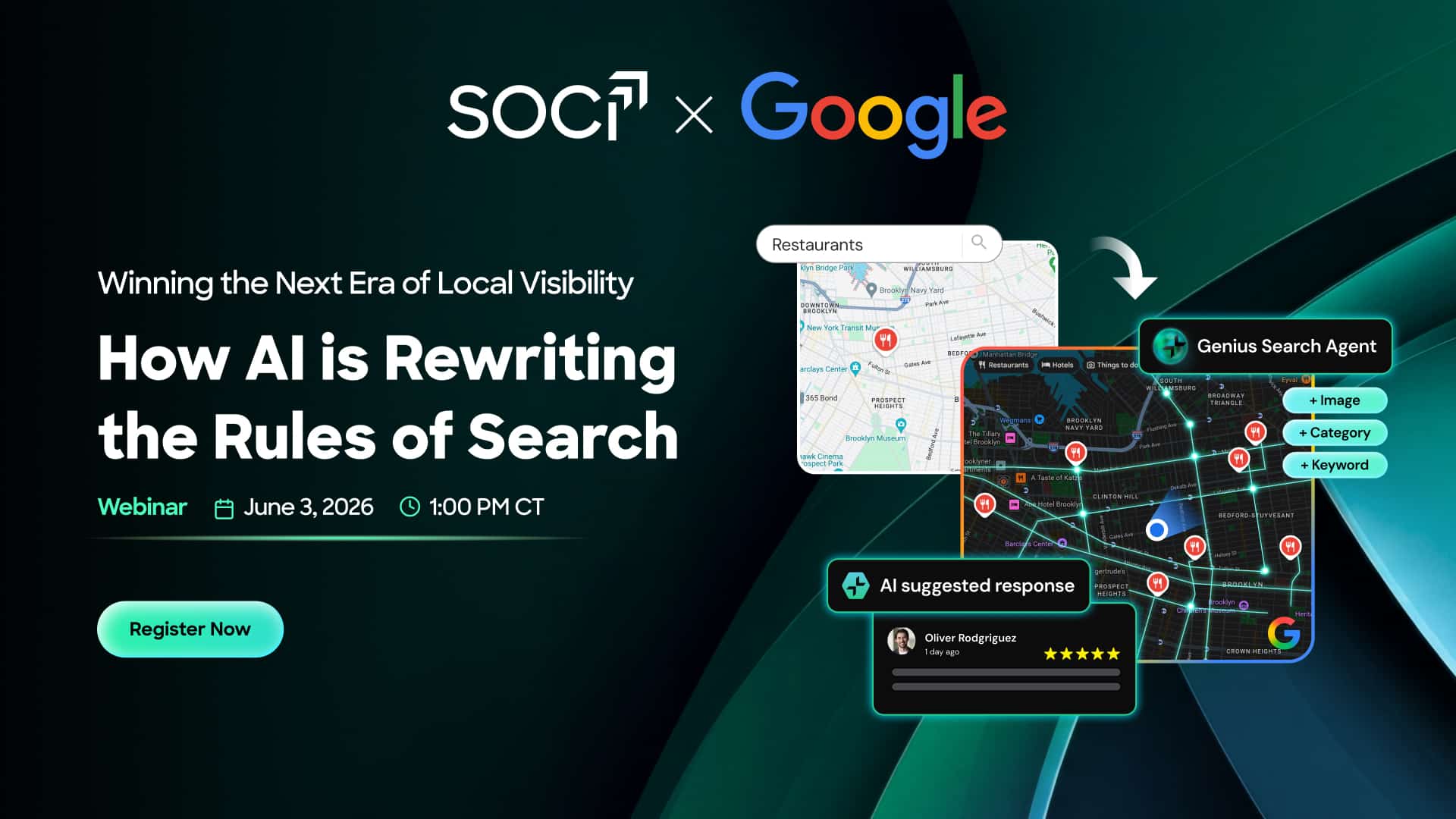
I recently discovered how AI is revolutionizing the way customers find local businesses. Tools like Google AI Overviews, Gemini, and Ask Maps are paving the way for more detailed, conversational searches.
It’s clear to me that traditional search rankings are no longer the sole factor in gaining visibility. Ensuring your business details are complete and accurate—like your Google Business Profile, reviews, and local content—can make a big difference.
I’m excited to join SOCi and Google for an exclusive webinar, Winning the Next Era of Local Visibility, on June 3. It’s a golden opportunity for anyone looking to stay ahead of the curve.
During this webinar, I look forward to learning:
I’m convinced that AI is already shaping customer discovery, so it’s crucial to ensure your business isn’t left behind.
Register now to secure your spot.
Inspired by this post on Search Engine Land.

I recently sat down with Veronika Höller for an enlightening discussion on PPC campaigns in an episode of PPC Live The Podcast. We delved into a scenario where a seemingly flawless campaign was secretly underperforming, uncovering the real issue beneath the surface.
Initially, Veronika encountered an impeccably organized account. It had all the right elements: a clean structure, compelling creatives, and well-allocated budgets with conversions rolling in. But there was one glaring omission—it wasn’t generating any revenue.
This discrepancy prompted us to investigate further, revealing that while surface metrics such as impressions, clicks, and conversions appeared promising, the true business impact was lacking. The unraveling began here.
The breakthrough came not from within the account but by stepping outside it. During competitor research, Veronika noticed that the brand’s messaging was indistinguishable from its competitors. There was no compelling reason for users to choose their products over others.
From a user’s perspective, the ads weren’t incorrect; they were simply forgettable. In a saturated market, being simply “good” wasn’t enough. The revelation was not about performance but positioning.
Veronika boldly decided to reconstruct everything from the ground up. This involved crafting new messaging, developing fresh creatives, and establishing a comprehensive strategic blueprint. A pivotal change was identifying not only the ideal customer but also defining who they were not targeting, utilizing anti-ICPs to refine the messaging.
This reset also incorporated enhanced localization, creating tailored landing pages for different markets, and formulating platform-specific strategies instead of simply recycling campaigns across channels. It was much more than optimization—it was a complete overhaul, and it succeeded.
Looking back at earlier times in her career, Veronika recalled a major misstep that will resonate with many PPC professionals. She had implemented a recommended target CPA but failed to adjust the budget accordingly.
This oversight led to a halt in campaign delivery and a significant drop in performance, all of which went unnoticed over the weekend. By Monday, the damage was done, and the client was understandably upset.
Veronika didn’t shy away from the situation. She promptly admitted her mistake, provided an explanation, and took full responsibility. This transparency shifted the client’s initial frustration into collaboration, as there was no defensiveness, only a structured plan for resolution.
The takeaway was invaluable: one must never apply recommendations blindly and should always consider the entire context before implementing changes.
For Veronika, mistakes aren’t something to avoid—they’re a stepping stone to mastery. “You can only be good if you fail,” she asserted.
This philosophy now influences her work approach and mentorship style. Mistakes signal progress, experimentation, and improvement.
Furthermore, sharing these experiences helps others steer clear of similar pitfalls.
Despite evolving PPC landscapes, tracking remains a persistent issue. Many setups suffer from flawed implementations, reliance on micro conversions, and misconfigurations in tools like Google Tag Manager.
In a world dominated by smart bidding and automation, inaccurate data not only constrains performance but leads it astray. Even the most stellar campaigns can falter without precise tracking.
Veronika emphasized that AI isn’t a magic bullet for improving outcomes. Feeding it mediocre data yields mediocre results.
Many marketers erroneously rely on AI tools for account analysis without a proper understanding of the necessary enhancements. AI can’t create uniqueness; it can only optimize existing inputs. Distinctive strategies still demand human ingenuity.
The most significant takeaway isn’t about tactics; it’s about mentality.
Perfection isn’t the goal. Avoid following recommendations blindly, and don’t assume tools will think for you. Instead, rely on your instincts, experiment, and accept that mistakes are a valuable part of the journey.
In performance marketing, the real hazard isn’t failure but becoming invisible by playing it safe.
Inspired by this post on Search Engine Land.

You may still have FAQ sections, FAQPage JSON-LD, reporting filters, and client promises built around Google’s expandable FAQ listings. The listing has gone away, but that does not mean every FAQ or every line of FAQ markup should disappear with it.
Your job now is to separate the retired Google Search feature from the content and data that may still serve a purpose. That distinction will tell you what to remove, what to retain, and what to measure.
Google ended support for FAQ rich results on May 7, 2026. The visible consequence is straightforward: adding valid FAQPage structured data no longer makes a page eligible for an FAQ rich result in Google Search.
The retirement also affects the tools around the feature. Google’s announced schedule separates the wind-down into three operational milestones:
| Milestone | What changes | What you should do |
|---|---|---|
| May 7, 2026 | FAQ rich results stop appearing in Google Search. | Stop treating FAQ markup as a Google rich-result opportunity. |
| By June 2026 | Google planned to remove the FAQ search appearance, the dedicated rich-result report, and FAQ support in the Rich Results Test. | Replace reports, tests, and documentation that depend on those surfaces. |
| By August 2026 | Google plans to remove FAQ rich-result support from the Search Console API. | Update API jobs before missing FAQ-specific data or filters can break them. |
These milestones affect eligibility, reporting, testing, and API access. They do not delete the visible questions and answers on your pages. They also do not establish that FAQPage markup is harmful. The retirement notice alone is not evidence of a penalty.
There is no universal requirement to purge FAQPage from every site. The right decision depends on what consumes the markup, how it is maintained, and whether it remains accurate.
| Decision | Use it when | Main risk to control |
|---|---|---|
| Keep it | A verified non-Google search engine, application, internal knowledge system, or publishing workflow consumes it, and the data stays synchronized with the visible page. | Do not assume another system uses the markup merely because it can parse JSON-LD. |
| Remove it | The only documented purpose was Google FAQ rich-result eligibility, or the implementation produces stale, duplicated, or misleading data. | Target FAQPage specifically so you do not erase unrelated structured data. |
| Keep it temporarily | You cannot yet identify every downstream dependency. | Give the uncertainty an owner and review date so temporary markup does not become permanent by neglect. |
The phrase “other systems may use it” is not a business case by itself. Ask for evidence: a documented integration, a consuming application, a test that shows the data being ingested, or a named team that depends on the output. Without one of those, you are maintaining code for a hypothetical benefit.
Retention also has a cost. Automatically generated markup can drift away from the visible answer, survive after an FAQ is deleted, or duplicate data emitted by a theme and a plugin. That creates audit noise and makes future structured-data incidents harder to diagnose. If no verified consumer remains, removing that unused layer is a reasonable cleanup.
FAQPage. Check both server-generated source and JavaScript-rendered output.Article, BreadcrumbList, Product, organization, or other data unless your audit finds a separate reason to change it.If you remove the markup, use a staged release or a small controlled page group where your publishing system allows it. Capture the prior output first, verify that the visible FAQ still works, and compare the full structured-data graph before and after deployment. A broad search-and-delete operation can remove braces, graph relationships, or neighboring schema that were never part of the retirement.

The reporting change deserves as much attention as the markup. A dashboard can keep loading while an FAQ filter returns no rows, a chart becomes permanently flat, or an alert stops firing. That is more dangerous than an obvious error because the report still looks operational.
Inventory every place where FAQ search appearance is used: saved Search Console views, exported workbooks, business-intelligence models, scheduled reports, client templates, annotations, anomaly alerts, and API queries. For each dependency, decide whether to remove the component, replace it with page-level reporting, or preserve the historical series as a closed metric.
Do not merge the date of Google’s presentation change with the date you remove code. Record both. Otherwise, a later analyst may blame a traffic movement on your deployment when the search feature had already disappeared, or attribute a template change to Google when it happened weeks later.

FAQ rich results could occupy extra search-result space and influence click behavior, so affected pages deserve closer monitoring. A sitewide organic trend will not isolate that effect. Most pages never had the same FAQ visibility, query mix, ranking stability, or search-result competition.
Build a page cohort from URLs that carried FAQ structured data and, where your historical records allow it, distinguish pages that actually received FAQ search appearances from pages that were merely eligible. Eligibility is not the same as an impression.
A before-and-after chart cannot prove that FAQ retirement caused a change. Rankings, seasonality, query demand, competing search features, and your own releases can move at the same time. Use the cohort analysis to identify where investigation is warranted, not to manufacture certainty the data cannot support.
A useful FAQ section can still solve a reader’s next problem. It can clarify eligibility, compatibility, pricing logic, implementation constraints, returns, terminology, or a decision that would otherwise send the visitor back to search. None of that value depends on an expandable Google result.
Review FAQ content as content, not as a schema container. Keep a question when it represents a real decision or recurring point of confusion. Rewrite it when the answer is vague, promotional, outdated, or dependent on information that appears elsewhere. Remove it when it exists only to repeat a keyword or restate the main body.
The same discipline helps answer-engine and generative-search work, but do not replace one unsupported promise with another. FAQPage markup is not a guaranteed route into an AI answer, citation, or model response. Clear visible content, precise scope, consistent entity information, and accessible supporting detail are useful publishing practices; none guarantees selection by a search engine or model.
Be especially careful with thin FAQ pages created solely to win the retired enhancement. If a page contains unique information or attracts useful demand, improve it. If it duplicates a stronger resource, consider consolidation only after checking its traffic, links, internal references, and destination. Do not delete or redirect a URL merely because its structured-data feature disappeared.
Start with a single inventory that joins code, content, reporting, and ownership. Give every FAQ implementation one status: retain for a verified consumer, remove as Google-only legacy code, or investigate because the dependency is unknown.
Resolve the unknown group first. It carries the greatest operational risk: deleting it may break an unrecorded integration, while leaving it indefinitely creates unmanaged data. Once every row has an owner and reason, update the template, reporting pipeline, documentation, and stakeholder expectations as one change set.
Your next concrete action is simple: search a rendered sample of each major page template for FAQPage, record what generates it, and write down who still consumes it. If no one can answer the last question, you have found the first dependency to investigate.

You open Google Ads to investigate a conversion problem, but the change itself lives in Tag Manager. That usually means switching tools, reconstructing the implementation, and finding out who is allowed to publish.
Embedded Tag Manager controls can shorten that path. They don’t make tagging risk-free, however. If you can manage tags from Google Ads, you still need a controlled way to inspect, test, approve, publish, and verify every change.
Inside Google Ads Data Manager, an observed Manage action for a connected Tag Manager source opens embedded controls. That puts campaign configuration, data connections, and at least some tag-management actions closer together.
The immediate benefit is less navigation. A marketer investigating campaign measurement may be able to reach the relevant Tag Manager controls without leaving Google Ads. That can be especially useful for a small team that doesn’t have a developer available for every routine inspection.
Don’t read the shared interface as a merger of the underlying responsibilities. Your website or app still produces the action and its data. Tag Manager still decides whether a tag should fire and what it should send. Google Ads still receives and uses the resulting signal. Moving the controls closer together doesn’t remove any of those layers.
The functional scope also appears unsettled. It isn’t yet clear whether the complete Tag Manager experience will be embedded or whether Google Ads will expose only selected management actions. Availability may vary while the interface is surfacing. Treat the embedded view as a convenient entry point, not as proof that every preview, permission, versioning, or troubleshooting function is present.
That distinction gives you a simple rule: use the embedded controls when they show enough context to make the change safely. Move to the full Tag Manager interface when you can’t see the trigger logic, variables, testing state, version history, permissions, or rollback path you need.

The dangerous part of tag management isn’t opening the right interface. It is publishing a plausible-looking change without proving what will happen. A conversion tag that fires twice can inflate results. A trigger that stops matching can interrupt measurement. Either problem can distort campaign decisions and obscure whether performance actually changed.
Use the same release sequence whether you start in Google Ads or Tag Manager:
Keep screenshots or a short test log for material conversion changes. The useful evidence is specific: the scenario tested, the event or input observed, the trigger result, the tag result, the destination used, and the version published. This makes a future discrepancy diagnosable instead of debatable.
Consent behavior deserves its own test case. Opening Tag Manager from Google Ads doesn’t change what a visitor permitted, what your configuration allows, or what your organization is responsible for. If the correct behavior is unclear, pause the release and involve the person responsible for privacy requirements and consent implementation.
The integration reduces tool switching, but it may also blur who owns a measurement change. Access to a Manage control is not the same as authority to publish. Decide that boundary before someone is troubleshooting a live campaign.
A workable division of responsibility looks like this:
One person may fill several of these roles on a small team. The roles still need to be named. Otherwise, the person who can reach the control becomes the person assumed to understand every downstream consequence.
Set three permissions explicitly: who may inspect, who may edit, and who may publish. Inspection can be broad. Publishing should stay with people who can evaluate the implementation, its consent behavior, and its effect on campaign measurement.
Your handoff record can be brief, but it should connect the systems. Include the business event, affected container or version, changed tag and trigger, Google Ads destination, test evidence, publisher, and rollback point. That record prevents Google Ads and Tag Manager from becoming two separate stories about the same conversion.

When a conversion disappears or looks inflated, start at the user’s action and move downstream. Don’t begin by republishing tags or changing campaign settings. Each speculative change introduces another variable and can erase the evidence you need.
| Layer | Question to answer | What a failure usually requires |
|---|---|---|
| Site or app | Did the qualifying action produce the expected event and values? | Repair the event, data, or user-flow behavior at its origin. |
| Tag Manager trigger | Did the intended trigger match, and did non-qualifying actions stay excluded? | Correct trigger conditions or the variables they evaluate. |
| Tag execution | Did the correct tag fire once with the intended identifiers and values? | Correct tag configuration, duplicates, runtime problems, or consent-dependent behavior. |
| Google Ads connection | Was the signal sent to the intended Ads destination? | Check the destination configuration and the connection between the systems. |
| Reporting | Is the received signal being interpreted as the business expects? | Separate an implementation problem from a reporting or attribution interpretation. |
This order matters. If the site never emitted the event, changing a Tag Manager trigger won’t create reliable source data. If the trigger and tag worked but the destination was wrong, rewriting the site adds risk without addressing the failure.
Duplicate conversions require the same discipline. Reproduce the action once, then look for multiple matching events, repeated trigger matches, multiple tags targeting the same destination, and parallel installations outside the container. Don’t delete the first duplicate-looking tag you find until you know which implementation is authoritative and what else depends on it.
For a missing conversion, capture evidence at each boundary: the action occurred, the event existed, the trigger matched, the tag executed, and the intended destination received the signal. Stop at the first failed boundary. That is where the next investigation belongs.
After a website release, repeat the same path before blaming Google Ads. Changes to forms, confirmation states, URLs, element selectors, or data structures can invalidate trigger assumptions even when the container itself hasn’t changed. The tag configuration may be unchanged and still no longer match the site.
If the Manage option is available in your account, start with inspection rather than a live edit. Choose one important conversion, map its complete path, document its current owner, and run the qualifying and non-qualifying tests. That gives you a safe baseline for deciding which future tasks belong in Google Ads and which still need the full Tag Manager workflow.

Your pages rank, your traffic reports look respectable, yet your brand disappears when a prospect asks an AI assistant for options. That gap is not just a reporting curiosity. Your content may be discoverable while your brand remains absent from the answer that shapes the decision.
Fixing that gap starts by changing what you measure. You need to know whether AI systems recognize your brand in the right unbranded conversations, describe it accurately, and do so often enough that one lucky mention cannot fool you.
Traditional rank tracking asks whether a page earned a particular position for a query. AI visibility adds a harder question: when a system assembles an answer, does it connect your brand with the category, problem, product attribute, or recommendation context that matters?
That distinction matters because brand recognition increasingly matters alongside conventional rankings. A strong organic position can help people and machines discover your information, but it does not guarantee that an AI response will name your brand, frame it correctly, or use it as a preferred example.
Recognition is more specific than general awareness. For AI search measurement, treat it as the repeated and accurate association of your brand with a relevant topic or decision. A mention is useful only when the surrounding answer helps the user understand why your brand belongs there.
This is why a mention count by itself is weak. A brand can be named frequently but described as the wrong type of company. It can appear in a long list without any explanation. It can also be cited as an information source while a competitor receives the actual recommendation. Record those outcomes separately.
Rankings still matter, but their role changes. They are part of the evidence and discovery layer, not the final visibility score. The practical endpoint is whether your brand becomes a clear, trusted part of the answer, especially when users can receive an answer without visiting a result page.

You cannot measure AI visibility with whichever prompt happens to come to mind during a meeting. A useful baseline needs a fixed prompt panel: a time-stamped collection of exact questions that represent the situations in which you want to be recognized.
Start with unbranded prompts. If the prompt already contains your name, the resulting mention says little about discovery. Keep branded prompts in a separate diagnostic set for checking factual accuracy, positioning, and direct brand understanding.
Organize the unbranded panel into three intent buckets:
A practical coverage panel can contain 25 exact prompts in each bucket, producing 75 queries. That is a testing design, not a universal minimum. If 75 prompts are too costly to repeat, preserve the three-bucket balance and select a smaller experimental cohort from the full panel. For a focused change, a cohort of 5-10 target prompts run daily across seven consecutive days gives you a more defensible baseline than a single session.
Do not rewrite prompts between the baseline and measurement periods. A change from a broad category question to a product-specific question is not a harmless variation; it changes what the system is being asked to retrieve and compare. Save alternate phrasings as separate prompt records.
For every run, record the exact prompt, model, displayed model version when available, date, environment, login state, location or locale, and response. Use a consistent testing environment. A logged-out browser with a cleared cache is one option; an API or synthetic testing platform can provide tighter control where available. The aim is not to create a perfectly sterile laboratory. It is to keep avoidable differences from becoming explanations for the result.
Then label each response using the same fields:
| Signal | What to record | What it tells you |
|---|---|---|
| Inclusion | Whether the brand appears in the response | How often the model associates the brand with the prompt context |
| Position in response | Where the first substantive mention appears | Whether the brand is central to the answer or peripheral |
| Framing | Recommended, neutral, compared, cautioned against, or merely cited | Whether visibility is helping the intended positioning |
| Accuracy | Correct or incorrect category, audience, capabilities, and limitations | Whether the model recognizes the right entity and facts |
| Citation | The linked or named supporting page, when citations are exposed | Which evidence appears to support the mention |
Calculate inclusion rate as the number of eligible runs that mention the brand divided by the total number of eligible runs. Keep the raw labels as well as the percentage. A single combined score can conceal an important failure, such as higher inclusion paired with inaccurate framing.
Break results out by model and prompt bucket. An average across every system and intent can make a brand look moderately visible when it is actually strong in category discovery, absent during evaluation, and misrepresented by one model. That is not one problem; it is three different problems requiring different changes.

AI recognition is not created by repeating a brand name more often. It grows when the web contains clear, consistent evidence about what the brand is, which topics it belongs to, what it offers, and why it is relevant in a particular context.
Generic claims leave little for a system to connect with a detailed prompt. Replace vague category language with facts that resolve a real requirement: the product type, intended user, model, offer, relevant specifications, supported use case, and meaningful constraints. The goal is not maximal detail on every page. It is enough detail for the page to answer the prompt it is meant to support.
For example, if your prompt panel contains requirement-led questions and the relevant page never states those requirements explicitly, that is the first gap to fix. Add one self-contained paragraph that connects the brand, product, and requirement in plain language. Do not simultaneously rewrite the introduction, change the page template, and add schema if you want to know whether that paragraph mattered.
Keep core entity facts consistent across your own pages. The canonical brand name, category, audience, product naming, and relationship between the company and its offers should not shift according to which team wrote the copy. Consistency reduces ambiguity; mechanical repetition does not.
Structured data can make relationships such as brand, model, and offer explicit in a machine-readable layer. Its effect on AI answers should still be tested rather than assumed. Schema is not a guarantee of selection, and it cannot create authority or factual support that the visible page lacks.
Markup should describe information that users can already verify on the page. If a page has a visible question-and-answer section, adding the corresponding FAQ markup creates a clean experiment: the visible answers stay fixed while the explicit structured-data signal changes. Likewise, brand, model, or offer properties can be added without rewriting the HTML copy when you want to isolate the machine-readable layer.
Do not add unsupported claims to JSON-LD because you want an AI system to repeat them. At best, the test becomes uninterpretable because the markup and page disagree. At worst, you make inaccurate information easier to reproduce. Treat structured data as a precise description of the page, not a hidden promotional channel.
Your website can define the entity, but self-description is only one part of recognition. Brands become easier to identify when they appear consistently in meaningful external contexts and are cited for topics they genuinely cover. That makes public relations, content distribution, industry participation, and reputation work part of AI search strategy rather than separate activities.
Audit external mentions for context, not just volume. A mention is more useful when it associates the right brand with the right category and a concrete area of expertise. Repeated mentions that use obsolete product names, vague descriptors, or the wrong category can reinforce confusion instead of authority.
For each important prompt cluster, create an evidence map with four lines:
<!– wp:list {
These days, simply fixing technical SEO issues on my site isn’t enough to make a significant impact.
When my site achieves technical parity with competitors, the ranking focus shifts from infrastructure to relevance. Google evaluates relevance based on how well my content aligns with search intent.
Let’s explore how I can make my site more relevant.
An intent mismatch happens when the content on my page doesn’t meet user expectations. If the page isn’t relevant or the signals sent are mixed, it results in poor behavior signals, like users bouncing off the page without finding answers.
These signals suggest to Google that my page doesn’t satisfy the query, causing ranking drops, fewer users viewing the page, and worsening behavior signals. It’s a situation that technical SEO alone won’t solve.
Initially, when I start an SEO strategy, improvements come quickly. If my website lags in technical standards, resolving crawl errors, addressing duplicate content, boosting page speed, and adding schema can result in significant gains.
However, once these changes place my site on par with competitors, Google evaluates sites based on user query satisfaction. Now, my technical foundation is solid, but the rules have changed.
Intent alignment becomes the primary improvement focus here.
Various elements affect a page’s intent and Google’s decision on whether it matches. These include:
My CTR can be influenced by factors like my title tag, meta description, URL structure, and schema, all measured against intent.
If my title tag is well-optimized yet mismatched with user queries, CTR will drop. Google sees low CTR as a relevance signal and adjusts rankings.
Intent misalignment can harm time-on-page, scroll depth, and interaction rates. A user searching to purchase something might exit immediately if they land on a how-to guide. Similarly, a user seeking an emergency plumber might bounce from a page lacking contact details.
LCP, INP, and CLS measure page load speed. A slow transactional page frustrates users ready to buy, whereas informational article readers are more patient.
While CWV thresholds matter everywhere, they heavily impact conversion and behavior on high-intent pages.
Schema markup explicitly tells Google the page content type. Contradictory content and schema signals send Google a wrong intent signal, affecting traffic.
Internal link anchor text informs Google about the linked page’s intent. If a transactional page’s links use informational text like “learn more about X,” intent signals get diluted.
Google uses URL patterns to infer page type. For instance, URLs in /blog/ are seen as informational. A product page in a blog path may struggle with ranking expectations.
Multiple pages targeting the same keyword with different intents dilute Google’s signal, hindering ranking. Using canonical tags can emphasize the preferred page for a keyword, consolidating or redirecting when necessary.
Let’s consider a common intent mismatch and steps I can take to audit and fix it.
If someone searches for “financial analysis software,” they intend to purchase software, a highly transactional query. Targeting this keyword with an informational blog post explaining DIY analysis creates a mismatch.
These users want to compare features and pricing or book a demo. Therefore, targeting the keyword with a dedicated page outlining features and pricing is optimal, aligning with user needs and boosting conversions.
To remedy intent mismatches, I start by compiling top-performing keywords and manually checking their Google rankings. This research shows what type of page and content best suits these keywords.
By researching competitors’ pages targeting my keywords, I note elements they include, such as tables, comparisons, or videos, which can inform improvements on my pages.
After making page improvements, I track performance indicators like clicks, rankings, and time on page to evaluate the effectiveness of changes.
Technical SEO is vital; it lays the groundwork. Pages that aren’t properly crawled won’t rank to their full potential, regardless of intent alignment.
Intent alignment, however, dictates how high a technically sound page can rank and its conversion rate. Every page should have clearly defined intent supported by technical signals for reinforcement.
Inspired by this post on Search Engine Land.

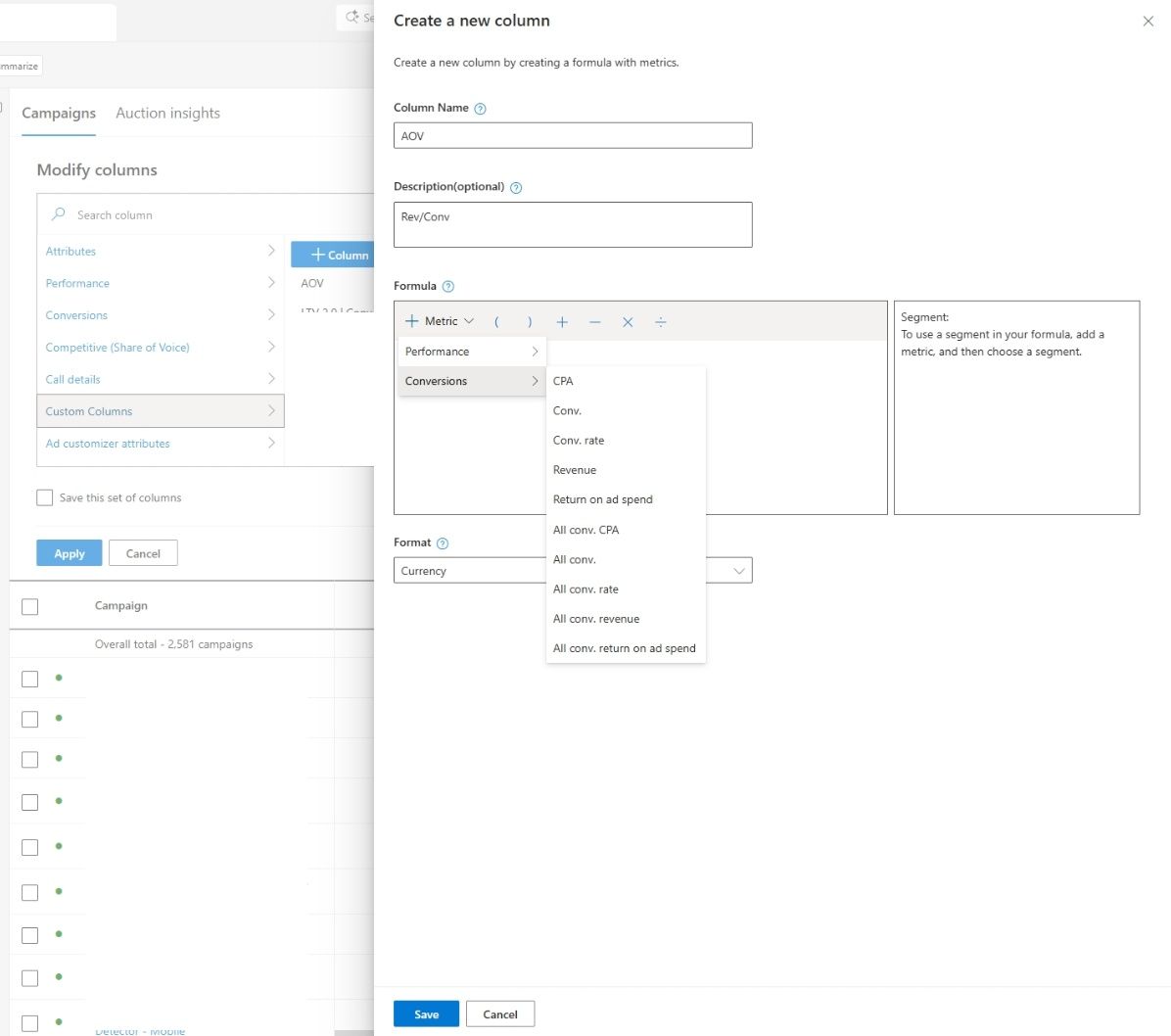
As someone exploring the ins and outs of Microsoft Advertising, I’ve discovered an update that’s sure to enhance our campaign analysis. Microsoft is now allowing us to customize columns with all conversion metrics, providing us with deeper insights and aligning reports with our unique business goals.
What does this mean for us? Well, according to Navah Hopkins, our go-to expert at Microsoft, we can now build custom metrics by leveraging the full spectrum of conversion data available in the platform. This means we can track all conversions and primary conversions, enabling us to tailor our reporting to meet our specific objectives more closely.
Please note the new image showcasing Microsoft’s enhanced custom columns feature. It’s a visual reminder of how these updates can transform our analytical capabilities.
Why am I excited about this? Because the standard reporting often doesn’t mirror how we truly measure success. By giving us the tools to expand custom columns, Microsoft allows us to define metrics that truly matter—be they lead quality, revenue, or a combination of conversion actions.
This flexibility is crucial for managing a variety of conversion types or navigating complex marketing funnels. Now, I can create custom columns, using ratios and metric combinations such as cost per qualified lead or conversion rates focused on primary goals.
Moreover, I appreciate that the revenue and ROAS calculations will now reflect the values that align with my conversion goals, providing more accurate insights directly linked to business outcomes.
What does this change imply for us in a broader sense? It represents a shift toward a more flexible and advertiser-defined measurement approach, instead of relying solely on standardized platform metrics.
This update highlights the ongoing demand for improved reporting customization as campaigns become increasingly automated and intricate.
So, what should we keep an eye on? I’ll be observing how advertisers like us utilize these custom metrics to guide optimization decisions, whether consistency in reporting improves across teams, and if similar flexibilities will roll out in other areas of the platform.
Bottom line? With Microsoft giving us more control over how we measure success, custom columns are evolving into a vital asset for campaign analysis. Read more about this update here.
Inspired by this post on Search Engine Land.