I’m seeing an important shift for Standard Shopping campaigns: Google is bringing Maximize Conversion Value bidding to these campaigns without requiring a Target ROAS. That gives advertisers more room to pursue value-based optimization without immediately being locked into a specific return target.
What’s happening. Google is rolling out Maximize Conversion Value bidding for Standard Shopping campaigns, and advertisers no longer have to set a Target ROAS to use it.
Before this update, if I wanted to optimize around conversion value in Standard Shopping, I generally had to use a Target ROAS bidding strategy. Now, this new option lets campaigns focus on maximizing conversion value while giving Google’s bidding system more flexibility to find the highest-value opportunities.
Why I care. This matters because I can now use Google’s value-based bidding in Standard Shopping without being constrained by a Target ROAS goal. That gives me more flexibility while preserving the control and transparency that many advertisers still prefer in Standard Shopping campaigns.
It may also reduce the need to run feed-only Performance Max campaigns just to access Maximize Conversion Value bidding. For advertisers who prefer tighter campaign control, that is a meaningful change.
Between the lines. I know many advertisers have continued to favour Standard Shopping because it offers more visibility and control than Performance Max. But when they wanted flexible value-based bidding, they often created feed-only Performance Max campaigns as a workaround.
With this update, that workaround may no longer be necessary for some accounts.
Why advertisers should care. I can now combine the structure and transparency of Standard Shopping with a more flexible automated bidding strategy. In practical terms, this could simplify campaign setups, reduce unnecessary Performance Max usage, and make account management cleaner.
The bottom line. Google is narrowing one of the biggest feature gaps between Standard Shopping and Performance Max. For me, this gives advertisers another reason to keep using Standard Shopping while still benefiting from automated value-based bidding.
First spotted. Performance marketer Yash Mandlesha spotted the update and shared the option on LinkedIn.
I used to think bad data mainly meant bad reporting. Now, in Google Ads, I see it as something much more expensive: bad delivery. When conversion data is wrong, it does not just make a dashboard confusing. It can train campaigns to spend budget chasing the wrong people.
As automation takes over more of the ad-buying process, from creative generation to bidding, data has become one of the few inputs I can still control. It may also be the most important one, because automation can only optimize toward the signals I give it.
I keep coming back to one question: what is worse, a brilliant ad shown to the wrong audience or an average ad shown to the right one? The first burns budget on people I do not want. The second may not win every click, but when someone does engage, at least they are closer to the customer I actually need.
That is why I have to ask myself a harder question before launching any automated campaign: did I spend more time verifying the data than writing the ad copy?
The cost of bad data has changed
A few years ago, bad tracking was mostly a reporting problem.
If a tag fired twice, a conversion was mishandled, a value came through incorrectly, or offline conversions stopped working for a few weeks, the main result was a dashboard that did not add up. It was frustrating, but the damage was usually limited. Someone would eventually question the numbers in a monthly review, I would trace the issue, fix it, and the next report would look cleaner.
That same data now feeds the algorithm buying paid media. Smart Bidding does not wait for me to interpret a report or sit through a monthly review. It reads conversion data and acts on it before I may even notice that something is broken.
The same wrong number now creates a very different outcome. A bad number in a report requires an explanation in a meeting. A bad number in a conversion action used for bidding costs money immediately, because the algorithm does not know the signal is wrong.
It simply optimizes toward that signal the moment it sees it, and it does so efficiently.
Google does not understand my funnel or my business
Google may let me label conversion actions as “lead,” “opportunity,” or something similar, but those labels are mainly for organization. The platform does not truly understand where each conversion event sits in my funnel.
What it sees is a conversion event with a numeric value attached to it, usually a currency value. It does not inherently know that a newsletter signup might be worth $2 in eventual value, a lead might be worth $60, and an opportunity might be worth $400. To Google, those are conversion events. Without better signals, it has no real context that one may be worth 200 times another.
The algorithm is not optimizing for my business outcome by default. It is optimizing for the data I provide. If that data is wrong, the optimization will be wrong too.
For example, if every form submission fires the same conversion with the same default value, I give the system no clean way to separate low-intent inquiries from high-value prospects. The algorithm treats them the same. And because low-quality leads are often cheaper to acquire, it can quickly flood the account with them.
The cost per lead may drop from $40 to $25, and the dashboard may make performance look more than 35% better. But behind that cleaner metric, the pipeline can dry up as genuinely qualified inquiries quietly fall by half.
Bad data can show up in different ways, but I see three issues that are especially likely to derail campaign delivery.
1. Wrong event
If I optimize for a top-of-funnel action like a page view while the real conversion events happen further down the funnel, the algorithm learns to buy more of those cheap events. The problem is that the lower-funnel activity may never follow.
2. Wrong value
If I count every conversion equally, or assign every conversion the same placeholder value, I hide the real differences in business value. When actual value can vary by 10 times or more, the algorithm will often chase the easier, lower-value conversions because they are cheaper to acquire.
3. No data
This problem does not get discussed enough. A complete break in conversion data can damage a campaign faster than almost anything else.
On Day 1, the algorithm starts wondering where the conversions went. By Day 2, it begins assuming they may not be coming back. By Day 3, it can start making serious bidding changes. Within a week, many campaigns can throttle themselves down to almost nothing.
How I pick the right signal for Google
So how do I fix this? I start by choosing the signal that best represents business value, not just the easiest action to count.
Take a typical lead generation business. Some leads will never convert, while others may be worth 10 times as much as the rest.
If the form asks the right qualifying questions, I may already know which leads are which. But if I optimize for every submitted lead using a target CPA, I am telling Google that all leads are equally valuable.
Imagine an account spending $20,000 a month at a $40 target CPA and generating about 500 leads. Only 150 qualify, and maybe just 50 are genuinely high value. A basic lead may be worth $60, a qualified lead may be worth $200, and a high-value lead may be worth $600. That is a 10 times spread in value.
In that situation, I have several ways to improve the optimization signal.
Optimize for a qualified lead: I can create a new conversion action, such as “qualified lead,” and fire it only when a lead has real value. Then I can move the target CPA strategy to that conversion action, knowing the campaign will ignore leads with no value. The advantage is that I train the campaign on a more meaningful signal. The downside is that every qualified lead is still treated equally.
Assign conversion values and use target ROAS: I can add a currency value to the qualified lead based on the potential revenue it could generate if it becomes a sale. Then I can switch the campaign to target ROAS, allowing Google to optimize for return instead of simply counting leads. The tradeoff is that it may still buy larger numbers of lower-value leads if it can acquire them at the right price.
Optimize for a high-value lead: I can create a “high-value lead” conversion event that fires only for top-tier leads, with or without a conversion value. Then I can optimize with either target CPA or target ROAS, depending on whether I care more about acquisition cost or return. The advantage is stronger lead quality. The downside is that, depending on spend and volume, the data may be too limited to support this approach until the account scales.
These are only a few possible optimization signals, and they do not even go deeper into the funnel. I can apply the same thinking to lower-funnel milestones by creating separate conversion actions for events such as contacted lead, qualified contact, or high-value contact.
Targeting and measurement can be different
This sounds simple, but the conversion event I optimize for and the one I report on are not always the same. In many cases, they should not be the same. One trains the algorithm. The other tells me how that training is performing.
In the example above, a client or internal stakeholder may still want to see cost per lead. That is a valid metric. But the campaign may be optimizing for the Qualified Lead conversion, not the original lead submission.
I can keep the original lead conversion running purely as a reporting metric, so stakeholders still get their cost-per-lead view while the campaign bids on the qualified lead signal that actually reflects business value.
Same campaign. Two conversions. Two very different jobs.
That brings me back to the question I started with: did I spend more time verifying the data than writing the ad? In an automated account, data is no longer just measurement. Data is strategy.
I see Google’s latest Google Ads API change as another clear move away from legacy automation and toward newer AI-driven campaign types, especially Performance Max.
Beginning August 3, 2026, Google says developers will no longer be able to create new Smart Campaigns through the Google Ads API. For me, the key detail is that this change is about new campaign creation only.
Existing Smart Campaigns are not being shut down. They can keep serving ads, and advertisers and developers will still be able to update and manage those campaigns through the API.
What changes is the ability to create brand-new Smart Campaigns through API workflows. If I depend on automated campaign setup, that is the part I would review now.
I care about this because it signals where Google wants advertisers to go next. Smart Campaigns may continue running, but the path for new API-based campaign creation is moving toward newer products such as Performance Max, Search campaigns, and Demand Gen campaigns.
Google is specifically pointing advertisers toward Performance Max as the primary alternative. Since Performance Max runs across Google’s advertising inventory and uses AI to automate more of the campaign process, it fits the broader direction Google has been taking for years.
I also see this as part of a wider consolidation around automated campaign formats. Google has increasingly emphasized systems that handle bidding, targeting, and creative optimization across channels, and limiting new Smart Campaign creation reinforces that shift.
For developers, the practical next step is to audit any application that creates Smart Campaigns before the August 3, 2026 deadline. The affected requests are campaign creation operations where advertising_channel_type is set to SMART and advertising_channel_sub_type is set to SMART_CAMPAIGN.
After August 3, attempts to create new Smart Campaigns through the API will fail. In version 24 of the Google Ads API, developers will receive a SmartCampaignError.CREATION_FAILED error.
In version 23 and earlier, the same type of request will return an OperationAccessDeniedError.CREATE_OPERATION_NOT_PERMITTED error.
My main takeaway is that advertisers, agencies, and software providers should not treat this as a last-minute technical cleanup. If campaign creation is built into an internal tool, onboarding flow, or platform integration, I would start mapping the replacement path now.
Google is not ending existing Smart Campaigns, but it is removing a key creation path for new ones. To me, that is a strong signal that future campaign planning should center on Performance Max and other AI-driven Google Ads campaign types.
In 2026, PPC budgeting goes beyond simply setting spending levels. It’s about understanding when to adjust budgets, scaling campaigns effectively, and how data informs Google’s automation in these decisions.
Over the years, Google’s automation has been driven by the signals supplied to it. In 2026, these signals are processed faster and more precisely, making clean signal architecture more crucial than ever.
While the fundamentals of budget management remain constant, the speed at which a poorly structured account can drain your budget has increased significantly.
Two Budget Mechanics You Must Grasp Now
Before tweaking targets, audiences, or bid strategies, it’s essential to comprehend how these two budget controls operate.
The Ad Scheduling Pacing Change
Google now paces campaigns with ad scheduling towards the full 30.4x monthly billing cap, regardless of how many days your ads run. Previously, a $100 daily budget targeted around $2,200 across 22 weekdays. Now, it targets $3,040 in the same period, and the billing ceiling remains unchanged.
If your campaigns utilize ad scheduling, you need to recalibrate your daily budget based on your total monthly spend rather than active days, setting it by dividing your monthly target by 30.4. For example, a $2,200 monthly target becomes a $72 per day budget if calculated this way. However, 24/7 campaigns remain unaffected.
Available for Demand Gen, Search, Standard Shopping, Performance Max, and YouTube campaigns, campaign total budgets let me set a fixed spending ceiling over a defined period instead of managing a daily limit. This window is from three to 90 days for some campaigns, while others can extend up to a year.
While there is no daily spend cap, allowing flexibility, it’s crucial to monitor these closely, especially when running alongside ongoing campaigns. Additionally, the budget type cannot be altered post-campaign creation, making committed decisions at setup vital.
What Actually Governs Google Ads Budget Spending
Efficiency Targets Usually Constrain Spend Before Budgets
In Smart Bidding strategies, efficiency targets often restrict spending before budget caps do. With a set tCPA of $50, if leads cost $80, the system reduces bids to avoid surpassing your target. It appears as if there’s a budget problem, but it’s actually a target problem.
I must initially set targets closer to the market conversion rates and then fine-tune them to align with my true goals. When close, the 10%-20% margin aids in navigating those final conversion opportunities effectively.
Performance Max Decides Where Your Budget Goes
Performance Max automatically allocates budget across various channels like Search, Shopping, and YouTube, with Google determining the split, not me. Excluding my brand can prevent paying for redundant conversions from Search campaigns.
Checking my negative keyword lists ensures clarity in branding and budget allocation. This helps avoid misallocation and focuses resources effectively.
AI Max Expands Ad Appearances
AI Max, available since April, expands query matching beyond my keyword list, generates ad copy from existing assets, and dynamically targets landing pages. Monitoring the initial spend distribution closely helps maintain alignment with intended strategies.
An insurance broker using Smart Bidding faced a disconnect: a 416% rise in conversion volume didn’t reflect in revenue due to form starts mistaken for completions. The system optimized for interactions, but the alignment with Cyrillic-language spam was costly without benefiting the pipeline.
This reflects a broader issue in lead generation: equal weight is assigned to all form fills, leaving Smart Bidding unable to distinguish high-value leads from irrelevant submissions.
Primary conversions must be meaningful actions that properly guide Smart Bidding. Secondary engagements belong in reports to avoid skewing bidding data.
For accounts outside the current beta, extending conversion windows to 90 days and assessing performance over these periods can help counteract issues arising from longer sales cycles.
Using First-Party Data for Budget Guidance
Customer Match, with a 540-day max membership duration, remains crucial in guiding automation toward valuable traffic. For effective budget allocation, I focus on exclusion before expansion, targeting acquisition budgets toward new prospects.
Retention strategies should be run separately to maintain consistency in conversion goals. It’s vital that exclusions, available from the start, streamline acquisition efforts effectively.
For ongoing daily budget campaigns, weekly increases of 10-20% are still relevant. For scheduled campaigns, I focus on monthly targets divided by 30.4 instead of daily adjustments.
Using Smart Bidding Exploration in open beta for Performance Max can increase unique conversions by exploring new queries. I evaluate results over 60-day windows to make informed decisions.
Demand-led pacing, complementing daily management, tracks predicted high demand periods to optimize spend within budgetary limits. For B2B accounts, longer evaluation periods safeguard against undervaluing long cycle campaigns.
Expanding beyond paid social? Discover how I learned to structure campaigns, control spend, and unlock demand without depending solely on the Meta playbook.
My paid social campaigns were thriving. I understood my audience intimately, had a tight creative process, and watched results improve each year. Naturally, when leadership proposed expanding into Google Ads, I was thrilled—envisioning it as a new revenue channel.
But sticking to our existing strategy only led to difficult conversations. Google demands different tactics—intent signals and campaign structures vary, and common budget-draining mistakes aren’t always obvious. Many brands mirroring their Meta strategy end up with flashy dashboards but disappointing balance sheets.
From my experiences, six frequent mistakes can cause substantial damage before they’re even noticed. They’re what I’ve seen most often with ecommerce brands transitioning to Google Ads—and each error is reversible.
Mistake 1: Treating Google like a retention channel
Utilizing Google Ads for retention and brand defense is possible, but relying solely on it as a strategy is problematic. I often notice brands new to the platform diving straight into Performance Max. Initially, the ROAS shines bright, making everyone happy. However, when the right question surfaces—”Are we truly growing or just capturing purchases?”—issues arise.
For example, a client approached me with branded search and retargeting doing most of the work in PMax—a mere tax on demand already created elsewhere, leading to stagnant revenue. Although ad spend was soaring, growth wasn’t.
Acquiring new customers requires a different setup, like:
Shopping campaigns to highlight products to new audiences.
Search campaigns centered on non-branded, high-intent keywords.
Layered PMax configurations to bypass defaulting to easy conversions.
When Google grants vast access to new audiences, focusing solely on closing disregards most of this opportunity.
Mistake 2: Not knowing how to leverage Google’s core levers
Although paid social expertise is somewhat transferable to Google, I’ve observed four major gaps. Let me share them with you in more detail.
Search intent: Social media ads interrupt, but search ads meet users actively seeking your offerings, transforming campaign structure, ad copy, and keyword targeting entirely.
Data feed optimization: An optimized product feed enhances visibility and targeting in Shopping or Performance Max campaigns.
Keyword research: Understanding match types and search intent is critical for reach and cost efficiency.
Landing pages: Engaging landing pages outperform product pages for high-intent but unfamiliar visitors.
Mistake 3: Allowing operational issues to interrupt campaign momentum
Consistent data is key for Google’s algorithms. Every unintended campaign pause can reset learning, causing weeks of degraded performance and wasted spend.
Common disruptions include:
Payments: Bill lapses, leading to campaign pauses, overshadow the actual cost when factoring in downtime recovery.
Tracking and feed integrity: Broken pixels and feed errors silently degrade performance.
Setting up automated alerts and regular audits can prevent these costly errors.
Mistake 4: Overly granular campaign structures
Detail-oriented advertisers may over-segment campaigns, believing it provides control. However, widespread budget allocation hinders Google’s automation from optimizing effectively.
Instead, tight, well-funded campaigns optimize better and are more manageable.
Mistake 5: Leaving campaigns on Max Conversion Value without ROAS targets
Max Conversion Value aims for conversion volume, neglecting cost efficiency. A realistic ROAS goal encourages the algorithm to maximize efficiency. Setting this correctly is crucial.
Mistake 6: Underfunding campaigns, keeping them in learning mode
Underfunding during the learning phase results in indefinite stalled progress. Adequately funding new campaigns from the outset fosters quicker, more accurate results.
Expanding beyond Meta to include Google is a strategic move, accessing actively expressed demand. These pitfalls aren’t deterrents but guideposts for smoother transitions and optimized strategies.
Operating in niche markets with Google Ads presents unique challenges, and it’s something I’m navigating in 2026. While the search volume might be low, the potential for opportunity is significant.
I’ve noticed that in targeted markets, people might only search a handful of times each month for my solutions. It’s a stark contrast to other advertisers who can test a plethora of headline variations with ease.
Many niche advertisers mistakenly apply high-volume strategies to their ads. In my experience, without sufficient data, Google’s automation struggles, which can dampen or entirely stall results.
Through this guide, I’ve found out what actually works when dealing with low search volumes and extended conversion timelines.
Why Low-Volume Markets Challenge Google Ads
There are a couple of scenarios I’ve encountered:
I own my brand space: My distinctive brand ensures that when people search for my company, I appear prominently with unique industry terms.
I get washed out: Sometimes, my keywords compete with those of larger brands, making it tough to stand out. Here, I battle consistent keyword pollution.
Each situation requires a distinct approach to effectively manage my advertising strategies.
Smart Bidding strategies, like Target ROAS, require substantial conversions that niche environments often don’t produce solely from search traffic.
If my campaigns do hit those numbers, it’s usually due to a budget burn collecting low-quality data. It’s unsustainable for many, including myself.
However, I’ve found that automation remains viable by feeding Google the right signals differently.
Relying solely on Search campaigns has proven ineffective for me, especially as Google’s AI Overviews account for a significant percentage of queries.
Start with Search, then Move to Performance Max
Performance Max requires solid conversion data, focusing on qualified leads or paying customers to truly optimize results.
Audience signals guide me in allocating budgets wisely, ensuring I’m not wasting resources.
Performance Max has served me well once I’ve accumulated sufficient data. However, dealing with keyword pollution requires aggressive negative tactics.
Use Demand Gen for Awareness
Introducing Demand Gen has allowed me to reach users across YouTube and Gmail before they actively engage in search for my offerings.
This strategy builds awareness, paving the way for future branded searches.
Protect Your Brand Terms
While organic rankings are important, I maintain a dedicated budget to safeguard my brand’s terms, especially when keywords overlap with the competition.
Even during slower periods, maintaining control over brand terms remains a priority.
Based on my data from a niche B2B SaaS client, exact match keywords consistently deliver leads at a lower cost, showcasing the benefits of targeted campaigns.
Adopting a broad match approach without sufficient data may lead to unnecessary spending on low-converting searches.
After solidifying my match strategies, I start tight and carefully expand:
Initiate with exact match keywords on strong intent terms.
Incorporate phrase matches for variation while being wary of broad match until robust data guides me.
Broaden match scope after accumulating 30+ conversions.
Critical Search Term Mining
With niche volumes, Google may not always show which search terms directed traffic, but when available, these insights are invaluable for market comprehension.
The terms that do surface offer significant insights:
Valid searches leading to clicks but not conversions (adjust bids or landing pages).
Wasteful, irrelevant searches depleting budget (add instantly as negatives).
Incorporating new keyword variations identified.
Handling early funnel searches strategically.
In scenarios where brand terms are unique, I find broad match approaches more forgiving.
Conversely, with competitive keywords, a robust list of negative keywords is imperative before considering broader matches.
Full Utilization of Headline and Description Slots
With limited ad runs, maximizing headline and description slots provides ample opportunity for optimization and engagement.
Targeted Landing Page Design
Landing pages I design don’t just capture leads; they guide prospects through seamless self-qualification, emphasizing detailed specs or clear differentiation as necessary.
My pages prioritize standing out, expecting that visitors have explored competitor offerings.
Precision in demand gen campaigns is necessary, targeting custom market segments instead of industry-wide interests.
Immediate differentiation is crucial on landing pages, so prospects understand value quicker than with competing alternatives.
Strategies for Niche Advertising Success in 2026
In 2026, small budget advertisers win not by spending, but by leveraging quality signals, focusing on visibility and precision.
My focus remains on signal quality surpassing search volume expectations.
Visibility across multiple platforms ensures stronger engagement than singular strategies.
Precise audience targeting outweighs the advantages of simply broader reach.
Feeding Google automation with strategic, tailored data is essential to unlocking potential in niche advertising.
The key to success in niche markets is knowing which automation to implement at the right time, the patience to accumulate sufficient data, and the foresight to disregard outdated strategies.
I recently came across a fascinating study highlighting how seasonality adjustments can actually backfire for advertisers during Black Friday, driving up costs and reducing efficiency.
A thorough analysis over three years, involving up to 6,000 advertisers, indicates that using Google’s seasonality bid adjustments during Black Friday and Cyber Monday (BFCM) often undermines efficiency, despite the platforms recommending them.
The big picture. Smart Bidding models are crafted to foresee predictable retail surges. Optmyzr analyzed tens of billions of impressions between 2022 and 2024, finding that advertisers who avoided seasonality adjustments usually had better efficiency metrics.
Without adjustments, Smart Bidding:
Recognized the BFCM conversion lift independently
Increased bids rationally
Maintained stable or improved ROAS, particularly in 2024
With adjustments: CPCs surged faster than the actual conversion rates, eroding efficiency.
Reality check: Google doesn’t need your “heads up.” Seasonality adjustments prompt Google to expect a conversion rate rise and to bid accordingly. If your prediction is off—and it usually is—Smart Bidding overshoots.
For example:
You predict a +50% CVR lift
The actual lift is +40%
This results in an overbid of about 7.1%
During BFCM’s high sales volumes, even minor mistakes become costly quickly.
The data: 3 years of the same story
1. Smart Bidding already adjusts for the CVR spike
2022: +17.5%
2023: +11.9%
2024: +7.5%
No additional guidance needed.
2. CPC inflation doubles with adjustments
Across all observed years, CPCs increased approximately twice as much when a seasonal adjustment was used.
3. ROAS drops significantly
Advertisers relying on Smart Bidding saw stable or improved ROAS, whereas those who intervened suffered double-digit losses.
The one exception: “Volume at all costs.” If the aim is pure revenue growth, disregarding margins, seasonality adjustments can be beneficial.
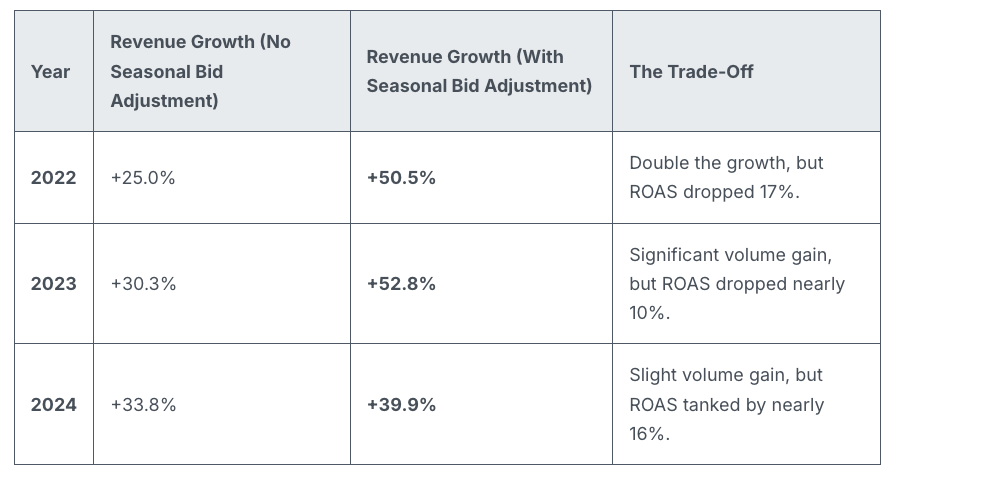
Revenue lifts were notably higher with adjustments:
2022: +50.5% vs. +25.0%
2023: +52.8% vs. +30.3%
2024: +39.9% vs. +33.8%
Efficiency may decline, but volume certainly increases.
When seasonality adjustments make sense. They’re useful when Google doesn’t have prior signals, like one-off or niche events.
Good for:
One-time flash sales
Email-only offers
Surprise clearance sales
Niche seasonal spikes
Not recommended for:
Black Friday
Cyber Monday
Christmas
Valentine’s Day
Any event with a predictable historic pattern
Why we care. Google already recognizes the significance of Black Friday. Smart Bidding is trained with years of BFCM data and can detect conversion rate spikes independently. Overriding this can lead to excessive bidding, increased CPCs, and reduced ROAS, so many marketers might be wasting their budget during this crucial week.
By recognizing when Smart Bidding has an adequate signal, advertisers can avoid expensive errors, maintain efficiency, and reserve seasonality adjustments for when they add true value.
Bottom line. Smart Bidding effectively manages major retail holidays. Seasonality adjustments often bring more chaos than benefits during predictable retail peaks. Keep them for unique, brand-specific events that Google can’t predict.
Smart move: Trust the algorithm — use tools like anomaly alerts, pacing monitors, and bid caps for control without conflicting with Smart Bidding’s core models.