As I delve into the intricacies of JavaScript and SEO, I came across a fascinating update from Google that caught my attention. It’s about how Google handles JavaScript execution on pages that don’t return a typical 200 HTTP status code.
Google recently updated their JavaScript SEO documentation to shed light on this topic. They explained that all pages with a 200 HTTP status code are automatically queued for rendering, irrespective of the presence of JavaScript.
However, if a page returns a non-200 status code, like a 404 error page, rendering might be bypassed, which is something Google emphasized in their updated guidelines.
Diving deeper, I discovered that Googlebot efficiently queues all pages with a 200 status code for rendering. This clarification came as a pleasant surprise to me as it paints a clearer picture of how Google handles such pages.
In fact, the specific section in the documentation that got an update provides a visual explanation, and I appreciated the added clarity it brings.
Google explained further that while pages with a 200 status code head to rendering, pages with other status codes might not meet the same fate.
Google’s weekly updates to the JavaScript SEO documentation also included other significant changes. Notably, they clarified aspects like JavaScript’s role in canonicalization and cautioned against using JavaScript for noindex tags directly in the original page code.
Why do we care about these updates? Well, understanding these nuances ensures I make informed decisions about my web pages. Ensuring my pages return a 200 status code is crucial; otherwise, Google might skip rendering them, which could negatively impact my website’s search ranking.
I recently learned about a significant ruling that will impact Google’s longstanding agreements with tech giants like Apple and Samsung. This decision means that moving forward, Google will only be able to secure its place as the default search engine on devices for one year at a time. Despite this change, I’m not expecting a major shift in Google’s dominance over the search market anytime soon.
Here’s what’s driving the news: On Friday, Judge Amit Mehta described this one-year cap as a crucial step in enforcing antitrust measures. This follows his 2024 decision, which concluded that Google was unlawfully monopolizing the realms of search and search advertising. According to Business Insider, the requirement aims to enforce fair competition in the industry.
Additionally, Judge Mehta’s earlier ruling outlined restrictions for Google:
Google must avoid any exclusive contracts regarding the distribution of Google Search, Chrome, Google Assistant, and the Gemini app.
They cannot condition licensing agreements of the Play Store on the preloading of these applications on devices.
Revenue sharing cannot be contingent on placing or maintaining these applications on devices beyond one year.
Partners are free to distribute alternative GSEs, browsers, or GenAI products simultaneously.
Why I care: This landscape shift could mean that user searches originate from a wider array of platforms. If AI-powered competitors like OpenAI, Perplexity, or Microsoft make even modest advances, we could see a more diverse and challenging search terrain emerge.
Reality check: In my view, this is more of a bump in the road rather than a disruption. Google’s financial resources, brand strength, and user habits continue to provide significant leverage in annual negotiations.
I’m excited to share with you that SMX Advanced is gearing up to make its mark in Boston from June 3rd to 5th, 2026, hosted at the Westin Boston Seaport. This is the premier event for those of us committed to mastering search marketing.
We’re really keen on highlighting the advanced strategies in SEO, PPC, and AI, and we can’t do it without your expertise.
The world of search is evolving incredibly fast.
As SEOs, we find ourselves adapting to AI SEO trends, making sense of AI Overviews dominating SERPs, and navigating Google’s ever-changing landscape and algorithm updates.
For those in PPC, there’s the challenge of making informed, data-driven decisions while seamlessly integrating new AI tools and maintaining that essential human touch.
We’re looking for speakers at SMX Advanced who can provide real solutions to these complex issues.
Do you have proven, high-level strategies for today’s marketing landscape? Now is the perfect time to share your session idea with us. Even if you haven’t spoken at SMX before, in person or virtually, we encourage diverse voices and perspectives to come forward.
The deadline for submitting your SMX Advanced session pitch is January 30th. Don’t delay—spots are limited and fill up quickly.
Consider these tips for crafting a compelling session proposal:
Ensure that your topic is truly advanced and tailored for intermediate to advanced professionals in search marketing.
Introduce an original idea or a unique session format.
Include a case study or specific examples to illustrate your points.
Be mindful of what can realistically be covered in a 20-minute timeframe.
Provide clear, actionable takeaways for participants to implement.
Clarify what skills or insights attendees will gain from your session.
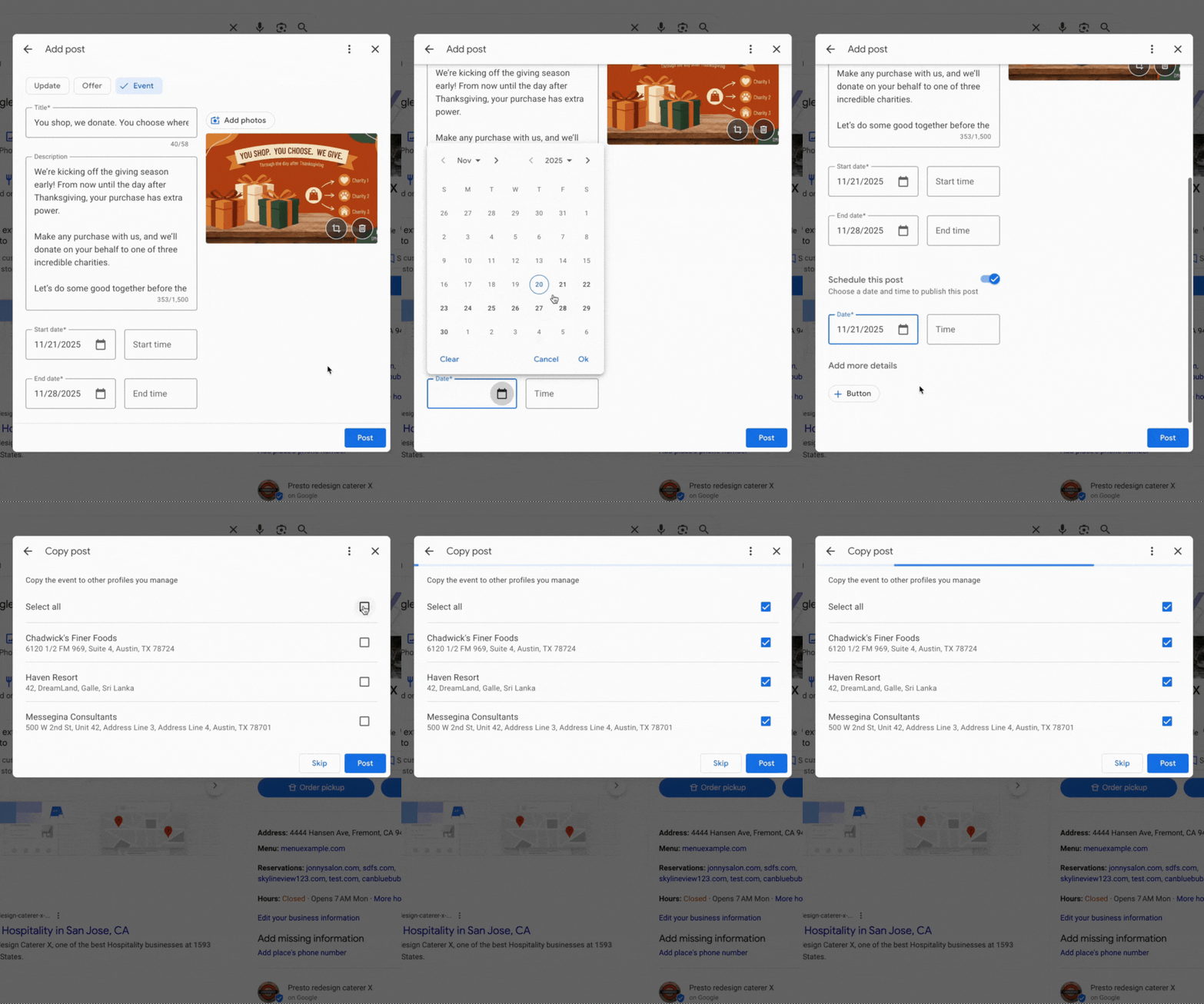
I’m thrilled to share that Google Posts now includes features that support scheduling and multi-location publishing within Google Business Profiles. These updates are designed to make it easier for us to manage our Google Posts, whether they are for our businesses or clients.
Scheduling. One exciting new feature when adding a Google Post within our Google Business Profiles is the option to “schedule this post.” We can now select the exact date and time when we want our posts to go live.
Lisa Landsman from Google shared on LinkedIn, “Plan your entire week or month in advance! You can now schedule your Google Posts to go live automatically at the perfect time.”
Multi-location publishing. If you, like me, manage several locations for a business, you’ll find the new multi-location feature incredibly convenient. It allows us to quickly copy Google Posts to some or all of our locations with just a click. Lisa Landsman explained, “Easily create a single post and apply it instantly to multiple business locations in one click.”
What it looks like. Here’s a GIF that shows this functionality in action:
Why we care. I care about these updates because I know how busy businesses can be. Often, we don’t have the time to pause everything just to create a timely Google Post about an upcoming event or important message. Now, we can schedule these posts in advance and copy them effortlessly across locations we manage.
As Lisa Landsman from Google pointed out, “We know the upcoming holiday season is a crucial, and hectic, time for your business. It’s also your biggest opportunity to get your events, offers, and updates in front of potential customers who are actively searching.”
During Black Friday, I’ve noticed many retailers, including myself, wasting substantial advertising budgets on Google Shopping ads. The main issue arises when these ads are still running for products that have already sold out, clearly demonstrating a pressing need for real-time stock management.
As we all know, Black Friday marks the peak of the retail season. However, it’s disheartening to find that so many brands, myself included, end up losing money on Google Shopping ads for items no longer available in inventory.
The problem: The ads continue to run even after items are out of stock, incurring cost-per-click charges with no possibility of conversion. Through a comprehensive study by ShoppingIQ involving 500 global retailers, it was revealed that a staggering 97% kept paying for clicks on items no longer in stock, sometimes persisting for 24–48 hours.
Why I care. Out-of-stock ads are not just a financial drain; they also skew campaign performance and disrupt algorithmic learning. When conversion rates plummet for unavailable products, it damages rankings, reduces ROI, and hampers future bidding strategies.
Example: Take Argos, for instance; they reportedly advertised items that were out of stock during Black Friday, leading to frustrated customers and depleted ad budgets.
Stock update refresh rates:
~24 hours: 90% of retailers
6–23 hours: 5%
48 hours: 2%
Other: 3%
Retailers’ response: Some companies, such as Mamas & Papas, have started leveraging ShoppingIQ’s real-time stock technology. This helps them focus ads solely on products that are actually available. Samantha Dabek, Senior Digital Marketing Manager, shares that they have managed to cut unnecessary costs and ensure advertising is targeted toward in-stock products.
The bigger picture: Google Shopping commands around 75% of US retail search spending. However, the default settings let out-of-stock ads run unchecked. ShoppingIQ strongly advocates for retailers to seek more transparency and control from Google to prevent wasted spending.
Bottom line: For those of us running high-stakes campaigns during Black Friday and other peak times, real-time stock management is essential. Otherwise, each wasted click represents money lost.
I recently discovered a game-changing update from Google that’s bound to catch the attention of many advertisers. Google’s Performance Max now allows me to upload video files directly in the “Edit assets” panel, simplifying the campaign setup process significantly. What’s even better? I don’t need a YouTube channel or Shared Library for this.
Here’s the scoop. This handy feature pops up as an “Upload” tab in the Google Ads UI, making it super easy to add video assets during PMax campaign creation. Just a simple drag-and-drop, and I’m set to move on, especially helpful if I’m new to video advertising.
In the YouTube ad setup, I’ll find a clear, highlighted box prompting me to drop in my video file, smoothing out what used to be a more complicated process.
How does it work? These video files are stored in a Google-managed channel, not on my personal YouTube account. While they’re usable in ads, they don’t function like typical YouTube uploads, which might affect how I manage my content.
Why it matters to me. This update is a boon if I don’t have a YouTube presence or need a quick way to upload video assets. However, I should be mindful of the trade-offs: I’ll have no analytics, no remarketing capabilities, no metadata access, and crucially, I won’t own the assets long-term. It’s a convenient option for quick setups, but I must proceed with caution and ideally upload through a proper brand channel when possible.
Important limitations. Using this method imposes several restrictions:
No YouTube Analytics
No remarketing audiences
No metadata editing
No custom thumbnails
No ability to appeal rejections or restrictions
No brand-channel presence or asset ownership
How I found out. The first mention of this update came from Web Marketing Consultant Dario Zannoni, who shared it on LinkedIn. I appreciated his insights into how this could change my advertising approach.
The takeaway. This feature is a great shortcut if I’m in a hurry or don’t have a robust YouTube setup. Still, maintaining best practices by using my official brand channel ensures I preserve analytics, gather audience data, and retain creative control.
In the ever-evolving world of AI-driven advertising, I’ve noticed that Performance Max campaigns have become absolutely crucial. Both Google and Microsoft offer these innovative opportunities, allowing advertisers to bring together creative assets, audience signals, and automation into a single seamless campaign type.
While Google and Microsoft share this foundational concept, they execute it uniquely. I am excited to offer an in-depth comparison of Google PMax and Microsoft PMax as they stood toward the end of 2025, hoping to shed light on the intricacies that could shape your 2026 advertising strategies.
What I found universally true across both platforms is the replacement of ad groups with asset groups. These groups encompass a blend of creatives, such as images and headlines, along with audience signals, but also carry an absence of any prioritization.
Significantly, PMax is built for automation. Both platforms request the use of Maximize Conversions or Maximize Conversion Value strategies, underlining the need for conversion tracking that can keep pace with no less than 30 conversions in a month.
Goal alignment is another crucial aspect. I realized that accurate reflection of business goals in your campaigns is imperative, for an artificially low ROAS target will likely backfire by yielding unexpectedly lower returns.
Search term visibility is an area where Google offers broader negative keyword support, unlike Microsoft who is still piloting this feature. However, Microsoft’s PMax creatives have been involved in AI placements longer, demonstrating proven results and thus indicating a stronger track record in this area.
Google’s PMax has evolved impressively, offering tools such as channel-level reporting and video asset support, which are particularly beneficial for visual marketing endeavors.
On the flip side, Microsoft’s edge, especially for B2B advertising, includes higher campaign limits, impression-based remarketing, and the integration of LinkedIn targeting signals, appealing for advertisers looking at high-quality lead generation.
Reflecting on both platforms, I believe PMax should be seen as a tool for incrementality rather than a replacement for proven search campaigns. The optimal approach involves leveraging both platforms’ strengths, whether it’s Google’s affinity for creative automation or Microsoft’s prowess in B2B targeting and remarketing.
In my experience, the open web often feels like the Wild West, especially in recent times. Many creators, myself included, have watched as our hard work is scraped and fed into large language models without any hint of permission.
This situation has become a free-for-all, leaving website owners with almost no means to opt out or safeguard their creative endeavors. There have been attempts to address this, such as Jeremy Howard’s llms.txt initiative. Much like robots.txt helps us manage site crawlers, llms.txt aims to provide guidelines for AI companies’ crawling bots.
However, a promising new protocol is on the horizon, potentially granting site owners like myself more control over how AI firms utilize our content. It looks like this might become part of robots.txt, allowing us to set definitive rules around AI system access and usage.
IETF AI Preferences Working Group
In response to this issue, the Internet Engineering Task Force (IETF) began the AI Preferences Working Group earlier this year in January. Their mission is to craft standardized, machine-readable rules to empower site owners to articulate AI usage preferences for their content.
Since its inception in 1986, the IETF has established core Internet protocols like TCP/IP, HTTP, DNS, and TLS. Now, they’re laying down foundations for the open web’s AI era. Leading this group are co-chairs Mark Nottingham and Suresh Krishnan, joined by figures from Google, Microsoft, Meta, and more.
Of particular interest is Google’s involvement via Gary Illyes, who is part of this working group.
“The AI Preferences Working Group will standardize building blocks that allow for expressing preferences about how content is collected and processed for Artificial Intelligence (AI) model development, deployment, and use.”
What the AI Preferences Group is Proposing
This group aims to deliver new standards that empower site owners to determine how LLM-powered systems can utilize their open web content.
A standard track document detailing a vocabulary to express AI-related preferences, independent of content association methods.
Standard track document(s) that explain how to associate these preferences with content using IETF-defined protocols and formats, for example, Well-Known URIs and HTTP response headers.
A standard approach for reconciling multiple preference expressions.
At the time of writing, nothing is set in stone yet. Early documents, however, provide a sneak peek into potential standards.
This working group published two crucial documents in August.
These documents propose significant updates to the Robots Exclusion Protocol (RFC 9309), suggesting new rules and definitions enabling site owners to specify AI content usage permissions.
How It Might Work
AI systems on the web are categorized and assigned standard labels. Whether a directory will exist for site owners to identify system labels remains unclear.
Currently, the defined labels include:
search: for indexing/discoverability
train-ai: for general AI training
train-genai: for generative AI model training
bots: for all types of automated processing, such as crawling and scraping
For each label, you can set two values:
y to allow
n to disallow.
I found it interesting that these rules can be applied at the folder level and customized for different bots. In robots.txt, they’re implemented using a new Content-Usage field, akin to existing Allow and Disallow fields.
Here’s an example robots.txt that the working group shared in their document:
Explanation Content-Usage: train-ai=n indicates that no content on this domain may be used for training any LLM model, whereas Content-Usage: /ai-ok/ train-ai=y permits model training using content within the /ai-ok/ folder.
Why Does This Matter?
There’s significant buzz about llms.txt within the SEO community and its use alongside robots.txt. Yet, no AI company has confirmed adherence to these guidelines, and Google disregards llms.txt.
Website owners, including myself, crave more explicit control over how AI companies leverage our content—be it for training models or RAG-based responses.
I feel that the IETF’s new standards signify positive progress. With Illyes as a contributing author, I remain optimistic that once finalized, companies like Google will embrace these standards, respecting new robots.txt rules during content scraping.
I’ve recently come across an exciting development from Google that could change the way we approach Google Ads. It’s called Journey Aware Bidding, and it’s designed to optimize Search campaigns by utilizing signals from every step of the customer journey. This aims to provide a smarter and more efficient way of managing campaigns.
Google has rolled out this new Search bidding model to enhance prediction accuracy and improve campaign performance. The idea is to consider the entire customer journey, not just the final conversion point.
How it works: Journey Aware Bidding learns not only from your primary conversion goal but also from non-biddable journey stages. If you’re someone who tracks and defines each step of your purchase funnel meticulously, this model could be particularly beneficial.
Google advises mapping out the entire process—from lead submission to final purchase—and labeling all critical touchpoints as conversions within standard goals. This method promises to integrate more of the conversion funnel into Google’s prediction models, potentially streamlining lengthy, complex journeys such as lead generation.
Why it matters: As someone who’s worked extensively with fragmented signals in conversion funnels, I’m intrigued by how Journey Aware Bidding could bring greater efficiency to our campaigns. It emphasizes learning from all key touchpoints, leading to smarter bidding strategies.
What you should know: To get the most out of this feature, align your optimizations to a single KPI-driven stage, such as purchases or qualified leads. While other journey stages should be marked as primary conversions, they should be excluded from campaign-level or account-default bidding optimization.
Ensure that all tracking and categorization are accurate to achieve the best results.
Pilot phase: Google is launching a closed pilot this year for select advertisers, with plans to expand after refining the model. This could be a game-changer in how we approach Search optimization.
The bottom line: If you’re ready to rethink how you optimize your campaigns, Journey Aware Bidding might be the innovative approach you’ve been waiting for. By understanding not just what converts, but how users get there, we could see significant improvements.
First seen: Senior Consultant Georgi Zayakov shared insights about this new bidding model on LinkedIn during Think Week 2025, alongside other intriguing products.
As the holiday season approaches, I’m thrilled to share that Google has rolled out a range of exciting AI-powered shopping features. Just recently, Google announced this major update, perfectly timed for our holiday shopping adventures.
What’s new with AI Mode? Picture this: you can now describe what you need as if you’re chatting with a friend! Google’s AI Mode organizes all the essentials—images, prices, reviews, and inventory—helping you decide confidently and quickly on your next purchase.
In my Gemini App experience, it has become my go-to for brainstorming gift ideas. It effortlessly compares products and supplies answers with handy shoppable links, all within a chat.
Are you too busy to check store stock levels? I now let Google’s agentic calling feature make those calls for me, ensuring I know about any promos or stock availability without lifting a finger.
And here’s something I absolutely love: tracking prices with agentic AI. Whenever an item I’ve been eyeing drops in price at eligible U.S. merchants, I receive a notification. I can let Google purchase it securely using Google Pay, all within my budget!
Why does this matter? The bustling holiday season is critical for many businesses. With these innovative AI features, I hope to see more traffic and revenue driving local stores rather than distracting buyers from making purchases.
I’m curious to see how these tools impact our shopping experiences, and I encourage everyone to explore these features to see where your website ranks.