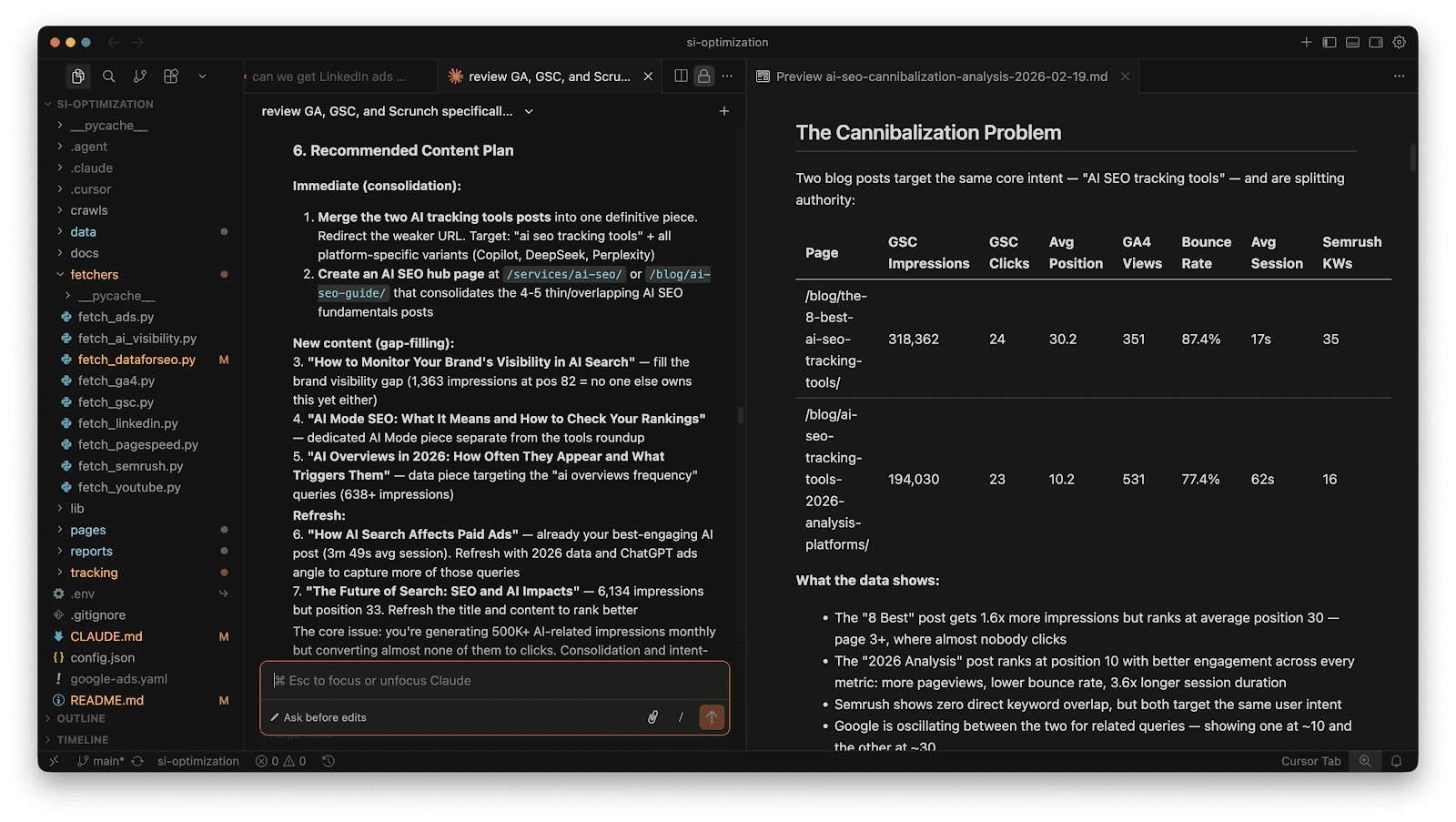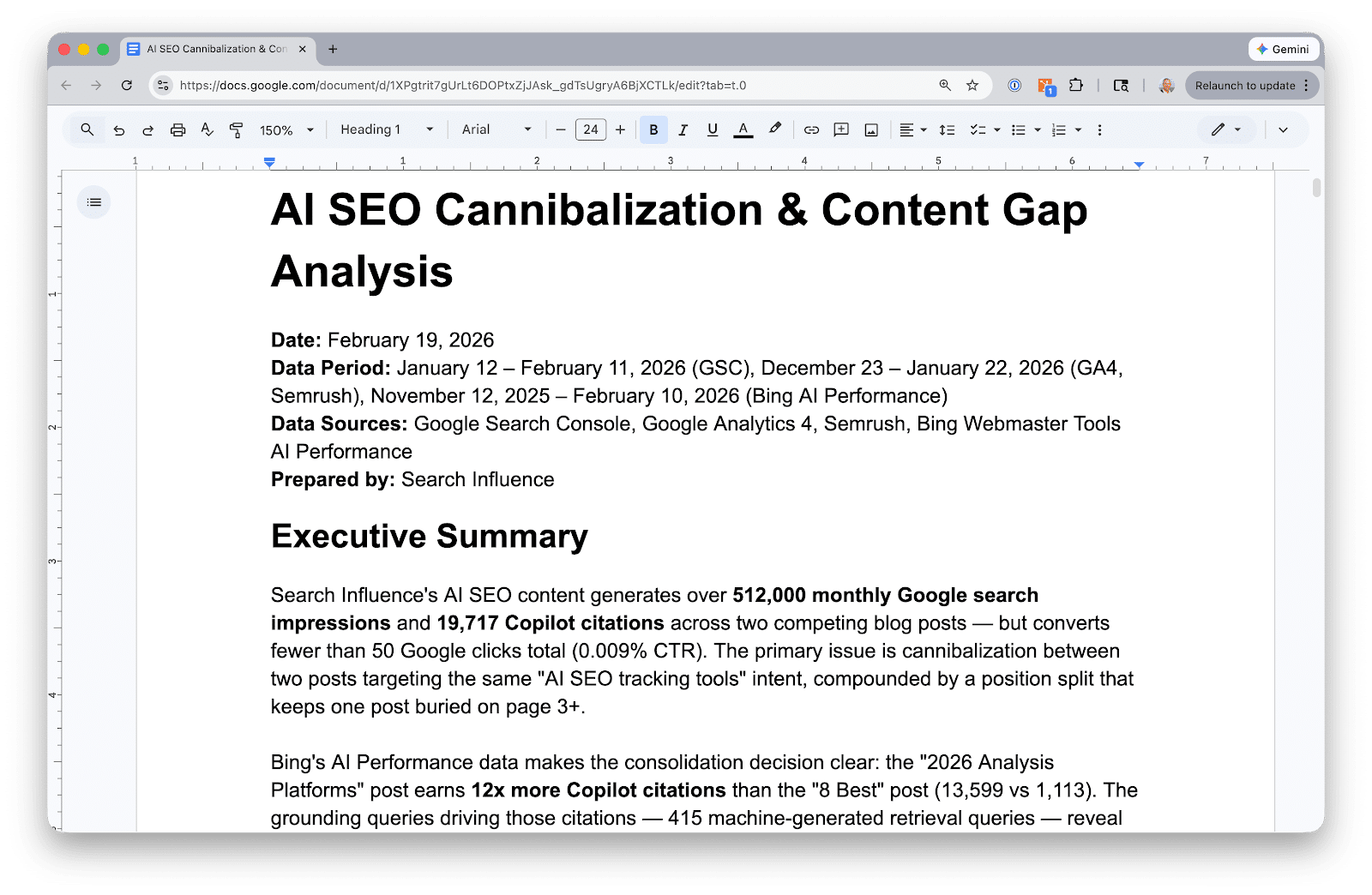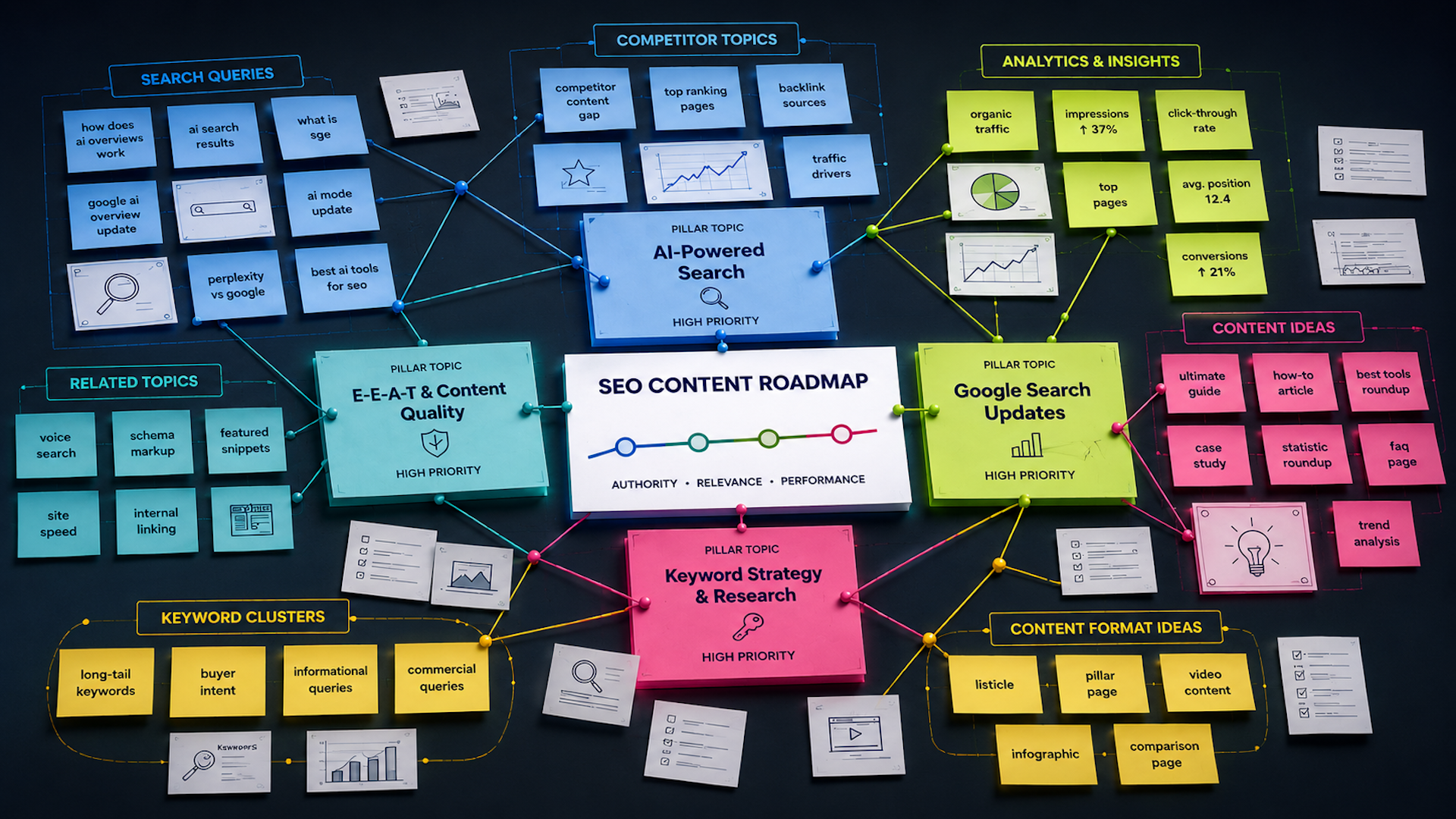
I can publish consistently, follow SEO best practices, and still watch competitors outrank me. When that happens, I usually find that the issue is not content quality alone. It is content coverage. Competitors are answering questions my audience is already asking, while my site is not fully part of that conversation yet.
That is where I use content gap analysis. It helps me identify the topics competitors rank for that I do not, then decide which opportunities are actually worth pursuing.
Finding gaps is rarely the hard part. SEO tools make that fairly easy. The real challenge is making sense of thousands of keywords across several reports and deciding what deserves attention first.
My workflow combines competitor data, first-party search data, and AI so I can prioritize content opportunities around business impact instead of search volume alone.
I bring my SEO data together before analyzing it
In this workflow, I use Semrush to identify competitive opportunities, Google Search Console to validate where my site already shows signs of authority, and Google Analytics to add business context. Then I use Claude to bring those datasets together, group related opportunities, identify patterns, and help me decide what belongs on the content roadmap.
I follow this process in one of two ways.
- I export reports directly from the platforms and upload them to Claude.
- If I have connected those platforms through MCP (Model Context Protocol, a standard that allows AI models to connect securely to data sources), I let Claude pull the data directly without manual exports. The workflow changes, but the analysis does not.
Here is the process I use to turn a pile of SEO data into a prioritized content plan.
Step 1: I choose the right competitors
A content gap analysis is only as useful as the competitors I compare myself against. That sounds obvious, but it is one of the easiest places to go wrong.
If I compare my site to Amazon, Reddit, or Wikipedia, I will end up with thousands of keyword “opportunities” that were never realistic in the first place. My goal is not to find every site ranking for my target keywords. My goal is to find businesses competing for the same audience.
I usually start with Semrush’s Organic Competitors report. Instead of relying only on a list of known competitors, I use this report to find domains that compete across many of the same keywords. From there, I narrow the list to three to five sites that closely match the business and target audience I am analyzing.
I do not worry if a few familiar names do not make the cut. Business competitors and organic search competitors are not always the same.
I also filter out sites that can distort the analysis, including large marketplaces like Amazon, community-driven sites like Reddit or Quora, reference sites like Wikipedia, local directories, review sites, and publishers that do not directly compete with the business.
There are exceptions. If I am analyzing a publisher, comparing against other editorial sites makes sense. The key is choosing competitors that create the type of content I am realistically trying to outperform.
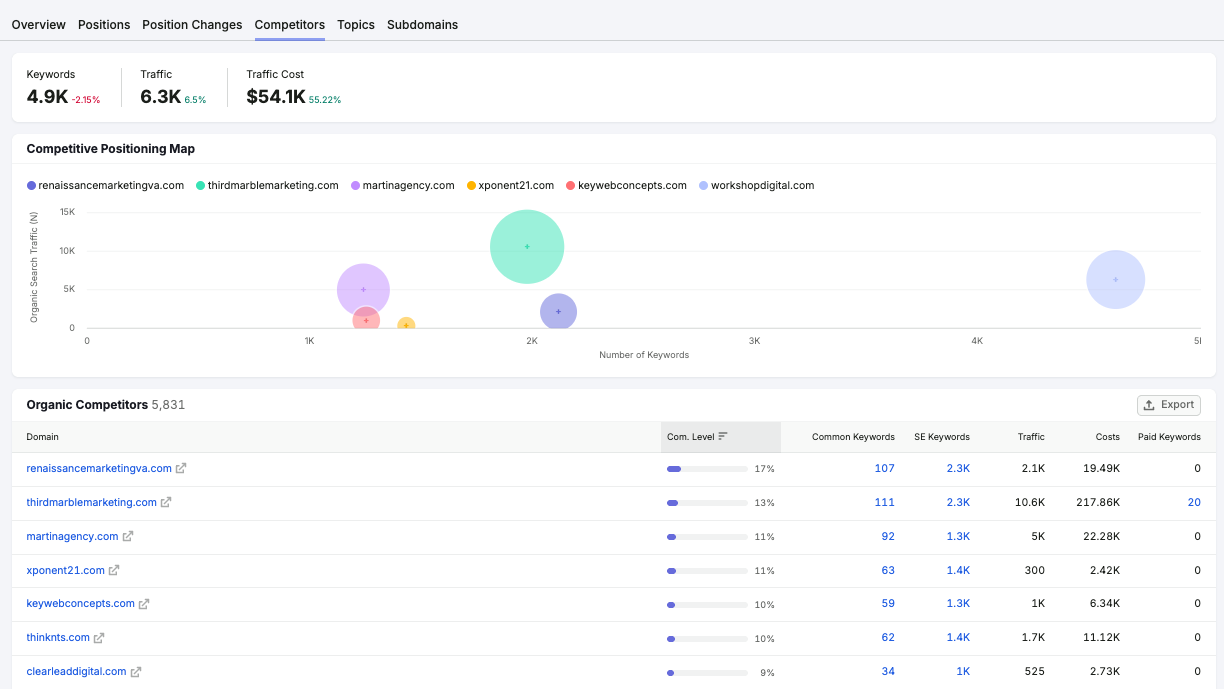
Before I move forward, I sanity-check the competitor list with stakeholders. Sales or product teams may know about newer competitors or strategically important niches that do not yet show up clearly in Semrush.
Once I have settled on the right competitors, I am ready to find the gaps that matter most.
Step 2: I gather and prepare the data
With the competitor list finalized, I collect the data Claude will analyze. Whether I upload exports or connect through MCP, the goal is the same: bring together competitive rankings, my site’s search performance, and engagement data so I can separate meaningful opportunities from noisy keyword lists.
I like to pull data from three core sources.
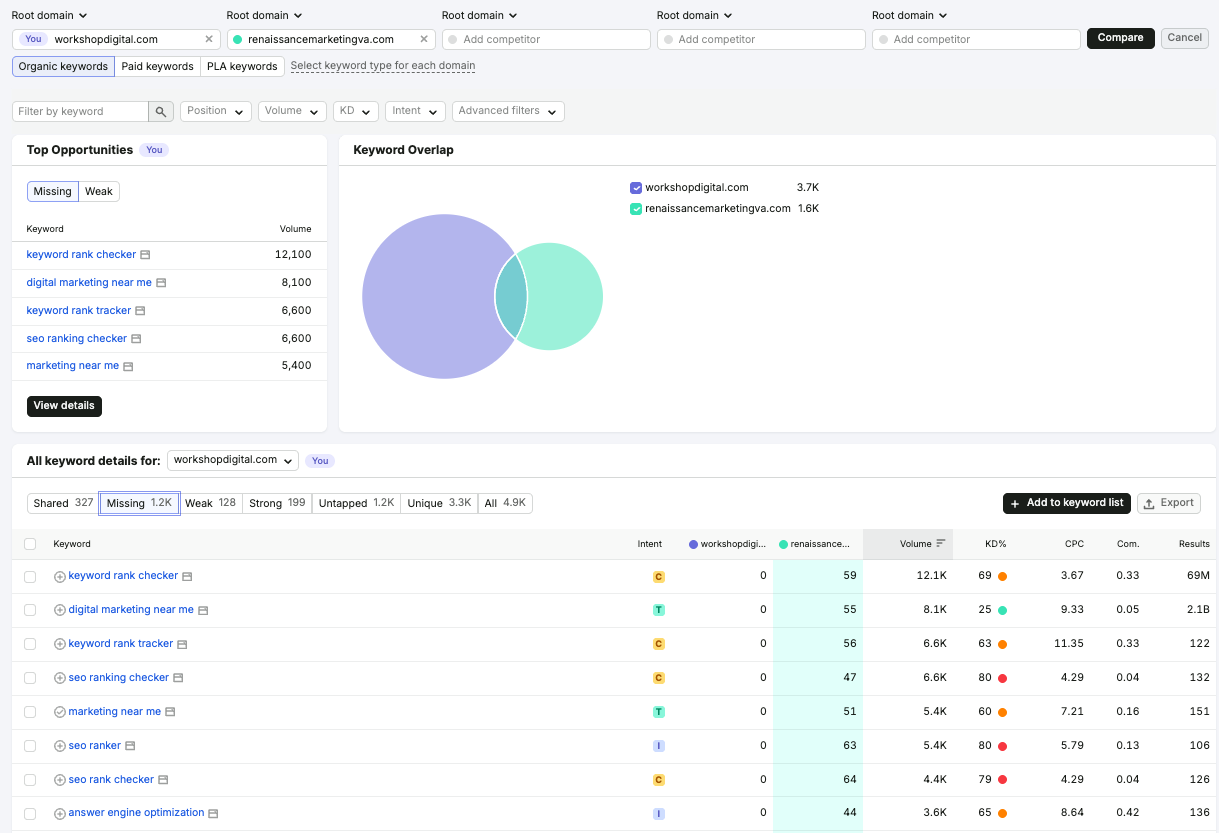
Semrush: I find the gaps
I start with Semrush’s Keyword Gap tool using the competitors selected in Step 1.
From there, I pay close attention to three buckets: keywords competitors rank for and I do not, keywords where I rank but competitors rank higher, and keywords where I rank but competitors do not.
The first bucket often points to missing topics or content hubs. The second bucket can reveal quicker wins, especially when my site already appears on Page 1 or Page 2. The third bucket shows existing strengths that I should protect and continue building around.
Google Search Console: I validate the opportunity
Next, I check Google Search Console before assuming every missing keyword deserves a new page.
For example, Semrush may show that I do not rank for a keyword, but GSC might reveal that I already receive impressions for closely related queries. That tells me Google has started associating my site with the topic, even if rankings have not caught up yet.
Those “almost there” topics often deserve a higher priority than topics where I would be starting from scratch.
In GSC, I look for queries with high impressions and average positions between 8 and 20, existing pages ranking for related terms, and long-tail queries that reveal additional search intent.
Google Analytics: I add business context
Search volume is only part of the story. Engagement metrics help me answer a more important question: if I improve visibility for this topic, is it likely to support business goals?
I review metrics such as organic sessions, engagement rate, average engagement time, key events or conversions, and landing page performance.
If a related content hub already drives engaged visitors or conversions, expanding that topic may be a smarter investment than chasing a completely new keyword with higher search volume.
I clean the data before handing it to Claude
If I am manually downloading the data and uploading it to Claude, I clean it first. Claude is excellent at finding patterns, but it can only work with the data I provide. Cleaner data leads to cleaner topic clusters and better recommendations.
I remove duplicate keywords, competitor-branded terms, careers queries, login queries, support queries, locations or product lines outside the business, keywords with clearly different search intent, and high-intent commercial keywords that are too broad to compete for.
For a manual workflow, I export Keyword Gap data from Semrush, query data from Google Search Console, and landing page performance data from Google Analytics, then upload the files to Claude. For a connected MCP workflow, I ask Claude to retrieve the Keyword Gap report, GSC query data, and GA4 landing page metrics directly from connected accounts.
Step 3: I ask Claude to find the story in the data
At this point, I should have a clean dataset that combines competitive keyword gaps, Search Console performance, and Google Analytics data.
This is where the workflow becomes much more useful. Instead of scrolling through thousands of rows looking for patterns, I ask Claude to organize the data into something I can actually build a strategy around.
The mistake I see most often is asking AI to “cluster these keywords.” That usually produces clusters based on keyword similarity alone. That can be useful, but it does not tell me what to do next.
Instead, I ask Claude to think like an SEO strategist. I give it context about the business, including products or services, target audience, primary business goals, content priorities or constraints, and the exported or connected data from Semrush, GSC, and Google Analytics.
Then I ask Claude to organize opportunities by search intent, funnel stage, business relevance, existing authority signals from GSC, user engagement from GA4, recommended content format, and internal linking opportunities.
Rather than returning a spreadsheet of grouped keywords, I want Claude to produce topic clusters with a clear recommendation for each one.
For example, one cluster might be labeled Technical SEO Audits and include supporting keywords, estimated opportunity, existing pages that could be updated, whether a new page is needed, internal linking recommendations, a priority score, and the reasoning behind the recommendation.
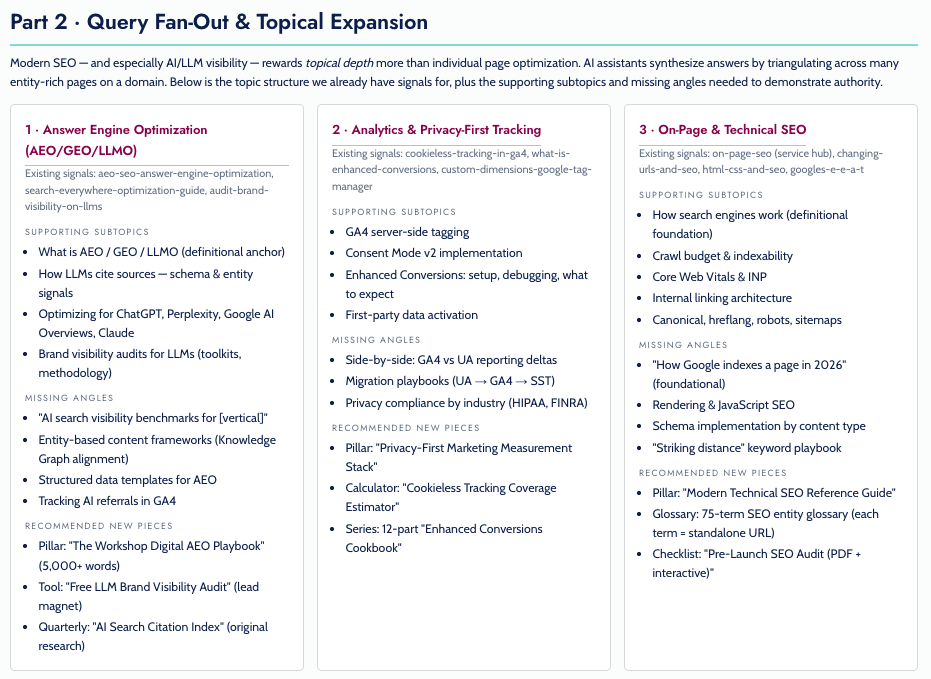
Another cluster might reveal that several competitor keywords can be addressed by expanding an existing guide instead of publishing three separate articles. That is the kind of insight that is hard to spot manually but much easier for AI to surface.
I separate quick wins from long-term investments
Not every opportunity belongs on the same roadmap. As part of my prompt, I ask Claude to classify each cluster into quick wins, new content opportunities, and authority plays.
Quick wins are existing pages that can be refreshed, expanded, or better optimized. New content opportunities are topics that deserve dedicated content because the site has little or no visibility. Authority plays are larger subject areas that may require multiple pieces of content and ongoing investment to compete effectively.
This simple step helps me move from an overwhelming keyword list to a roadmap with both short-term wins and long-term initiatives.
I do not skip the human review
Claude can organize information remarkably well, but it does not know the business the way I do.
Before moving on, I ask whether the topic supports business goals, whether multiple search intents are being combined into one cluster, whether existing content could already satisfy the need, whether the opportunity is realistic given authority and resources, and whether I would actually assign the topic to a writer.
If the answer is no, I refine the cluster or remove it.
The goal is not to accept every AI recommendation. The goal is to spend less time organizing data and more time making strategic decisions.
The biggest prompt lesson is simple: I do not ask Claude to organize keywords. I ask it to recommend what my content strategy should be based on the data I have provided.
Step 4: I score and prioritize the opportunities
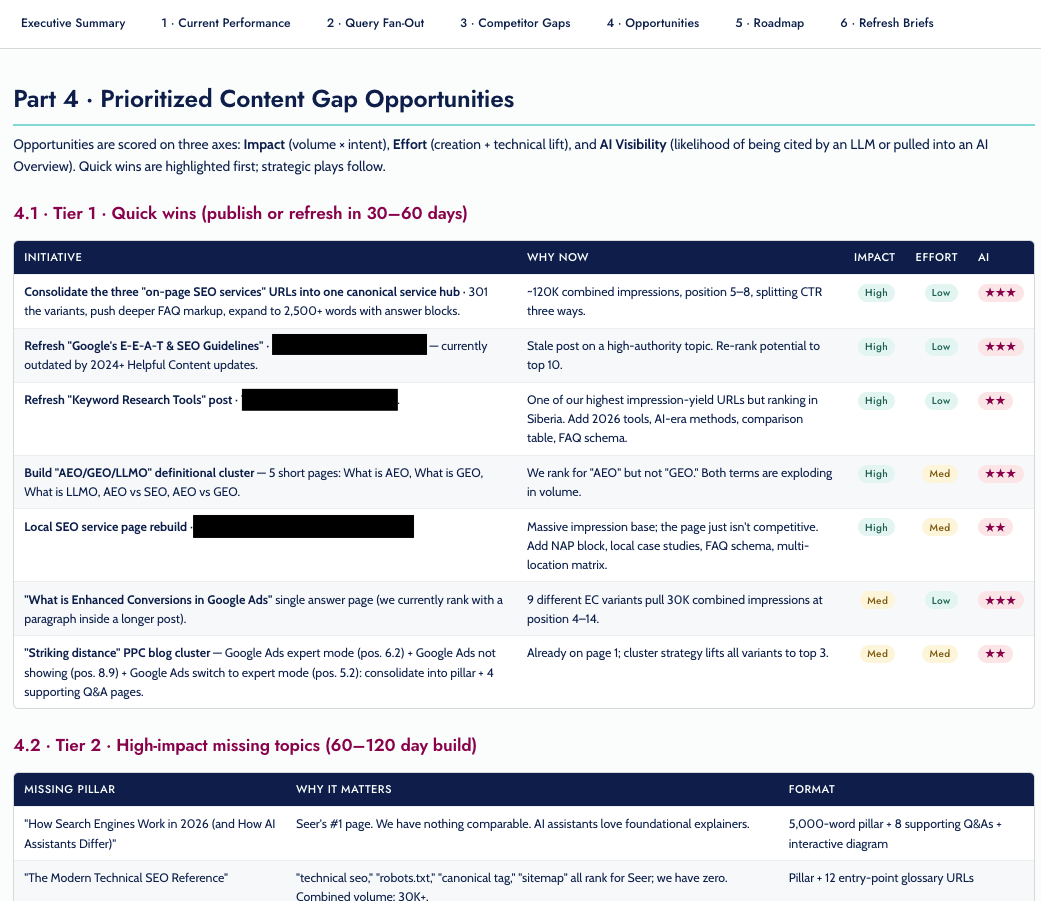
Once Claude has grouped the keywords into topic clusters, the next step is deciding what deserves attention first.
This is where many content gap analyses fall apart. Teams naturally gravitate toward the biggest search volumes, but volume is only one piece of the puzzle. A topic that attracts qualified visitors and supports business goals is often a better investment than a high-volume keyword that is difficult to rank for or unlikely to convert.
I score each opportunity across several criteria before I build a roadmap.
Business relevance
I start with a simple question: if this content performs well, does it help the business?
Topics aligned with products, services, or the customer journey should carry more weight than informational topics with little commercial value.
Existing authority
Next, I look at signals from Google Search Console. If my site already earns impressions or ranks on the second page for related queries, Google has likely established some level of topical authority.
In those cases, improving an existing page or expanding a content hub may produce results much faster than starting from scratch.
Search demand
Search volume matters, but I do not let it dominate the scoring model.
A collection of related long-tail queries with moderate demand can sometimes generate more qualified traffic than one broad keyword.
Ranking difficulty
I review the current search results before committing to a topic. I look at whether authoritative brands dominate the first page, whether the intent is informational, commercial, or transactional, what types of content are ranking, and whether I can realistically create something more useful or complete.
This quick reality check keeps me from chasing opportunities that are not practical.
Estimated effort
Finally, I consider the work involved. Some opportunities require a light refresh of an existing article. Others call for a new content hub supported by multiple pages.
Both can be worthwhile, but they should not carry the same priority when resources are limited.
I let Claude apply the framework
Once I define the scoring criteria, Claude can evaluate every topic cluster consistently.
For example, I may ask Claude to score each opportunity on a five-point scale for business relevance, existing authority, search demand, ranking difficulty, and content effort. Then I ask it to calculate an overall priority score and explain why each recommendation received that score.
The explanation is just as valuable as the number. If I disagree with a recommendation, I can adjust the weighting, add more business context, and ask Claude to score the opportunities again.
By the end of this step, I have more than a list of content ideas. I have a prioritized content strategy that shows what to tackle next, what can wait, and what is not worth pursuing.
Step 5: I turn priorities into page-level recommendations
Once I have prioritized the opportunities, the next step is figuring out exactly what to change.
Rather than handing a team a ranked list of topics, I ask Claude to generate page-level recommendations for the highest-priority opportunities. This is where connected data becomes especially valuable.
Because Claude has access to Semrush research, Google Search Console performance, Google Analytics metrics, and my prioritization framework, it can evaluate each page in context instead of treating every recommendation the same.
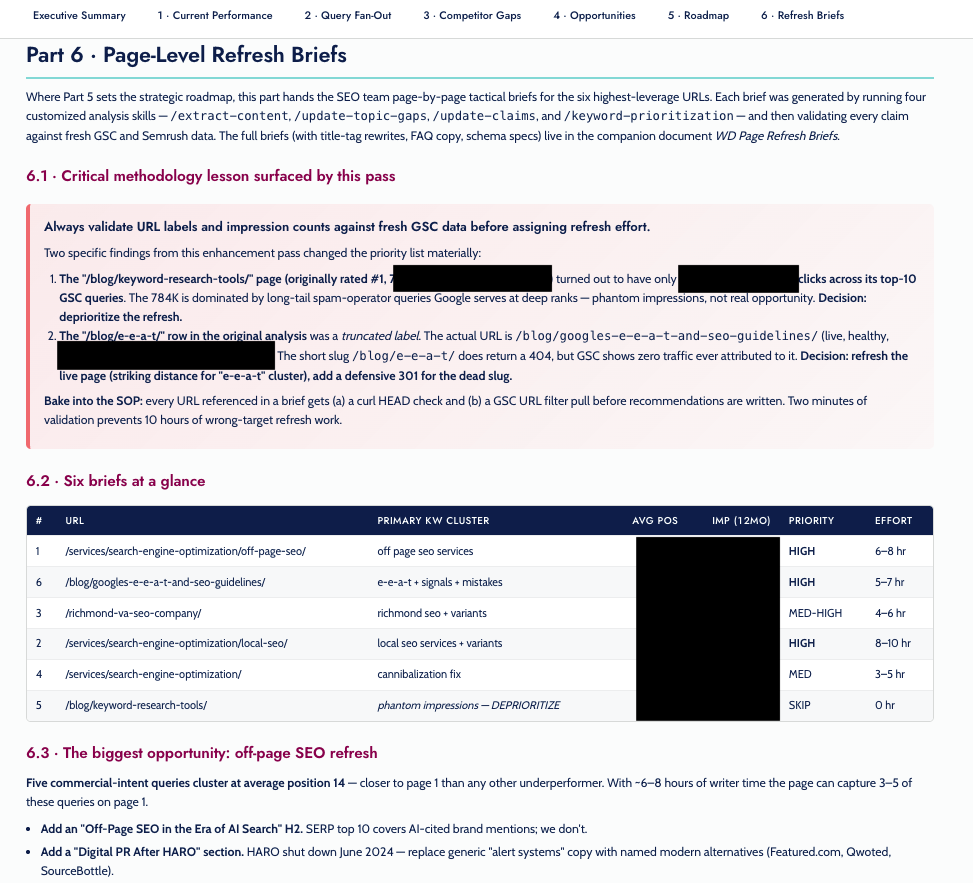
For each priority page, I ask Claude to produce a recommendation that explains why the page was selected, the primary keyword cluster, current rankings and impression data, supporting evidence from GSC and competitor research, recommended updates, estimated effort, expected impact, and priority level.
One of the biggest advantages of this approach is validation.
Before recommending a refresh, Claude can compare URL-level Search Console data against the original analysis. Sometimes what looks like a strong opportunity turns out to be misleading. A keyword may have inflated impression counts, a URL could have been mislabeled in an export, or the page may not be as close to ranking as it first appeared.
Catching those issues before assigning work can save hours of unnecessary effort.
The recommendations also make stakeholder conversations easier. Instead of saying, “I think we should update this page,” I can point to the supporting data, explain why it is a priority, estimate the effort involved, and tie the recommendation back to the larger content strategy.
I treat these recommendations as implementation plans rather than full content briefs. They help SEO and content teams understand what should change, why it matters, and where to focus first. Writers can then use those recommendations to create or update content with confidence.
Step 6: I measure whether the gap is closing
Publishing the content is not the finish line. It is the start of the next round of analysis.

I begin with Google Search Console, tracking whether target queries are gaining impressions, improving in average position, and generating more clicks. When I refresh an existing page, I compare performance before and after the update to see whether the changes actually moved the needle.
Next, I look at Google Analytics. Better rankings do not always translate into better business outcomes, so I review organic traffic alongside engagement and conversion metrics. If an updated page attracts more visitors but fails to keep them engaged or contribute to conversions, I know it is time for another round of optimization.
If I am using Claude through MCP, I can also ask it to compare performance over time and summarize what changed. I might ask which refreshed pages improved the most, which content clusters gained the most visibility, which recommendations drove the strongest business results, and which opportunities still need attention.
Instead of comparing reports month after month, Claude can quickly surface significant changes and point me toward the pages that deserve attention.
I do not treat content gap analysis as a one-time exercise. Competitors publish new content, search behavior shifts, and my own site authority evolves. I like to repeat this workflow every quarter, or more often in fast-moving industries, so I can keep finding new opportunities and stay ahead of competitors.
The tools will continue to improve, but the repeatable workflow is what creates the advantage.
I build a repeatable content gap analysis process
A content gap analysis helps me prioritize opportunities worth pursuing instead of chasing every possible keyword.
Semrush helps me uncover competitive gaps. Google Search Console shows where I already have momentum. Google Analytics adds the business context that rankings alone cannot provide. Claude brings those datasets together, helping me identify patterns, prioritize opportunities, and create actionable recommendations in a fraction of the time it would take manually.
Whether I upload reports or connect my tools through MCP, the workflow stays the same. I gather the right data, validate the opportunities, let AI organize the information, and apply my own expertise to decide what comes next. That is the part AI cannot replace.
The biggest advantage is not simply having better prompts or faster analysis. It is having a repeatable process that helps a team make smarter content decisions every quarter.
Prompt template: My prioritized content gap roadmap
Here is the prompt I use after I have gathered the data, whether I have uploaded exports from Semrush, Google Search Console, and Google Analytics or connected those tools to Claude through MCP.
“You are an experienced SEO strategist helping me perform a content gap analysis.
I’ll either provide exported reports from Semrush, Google Search Console, and Google Analytics, or you’ll access those tools through connected MCP integrations.
My goal is to identify the highest-impact content opportunities based on competitor visibility, existing authority, business value, and implementation effort.
Here’s my business context:
– Company:
– Industry:
– Products/services:
– Target audience:
– Primary business goals:
– Geographic focus:
– Any strategic priorities or constraints:
– Tone of voice: [Insert brand voice adjectives here (e.g., authoritative, conversational, technical)].Using the available data, complete the following tasks.
1. Identify content gaps
Organize keywords into these categories:
– Competitors rank and we don’t.
– We rank below competitors.
– We rank and competitors don’t.Highlight any content gaps, opportunities to consolidate pages, or keyword cannibalization issues.
2. Validate the opportunities
Use Google Search Console data to determine:
– Which topics already receive impressions.
– Which pages rank between positions 8 and 20.
– Which existing URLs have the strongest chance of improving with optimization.Use Google Analytics data to determine:
– Which pages drive meaningful engagement.
– Which pages contribute to conversions.
– Which content hubs are worth expanding.3. Create strategic topic clusters
Group related opportunities by:
– Search intent
– Business relevance
– Funnel stage
– Recommended content type
– Internal linking opportunitiesDon’t cluster based only on keyword similarity. Focus on topics that should become part of the same content strategy.
4. Prioritize every opportunity
Score each topic cluster using:
– Business relevance
– Existing authority
– Search demand
– Ranking difficulty
– Estimated effortAssign each opportunity a priority (High, Medium, Low) and explain why.
Separate recommendations into:
– Quick wins
– New content opportunities
– Long-term authority investments5. Recommend next steps
For every high-priority opportunity, recommend whether we should:
– Refresh an existing page
– Consolidate multiple pages
– Create a new page
– Build a pillar page with supporting contentInclude supporting evidence for every recommendation.
6. Deliver the results
Create:
– An executive summary
– Prioritized topic clusters
– A scored opportunity table
– Page-level recommendations for the highest-priority URLs
– A phased implementation roadmap (30, 60, and 90+ days)If you find conflicting data between Semrush, Google Search Console, and Google Analytics, explain the discrepancy and recommend which source should guide the decision. The output should both be HTML and a Google Sheet.
Before presenting your final recommendations, validate your own analysis. If reviewing Search Console or Analytics data changes your original recommendation, explain why and update your prioritization accordingly.”
This prompt is only a starting point. I add business context, editorial guidelines, and scoring criteria that are unique to the organization I am analyzing. The more context I give Claude, the more useful and actionable its recommendations become.
Inspired by this post on Search Engine Land.