Tag: Content Visibility

  • Ask YouTube AI Search Now Reaches U.S. Desktop Users

    Ask YouTube AI Search Now Reaches U.S. Desktop Users

    I’m watching YouTube take a bigger step into conversational search by expanding Ask YouTube to signed-in U.S. desktop viewers who are 13 and older. What started as a Premium-only experiment is now reaching a much broader audience.

    What is Ask YouTube? I see Ask YouTube as YouTube’s AI-powered search layer. Instead of typing a traditional keyword query and scanning a list of videos, I can ask a natural-language question in the YouTube search bar and get an AI response that may include text, video clips, long-form videos, Shorts, and suggested follow-up prompts.

    Access is expanding. When YouTube announced the test in April, Ask YouTube was limited to U.S. YouTube Premium members who were 18 and older and opted in through youtube.com/new. On July 6, YouTube expanded it to signed-in U.S. viewers 13 and older using English-language searches on desktop.

    Signed-out viewers and supervised accounts are still excluded for now. YouTube also said it plans to bring the feature to more devices, languages, and users worldwide in the coming months.

    ```json
{
  "alt": "Blank white image with no discernible features.",
  "caption": "A completely blank canvas—pure white and open to endless possibilities.",
  "description": "This image is entirely white, devoid of any visible features or markings. The blank nature of the image provides a neutral backdrop suitable for various uses. Ideal for design mockups, as a clean slate for digital artwork, or to be used as a minimalist element in creative projects. Keywords: blank, white, empty, neutral."
}
```

    Standard YouTube Search is not going away. If I land on an Ask YouTube results page and want the usual video results, I can click All or return to the Home page. That means Ask YouTube remains a separate search option, not a full replacement for traditional YouTube Search.

    Views still count for creators. YouTube said videos featured inside Ask YouTube responses can give creators another path to discovery. Views from Shorts, videos, and previews shown in Ask YouTube responses count toward total view metrics and YouTube Partner Program eligibility.

    I also noticed that featured videos display the video title and channel name, which matters for attribution and visibility. For creators, YouTube’s guidance is clear: publish unique, high-quality content with descriptive titles and clear chapters so its systems can better match video segments to viewer questions.

    Large Google logo over colorful stacks of digital pages and folders, symbolizing search advertising, web content, and online marketing updates.
    A bold Google logo sits atop layered, colorful digital documents, evoking the fast-moving world of search marketing, ad formats, campaign assets, and platform updates.

    Why I care. YouTube is putting conversational AI search in front of a much larger group of U.S. desktop users. If I’m creating or optimizing video content, this raises the value of clear titles, useful chapters, and segments that directly answer specific questions.

    For SEO and content teams, this is another reminder that discovery is shifting from simple keyword matching toward answer-based experiences. The videos most likely to benefit are the ones that make it easy for YouTube to understand what each section covers and which viewer questions it solves.

    What it looks like. YouTube shared a GIF showing Ask YouTube in action, where users can ask a question, review AI-assisted results, and continue with follow-up prompts.

    The announcement: Try a new conversational search experience with Ask YouTube


    Inspired by this post on Search Engine Land.


    crushpress.ai community screenshot
  • Google Discover Fan-Out: How Niche Sites Gain Visibility

    Google Discover Fan-Out: How Niche Sites Gain Visibility

    I see Google Discover’s “Tailor Your Feed,” now showing up as “Add topics to your feed,” as a meaningful shift in how people can shape what appears in their feed. Instead of relying only on Google’s inferred signals, such as clicks, dwell time, follows, and engagement history, I can now type what I want to see in natural language and let Google translate that request into feed instructions.

    That matters because it creates a third visibility path for small and niche publishers. Until now, a smaller site usually needed either strong implicit affinity from a user or an explicit follow. With prompt-based tuning, a user can simply ask for a topic, creator, source, or type of content, and Google can retrieve matching material even when that content has barely appeared in Discover before.

    Image

    In my tracking, the feature turns prompts into actions such as SEE_MORE and SEE_LESS. Those actions are applied after the user refreshes or updates the feed. The experience feels conversational, but underneath it appears to create persistent instructions that can affect both the current feed and future Discover sessions.

    Image

    I also see signs of an LLM-style system behind the workflow. A user prompt is interpreted, converted into a readable assistant response, and returned with a structured result. In one observed example, the prompt “show me more content on seroundtable.com” produced an actionable SEE_MORE response and a persistent thread key, suggesting that feed tuning is treated as an ongoing conversation rather than a single isolated command.

    Image

    The feature first appeared in Search Labs for US English accounts in December 2025. At that stage, the impact was subtle: after several refreshes, I could see a few on-topic cards, but the feed did not radically transform. By early 2026, Google started adding attribution, including labels such as “resulting from natural language tuning” and later “You asked to see,” making it easier to identify which cards were influenced by a prompt.

    Image

    By spring 2026, “Tailor Your Feed” had effectively become “Add topics to your feed.” The interface moved toward a chat-style entry point with prompt starters such as “Show me content from…,” “I want videos about…,” and “Keep me updated…”. The same underlying verbs remained, but Google made them easier for everyday users to trigger.

    Image

    The most important technical clue is the pipeline behind the feature. Discover cards influenced by these prompts can be associated with naturallanguagetuningcontent.f for current tuning and historicalnaturallanguagetuningcontent.f for older prompts that continue shaping the feed. I read that “historical” pipeline as evidence that these preferences are meant to last over time, not disappear after one refresh.

    Image

    From the observed cards, I see two ways this content is selected. The first and dominant mode is entity or interest expansion. A prompt is mapped to related people, topics, publishers, or concepts, and Discover expands around that meaning. This is why asking for one source or creator may also surface related sources, related subjects, or nearby entities rather than only the exact name typed into the prompt box.

    Image

    The second and more interesting mode is query-intent fan-out. In this mode, a prompt is decomposed into natural-language retrieval queries. A broad request about SEO, for example, can become query intents such as “SEO strategies algorithm changes,” “Google ranking system updates,” or “tips for getting content into google discover.” Those query intents then retrieve articles based on semantic relevance.

    Image

    This is where the connection to Generative Engine Optimization becomes clear to me. The Discover fan-out behaves like the retrieval pattern we see in generative search: one user prompt becomes several more specific sub-queries, and content is selected because it answers one of those sub-queries well. Popularity can still matter in some cases, but it is not the only gatekeeper.

    Image

    That distinction is what gives niche publishers a real opening. In the observed data, prompts surfaced examples such as vegan recipe creators, Mississippi Today, a LinkedIn post, niche Japanese-property blogs, and a gardening site tied to a seed-starting query. Some mainstream publishers still appeared, including Reuters and VentureBeat in certain contexts, but the pattern was not limited to the usual high-volume Discover winners.

    Image

    In the most striking cases, the pipeline surfaced articles with no detectable prior Discover distribution in the tracking dataset. I am not using “distribution” here as an audience number or a Search Console metric. I mean that the article did not appear to have circulated previously in the Discover tracking data available for analysis.

    Image

    That makes this pipeline different from classic Discover distribution. Traditional Discover systems often re-serve articles that already have engagement momentum. Prompt-based tuning can retrieve content because it matches what a user explicitly asked for, even if the article has not already built a Discover track record.

    Image

    I would not treat this as a mass traffic channel yet. Google appears to promote these cards cautiously, and the pipeline does not seem to snowball the way broader Discover pipelines can. It serves the user who asked. It does not automatically broadcast the content to a much larger audience.

    Image

    I would also be careful about false positives. In one Japanese-property cluster, relevant results such as guides to buying a home in Japan appeared alongside a video-game article about in-game home locations. That kind of loose match helps explain why Google may rank and distribute these cards conservatively.

    Image

    For publishers, the practical implication is straightforward: I would optimize for both topical clarity and query-intent vocabulary. The entity-expansion mode rewards sites that are unmistakably about a topic users can name. The fan-out mode rewards titles, headings, and introductions that align with the natural-language questions and information needs Google derives from prompts.

    Image

    That does not mean stuffing pages with raw keywords. The better move is to describe the content clearly in the language a real person would use when asking Discover for more of it. If a user might ask for “buying Japanese property guide,” “starting seeds indoors guide,” or “tips for getting content into google discover,” I want the page’s title, H1, and opening section to make that relevance obvious.

    Image

    The strategic shift is that selection power moves closer to the user. In the classic feed, Google infers demand. In this model, the user declares it. Google then turns that declaration into entities, interests, and query intents that drive retrieval.

    Image

    For small publishers, that is the opportunity. If the feature graduates from Search Labs and users adopt it at scale, a focused site with clear topical authority could appear because it directly satisfies declared demand, not because it already won the popularity contest inside Discover.

    Image

    There are still real limits. The feature has been US English and Search Labs focused, with French feeds showing essentially no presence in the observed data. Adoption also appears early. A powerful prompt-based personalization system changes little if users do not actually use it.

    Image

    What I am watching next is whether Google expands this beyond Search Labs, whether the current and historical tuning pipelines become more visible, and whether this behavior converges with broader generative retrieval systems. A nascent generativeretrieval.f pipeline has already appeared in tracking data, but that broader connection still needs confirmation.

    My read is that Discover is moving from observed personalization toward declared personalization. Google still infers plenty, but users are beginning to write part of their own interest profile. If that model becomes mainstream, niche publishers with clear focus, strong entity signals, and natural-language relevance may gain a new route into Discover visibility.

    Notes: In this analysis, a Discover pipeline means the selection circuit that chooses and serves cards. The .f suffix in identifiers such as historicalnaturallanguagetuningcontent.f is an observed internal marker attached to Discover card metadata. “Fan-out” refers to a mechanism where one prompt is broken into several retrieval sub-queries. “GEO” means Generative Engine Optimization, or the practice of optimizing content for visibility in generative search and answer systems. “AIO” refers to AI Overviews, and “AI Mode” refers to Google Search’s conversational interface.

    Field tracking referenced here covers Google app Search Labs US English accounts from December 2025 through June 2026. Pipeline behavior is based on close observation of Discover feed cards and 1492.vision tracking data. The internal mechanisms described are my interpretation of observed data and public research, and approximate dates are treated as approximate.


    Inspired by this post on Search Engine Land.


    crushpress.ai community screenshot
  • Unlocking the Power of Google Discover Publisher Profiles

    Unlocking the Power of Google Discover Publisher Profiles

    I find it fascinating how Google Discover has evolved with the introduction of publisher profiles and follow features. These profiles have started making waves, yet they remain a bit enigmatic due to limited documentation.

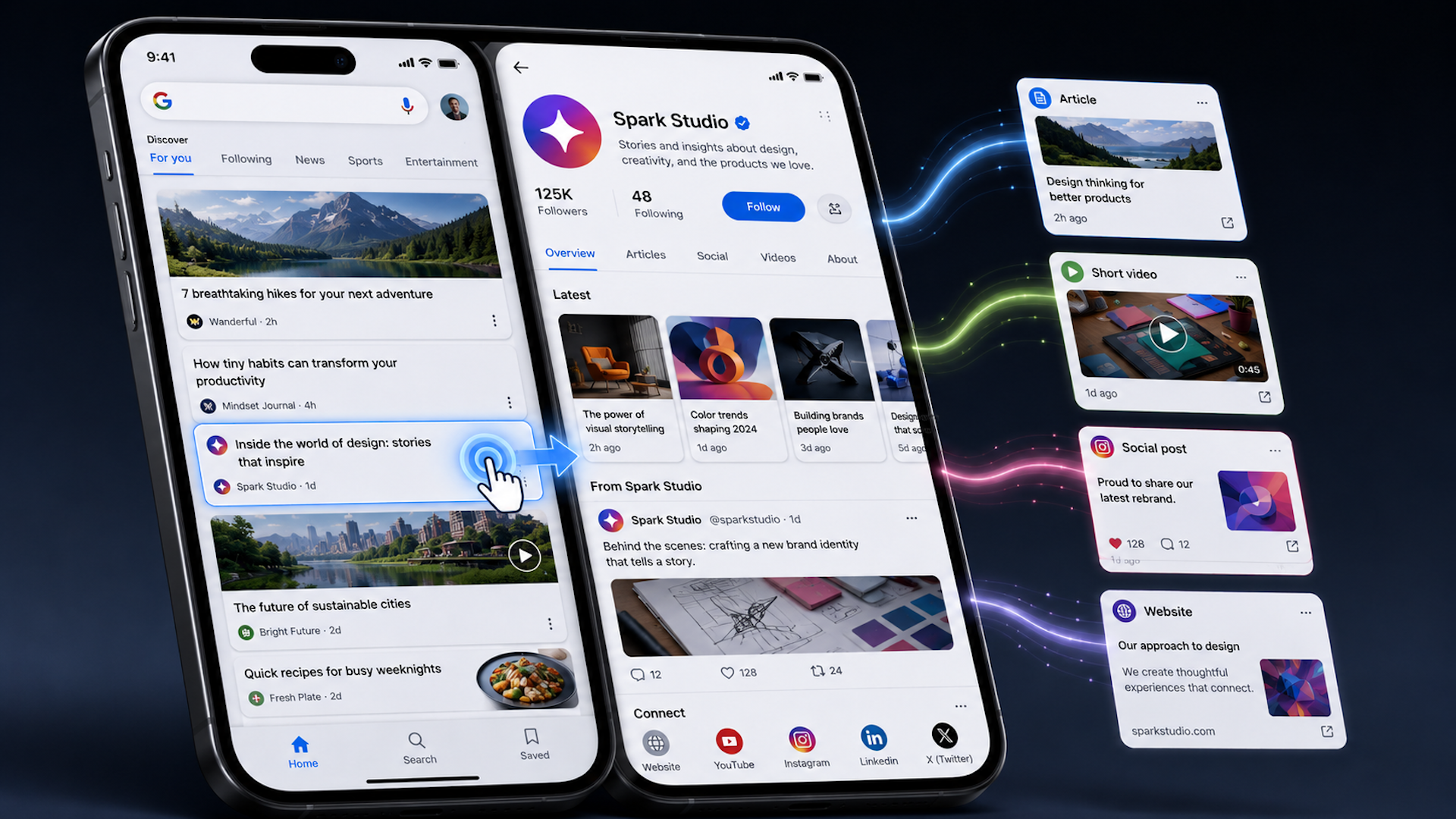
    More publishers, creators, and social-first accounts are now visible through these profiles. Let me take you through how these profiles work, how they connect with social accounts and the Knowledge Graph, and why some publishers already enjoy enhanced customization features.

    As a technical SEO enthusiast, I’m quite accustomed to Google glossing over details in their documentation. And with Discover publisher profiles, that mystery deepens.

    Google barely mentions these profiles in their official Discover documentation, though they seem to play an increasingly significant role in the visibility of publishers and creators.

    ```json
{
  "alt": "The CapmatchOne logo with a gradient circle and bold text.",
  "caption": "Discover innovation with the CapmatchOne logo, featuring sleek typography and a modern gradient circle.",
  "description": "The CapmatchOne logo features bold, modern typography coupled with a gradient circle, symbolizing connection and innovation. The sleek design conveys a sense of progress and creativity. This image can be used for branding or promotional purposes, appealing to audiences interested in innovative solutions and forward-thinking designs."
}
```

    It’s intriguing to see how Discover profiles let users manage the publishers they follow while gathering content from various websites and social platforms.

    Because Google has been reticent about the inner workings of these profiles, I’ve taken upon myself to study their patterns across different accounts. Here’s what I’ve noticed about:

    Google rolled out substantial updates to Discover in September 2025, vastly altering how we engage with content through publisher follows and profile pages.

    ```json
{
  "alt": "Text explaining how to follow publishers or creators on Google Discover.",
  "caption": "Discover new content on Google by following your favorite publishers and creators. Preview their posts before following to tailor your feed.",
  "description": "An informative text image from Google detailing how users can follow publishers or creators directly on Discover. It highlights the ability to preview content, such as articles and YouTube videos, before following. Users are advised to sign in to their Google Account to explore this feature. Ideal for those looking to customize their content consumption on Google Discover."
}
```

    The update granted publishers dedicated landing pages for content aggregation, offering users a streamlined way to interact with preferred publishers and seamlessly integrating social content into Discover.

    The most eye-catching aspect of this update is how it empowers users to have greater control over publisher visibility while enabling brands to reach their audience more effectively.

    Publishers can’t typically alter the layout of these pages, but some recently gained access to customize their profiles, an option part of a limited beta test.
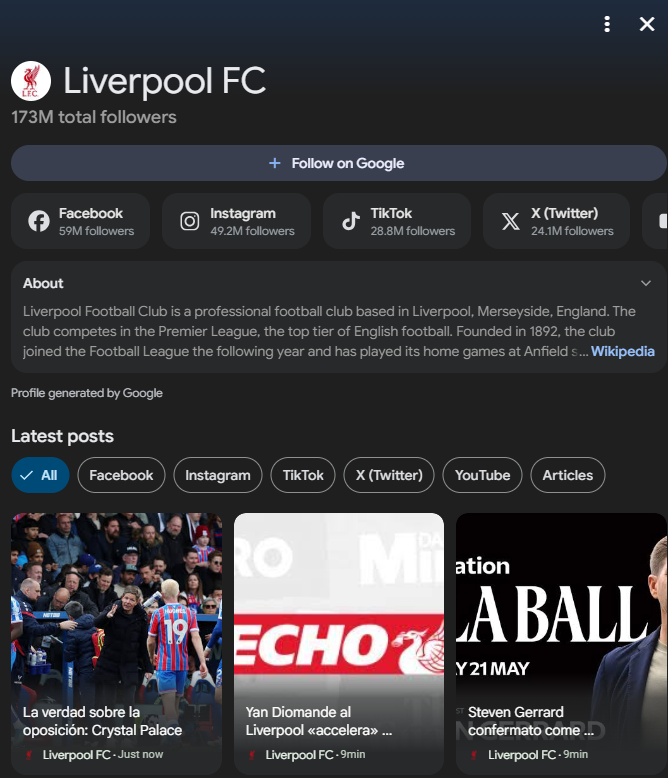
    ```json
{
  "alt": "Liverpool FC social media profile overview with follower counts and recent posts.",
  "caption": "Discover Liverpool FC's expansive online presence with millions of followers across platforms and stay updated with the latest posts and news.",
  "description": "This image showcases the Liverpool FC social media profile, highlighting 173 million total followers. It features follower counts across platforms like Facebook, Instagram, TikTok, and Twitter, along with a brief description about the club. At the bottom, recent posts are displayed with options to filter by platform. Keywords: Liverpool FC, social media, followers, football club, recent posts."
}
```

    Common to most publisher profiles are features like a profile photo, usually sourced from the Knowledge Graph or a YouTube profile, which also counts total social followers, and integrates various social media handles.

    The social connections catered to include platforms like YouTube, TikTok, Instagram, Facebook, X, and LinkedIn. The ‘About’ section is succinct, often derived from a Wikipedia entry or something similar.

    Some editable profiles offer additional features like customized banners, pinned posts, and external links that could direct users to apps or livestreams, further enhancing content reach.
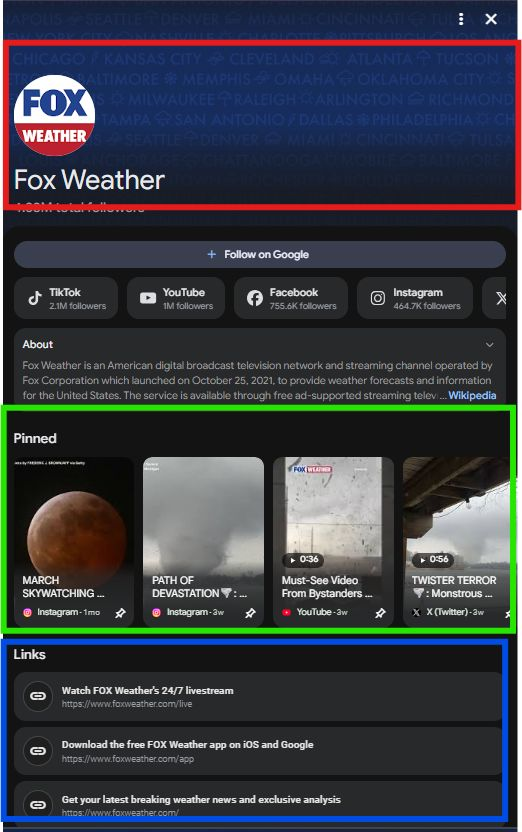
    ```json
{
  "alt": "Fox Weather page with social media links, about section, pinned videos, and navigation links.",
  "caption": "Explore the dynamic Fox Weather page, featuring live updates, pinned videos, and easy access to their apps and social media platforms.",
  "description": "The Fox Weather page displays their logo and title prominently at the top. Below are quick-follow options for TikTok, YouTube, Facebook, and Instagram. An 'About' section provides details about their services, while a set of pinned videos showcase various weather events. Navigation links at the bottom offer access to their livestream, mobile app downloads, and news updates. This comprehensive setup ensures users stay connected with the latest weather information."
}
```

    There are two main types of Discover publisher profiles: ones for entities with websites and others solely focused on social media publishers.

    Web-focused publishers’ profiles tend to be more comprehensive, often including the About section, logos, social accounts, and website links—although social links might sometimes need a manual push to be included.

    On the other hand, profiles for social media publishers focus on prominent journalists, notable figures, and those solely identifiable through social media.

    These profiles are generally less complete unless they are tied to a Knowledge Graph, missing elements like profile pictures or descriptions, frequently needing aid from connected YouTube accounts for better appearance.

    Looking forward, I anticipate Google may broaden access to these editable profiles, though I suspect customization will remain selective, likely reserved for well-established publishers and creators.


    Inspired by this post on Search Engine Land.


    crushpress.ai community screenshot