This past Black Friday and Cyber Monday, I delved into the fascinating insights from our Black Friday Index, crafted from a vast pool of 400 million genuine conversations. It was enlightening to see which brands stood out as AI’s top recommendations, especially as so many of us relied on Answer Engines to hunt down the best deals.
As I explored the data, the impact of AI on shopping trends became crystal clear. The technology not only streamlined how we search for deals but also influenced brand visibility and consumer choices. The excitement of seeing how AI is reshaping shopping habits made this year’s Black Friday and Cyber Monday particularly intriguing for me.
The findings from the Black Friday Index are a testament to the growing importance of AI in retail, showing us how indispensable it has become for both consumers and brands. Being part of this evolution makes me look forward to what future shopping events will bring, especially as technology continues to advance.
If your Black Friday plan stops at rankings, feeds, paid media, and conversion rate, it now has a blind spot. A shopper can ask an AI system to narrow a category, compare products, judge whether a discount is worthwhile, and recommend where to buy – without following the search journey you designed.
Your job is not to make an AI repeat your promotion. It is to make your products easy to identify, compare, and verify while demand moves from early research to live deal hunting. That requires coordinated work across your own site, retailers, marketplaces, review coverage, video, and genuine customer discussion.
Black Friday creates two different AI demand states
Before Black Friday, shoppers are reducing a large market into a shortlist. Their questions tend to concern suitability: which product fits a use case, what features matter, which compromises are acceptable, and whether waiting for a sale makes sense. When the event begins, the task changes. Price, availability, seller credibility, current sentiment, and the quality of the deal become more important.
Those percentages do not establish a permanent formula for every category or model. They do expose a useful operating distinction: the content that builds a shortlist is not sufficient on its own when shoppers want current confirmation from other people.
Build your campaign around four information layers:
The identity layer explains what your brand sells, which categories it belongs in, and who its products are for.
The decision layer supplies specifications, use cases, limitations, compatibility details, and defensible comparisons.
The offer layer states the current price, discount terms, sale window, availability, fulfillment conditions, and applicable returns information.
The verification layer gives shoppers independent evidence through reviews, demonstrations, retailer listings, comparison coverage, and legitimate customer discussion.
The first two layers should be settled before promotional demand arrives. The offer layer must be updated whenever the commercial facts change. The verification layer takes longer to earn, so it cannot be manufactured credibly on launch day.
Make every offer answerable without reconstruction
An AI system should not have to combine a slogan on your homepage, specifications in a PDF, a discount in a banner, and shipping terms in a support page to explain your offer. Every extra reconstruction step creates another opportunity for omission, confusion, or a stale answer.
Start at the homepage because it is more than a navigational doorway. Within the examined brand-site citations, homepages accounted for 40%. Give that page a plain statement of what the brand is, the categories it serves, the customer problems it solves, and the main paths to product information. A clever campaign line can support that explanation, but it should not replace it.
Then audit each priority product or offer page in this order:
Use the exact product name and model consistently in the title, visible copy, structured data, retailer listings, and supporting content.
State what the product is and who it suits near the top of the page. Do not make the reader infer the category from branding language.
Present specifications as labeled facts. Include the dimensions, materials, capacity, compatibility, included components, or technical requirements that actually drive a decision in your category.
Explain the important tradeoffs. A page that identifies who should not buy the product can be more useful than one that describes every shopper as an ideal customer.
Place the live offer in visible text. Include the current price, reference price where applicable, conditions, start and end information, seller, stock state, and fulfillment details that a buyer needs to interpret the promotion.
Add concise questions and answers for real research intents: compatibility, setup, maintenance, warranty, returns, common alternatives, and differences between adjacent models.
Provide evidence close to the claim it supports. Demonstrations should show the use case, while reviews and technical documentation should be clearly attributable and reachable.
Keep stable product facts separate from volatile promotional facts in your content workflow. The product’s dimensions should not change because a sale begins, but price and availability might. Assign ownership accordingly: merchandising maintains the offer state, while product or content teams maintain the underlying facts.
Structured data can make those facts less ambiguous to machines, but it cannot rescue incomplete visible content. Product and Offer markup should agree with the page a shopper sees. If a price, availability value, model identifier, or seller differs between the markup and the page, the markup has added conflict instead of clarity.
Finish with a manual extraction test. Give someone who did not build the page the URL and ask them to answer: What is this product? Who is it for? Why would they choose it over the closest alternative? What exactly is the Black Friday offer? What restriction could change the decision? If any answer requires another tab or an assumption, the page is not finished.
Build comparison coverage before the promotion starts
Brand pages are good at establishing first-party facts. Shopping recommendations require a second job: organizing choices and reducing uncertainty. That is why AI systems repeatedly draw from retailers, review publishers, video platforms, and community conversations when they construct commercial answers.
Retail concentration matters too. Generalist retailers held 48% of retail citations, while electronics specialists held 23%. Large retailers have broad assortments, familiar identities, and enough product information to answer many different shopping questions. A smaller brand is unlikely to reproduce that footprint, but it can make its category knowledge and product distinctions much easier to reuse.
Create comparison pages around decisions, not around the phrase “best product.” A useful comparison should tell the reader:
Which products are genuinely comparable and which belong to a different use case.
What each option is best suited to, using a stated criterion rather than a vague superlative.
Which specifications materially change the experience.
What the buyer gives up by choosing the cheaper, smaller, faster, or more capable option.
Whether accessories, subscriptions, installation, or compatibility requirements affect the practical cost.
Which facts are stable product attributes and which are temporary Black Friday conditions.
Publish first-party comparisons even when an independent reviewer would be more persuasive. Your version establishes accurate entities, specifications, and distinctions that other people can check. It should disclose its perspective and link to the underlying product details rather than pretending to be neutral.
For third-party coverage, prioritize relevance over raw volume. Give suitable reviewers and publishers clean model names, current specifications, images, documentation, and access to products where your normal review policy allows it. Correct factual errors without trying to dictate conclusions. Inclusion in a trusted comparison is valuable because the comparison answers a real decision, not merely because it creates another brand mention.
Treat off-site evidence as part of product information
Your website can declare what a product does. It cannot independently establish how the product behaves in ordinary use or how buyers feel about its compromises. AI shopping answers often seek that corroboration elsewhere.
Each environment contributes a different kind of evidence:
YouTube can show setup, scale, sound, motion, results, and other experiential details that are difficult to communicate in a specification table. Use accurate titles and descriptions, identify the exact model, and make spoken explanations clear enough to stand without promotional visuals.
Retailer and marketplace listings connect the product to a category, seller, price, reviews, and comparable inventory. Keep identifiers, variants, specifications, and images consistent with your own site.
Review coverage organizes alternatives and makes tradeoffs explicit. Give reviewers enough factual material to distinguish models without forcing them to decode your catalog.
Community conversations reveal recurring questions, edge cases, frustrations, and unexpected use cases. Use those conversations to improve product information and support. Do not simulate participation or manufacture endorsements.
Consistency is the operational priority. If your site calls a product one name, a retailer shortens it, a video uses a family name, and marketplace variants omit the model number, you have created several weak identities instead of one strong one. Maintain a shared product record containing the approved name, model identifier, category, key specifications, variant labels, current imagery, and canonical URL. Give every channel owner access to it.
Do not turn this into a backlink-counting exercise. A mention that does not help identify, compare, or verify the product contributes little to the shopping decision. Audit off-site presence by question instead: Where can a shopper see the product used? Where can they compare it with the nearest alternative? Where can they verify specifications? Where can they find credible discussion of its limitations?
Run a two-phase AI visibility operation
Black Friday AI optimization should operate in a preparation phase and a live phase. The preparation phase builds retrievable facts and comparison context. The live phase protects accuracy while offers, availability, and public conversation change.
Before the promotion, build a fixed prompt set from customer decisions rather than from your target keywords alone. Include category discovery, a constrained use case, a direct product comparison, a compatibility question, a value question, and a deal-verification question for every priority category. Keep the wording stable enough that later results are comparable.
Run those prompts separately on the AI platforms your customers are likely to use. Do not collapse their responses into one score. In the observed Black Friday sample, Gemini responses averaged 606 words, OpenAI responses averaged 401, and Perplexity responses averaged 288. Those are sample characteristics, not permanent product specifications, but they show why a citation or mention can play a different role on each platform.
Use one tracking row for each prompt and platform. Record:
The exact prompt, model or product name, and time of the check.
Whether the brand and correct product appear.
How the product is framed: recommended, compared, merely listed, or excluded.
Which URLs support the answer.
Whether the price, specifications, seller, availability, and promotion terms are accurate.
Which competitor or third-party page supplied information you did not make easy to find.
The correction required: page content, structured data, marketplace data, comparison coverage, video, or support documentation.
At sale launch, rerun the deal and verification prompts. Repeat the check after any material price, inventory, seller, or terms change. If an answer is wrong, correct the authoritative page and connected listings first. A prompt variation may produce a different answer, but it does not repair the underlying information conflict.
Judge progress by failure mode rather than by a single visibility number. A missing brand is a discovery problem. The wrong model is an identity problem. An incorrect price is a freshness problem. A competitor winning every comparison may indicate weak decision content or stronger independent corroboration. Each diagnosis leads to different work.
Key takeaways
Plan separately for pre-sale research and live deal verification because the source mix changes when Black Friday begins.
Give every priority offer a clear identity, complete decision facts, current commercial terms, and evidence a shopper can verify.
Build comparisons around use cases and tradeoffs, not unsupported claims that a product is “best.”
Coordinate product information across your site, retailers, marketplaces, video, review coverage, and community support.
Test the same customer decisions across AI platforms and classify failures before choosing a fix.
Before your next promotion, choose one prompt for each major customer decision in your highest-value category. Run the set when product pages are frozen, again when the sale launches, and whenever a material offer fact changes. The gaps you find will give your content, merchandising, SEO, marketplace, and communications teams a concrete Black Friday worklist – before shoppers ask AI to make the choice for them.
You can run a busy Black Friday ad account and still lose money after the click. When media costs rise, every unclear offer, unnecessary form field, checkout surprise, and unworked lead consumes traffic you already paid to acquire.
The practical response is to manage the ad, landing page, checkout or form, and follow-up process as one conversion system. That gives you more useful decisions than simply chasing cheaper clicks or celebrating a higher click-through rate.
Higher ad costs change the acceptable post-click error rate
That combination matters because engagement and profitability can move in different directions. A campaign can attract more clicks while producing worse economics if its landing page converts poorly, its orders carry weak margins, its returns increase, or its leads fail to become customers. The early Black Friday figures could not settle that question because final conversion value and return on ad spend were still pending.
Do not respond by rejecting every expensive click. A higher CPC can work when the visitor converts at a strong enough rate and produces sufficient margin. A lower CPC can fail when cheap traffic generates low-quality leads, abandoned carts, cancelled orders, or purchases that are later returned.
Set your bidding and budget limits from unit economics before the promotion begins. For ecommerce, a useful starting relationship is:
Maximum sustainable CPC = post-click conversion rate x contribution margin per retained order.
Use retained orders rather than initial orders when returns and cancellations materially affect the business. Define contribution margin with the costs your finance team actually uses, rather than treating revenue as profit. If margins vary significantly by product, calculate the limit by product group or offer instead of applying one account-wide figure.
For lead generation, work backward from acquired customers:
Maximum sustainable cost per lead = lead-to-customer rate x acceptable cost per acquired customer.
Base the lead-to-customer rate on qualified, followed-up leads from a comparable campaign. A form submission is not equivalent to a sale. If your sales team rejects many submissions or cannot contact them, the headline cost per lead is hiding the real acquisition cost.
Build the destination from the ad promise backward
Post-click optimization starts before anybody reaches the page. Every ad makes a promise about a product, price, discount mechanism, eligibility condition, deadline, benefit, or next step. The destination must let the visitor verify and act on that promise without reconstructing it from banners, menus, and fine print.
List every decision-relevant claim in the ad. Include what is offered, who or what qualifies, how the saving is applied, and any material restriction.
Send the click to the narrowest page that can fulfil that promise. A product ad should reach the relevant product or variant. A category offer should reach a filtered collection. A lead-generation ad naming a specific service or resource should reach a page dedicated to it.
Repeat the decisive terms near the first meaningful action. The visitor should not need to enter checkout or submit a form to discover that the advertised condition does not apply.
Remove competing actions that do not help the visitor complete the promised journey. Navigation can remain useful, but unrelated promotions should not overpower the action the ad introduced.
Test the complete path with the campaign parameters attached. Confirm that the destination loads, the offer persists, the intended variant appears, the form or checkout works, and the conversion is recorded once.
Message match does not mean copying the ad word for word. It means preserving meaning. If the ad promotes a particular item, the page should not make the visitor search for it. If a code is required, show the code and its instructions where the visitor can use them. If eligibility or availability varies, disclose that before the visitor commits time or payment details.
For ecommerce traffic
The first useful view of the destination should establish the product, the applicable offer, the effective price when it can be calculated accurately, availability, fulfilment terms, return conditions, and the purchase action. Do not manufacture urgency with a countdown or stock claim your systems cannot support. That may produce clicks or carts, but it also creates avoidable cancellations, refunds, support work, and distrust.
Then test the transaction, not just the page. Add the advertised item or qualifying combination, apply the promotion as a customer would, select fulfilment, and reach the payment stage. Use an approved test environment, test payment method, or safely reversible transaction. An unreviewed live checkout change can break payments, tax handling, shipping rules, discount logic, or measurement at the most expensive point in the funnel, so keep a rollback path.
For lead-generation traffic
Ask for fields that support qualification, routing, compliance, or the next conversation. Every additional question should have an owner and a use. If nobody acts on the answer, remove it from the first interaction or collect it later.
The confirmation experience should explain what happens next without promising a response time the team cannot meet. Route the submission to a named queue or owner, retain the ad and offer context, and give the follow-up team the same promise the prospect saw. A lower CPC does not help if qualified prospects wait unassigned or receive a generic response unrelated to the ad.
Find the first expensive leak before changing the whole funnel
A conversion rate tells you that a problem exists, but not where it lives. Break the journey into transitions and inspect the first meaningful loss. Use your own comparable baseline rather than a universal benchmark: product prices, offer strength, traffic intent, checkout design, sales process, and measurement rules make account-to-account comparisons unreliable.
Transition
What a weak transition may indicate
First checks
Ad click to recorded landing session
A destination, page-load, consent, or tracking problem
Final URL, campaign parameters, redirects, page availability, and session recording
Landing session to product, cart, or form action
Weak message match, unclear value, poor hierarchy, or an unusable primary action
Headline, offer terms, selected product or variant, call to action, and device behaviour
Total price, fulfilment choices, required fields, error handling, promotion logic, and payment flow
Purchase to retained order
Expectation mismatch, fulfilment issue, cancellation, or return pressure
Product and offer accuracy, availability, delivery communication, cancellations, refunds, and margin
Submitted lead to qualified opportunity or sale
Poor traffic fit, weak qualification, routing delay, or ineffective follow-up
Lead validity, qualification outcome, owner assignment, contact attempts, opportunity creation, and closed customers
Use a disciplined triage sequence while the promotion is live:
Validate the offer and measurement first. A broken discount or duplicated conversion event can make every later decision wrong.
Segment the journey by ad, offer, destination, device class, audience, and new versus returning visitor where those distinctions are available and appropriate.
Locate the earliest transition that deteriorated against a comparable baseline. Downstream symptoms often begin upstream.
Weight the problem by spend and business value. A severe issue on a low-spend path may matter less than a moderate leak consuming most of the budget.
Change the smallest element capable of testing the diagnosis. Preserve a control where traffic supports a proper experiment, and record when each change went live.
Verify both the user experience and the analytics after deployment. A visual improvement is not complete if the offer, transaction, or measurement has broken.
Do not declare a winner from a short burst of promotional traffic simply because the percentage moved. Offer periods can change traffic mix rapidly, and returns or lead outcomes may not be visible immediately. If the campaign cannot produce enough observations for a reliable controlled test, use a careful change log, compare like-for-like segments, and label the result as directional rather than certain.
Prioritize high-confidence friction before cosmetic experimentation. An offer that fails to apply, a dead button, an invalid form rule, or an unassigned lead has a clear mechanism and consequence. Small wording and design preferences come later unless your funnel evidence points directly to them.
Measure the outcome that can afford the next click
Maintain an operational view for managing the live campaign and an economic view for deciding whether it worked. Mixing them into a single dashboard encourages premature conclusions.
The operational view
Spend, impressions, clicks, CTR, and CPC show how the market and ads are behaving.
Recorded landing sessions reveal whether paid clicks are reaching a measurable destination.
Product views, cart starts, form starts, and checkout starts expose intermediate movement.
Promotion failures, payment errors, form errors, and lead-routing failures identify problems that need immediate intervention.
These indicators are useful for control, but they are not the final business result. A campaign should not receive more budget merely because it produces an attractive CTR or a lower CPC.
The economic view
For ecommerce, connect each conversion to collected revenue, discount cost, product and fulfilment economics, advertising cost, cancellations, refunds, and returns using the definitions approved by your business. Review conversion rate, cost per acquired customer, revenue per click, contribution per retained order, and campaign contribution together. A blended ROAS can conceal a shift toward low-margin products or orders that do not remain completed.
For lead generation, retain the campaign, creative, offer, and destination identifiers through the customer system. Report submitted leads, valid leads, qualified leads, opportunities, customers, lead-to-customer rate, cost per acquired customer, and contribution from acquired customers. This prevents a cheap but unqualified lead source from taking budget away from a more expensive source that closes.
A provisional view helps you manage active spend. A reconciled view tells you whether the campaign created durable value. Keep both, label them clearly, and use the reconciled economics when setting the next campaign’s limits.
Key takeaways for your Black Friday operating plan
Set CPC, cost-per-lead, and budget guardrails from conversion rates and contribution economics, not from last year’s media price alone.
Treat every advertisement as a promise that the destination, form or checkout, confirmation, and follow-up process must preserve.
Diagnose the funnel by transition. Fix the first meaningful, spend-weighted leak before redesigning everything downstream.
For ecommerce, optimize toward retained orders and contribution, not initial revenue alone.
For lead generation, connect clicks to qualification and acquired customers, not just submitted forms.
Use live engagement data for operational decisions, but label profitability as provisional until delayed outcomes have been reconciled.
Before you raise your next Black Friday budget, open the highest-spend ad and follow its actual path through the landing page, offer, checkout or form, confirmation, and order or lead handoff. Write down the first place where the promise becomes unclear or the action becomes harder. Fix that point, verify the measurement, and then decide whether the next click deserves more budget.
I recently came across a fascinating study highlighting how seasonality adjustments can actually backfire for advertisers during Black Friday, driving up costs and reducing efficiency.
A thorough analysis over three years, involving up to 6,000 advertisers, indicates that using Google’s seasonality bid adjustments during Black Friday and Cyber Monday (BFCM) often undermines efficiency, despite the platforms recommending them.
The big picture. Smart Bidding models are crafted to foresee predictable retail surges. Optmyzr analyzed tens of billions of impressions between 2022 and 2024, finding that advertisers who avoided seasonality adjustments usually had better efficiency metrics.
Without adjustments, Smart Bidding:
Recognized the BFCM conversion lift independently
Increased bids rationally
Maintained stable or improved ROAS, particularly in 2024
With adjustments: CPCs surged faster than the actual conversion rates, eroding efficiency.
Reality check: Google doesn’t need your “heads up.” Seasonality adjustments prompt Google to expect a conversion rate rise and to bid accordingly. If your prediction is off—and it usually is—Smart Bidding overshoots.
For example:
You predict a +50% CVR lift
The actual lift is +40%
This results in an overbid of about 7.1%
During BFCM’s high sales volumes, even minor mistakes become costly quickly.
The data: 3 years of the same story
1. Smart Bidding already adjusts for the CVR spike
2022: +17.5%
2023: +11.9%
2024: +7.5%
No additional guidance needed.
2. CPC inflation doubles with adjustments
Across all observed years, CPCs increased approximately twice as much when a seasonal adjustment was used.
3. ROAS drops significantly
Advertisers relying on Smart Bidding saw stable or improved ROAS, whereas those who intervened suffered double-digit losses.
The one exception: “Volume at all costs.” If the aim is pure revenue growth, disregarding margins, seasonality adjustments can be beneficial.
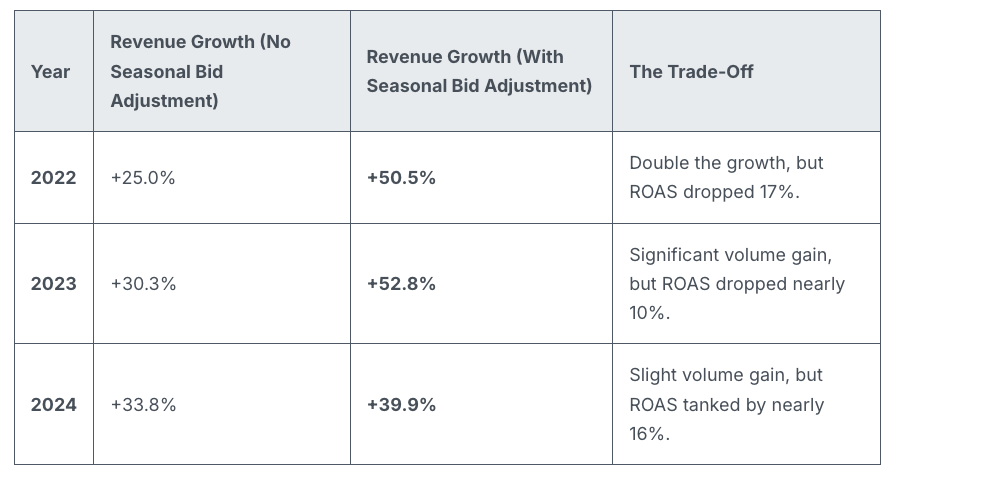
Revenue lifts were notably higher with adjustments:
2022: +50.5% vs. +25.0%
2023: +52.8% vs. +30.3%
2024: +39.9% vs. +33.8%
Efficiency may decline, but volume certainly increases.
When seasonality adjustments make sense. They’re useful when Google doesn’t have prior signals, like one-off or niche events.
Good for:
One-time flash sales
Email-only offers
Surprise clearance sales
Niche seasonal spikes
Not recommended for:
Black Friday
Cyber Monday
Christmas
Valentine’s Day
Any event with a predictable historic pattern
Why we care. Google already recognizes the significance of Black Friday. Smart Bidding is trained with years of BFCM data and can detect conversion rate spikes independently. Overriding this can lead to excessive bidding, increased CPCs, and reduced ROAS, so many marketers might be wasting their budget during this crucial week.
By recognizing when Smart Bidding has an adequate signal, advertisers can avoid expensive errors, maintain efficiency, and reserve seasonality adjustments for when they add true value.
Bottom line. Smart Bidding effectively manages major retail holidays. Seasonality adjustments often bring more chaos than benefits during predictable retail peaks. Keep them for unique, brand-specific events that Google can’t predict.
Smart move: Trust the algorithm — use tools like anomaly alerts, pacing monitors, and bid caps for control without conflicting with Smart Bidding’s core models.
During Black Friday, I’ve noticed many retailers, including myself, wasting substantial advertising budgets on Google Shopping ads. The main issue arises when these ads are still running for products that have already sold out, clearly demonstrating a pressing need for real-time stock management.
As we all know, Black Friday marks the peak of the retail season. However, it’s disheartening to find that so many brands, myself included, end up losing money on Google Shopping ads for items no longer available in inventory.
The problem: The ads continue to run even after items are out of stock, incurring cost-per-click charges with no possibility of conversion. Through a comprehensive study by ShoppingIQ involving 500 global retailers, it was revealed that a staggering 97% kept paying for clicks on items no longer in stock, sometimes persisting for 24–48 hours.
Why I care. Out-of-stock ads are not just a financial drain; they also skew campaign performance and disrupt algorithmic learning. When conversion rates plummet for unavailable products, it damages rankings, reduces ROI, and hampers future bidding strategies.
Example: Take Argos, for instance; they reportedly advertised items that were out of stock during Black Friday, leading to frustrated customers and depleted ad budgets.
Stock update refresh rates:
~24 hours: 90% of retailers
6–23 hours: 5%
48 hours: 2%
Other: 3%
Retailers’ response: Some companies, such as Mamas & Papas, have started leveraging ShoppingIQ’s real-time stock technology. This helps them focus ads solely on products that are actually available. Samantha Dabek, Senior Digital Marketing Manager, shares that they have managed to cut unnecessary costs and ensure advertising is targeted toward in-stock products.
The bigger picture: Google Shopping commands around 75% of US retail search spending. However, the default settings let out-of-stock ads run unchecked. ShoppingIQ strongly advocates for retailers to seek more transparency and control from Google to prevent wasted spending.
Bottom line: For those of us running high-stakes campaigns during Black Friday and other peak times, real-time stock management is essential. Otherwise, each wasted click represents money lost.