Tag: Ad Optimization

  • Mastering Google AI Bidding: Taking Control When It Breaks

    Mastering Google AI Bidding: Taking Control When It Breaks

    I’ve noticed that Google’s AI-powered bidding can truly be enticing. It promises to optimize my campaigns if I just feed it my conversion data and set a target, allowing me to focus on the bigger picture of strategy.

    The idea is that machine learning will take care of everything else. But, what Google doesn’t really highlight is that its algorithms prioritize Google’s outcomes, which might not align with my goals.

    As I delve into 2026, it’s clearer than ever that with Smart Bidding becoming more opaque and Performance Max absorbing more campaign types, discerning when to direct the algorithm—and when to take charge—has become an essential skill for exceptional PPC managers.

    AI bidding can yield impressive results, but there’s also a risk of it undermining profitable campaigns by prioritizing volume over efficiency. The key isn’t in the technology itself but in knowing when the algorithm requires direction, tighter constraints, or a complete override.

    This article will guide you through:

    • How AI bidding actually operates.
    • Recognizing the warning signs when it’s failing.
    • The intervention points where human judgment is crucial.

    How AI Bidding Actually Works – And What Google Doesn’t Tell You

    Smart Bidding offers various strategies, such as Target CPA, Target ROAS, Maximize Conversions, and Maximize Conversion Value. Each uses machine learning to predict conversion likelihood and adjusts bids in real time.

    The algorithm evaluates numerous signals during auctions—device type, location, time of day, and more—to determine an optimal bid. During the “learning period” of typically seven to 14 days, the algorithm probes the bid landscape to understand the conversion probability curve.

    Although Google advises patience during this phase, sometimes campaigns get stuck in perpetual learning and fail to stabilize.

    Dig deeper: When to trust Google Ads AI and when you shouldn’t

    Google’s Optimization Goals vs. Your Business Goals

    The algorithm optimizes for metrics that increase Google’s revenue, which might not align with my profitability goals. For instance, setting a Target ROAS at 400% might prompt the system to maximize total conversion value, focusing on spending the full budget rather than understanding the varied nuances of my business.

    My business goals might require a different approach, such as a specific volume threshold or maintaining varying margin requirements across products. The algorithm doesn’t account for these intricacies, like cash flow constraints.

    Key Signals the Algorithm Can’t Understand

    While AI bidding is effective, it has its limitations. Without intervention, several factors may go unaccounted for, like seasonal patterns, product margin differences, and changes in market conditions.

    For example, the algorithm might not recognize the distinction between products with different profit margins. A $100 sale on Product A with a 60% margin is distinct from a sale on Product B with a 15% margin, yet the algorithm treats them equally, highlighting the need for profit tracking and margin-based segmentation.

    Warning Signs Your AI Bidding Strategy Is Failing

    The Perpetual Learning Phase

    Extended learning periods are a major red flag. If my campaign’s “Learning” status persists for over two weeks, it indicates a problem. The causes could range from low conversion volume to frequent changes that reset the learning phase.

    When to Intervene

    • Boost the budget to speed data collection.
    • Relax the target for higher conversions.
    • Switch to a less aggressive strategy, like Enhanced CPC.

    Budget Pacing Issues

    Healthy AI campaigns show smooth budget pacing. If I observe erratic patterns like front-loaded spending or consistent underspending, it signals a lack of algorithm confidence.

    The Efficiency Cliff

    This refers to when performance starts strong but then deteriorates. It’s usually visible in Target ROAS campaigns where, month after month, the ROAS declines as the algorithm exhausts efficient segments and expands into less qualified traffic.

    Traffic Quality Deterioration

    Even when metrics seem fine, qualitative signals might suggest otherwise. I might notice a drop in engagement or shifts in geographic targeting, indicating the algorithm is prioritizing cheaper clicks which don’t necessarily convert better.

    The Search Terms Report Reveals the Truth

    Regularly exporting the search terms report helps identify issues. I look for irrelevant expansions or low-intent queries that consume budget with little conversion value, such as a luxury retailer finding clicks for “free furniture donation pickup.”

    Strategic Intervention Points: When and How to Take Control

    Segmentation for Better Control

    When it comes to AI bidding, a one-size-fits-all approach might not work for diverse business models. By segmenting my campaigns, I can tailor algorithms to meet specific goals, using separate campaigns for high- and low-margin products or different regional performances.

    Bid Strategy Layering

    Sometimes, a hybrid approach serves better. I might run a Target ROAS under normal conditions and adjust it manually during peak times to capture volume, or use Maximize Conversion Value with bid caps to honor unit cost constraints.

    The Hybrid Approach

    Pairing AI with manual campaigns can optimize effectiveness. Allocating a percentage of the budget to each allows for capturing valuable traffic through manual efforts while still leveraging AI for broader campaign management.

    COGS and Cart Data Reporting (Plus Profit Optimization Beta)

    Google now supports reporting cost of goods sold and cart data, allowing a clearer view of profitability within Ads reporting. Although still in testing, this feature could soon enable profit-focused bidding rather than revenue-focused, enhancing performance analysis.

    Dig deeper: Margin-based tracking: 3 advanced strategies for Google Shopping profitability

    When AI Bidding Actually Works

    AI bidding thrives under solid fundamentals, such as sufficient conversion volume and a stable business model with clear margins. In these contexts, AI often surpasses manual bidding by processing more variables than a human possibly could.

    This tends to hold true for mature ecommerce accounts, stable lead generation programs, and SaaS models with predictable conversion paths.

    Preparing for AI-First Advertising

    As Google continues to simplify advertisement management through automation, my role has evolved from bid management to being an AI strategy director. My focus is now on setting clear goals, providing context, and intervening when needed.

    Despite the reduction in advertiser control, certain strategic decisions remain human-driven, ones that require intelligence beyond what an algorithm alone can provide.

    Master the Algorithm, Don’t Serve It

    AI-powered bidding is a remarkable tool for optimization that delivers unparalleled results when conditions are optimal. However, the key lies in mastering it, ensuring that my business context informs the algorithm’s decisions, and knowing when to take control to align it with my strategic goals.

    The strongest PPC leaders today are those who don’t just manage bids but helm the systems that manage them.


    Inspired by this post on Search Engine Land.


    crushpress.ai community screenshot
  • Boost Your ROAS Like a Pro with Insights from La Maison Simons

    Boost Your ROAS Like a Pro with Insights from La Maison Simons

    Have you ever felt uneasy managing large catalogs in Google Performance Max, almost like you’re handing over your wallet to an algorithm? I sure have.

    La Maison Simons faced a similar struggle. With too many products and not enough control, they decided to rebuild their segmentation using Channable Insights. This change turned their perplexing campaign into a revenue powerhouse.

    Step 1: Stop segmenting by category

    Initially, Simons divided campaigns by product category. It seemed like a good idea until their popular sweater consumed the entire budget, leaving less visible or new products unnoticed.

    Static segmentation brought limited visibility and sluggish decision-making. Marketers were trapped with manual tweaks, while Google auto-focused on what’s already succeeding.

    Step 2: Segment by performance

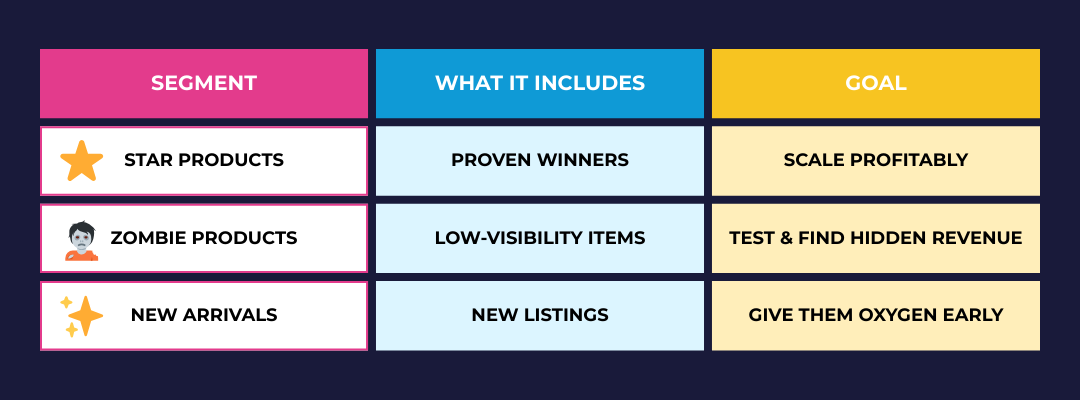
    With Channable Insights, product-level data like ROAS and clicks now fuel dynamic grouping:

    ```json
{
  "alt": "Product segmentation chart showing Star Products, Zombie Products, and New Arrivals with goals.",
  "caption": "Discover the three pillars of product segmentation: Star products to scale profitably, Zombie products to test and find hidden revenue, and New arrivals to nurture early.",
  "description": "This image illustrates a product segmentation chart divided into three categories: Star Products, Zombie Products, and New Arrivals. Each segment has a corresponding goal and includes items like proven winners or new listings. The chart uses bold colors: pink for segments, blue for inclusions, and yellow for goals, optimizing clarity and visibility. Keywords: product segmentation, Star Products, Zombie Products, New Arrivals, business strategy."
}
```

    Products automatically transition between segments based on performance. As Etienne Jacques, Digital Campaign Manager at Simons, expressed:

    “One super popular item no longer takes all the money.”

    Step 3: Shorten your analysis window

    Instead of the usual 30-day signals, Simons decided to use a rolling 14-day window. This means quicker reactions, more accurate decisions, and less wasted spend in a fast-paced catalog.

    Step 4: Push the strategy across channels

    Why limit the strategy to Google? Simons applied the same segmentation across:

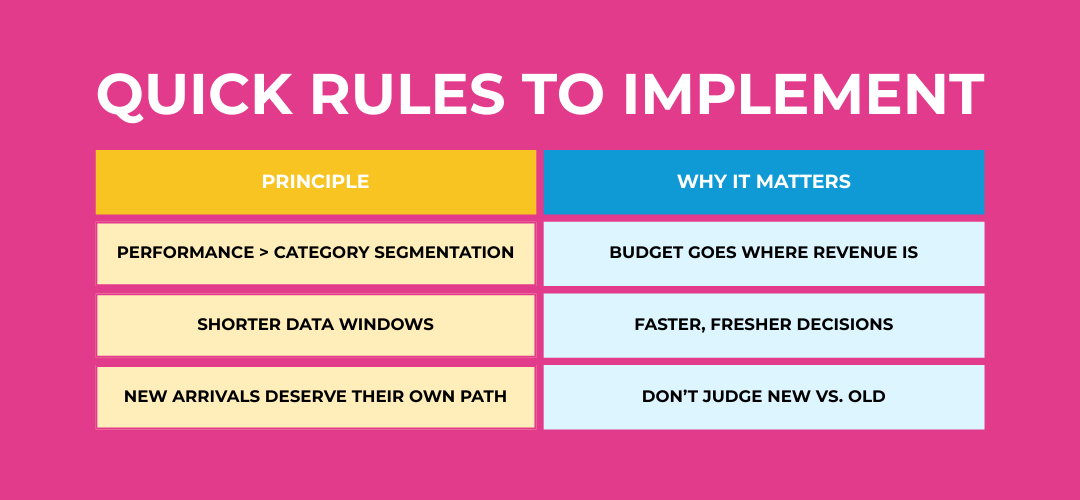
    ```json
{
  "alt": "Image displaying a table with 'Quick Rules to Implement'. Includes principles and their importance.",
  "caption": "Unlock success with quick rules: Prioritize performance over segmentation, embrace shorter data windows, and give new arrivals a unique path.",
  "description": "The image outlines 'Quick Rules to Implement', featuring a table with two columns: 'Principle' and 'Why It Matters'. Principles include prioritizing performance over category segmentation, using shorter data windows, and ensuring new arrivals have unique paths. The reasons include aligning budgets with revenue, making faster decisions, and treating new items without bias. The visual uses a bright pink background with contrasting colors for text, aiding clarity and engagement."
}
```
    • Meta
    • Pinterest
    • TikTok
    • Criteo

    This cross-channel consistency amplifies optimization.

    Step 5: Watch the metrics climb

    Simons unlocked impressive results without increasing ad spend:

    • ROAS growth: from ~800% to ~1500%
    • CPC decrease: $0.37 to $0.30
    • CTR lift: 1.45% to 1.86%
    • 14% increase in average order value
    • 1300% ROAS for New Arrivals campaigns
    • Faster workflows and fewer manual tweaks

    Even previously invisible products turned into unexpected profit drivers with a spot in the limelight.

    Step 6: Treat automation as control, not chaos

    Automation has restored marketing control rather than taking it away. Now, teams can learn from data and actively influence product growth instead of leaving everything to PMax autopilot.

    Your action plan

    • Classify products as Stars, Zombies, and New Arrivals.
    • Automate campaign reassignment based on real-time data.
    • Refresh product insights every 14 days.
    • Roll out segmentation logic to every paid channel.
    • Scale what wins – test what’s yet to succeed.

    Aiming for Simons-style ROAS gains without raising ad spend? Start with a free feed and segmentation audit to enhance your product data quality.


    Inspired by this post on Search Engine Land.

    crushpress.ai community screenshot
  • Unlocking VTC Bidding: A New Era for Google App Campaigns

    Unlocking VTC Bidding: A New Era for Google App Campaigns

    I’ve noticed a significant shift in Google Ads as they now allow us to optimize bidding for view-through conversions (VTC) in Android App campaigns. This change highlights a growing emphasis on video-driven performance.

    In the past, VTC was a subtle, behind-the-scenes signal within Google’s system. Now, it’s a visible option that allows me to focus on conversions that occur after an ad is seen, rather than clicked.

    The shift. It’s evident that Google is steering app advertising away from traditional click-focused strategies, encouraging an approach centered around influence and incremental results. This is particularly beneficial for platforms like YouTube and in-feed video advertising.

    This update means our bidding strategies align more intuitively with the actual ways users discover and install apps today.

    Why it matters to me. This flexibility allows me to go beyond mere clicks, enhancing measurement metrics for video-centric app campaigns. It’s an exciting validation for those of us invested in upper-funnel marketing activities.

    Who benefits the most? Advertisers who prioritize video content and focus on creating awareness and engagement. This is a game-changer for teams oriented towards long-term growth, not just immediate installs.

    ```json
{
  "alt": "Google Ads interface showing options for language selection and view-through conversion optimization.",
  "caption": "Explore the Google Ads settings with options to tailor your campaign's language and optimize view-through conversions for better targeting.",
  "description": "This image displays a screenshot of the Google Ads interface, focusing on campaign settings. The interface includes sections like Mobile app, Locations, Languages, and options for view-through conversion optimization. Users can select the languages their customers speak, with 'English' already chosen. The screenshot also highlights options related to EU political ads, ensuring compliance with regulations. This setup aids advertisers in optimizing campaign performance effectively."
}
```

    What I’m keeping an eye on:

    • How Google’s attribution models affect campaign reliance
    • Potential shifts in Cost-Per-Acquisition expectations
    • The growing importance of creative quality over click-centric strategies

    First seen by. I came across this update thanks to Rakshit Shetty, a Senior Performance Marketing Executive who first spotted this change.

    Bottom line. Google is elevating view-based data for app campaigns to a priority status, marking a shift towards a performance marketing strategy led by AI and agnostic of sales funnels.


    Inspired by this post on Search Engine Land.

    crushpress.ai community screenshot
  • Rethink Your Dashboards: Beyond Click-Based Attribution

    Rethink Your Dashboards: Beyond Click-Based Attribution

    As someone deeply involved in marketing, I’ve seen how the explosion of marketing channels and touchpoints has made measuring success a truly strategic endeavor.

    I’ve noticed that click-based attribution models—such as last-click and first-click—are still widely used as standard. Yet, as I delve deeper into these metrics, I realize they’re becoming less effective as standalone measures.

    These models dominate executive dashboards, giving me pause because this reliance can impose significant limitations.

    In my experience, click-based metrics can indeed be valuable for understanding digital interactions. However, it’s risky for executives to center major strategies and budget allocations solely around clicks, as this can lead to neglecting vital parts of the customer journey—parts that truly count.

    In this article, I want to explore:

    • What click-based attribution really captures.
    • How it falls short in a complex, multi-channel world.
    • The risks of over-relying on click metrics for business decisions.
    • Alternative measurement approaches that better align marketing with actual business results.
    • Ways marketing leaders, like myself, can guide executives toward more comprehensive outcome-focused frameworks.

    My goal isn’t to dismiss clicks; they have their place. They should, however, provide context rather than serve as the core measure of success.

    What Does Click-Based Attribution Actually Measure?

    Click-based attribution tracks ad clicks and assigns conversion credit to the responsible marketing touchpoints. In my role, I observe that models vary—first-click, last-click, linear, time-decay, to name a few—but fundamentally, they all divide credit along the user journey differently.

    Platforms tend to default to click-based models because clicks are straightforward to capture and report. However, their clarity can often mislead.

    I’ve learned that click-based attribution hinges entirely on user interaction with tracking links. Without a click, or with delayed decisions, important touchpoints might be misattributed or entirely overlooked.

    While this approach might work in simplistic funnels, today’s customer journeys are multi-device and multi-channel, quickly diminishing the value of clicks in context.

    Dig deeper: The end of easy PPC attribution – and what to do next

    The Problems with Solely Relying on Click-Based Attribution

    When I examine today’s buyers, I see that they rarely follow neat, linear paths—an assumption made by click-based models.

    Instead, buyers interact across many devices, channels, and may even engage through offline touchpoints. Consider social media, AI like ChatGPT, or brand recognition from videos, influencers, or website content.

    Many valuable interactions go untracked by clicks, though they meaningfully influence buyer perception and conversion readiness.

    Imagine a buyer: they watch a video on LinkedIn, then research your product through third-party reviews and your case studies on your website. Days later, they directly Google your brand and make a purchase.

    In click-based systems, only the final branded search click would be credited, overlooking all previous touchpoints that educated and persuaded the customer.

    Such blind spots aren’t trivial; they form a canyon between reality and measurement.

    … (content continues in the same format) …

    Inspired by this post on Search Engine Land.

    crushpress.ai community screenshot
  • Protect Your Holiday Budget: Tackle Uncontested Ad Costs

    Protect Your Holiday Budget: Tackle Uncontested Ad Costs

    I recently discovered that uncontested ads might be silently eating away at my holiday budget. Even when I’m the sole bidder, my CPCs remain stubbornly high. Here’s how I began to reclaim those wasted dollars.

    This holiday season, Google Search and Shopping Ads are projected to surpass a staggering $70 billion in spending. However, many advertisers, myself included, overlook a critical flaw in Google’s auction system that drains our funds—even in the absence of competitors.

    The team at BrandPilot identifies this issue as the “Uncontested Google Ads Problem,” a significant yet often ignored source of wasted ad spend during peak times.

    During SMX Next, I learned from John Beresford, the Chief Revenue Officer at BrandPilot, about a little-known quirk in Google’s auction logic. It’s fascinating how this can lead advertisers like me to overspend on our brand terms, shopping placements, and category keywords because Google doesn’t automatically lower our CPCs when no one else is bidding.

    Instead of enjoying lower costs as the sole bidder, I found myself paying the same high rate as if competitors were still active. It’s a situation that unfolds thousands of times a day for major brands, and like me, many marketers don’t even realize it.

    In John’s session, we explored:

    • Understanding why “competition gaps” are far more frequent than we think.
    • Discovering how uncontested moments can warp CPCs, even on brand keywords.
    • The potential of real-time auction visibility—and how AI is revolutionizing the field.

    He also shared how advertisers are deftly reclaiming wasted spending and channeling it back into growth, without giving up impression share, traffic, or revenue.

    Watch the session from BrandPilot to learn how to:

    • Identify why CPCs are artificially high when competitors are missing.
    • Calculate the true financial impact of the Uncontested Ads Problem on your budget.
    • Execute AI-driven bidding and suppression strategies to avoid self-bidding and increase ROAS.

    If you’re managing Google Search or Shopping campaigns this holiday season, this session is a must-see. Learn how to keep Google from sneaking off with your budget and start converting those savings into real performance improvements.


    Inspired by this post on Search Engine Land.

    crushpress.ai community screenshot
  • Why Double-Checking PPC Settings Can Save Your Campaign

    Why Double-Checking PPC Settings Can Save Your Campaign

    As a seasoned PPC professional, I’ve learned the hard way that even experts can fall victim to default settings. It’s become clear to me how crucial it is to thoroughly double-check every campaign setting.

    On episode 334 of PPC Live: The Podcast, I chatted with Sophie Fell, Head of Paid Media at Liberty Marketing Group. We delved into a memorable PPC mishap involving location targeting, illustrating how minor oversights can escalate into significant issues—but also how to resolve them effectively.

    Sophie shared a story where she inadvertently launched a campaign with worldwide location targeting. The campaign quickly amassed 1,500 leads, which appeared promising until she realized they were from unintended locations.

    At first glance, such a spike in leads seemed like a triumph, yet we soon saw it as a cautionary tale. Upon further investigation, the reason was clear: the location settings were misconfigured. This experience taught us the importance of scrutinizing results that seem unusually favorable.

    The client noticed the mistake around the same time as Sophie. She addressed the situation with honesty, acknowledging the error, clarifying the misstep, and resolving it promptly. This transparency was crucial in maintaining trust, even if the client felt understandably frustrated.

    This wasn’t a case of lacking expertise; rather, it was about rushing through processes and assuming reviews had been done. We’ve all made assumptions that trip us up, and this incident was a stark reminder of the dangers inherent in default settings.

    Once the issue was corrected, Sophie’s campaign achieved exceptional results, hitting targets early and surpassing revenue goals by £3.5 million. This success wasn’t defined by the initial error but by the way it was handled.

    Nowadays, Sophie double-checks campaign settings multiple times for assurance. She examines settings during any unusual performance shifts and ensures results are thoroughly vetted. Her key takeaway: post-launch reviews often catch what pre-launch overlooks.

    When mistakes occur, Sophie advises: pause, assess, and be transparent. It’s critical to take responsibility, explain the error, and detail preventive measures. Errors only escalate into issues if mishandled.

    In her audits, Sophie frequently encounters outdated accounts, over-reliance on brand campaigns, and misapplied automation tools. She emphasizes the ongoing importance of aligning keywords, ads, and landing pages, even in the era of AI-driven marketing.

    Discussing mistakes is vital—many assume industry veterans no longer err, but learning never stops. Sharing these experiences fosters junior confidence, enhances leadership, and propels industry evolution.

    I believe a healthy team culture tolerates experimentation and accountability. Sophie highlights the need for clear testing frameworks, budget constraints, and openness. Teams claiming perfection often lack innovation.

    The key takeaway? Regularly verify your campaign settings. Platforms evolve, defaults change, and assumptions can lead astray. Ensuring campaigns align with intentions prevents mishaps.


    Inspired by this post on Search Engine Land.


    crushpress.ai community screenshot
  • Unlock Boosted Ad Performance with Google Merchant Videos

    Unlock Boosted Ad Performance with Google Merchant Videos

    I’ve discovered that Google has quietly introduced a new feature in their Performance Max (PMax) campaigns, allowing advertisers like us to access video assets directly from the Merchant Center. This seemingly small adjustment is poised to make a significant impact on how we handle retail and e-commerce ads.

    How it works. As part of this update, Google Ads now enables us to:

    • Auto-surface product-associated videos directly from Merchant Center during the PMax setup process.
    • Shorten creative workflows for our retail and e-commerce teams, saving us valuable time.
    • Improve product-to-creative alignment, thereby enhancing ad relevance.
    • Boost performance especially for those of us managing extensive SKU catalogs.

    Why this matters. This update is a game-changer because it eliminates a key friction point within PMax: the challenge of integrating high-quality, product-relevant videos into our campaigns. By streamlining this process and pulling videos directly from the Merchant Center, Google is enhancing the connection between inventory and creative assets. This means higher ad relevance, greater engagement, and improved overall performance.

    For brands like ours that have vast SKU inventories, this feature significantly accelerates the workflow and guarantees comprehensive video coverage — something we used to find challenging and resource-draining.

    ```json
{
  "alt": "Screenshot of video selection options for an ad, highlighting Merchant Center tab.",
  "caption": "Explore new video insertion options with the Merchant Center tab for your digital ads!",
  "description": "This image shows a screenshot of a user interface for selecting up to five YouTube videos for an advertisement. The highlighted 'Merchant Center' tab, marked as 'BETA', suggests a new feature in progress. Surrounding tabs include Suggested, Asset Library, YouTube, Social, and Upload, indicating comprehensive video source integration for ad campaigns. Keywords: YouTube, Merchant Center, ad video selection."
}
```

    The bigger picture. It seems that Google is on a mission to expand PMax’s creative capabilities. From integrating social video imports to this new Merchant Center video feature, there’s a clear intention to make PMax more user-friendly for advertisers heavily involved in commerce.

    First seen. This update caught my attention thanks to senior performance marketing executive, Rakshit Shetty, who shared his insights on LinkedIn.

    The bottom line. Although it’s a subtle change, it’s undoubtedly a meaningful victory for brands operating at scale in the eCommerce space.


    Inspired by this post on Search Engine Land.


    crushpress.ai community screenshot