You may have handed Google more control than your operating process can currently supervise. Performance Max can place catalog images on television screens, Merchant Center data can shape what is eligible to advertise, and automated recommendations can alter campaign behavior faster than a monthly report will reveal.
The answer isn’t to reject automation. It is to build a control system around it: define the business outcome, verify the inputs, expose where the budget goes, assign owners to platform alerts, and reserve consequential decisions for a person. Here is the operating model we would put in place.
Key takeaways
Manage Google Ads automation as a system of inputs, decisions, evidence, and interventions. Campaign settings alone no longer describe everything the platform may do.
Validate conversion definitions before changing bids or budgets. An automated campaign can optimize efficiently toward a badly defined outcome.
Inspect Performance Max by channel. If connected TV inventory is present, review the images, video, product feed, and QR-code journey as television advertising.
Turn Merchant Center diagnostics into an owned work queue. A centralized dashboard helps only when every alert has a severity, deadline, and accountable person.
Use AI to summarize, draft, classify, and generate hypotheses. Require human approval for budget, bidding, measurement, targeting, and feed-wide changes.
Keep a decision log. When platform visibility is limited, your own record of what changed, why it changed, and what would trigger a rollback becomes essential evidence.
Build a control plane above the campaign interface
An automated campaign is not a set-and-forget campaign. It is a feedback loop. You supply goals, conversion signals, budgets, product data, creative assets, audience information, and landing pages. Google makes allocation and delivery decisions from those inputs. Performance data comes back, but not always at the level of detail you would prefer.
Your job is therefore broader than adjusting settings. You need to govern the loop. Start by documenting four things for every automated decision surface:
If you manage a Google Ads account, the EU political advertising declaration can look like a routine yes-or-no setting. The real risk sits behind that setting: you can choose the wrong answer, apply the right answer at the wrong scope, or let a future campaign inherit a declaration that no longer fits.
Treat the declaration as a classification decision
The declaration applies across active campaigns, including campaigns you believe are obviously commercial. You cannot satisfy the requirement merely by deciding that political advertising is not part of your usual strategy. Google is asking for a recorded campaign status, so silence is not a substitute for selecting an answer.
Start by separating two questions. The first is whether a campaign should be classified as an EU political ad. The second is where you should record that classification in Google Ads. The platform gives you tools for the second question, but a setting does not resolve a genuinely uncertain legal classification.
Review the actual campaign rather than its name or internal purpose. Look at the ads, landing pages, intended audience, geographic reach, sponsor, and subject matter. If those facts leave reasonable uncertainty about whether a campaign is political advertising, route the decision to the person responsible for legal or regulatory compliance. Your marketing team can assemble the evidence, but it should not improvise a legal conclusion just to clear an account notification.
Submitting the Google field addresses the platform’s declaration request. It does not, by itself, prove that the campaign satisfies every legal obligation that may apply to political advertising in the EU. Treat the declaration as one compliance control, not as a complete legal review.
Choose the declaration scope that matches your account
Google provides three ways to record the answer. The right route depends on whether your campaigns share the same classification and whether you have a reliable review step for future launches.
Declaration route
Where you use it
When it fits
Main control risk
Campaign level
Open the individual campaign’s settings and use the EU political ads option
One campaign needs review, or the account contains mixed campaign types
Reviewers may apply inconsistent answers across similar campaigns
Multiple campaigns
Open the Campaigns tab and use the EU political ads option for the selected campaigns
Several reviewed campaigns require the same answer
An incorrect selection can spread the answer to campaigns that were not meant to be included
Account level
Confirm once for existing and new campaigns
The entire account is known not to contain EU political ads and future launches are controlled
A later campaign can inherit the account-level No even when it needs separate treatment
If all existing campaigns are non-political and your organization does not run political advertising, an account-level No is usually the cleanest option. It covers existing and new campaigns, reducing repetitive work. Google also allows that choice to be overridden later.
Do not use account-level No merely because most campaigns are commercial. A mixed account needs campaign-level decisions. The bulk tool is useful when many campaigns have already received the same classification, but it should be the final application step rather than a shortcut around reviewing them.
Build a record you can defend and update
The interface records an answer, but your internal file should explain why that answer was chosen. This matters when another administrator changes the account, an agency takes over, or someone later asks whether a campaign was included in the review.
Create a list of every active campaign in the account. Do not review only the campaigns currently spending the most.
Collect the facts needed for classification: ad creative, landing pages, targeting, geographic reach, sponsor, and subject matter.
Mark each campaign Yes, No, or Unresolved in an internal worksheet or ticket. Unresolved is a temporary review state, not the answer you submit to Google.
Send unresolved classifications to your legal or compliance owner before applying a bulk or account-level declaration. If the answer could create legal exposure, obtain advice appropriate to the campaign and jurisdiction rather than relying on a general checklist.
Select the narrowest Google Ads scope that accurately reflects the reviewed campaigns. Use the account-level option only when one answer genuinely fits the whole account and its launch process.
Record the submission date, account ID, campaigns covered, reviewer, final answer, and basis for the decision. Retain a screenshot or export showing the state you submitted.
This record is not paperwork for its own sake. It lets you distinguish a reasoned decision from an accidental default. It also makes correction faster: you can identify which campaigns were covered without reconstructing the account as it existed when the declaration was made.
Stop future campaigns from inheriting the wrong answer
The efficiency of an account-level No creates its main weakness. Because the choice applies to new campaigns as well as existing ones, a later campaign can enter the account under an answer selected for an earlier portfolio.
Add the EU political ads decision to your campaign launch approval. The person creating a campaign should not have to interpret the law alone, but they should have to identify whether the campaign needs compliance review.
Require a recorded EU political ads status before campaign activation.
Route every Yes or Unresolved status to the designated compliance owner.
Override the account-level answer when a reviewed campaign requires different treatment.
Recheck the declaration when creative, landing pages, geographic reach, sponsorship, or subject matter changes materially.
Include the setting in account handovers so a new agency or administrator understands the inherited default.
Ownership should be explicit. A paid media operator can maintain the setting, a campaign owner can provide the facts, and a legal or compliance specialist can resolve difficult classifications. If everyone assumes someone else owns the declaration, it becomes an account notification that gets cleared without a defensible decision.
EU political ads declaration FAQ
Does an account-level No cover campaigns created later?
Yes. Google’s account-level confirmation applies to existing and new campaigns. That makes it efficient for an account that does not run EU political ads, but it also means you need a pre-launch check in case the account’s campaign mix changes.
Can you change the declaration after submitting it?
Yes. Google allows the account-level choice to be overridden. Correct a known error promptly, then update your internal record with the new answer, the date, the affected campaigns, and the reason for the change. Do not leave conflicting screenshots or worksheets that make the current decision unclear.
What should you do if you missed March 31, 2026?
Open the account and inspect the current declaration state, campaign settings, and account notifications. If the relevant control remains available, submit an accurate answer after reviewing the campaigns. If a declaration is already present, verify whether it is correct rather than assuming another administrator handled it properly. Escalate a blocked interface through the platform’s support route, and send uncertain legal classifications to qualified counsel or your compliance team.
A missed deadline creates a compliance gap, but it does not tell you by itself what enforcement action has occurred. Verify the account instead of speculating. Your next concrete move is to assign an owner, inventory the active campaigns, and record the correct declaration at the appropriate scope.
A routine budget or scheduling edit can turn a running Demand Gen campaign into a rejected API request. A separate pattern of policy violations can move your Google Ads account from a warning to suspension. If you manage campaigns, integrations, or client accounts, you need controls for both risks.
The practical answer is to separate campaign validation from account enforcement. Validate every proposed configuration before sending it to Google, track warnings and strikes as account-level risk, and give each kind of failure its own response path.
A campaign can pass one compliance layer and fail another
Google Ads compliance is easier to manage when you stop treating it as a single pass-or-fail check. There are two distinct layers in this case:
Campaign requirements determine whether a proposed setup or change is valid. The Demand Gen daily minimum is a campaign-level validation rule.
Policy enforcement tracks repeated violations associated with the account. Warnings and strikes can escalate even when a campaign’s budget and schedule are technically valid.
The distinction changes what you do next. A budget validation error calls for a corrected configuration. A warning or strike calls for policy investigation, remediation, or an appeal. Raising a budget will not resolve a policy strike, and winning a policy appeal will not make an under-minimum Demand Gen configuration valid.
Your operating dashboard should therefore show two statuses instead of one: campaign eligibility and account policy risk. If either status is hidden, a team can fix the visible problem while leaving the more consequential one untouched.
The $5 Demand Gen rule applies when a change is made
Starting April 1, 2026, Google requires Demand Gen campaigns to maintain a minimum daily budget of $5 USD, or the local-currency equivalent. The requirement affects every pathway through which those ads are bought, so it should not be treated as an API-only concern.
The important exception is narrow. Existing Demand Gen campaigns already operating below the minimum can continue without a change. But that existing state is not a reusable exemption. If you alter the budget, start date, or end date and the resulting daily spend falls below the threshold, the proposed change must satisfy the new requirement.
That includes campaigns using an ordinary daily budget and campaigns budgeted over a flighted schedule. A date-only edit can therefore become a budget compliance event. Do not let a scheduling workflow bypass the same validation used for a direct budget change.
Preflight every relevant Demand Gen mutation
Before your system submits a new campaign or edits an existing one, run these checks:
Confirm the campaign type. Apply this rule specifically to Demand Gen rather than to every campaign indiscriminately.
Read the proposed budget, currency, start date, end date, and whether the budget is daily or flighted.
Recalculate eligibility whenever the budget or either date changes. Validate the resulting daily amount, not merely the field the user edited.
Compare the result with the applicable $5 USD minimum or local equivalent.
If the proposal is below the minimum, stop it before submission and explain which value or schedule caused the failure.
If compliance requires more spend, return the decision to the campaign owner. Do not silently raise a budget, because that changes a real financial commitment.
Keep grandfathered campaigns visible in an exception register. Record that they are allowed to continue only while unchanged, and display a warning before anyone opens a budget or date-editing workflow. Otherwise, an operator may discover the restriction only after planning a time-sensitive launch adjustment.
Handle API v20 and v21 differently
The error response depends on the API version. In Google Ads API v21 and later, an under-minimum proposal returns BUDGET_BELOW_DAILY_MINIMUM, with further detail in the error metadata. In v20, the same validation can appear as a generic UNKNOWN error, with the specific failure referenced through the unpublished error-code field.
Do not build your integration around a single human-readable error string. Make the handler version-aware, retain the complete error payload, and combine the response with facts your own system already knows: campaign type, proposed budget, currency, and schedule. That lets you turn an opaque v20 failure into a useful message without pretending every UNKNOWN response has the same cause.
Your release tests should cover a new Demand Gen campaign below $5 USD, one exactly at the minimum, and one above it. Also test an unchanged grandfathered campaign, a budget edit that leaves it below the minimum, and a date edit that causes the resulting daily spend to fall below the minimum. Run the response tests separately against v20 and v21-or-later handling.
The three-strikes system is an account-risk timeline
Budget validation is immediate and configuration-specific. The three-strikes system is cumulative. Repeated violations of 15 specified advertising policies can escalate over a 90-day period, which means a new notice must be evaluated in the context of the account’s recent history.
Enforcement stage
Immediate consequence
Required response
Warning
An opportunity to correct the issue before a strike penalty
Remove the violation promptly, or appeal if the classification is wrong
First strike
Ads are paused for three days
Acknowledge and correct the violation, or submit an evidence-based appeal
Second strike
Ads are paused for seven days
Resolve the issue or appeal, then review the entire account before activity resumes
Third strike
The account is suspended
Appeal is the remaining route to restore the account
Your first triage question should be precise: what enforcement stage does the account notice name? A warning, first strike, second strike, and suspension do not have the same deadline or business consequence. Record the stage exactly instead of reducing every notice to a generic “disapproval” ticket.
At the warning stage, inspect every affected ad, asset, product, and destination tied to the named policy. Correct the problem across the account, not only on the first item shown in the interface. Repeated instances of the same underlying issue can leave you exposed even after one ad is repaired.
If the classification appears wrong, preserve the original material and appeal with specific evidence. State which item was flagged, which named policy applies, and why the item complies. A factual appeal is more useful than a general assertion that the account has done nothing wrong.
Do not assume that a successful appeal automatically restarts your risk window. An accepted appeal may not reset the 90-day clock. Keep the original warning and strike dates in your account record, retain the appeal outcome, and verify the account’s displayed status before approving further policy-sensitive changes.
Build compliance into the change workflow
The safest time to catch a problem is before a person or automation submits it. A usable compliance gate should answer three questions: is the proposed campaign configuration valid, does the account have unresolved enforcement risk, and who is authorized to accept the resulting spend or policy exposure?
Keep one complete change record
For every Demand Gen creation or material edit, retain:
The customer, account, campaign, and budget identifiers.
The campaign type and whether the campaign is new, active, or grandfathered below the minimum.
The current and proposed budget, currency, start date, end date, and flighted-budget status.
The Google Ads API version used for the request.
The full validation response and error metadata, not only the displayed message.
Any active warning or strike, including the named policy, enforcement stage, notice date, remediation, and appeal outcome.
The person who approved a budget increase, schedule change, policy correction, or appeal.
This record prevents two common handoff failures. A developer can see that a generic v20 error has a known Demand Gen context, while an account manager can see that an apparently simple launch change is being made during an active strike window.
Use normal and protected release paths
A normal release path can handle a configuration that passes campaign validation and an account without an unresolved warning or strike. A protected path should require human review when the account has active enforcement risk, when a grandfathered campaign is being changed, or when compliance requires an increase in spend.
The reviewer should not merely click approve. For a budget exception, the reviewer confirms the financial change and the resulting schedule. For a policy event, the reviewer checks all affected account material, confirms whether remediation or appeal is appropriate, and records the decision before ads resume.
Test the failure path, not just successful launches
Many campaign tools test whether a valid request can be created but never test whether a rejected request is explained correctly. Add regression cases for the boundary budget, schedule-driven failures, grandfathered campaigns, v20 UNKNOWN handling, v21-or-later structured handling, warning intake, first- and second-strike pauses, and suspension escalation.
Each test needs an expected operator action. A failed budget test should identify the field or schedule to change. A warning test should create a policy-review task. A strike test should display the pause period and recent enforcement history. A suspension test should route directly to the appeal workflow.
Respond to failures without making the account riskier
When a validation error or enforcement notice appears, rapid unstructured editing can obscure what happened. Use a short incident sequence that preserves evidence and limits unnecessary changes:
Pause the affected change. Avoid unrelated edits to the same campaign or policy-sensitive material until the event is classified.
Capture the exact account, campaign, asset, error code, metadata, policy name, enforcement stage, and notice time.
Classify the event as a campaign validation failure, a policy warning, a first or second strike, or a suspension.
For an under-minimum Demand Gen request, prepare a compliant budget or schedule proposal and obtain approval for any additional spend.
For an accurate policy notice, remove the violation and inspect the account for other instances of the same issue. For a questionable classification, preserve the evidence and appeal.
Before resuming activity, verify that the proposed campaign configuration passes validation and that the current account-enforcement status is understood.
Do not interpret BUDGET_BELOW_DAILY_MINIMUM as evidence of a policy strike. It is a configuration failure with a configuration remedy. Conversely, do not let a successful API retry create false confidence when the account still has an unresolved warning or strike.
Key takeaways
From April 1, 2026, Demand Gen campaigns need at least $5 USD per day or the local equivalent when the rule is triggered.
Existing campaigns below the minimum can continue unchanged, but a budget, start-date, or end-date edit can require compliance.
Google Ads API v21 and later exposes BUDGET_BELOW_DAILY_MINIMUM; v20 can return UNKNOWN with the validation detail elsewhere in the response.
The policy ladder moves from a warning to three-day and seven-day pauses, then suspension on a third strike.
A successful appeal may not reset the 90-day clock, so retain the full enforcement timeline.
Track campaign eligibility and account policy risk separately, then require both to pass before release.
Before your next campaign release, add two explicit gates to the workflow: one that validates the proposed Demand Gen budget and schedule, and one that checks the account’s warning and strike history. That small separation gives your team a clear action whether the next problem arrives as an API error or an enforcement notice.
When one person can change account-wide exclusions, grant access, or launch AI-generated automation, PPC gets faster and more fragile. A misplaced negative keyword can suppress valuable demand, compromised access can put spend at risk, and a useful-looking tool can repeat one bad decision across an entire account.
You do not need to give up speed to regain control. You need a small operating system around PPC changes: narrow scope, named ownership, independent review, evidence of what changed, and a tested way back.
Treat exclusions, access, and automation as one control system
Negative keyword management, account security, and custom tooling may look like separate jobs. Operationally, they share the same failure pattern: a person or program receives permission to affect spend, but the surrounding controls are weaker than the action.
A sound PPC control system answers five questions before a consequential change goes live:
Who owns the decision? A named person, not a team alias or an unmonitored automation account.
How far can it reach? One campaign, the whole account, or every account connected to a manager.
What evidence supports it? Search-query data, a business rule, an access request, or a documented automation requirement.
Who reviews it? Someone other than the requester when the change can affect access, multiple campaigns, or substantial spend.
How will you reverse it? A saved export, access-revocation path, previous tool version, or clearly documented rollback action.
Control surface
Likely failure
Control before execution
Recovery evidence
Negative keywords
Relevant demand is excluded
Scope, intent, and match-type review
Pre-change export and removable shared list
Account access
An unauthorized or overprivileged user changes campaigns
Named identities, passkeys, and minimum necessary permissions
Current access roster, recovery path, and revocation procedure
Custom tooling
An incorrect rule is repeated at scale
Read-only testing, explicit limits, and human approval
Tool version, inputs, outputs, execution log, and rollback package
Key takeaways
Use account-level exclusions only when the intent is unwanted everywhere; otherwise, keep the rule at campaign level.
Secure every human identity before connecting another script, app, or generated tool to the ad account.
Let AI propose nuanced classifications, but keep permissions, spend limits, and prohibited actions in deterministic rules.
Give new tools read-only access first. Live write access should be earned through review and testing.
Do not approve a high-impact PPC change unless you can identify its owner, evidence, scope, and rollback path.
That convenience removes administrative friction, but it also makes governance more important. An account-level list is not merely a collection of terms. It is a reusable policy that can decide which demand the entire account is allowed to pursue.
Separate universal exclusions from contextual exclusions
Classify every candidate before uploading it:
Universal exclusion: The intent has no commercial value anywhere in the account. This is the only class that should normally be considered for an account-level list.
Campaign-specific exclusion: The intent is wrong for one offer, location, audience, or funnel stage but may be useful elsewhere. Keep it attached to the relevant campaign.
Protected intent: The term is strategically valuable, ambiguous, branded, or connected to a different business line. Flag it so a reviewer can prevent accidental exclusion.
Unresolved intent: The query cannot be classified safely from the available context. Do not upload it merely to finish the batch.
The protected and unresolved classes matter because the cost of a false positive is easy to miss. You can remove a negative later, but you cannot recover the auctions that were suppressed while it was active.
Use match syntax deliberately
Format is part of the decision. Microsoft specifies brackets for an exact-match negative and quotation marks for a phrase-match negative; a hyphen is not the required negative-keyword marker. That means [free audit] and “free audit” represent different exclusion choices, while -free audit is not a substitute for selecting the intended match type.
Before publishing a list, require a working manifest with the candidate keyword, intended match type, proposed scope, reason for exclusion, requester, reviewer, and affected campaigns. The upload file may contain only the keyword lines, but the manifest preserves the reasoning that the platform list does not.
Use a reversible release sequence
Collect candidates from actual search-query evidence and explicit business rules.
Label each candidate as universal, campaign-specific, protected, or unresolved.
Check whether the term represents useful intent in any other campaign or business line.
Select exact or phrase matching based on the smallest defensible exclusion.
Apply the list at the narrowest scope that solves the problem.
Export the approved state and record the owner, reviewer, scope, and change reason.
Inspect the affected search traffic and business outcomes after release. If the exclusion blocks valuable demand, detach or edit the list and document the rollback.
This process turns a negative list from an informal cleanup device into an auditable control. It also gives a custom review tool structured data to work with later.
Secure the people and machines that can change spend
Access control is the boundary around every other PPC safeguard. A perfect approval workflow does little if an attacker can sign in as an administrator or if a shared credential cannot be traced to a person.
Google Ads supports passkeys as a password-free, phishing-resistant sign-in method. Its passkey requirements also apply to sensitive activity such as user-access changes and account-linking updates. Confirm device eligibility in the Google Ads setup process, enroll the people with meaningful account access, and document recovery before changing existing sign-in arrangements.
A passkey strengthens authentication, but it does not decide who should be an administrator. It will not remove dormant users, prevent excessive permissions, or stop an authorized person from making a poorly reviewed change. Treat authentication and authorization as separate controls.
Set a minimum access policy
Use named identities. Each human should have an individual account. Shared sign-ins weaken accountability and make clean revocation harder.
Grant the minimum necessary role. Reporting, editing, administration, and account linking are different jobs. Do not grant administrative access merely because it is convenient.
Review sensitive access changes independently. A request to add a user, elevate a role, or link an account should identify the requester, business reason, intended duration, and approver.
Keep recovery usable. Record who can restore access, where the procedure is kept, and how identity will be verified. Check this before removing an old administrator.
Remove access when the work ends. Offboarding is not complete while the person, vendor, tool, token, or linked account can still reach campaign data or settings.
Give automation its own security boundary
Do not solve machine access by placing a person’s reusable password inside generated code. Keep credentials out of prompts, screenshots, source files, and copied error messages. Use a dedicated machine identity or supported authorization flow where the platform allows it, limit its permissions, and maintain a direct way to revoke it without disabling an employee’s account.
Record which tool uses each credential, what accounts it can reach, what actions it can take, who owns it, and when its access was last reviewed. If you cannot answer those questions, the tool is not ready for live-account access.
Build small PPC tools with hard safety boundaries
AI-assisted coding can translate a plain-language requirement or decision flow into a functional prototype, making custom PPC tools accessible to teams that do not have a conventional development queue. The useful shift is not that code has become effortless. It is that you can test a narrowly defined workflow before committing to a large software project.
The fastest prototype is not automatically safe enough to control an ad account. Generated code can misunderstand a requirement, mishandle an edge case, expose a secret, or execute a valid instruction at the wrong scope. Treat the first output as an untrusted implementation of your specification.
Choose a task with a visible decision boundary
A negative-keyword reviewer is a strong first project because the input, decision, and output can all be inspected. A useful read-only version could accept a search-query export, current negative lists, campaign names, protected brand terms, known competitor terms, and your classification rules.
Its output should not be a bare list ready for automatic upload. Require one row per recommendation with:
The original query and campaign context.
The proposed negative keyword.
The proposed exact or phrase match type.
The proposed campaign or account scope.
A short reason tied to a supplied business rule.
Any conflict with protected or already-targeted intent.
A clear review status, including an unresolved state when the tool lacks enough context.
This shape makes each recommendation challengeable. A reviewer can reject one decision without accepting or discarding the whole batch.
Use deterministic rules for boundaries and AI for proposals
Traditional if-then logic is dependable when the rule is explicit, but it can struggle with the many ways a searcher expresses an intent. Language models can help classify that nuance. The safe architecture is hybrid:
Deterministic layer: Enforces permissions, allowed accounts, protected terms, accepted file types, match syntax, duplicate handling, prohibited actions, and whether a live write is permitted.
AI layer: Proposes semantic classifications, explanations, and candidate actions from the context you supply.
Human layer: Resolves ambiguity, checks commercial meaning, approves high-impact changes, and owns the result.
Do not ask the model to decide its own permission level or bypass an approval because it describes a recommendation confidently. Confidence of expression is not authorization.
Give the coding assistant an operational specification
You can begin with a prompt like this: Build a read-only PPC negative-keyword review tool. It must accept exported query data and current negative lists, preserve the original rows, detect duplicates and protected terms, propose exact or phrase negatives with campaign or account scope, explain every proposal, mark ambiguous cases for human review, and export a review file. It must not connect to a live ad account, change campaigns, store credentials, or turn unresolved cases into exclusions.
Then refine the implementation through observed failures, not cosmetic prompting. Supply a representative export, inspect every transformation, test empty and malformed inputs, verify that protected terms remain protected, and confirm that the output can be traced back to the original row. The ability to build and revise PPC utilities through natural-language instructions shortens the prototype cycle, but it does not remove the need to validate the result.
Only consider live write access after the read-only tool produces reviewable output consistently under your actual rules. Even then, preserve a manual approval gate, constrain the reachable accounts and operations, log the applied changes, and prepare a rollback export before execution.
Make every high-impact change produce evidence
A control system becomes real when it leaves artifacts another person can inspect. Chat messages and memory are not enough when a campaign stops serving or account access changes unexpectedly.
Define high-impact actions in advance. They should include account-wide exclusions, administrative access changes, account linking, automated writes across campaigns, and changes that can materially alter spending. Your organization may add other actions based on its account structure and risk tolerance.
For each high-impact action, retain a compact change record:
The requested change and business reason.
The account and campaign scope.
The supporting query data, access request, or tool output.
The requester’s and reviewer’s identities.
The state immediately before execution, including relevant exports.
The exact action taken and whether it completed successfully.
The verification performed afterward.
The rollback action and the person authorized to use it.
This record does more than support an audit. It shortens diagnosis. If traffic changes unexpectedly, you can distinguish a new negative list from an access event or automation release without reconstructing the account from memory.
Start with one controlled PPC workflow
Choose one repetitive task that currently ends in copying, pasting, and informal approval. Negative-query triage is a practical candidate because its inputs can be exported and its recommendations can be reviewed before anything touches a live campaign.
Secure the people first, build the tool in read-only mode, and run it against exported data. Your first milestone is not autonomous execution. It is a decision that another person can understand, approve, trace, and reverse. Once that works reliably, you have a foundation for faster PPC operations without surrendering control.
Your calendar is full, clients are getting answers, and revenue is coming in. Yet the business still feels fragile. A delayed approval wrecks the week, a small request becomes another deliverable, and time off means work waiting for your return.
Sustainable SEO freelancing fixes the operating model behind that problem. The goal is not merely to get fewer meetings, more flexible hours, and more choice over projects. It is to build a practice in which pricing, scope, capacity, and client expectations reinforce one another.
Build the business around capacity, not availability
A freelancer can be available all day without having all day available for client delivery. Sales, proposals, invoicing, administration, professional development, tool maintenance, and recovery all consume capacity. If your revenue plan assumes that every working hour can be sold, it is underfunded before the first client request arrives.
Start with a capacity model rather than a revenue wish. Write down the time your practice must preserve for four kinds of work:
Client operations: meetings, email, access management, feedback, documentation, and invoicing.
Business development: qualification, proposals, referrals, publishing, partnerships, and follow-up.
Maintenance: learning, process improvement, administration, planned leave, and genuine space for unexpected work.
Only the delivery portion is directly billable in many engagements. Client operations still belong in the price. Business development and maintenance must be funded by the margin across all work. Treating them as unpaid tasks to complete after delivery is how a profitable-looking schedule becomes an exhausting one.
Use two simple calculations:
Required practice revenue = owner pay + business overhead + taxes and required reserves + reinvestment + profit.
Required effective rate = required practice revenue divided by realistic billable delivery capacity.
The effective rate is an internal diagnostic, not necessarily the price you show a client. A fixed-fee project can still be evaluated against it after accounting for calls, revisions, project management, and follow-up. If the effective rate is below your requirement, the project is not rescued by calling it value-based pricing.
Set a delivery ceiling as well as a revenue floor. The ceiling is the recurring workload you can support while keeping the non-delivery parts of the business intact. When demand passes it, your choices are to defer the start, narrow the scope, raise the fee, refer the work, or add carefully managed support. Quietly extending the working day is not additional capacity. It is borrowed capacity that will be repaid through slower work, weaker decisions, or lost recovery time.
Price the scope you control and the uncertainty you carry
SEO outcomes depend on more than the freelancer doing the work. Rankings, traffic, leads, and revenue can be affected by search-system changes, competitors, technical constraints, content quality, client implementation, product demand, tracking, and the time required for discovery and evaluation. Promise disciplined work and decision quality. Do not guarantee an outcome you cannot control.
A sustainable proposal connects a business problem to a bounded unit of work. It should answer the following questions in language a client can inspect:
Objective: What decision, constraint, or opportunity is this engagement meant to address?
Included work: Which properties, markets, templates, query groups, content types, or implementation tasks are covered?
Deliverables: What will the client receive, and in what form?
Exclusions: Which adjacent tasks are not included, even if they become visible during the work?
Client inputs: Which access, data, subject-matter review, engineering help, and approvals are required?
Dependencies: What can delay or limit the work without changing your obligations?
Feedback rule: Who consolidates comments, and when does feedback become a change request?
Definition of done: What observable condition closes the deliverable?
Change rule: How will additional work be estimated, approved, scheduled, and billed?
That final definition matters in SEO because delivery and performance are different events. A technical recommendation can be complete when it is documented, reviewed, and handed to the implementation owner. An implementation engagement is not complete at that point; it may require deployment checks and validation. Neither definition should imply that a valid change guarantees a ranking, rich result, AI citation, or business outcome.
Choose a commercial model that matches the work
Different kinds of uncertainty need different pricing structures:
Use a project fee when the objective, boundaries, inputs, and completion condition can be defined with reasonable confidence.
Use paid discovery when the client is asking for a firm solution before either party understands the site, data, constraints, or implementation environment.
Use a retainer when the client needs a recurring decision process, a prioritized work queue, or reserved capacity. State what recurs; do not sell an undefined bucket of access.
Use advisory access when the main value is judgment rather than production. Define the communication channel, response expectations, meeting boundary, and treatment of work that becomes execution.
Use optional work units when the core engagement is stable but the volume may change, such as additional templates, briefs, markets, or implementation reviews.
Do not price unresolved ambiguity as if it were a small, predictable task. Move the ambiguity into discovery, an assumption, an allowance, or an explicit change mechanism. Otherwise, the client pays for a tidy promise while you absorb the untidy reality.
Review every completed engagement using actual effort, not remembered effort. Include calls, access problems, research, revisions, quality assurance, administration, and post-delivery support. Compare that total with the fee and the value of the work. If a project missed its economic target, determine whether the cause was price, estimation, scope, client behavior, or your process. Raising every fee will not fix an undefined service, just as a tighter checklist will not fix a fundamentally unsuitable client.
A scope document also does not replace a proper agreement. When cancellation terms, liability, intellectual property, confidentiality, data access, payment enforcement, or subcontracting create meaningful exposure, use a contract appropriate to your jurisdiction and obtain qualified legal or accounting advice where needed.
Productize delivery without commoditizing your judgment
Productization does not mean giving every client the same recommendations. It means giving every engagement a reliable operating spine so your attention stays on the decisions that require expertise.
A reusable SEO delivery system can include:
An intake form that captures the business model, target audience, conversion paths, priority markets, known constraints, previous work, and decision owners.
An access checklist that separates required systems from useful systems and records who can resolve missing permissions.
A baseline record covering current visibility, important landing pages, technical conditions, conversions, measurement limitations, and known releases.
A hypothesis log that states what you think is happening, what evidence supports it, what would disprove it, and what action follows.
A prioritization method that weighs likely value, confidence, effort, dependencies, reversibility, and time to learn.
A deliverable template with an executive decision layer and enough implementation detail for the person expected to act.
A quality-assurance checklist specific to the work, whether that work concerns crawling, indexing, internal links, content, structured data, migrations, or measurement.
A decision log recording what was approved, deferred, rejected, changed, or left unverified.
A closeout note that names completed work, open risks, ownership, measurement limits, and the next decision.
The template should standardize evidence and handoffs, not conclusions. If every audit produces the same findings, either the diagnosis is too shallow or the service has quietly become a checklist sale.
Use automation to remove handling, not accountability
Automation and AI can help classify crawl data, normalize repeated inputs, draft routine summaries, compare versions, or turn meeting notes into a proposed action list. That can reduce handling time, but it does not transfer responsibility for the result.
Keep a human owner for claims, prioritization, technical interpretation, client-specific context, and any change that could affect a live site. Verify generated URLs, examples, markup, calculations, and recommendations against the actual property. Do not place confidential client data, credentials, customer information, or unpublished plans into an unapproved tool. Faster output is not a benefit if it creates a factual, security, contractual, or reputational problem.
Measure the process by whether it reduces total effort and rework. A generated deliverable that takes longer to verify than to create manually is not yet a useful workflow. Keep the automation only when its inputs, review point, failure modes, and owner are clear.
Report decisions instead of exporting activity
A sustainable report should make the next decision easier. Separate what changed from what was merely observed, and separate controllable progress from lagging performance.
Completed: What was delivered, implemented, or validated?
Observed: What changed in search visibility, referrals, conversions, technical conditions, or other agreed measures?
Uncertain: Which changes cannot yet be attributed, verified, or interpreted confidently?
Blocked: What needs a client decision, access change, developer, editor, or other owner?
Recommended: What should happen next, why does it matter, and what would it displace?
For AI search visibility, report only what can be observed with a stated method. A brand mention, cited page, referral visit, and commercial conversion are different signals. Do not collapse them into a single success claim. The same discipline applies to traditional search: movement in a dashboard is not automatically attributable to your latest task.
Make client relationships renewable, not endless
A good client is not simply one who can afford the fee. Sustainable delivery also requires access, decisions, implementation ownership, realistic expectations, and professional communication. Qualification should test the conditions under which your work can succeed.
Screen for operating fit before writing the proposal
Ask enough during qualification to expose the actual engagement:
What business decision or problem has made SEO a priority?
What has already been attempted, and what happened after the recommendations were delivered?
Who owns content, development, analytics, legal review, and final approval?
Which systems and data can the client provide?
What internal constraints could prevent implementation?
How will the client judge progress, and which measures are known to be incomplete?
Why is the work being considered now?
What does the client expect you to own that is not yet visible in the brief?
Listen for mismatches rather than trying to overcome every objection. A prospect demanding guaranteed rankings is not presenting a clever pricing puzzle. A company with no implementation owner is not ready for an execution-heavy roadmap unless resolving ownership becomes part of the engagement. A stakeholder who refuses to define a decision process is warning you that approval and rework may dominate delivery.
Declining poor-fit work protects more than time. It protects the attention required by existing clients and preserves room for work you can perform well. If you accept a difficult fit for a valid strategic reason, price and scope the additional coordination explicitly. Do not pretend the friction is free.
Set communication boundaries clients can rely on
Responsiveness is easier to trust when it is defined. Tell clients where requests go, when you review that channel, how meetings are scheduled, what qualifies as urgent, and what happens when a request changes committed work. A fixed operating rhythm is usually clearer than continuous partial availability.
Define urgent conditions narrowly. A release that unintentionally blocks important pages from crawling or indexing may warrant immediate triage. A routine question waiting for stakeholder review does not become an emergency because someone marked the message urgent. The boundary should protect genuinely consequential events while keeping normal work predictable.
Keep decisions in a shared record rather than scattered across meetings and messages. After a discussion, capture the decision, owner, dependency, and resulting scope change. This protects both sides from memory-based disagreements and makes later reporting substantially easier.
Renew around the next useful decision
A retainer should continue because recurring work still exists, not because neither side initiated an ending. Before renewal, review what was completed, what remains blocked, what the client can implement, what the data can support, and which decisions are likely to matter next. Then resize, redesign, pause, or end the engagement accordingly.
Maintain a pipeline even when capacity is full. Record qualified leads, keep referral relationships active, preserve non-confidential proof of your work, and make your positioning specific enough that the right buyer can recognize a fit. If losing any single client would immediately force you into financial emergency, the practice has a concentration problem even when current revenue looks healthy. Address it before the relationship ends, not after.
An orderly exit is part of good service. Hand over current documents, access ownership, open risks, pending decisions, and measurement caveats. Remove your access when it is no longer required. A client should not need to keep paying simply to understand the state of their own work.
Key takeaways and your next operating change
Base your revenue model on realistic billable capacity, not every hour you could theoretically work.
Put client operations, business development, maintenance, and recovery inside the economics of the practice.
Sell controlled deliverables and sound decisions; do not guarantee rankings, traffic, AI citations, or revenue.
Move uncertainty into paid discovery, explicit assumptions, optional work, or a change process.
Standardize intake, evidence, quality assurance, decisions, and handoffs while keeping recommendations specific to the client.
Use automation only when the inputs, verification step, failure modes, and accountable owner are clear.
Qualify for implementation capacity and decision quality, not budget alone.
Renew retainers around an identifiable work queue or recurring decision process, and end them cleanly when that need disappears.
Before sending your next proposal, inspect a recently completed engagement. Reconstruct its total effort, identify the request that created the most unplanned work, and decide whether the next version needs a higher fee, a narrower boundary, a better input, or a clearer change rule. Put that correction into the proposal itself.
Sustainability is built at the point where work is sold and defined. Protect that point, and growth no longer has to mean carrying more ambiguity, more availability, and more unpaid coordination.
You contact Google Ads support because something already threatens delivery, measurement, or spend. Then the support form asks you to authorize a specialist to enter the account and change it. At that point, your troubleshooting request becomes a live account change.
The right response is not to accept or refuse automatically. Treat the checkbox as a controlled handoff: define the problem, limit the scope, preserve the current state, and decide how you will verify or reverse any action before support touches a live campaign.
Key takeaways
The authorization checkbox can let a Google Ads specialist access your account and make changes related to the support issue.
Google does not guarantee that support-led changes will improve results; you remain responsible for effects on campaign performance and costs.
Record the affected campaigns, relevant settings, exclusions, and current performance before authorizing access.
Ask for diagnosis and a documented proposed change before execution when the support workflow allows it.
After support acts, compare the account with your baseline, test the original problem, and monitor for unintended effects.
The checkbox authorizes changes, not outcomes
Google Ads support is using a flow that begins with a beta AI chat. If you move to the support form, you may have to check an authorization box that lets a specialist access the account and make changes to address the issue. The accompanying terms do not promise a particular result, and the advertiser remains responsible for effects on performance and costs.
That distinction matters because permission, scope, and accountability are separate decisions:
Permission determines whether the specialist can enter the account and act.
Scope determines which problem, campaigns, and settings the work should cover.
Accountability determines who bears the consequences if spend, delivery, measurement, or performance changes.
The checkbox answers the permission question. It does not, by itself, give you a useful change boundary, a rollback plan, or proof of what was altered. You have to create those controls around the support case.
This is also why a technically correct fix is not automatically a good business outcome. Support may resolve the reported platform problem while the resulting configuration produces consequences you did not intend. Evaluate the technical result and the commercial result separately.
Set the change boundary before submitting the form
A useful support request should be narrow enough that another account manager can tell what support is allowed to touch and what must remain unchanged. Build that record before you authorize changes, not after you notice an unexpected result.
Describe the observable problem. State what is happening, where it is happening, and what you expected instead. Separate what you can observe from your theory about the cause.
Name the affected objects. Identify the relevant account, campaign, ad group, conversion action, or other setting as precisely as your case allows. Avoid a broad instruction such as fix performance.
Capture the before-state. Save screenshots or an export of every setting relevant to the case. Depending on the issue, that can include budgets, bidding, targeting, scheduling, conversion measurement, and campaign status.
List explicit exclusions. State which campaigns, budgets, bidding settings, targeting rules, or measurement configurations must not change. Accessible does not have to mean in scope.
Define the confirmation step. Ask the specialist to document the proposed edit, the reason for it, its likely operational effect, and whether it can be reversed before applying it.
Assign the recovery decision. Name the person who will decide whether to keep, reverse, or contain the change if costs or performance move outside your acceptable boundary.
Case note template: Issue: [observable symptom] in [account or campaign]. Scope: [objects and settings support may examine]. Keep [excluded areas] unchanged. Diagnose first. Before changing budget, bidding, targeting, conversion measurement, or another live setting, document the proposed edit and whether it can be reversed. After applying an edit, list what changed and when. If the work is not reversible or the scope must expand, stop and request confirmation.
That note is an operational instruction and an audit record; it does not rewrite Google’s terms or guarantee that a staged approval process will be available. If the workflow cannot provide confirmation before execution, decide whether direct action is acceptable before checking the box.
If you manage an account for a client or another business unit, confirm that you have authority to approve live changes. Having account access is not the same as having permission to accept financial or performance risk on someone else’s behalf.
Choose speed only when the recovery path is clear
Authorization can reduce the back-and-forth involved in troubleshooting because the specialist can act inside the account. The trade-off is that a support-led edit can affect a live campaign before you have independently evaluated it. Speed is valuable only when you can detect and contain a bad result.
Authorization is more defensible when all of the following are true:
The problem and affected account area are clearly identified.
You have preserved the relevant settings and current state.
The person submitting the case has the necessary internal or client approval.
Someone is available to inspect the account after support acts.
You know which outcome would trigger reversal or another containment step.
The proposed work is reversible, or the responsible owner has consciously accepted that it may not be.
Wait before authorizing when the request is still vague, no one can review the resulting edits, or a change could materially affect spend or measurement without an accountable approver. Also pause when you cannot determine whether the expected action is reversible. In those situations, the cost of recovering from an uncontrolled edit may exceed the time saved during the support exchange.
Do not check the box merely because it is the next required field. Use the beta AI chat or other non-editing troubleshooting available to you while you clarify the issue and secure approval. If support cannot proceed without direct change authority, that is a decision point, not an administrative formality.
Audit the account as soon as support acts
A message saying the case is resolved is not proof that the account is safe. Resolution means support believes it addressed the reported issue. Your verification must establish what changed, whether the original symptom improved, and whether the account picked up a new commercial risk.
Obtain the applied-change record. Ask for the settings changed, the affected objects, the time of each change, and the reason for it.
Compare configuration with your baseline. Check the settings in scope and the areas you explicitly excluded. Investigate any difference that was not disclosed.
Retest the original problem. Use the same observation that established the issue. A configuration change is not a successful fix unless the relevant behavior also changes.
Inspect financial and performance guardrails. Watch spend, delivery, conversion measurement, and the campaign indicators that matter to the affected account. Use a review cadence appropriate to its traffic and financial exposure rather than waiting for a routine report.
Avoid unrelated edits during verification. If several people change the account at once, you may be unable to tell whether support’s action fixed the problem or created a side effect.
Use the pre-agreed recovery path. If a guardrail is breached, contain or reverse the change through the responsible account owner. Do not improvise a second broad change while the first one is still being evaluated.
Keep the support case, your before-state, the final change list, and the verification result together. That record helps the next person understand whether an unusual setting was deliberate, support-applied, or left behind by an unresolved incident.
Make support authorization part of account governance
If more than one person manages your Google Ads account, do not rebuild this decision process for every ticket. Add support-led changes to the same operating rules you use for internal campaign changes.
Requester: documents the problem and opens the case.
Approver: decides whether support may make live changes and whether the financial risk is acceptable.
Observer: checks the account promptly after an edit and monitors the relevant guardrails.
Recovery owner: decides whether to retain, reverse, or contain the change.
One person may fill several roles in a small team, but each responsibility should still be explicit. For agencies, record the client’s approval when the proposed work could affect budget, delivery, or measurement. For larger teams, store support authorization with the account’s other change records so it survives staff handoffs.
Prepare the case note template and ownership rules before the next support request. When the authorization box appears, you should be able to state the scope, exclusions, approver, before-state, and recovery path clearly. If you cannot, keep troubleshooting and do not hand over change authority yet.
When one client pays enough of your bills, every bad meeting becomes a balance-sheet question. You may know the relationship is damaging your team, yet the revenue makes ordinary boundaries feel financially reckless.
You don’t have to choose between culture and cash on instinct. Measure the dependency, diagnose whether the relationship can be repaired, model the consequences of leaving, and agree on decision triggers before the next crisis. That turns an emotionally loaded client problem into a management decision you can defend.
Measure revenue concentration and relationship damage separately
A concentration problem and a culture problem are not the same thing. A respectful, profitable client can still create dangerous financial dependence. A smaller client can still cause disproportionate harm through abusive communication, uncontrolled scope, chronic escalation, or demands that conflict with how you have promised to treat your team.
When both problems exist in the same account, leaders start rationalizing. Harmful conduct gets reframed as commercial importance, while legitimate concern about cash gets dismissed as a failure to live the company’s values. Separate the two questions so neither one can hide the other.
The concentration can be larger than leadership realizes. In one agency’s case, a single client represented 70% of its income, and the severity became clear only after the figures were examined closely. You should not wait for a deteriorating relationship to discover the same exposure.
Create a one-page exposure record for every material client. At minimum, include:
Revenue share: client revenue for the reporting period divided by total company revenue for the same period.
Gross profit contribution: what remains after the direct cost of serving the account, using the accounting method your finance lead applies consistently.
Cash exposure: unpaid invoices, work already delivered but not billed, and committed costs that would remain if the client left.
Capacity share: the people, specialist skills, and leadership attention tied to the account.
Relationship evidence: dated examples of missed commitments, scope conflict, inappropriate conduct, repeated escalation, or blocked work.
Dependency beyond revenue: access to a market, a case study, a partner relationship, or specialist knowledge that would disappear with the account.
Do not compress these measures into one vague red, amber, or green rating. Revenue, cash, capacity, and conduct create different risks and require different responses. A client that supplies substantial revenue but pays reliably and behaves well needs a diversification plan. A client that repeatedly harms the team needs a repair or exit decision, even if its revenue share is smaller.
Model four choices before the next client confrontation
Leaders often compare only two options: tolerate the relationship or terminate it. That false choice makes the status quo look safer than it is. Put four pathways through the same financial and cultural test.
Path
Question to answer
Evidence required
Continue unchanged
Is the problem genuinely isolated, or are you postponing a decision?
A specific reason the harmful pattern is unlikely to recur.
Repair the relationship
Can both parties change observable behavior within an agreed period?
Named owners, required changes, a review date, and an exit trigger.
Reduce the dependency
Can you keep the client while lowering its share of revenue or capacity?
A credible acquisition plan, delivery capacity, and limits on further expansion of the account.
End the relationship
Can you meet contractual obligations and absorb the cash impact?
A validated cash plan, contract review, transition plan, and communication sequence.
Use one set of assumptions across all four paths. Otherwise, optimism will attach itself to the option leadership already prefers. For each path, write down the revenue retained or removed, expected collection of outstanding invoices, unavoidable delivery costs, capacity released, transition costs, and the amount of replacement business that is actually supported by an active pipeline.
Do not count a hopeful proposal as collected cash. Record pipeline opportunities by stage, owner, next action, and evidence of buyer commitment. Then run the plan without immediate replacement revenue. If the company remains viable only when every prospect closes on the preferred schedule, you do not yet have an exit plan; you have a best-case forecast.
A client-share percentage is a warning signal, not an automatic verdict. There is no universal number in the available evidence that tells every company when to terminate an account. Your acceptable exposure depends on cash reserves, margins, payment timing, contractual commitments, delivery flexibility, and the reliability of the pipeline. Set an internal ceiling with the people responsible for finance and governance, then define what action begins when that ceiling is crossed.
Because termination can create contractual, employment, tax, and cash-flow consequences, have qualified legal counsel review the agreement and have your accountant or financial lead validate the scenario before notice is given. The safe sequence is to understand the exposure first, not to discover it through a dispute or missed payment.
Give repair a testable plan, not another vague conversation
Not every difficult period means the client relationship is beyond repair. Campaign results can deteriorate because the client’s own operation changed. Restructuring, personnel changes, or a security breach can disrupt lead handling and conversion, even when the agency’s work did not suddenly become worse. Diagnose account performance and relationship conduct independently.
Start with observable facts. Replace “the client is toxic” with a record that another decision-maker could evaluate: what happened, when it happened, who was involved, what obligation or boundary was affected, and what operational consequence followed. This protects the team from having to repeatedly prove the same harm, while also preventing a serious commercial decision from resting on labels alone.
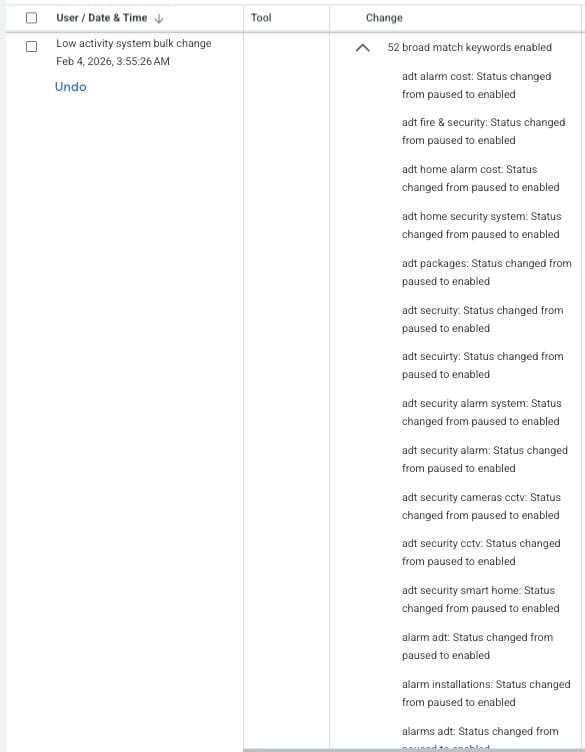
I’ve noticed something quite unexpected happening with Google Ads lately. It seems that their system tool is re-enabling paused keywords automatically, which has led to increased campaign expenses without warning.
Some advertisers, including myself, have observed a Google Ads tool—created for low-activity bulk changes—unexpectedly switching paused keywords back to active. This unusual behavior has been a surprise to many account managers, like myself, who haven’t come across this issue before.
What’s happening? The activity logs are showing entries linked to Google’s ‘Low activity system bulk changes’ tool executing actions that enable previously paused keywords. These logs appear as automated bulk updates and, thankfully, have an ‘Undo’ option available.
In the past, this tool mainly paused inactive elements rather than reactivating them, so this change in behavior is quite perplexing.
What’s unclear? Google hasn’t issued any public documentation to explain this behavior, leaving us unsure whether it’s an intentional feature, a limited test, or a mere bug.
I find myself wondering what exactly triggers this reactivation and how widespread this phenomenon is becoming.
Why does this matter? If like me, you’re diligently managing your campaigns, unexpected keyword reactivation can change your campaign delivery in ways you didn’t plan for, impacting budgets, pacing, and overall performance—particularly if you’ve paused keywords for a specific reason.
For both agencies and in-house teams, this change is raising concerns about automated systems potentially overriding manual settings.
What steps should we take now? As account managers, we might want to regularly check change histories, be on the lookout for any unexpected keyword activations, and use the ‘undo’ function promptly if we notice unplanned changes.
Until Google clarifies the situation, more careful monitoring of campaigns relying heavily on paused keywords might be necessary.
First Alerted This issue was first brought to light by Performance Marketing Consultant Francesco Cifardi on LinkedIn.
I recently had the pleasure of speaking with Amanda Farley, the brilliant CMO of Aimclear, on episode 340 of PPC Live The Podcast. Amanda’s journey from owning a gallery and tattoo studio to leading award-winning global campaigns is nothing short of inspiring. Her unique T-shaped marketing expertise, combining in-depth PPC knowledge with a broad skill set across social, programmatic, PR, and integrated strategies, offers valuable insights into modern marketing.
Through our engaging conversation, Amanda shared her lessons on overcoming setbacks and balancing AI with human insight. Her experience underscores the importance of mixing calm leadership with a relentless curiosity and drive for continuous learning.
Overcoming Limiting Beliefs and Embracing Creativity
Amanda once ran an gallery and tattoo parlor while believing she wasn’t an artist herself. Surrounded by creatives, she eventually realized her only barrier was a limiting belief. After embracing painting, she created hundreds of artworks and discovered a powerful outlet for expression.
This mindset shift mirrors marketing growth. Success isn’t just technical — it’s mental. By challenging internal doubts, marketers can unlock new skills and opportunities.
When Campaign Infrastructure Breaks: A High-Stakes Lesson
Amanda recalls a global campaign where tracking infrastructure failed across every channel mid-flight. Pixels broke, data vanished, and campaigns were running blind. Multiple siloed teams and a third-party vendor slowed resolution while budgets continued to spend.
Instead of assigning blame, Amanda focused on collaboration. Her team helped rebuild tracking and uncovered deeper data architecture issues. The crisis led to stronger onboarding processes, earlier validation checks, and clearer expectations around data hygiene. In modern PPC, clean infrastructure is essential for machine learning success.
The Hidden Importance of PPC Hygiene
Many account audits reveal the same problem: neglected fundamentals. Basic settings errors and poorly maintained audience data often hurt performance before strategy even begins.
Outdated lists and disconnected data systems weaken automation. In an machine-learning environment, strong data hygiene ensures campaigns have the quality signals they need to perform.
Why Integrated Marketing Is No Longer Optional
Amanda’s background in psychology and SEO shaped her integrated approach. PPC touches landing pages, user experience, and sales processes. When conversions drop, the issue may lie outside the ad account.
Understanding the full customer journey allows marketers to diagnose problems holistically. For Amanda, integration is a practical necessity, not a buzzword.
AI, Automation, and the Human Factor
While AI dominates industry conversations, Amanda stresses balance. Some tools are promising, but not all are ready for full deployment. Testing is essential, but human oversight remains critical.
Machines optimize patterns, but humans judge emotion, messaging, and brand fit. Marketers who study changing customer journeys can also find new opportunities to intercept audiences across channels.
Building a Culture That Welcomes Mistakes
Amanda believes leaders act as emotional barometers. Calm investigation beats reactive blame when issues arise. Many PPC problems stem from external changes, not individual failure.
By acknowledging stress and focusing on solutions, leaders create psychological safety. This environment encourages experimentation and turns mistakes into learning opportunities.
Testing Without Fear in a Changing Landscape
Marketing is entering another experimental era with no clear rulebook. Amanda encourages teams to dedicate budget to testing and lean on professional communities for insight.
Not every experiment will succeed, but each provides data that informs smarter future decisions.
The Tasmanian Devil Who Practices Yoga
Amanda describes her career as If the Tasmanian Devil Could Do Yoga — a blend of fast-paced chaos and intentional calm. It reflects modern marketing: demanding, unpredictable, and balanced by thoughtful leadership.
A compromised administrator account, a rushed handoff, or one mistaken approval can put campaigns and billing at risk. Google Ads multi-party approval reduces that one-person exposure by requiring a second eligible administrator to authorize certain sensitive changes before they take effect.
The control is useful, but it is not self-managing. You still need enough qualified approvers, a clear review standard, and a process for requests that are urgent, stale, denied, or simply missed. Here is how to build that process without turning every account change into a bottleneck.
What multi-party approval changes in Google Ads
Multi-party approval introduces dual control for selected high-risk account actions. An administrator initiates a sensitive change, but that administrator’s authority alone is not enough to finalize it. Google Ads sends an in-product approval request to other eligible administrators, one of whom must review and approve or deny the action.
The request remains actionable for 20 days. If nobody acts before that window closes, the request expires and the proposed change is not implemented. That fail-closed behavior matters: silence does not become permission merely because the request has been waiting.
You can find these requests in the Admin menu under Access and security. Google Ads labels their outcomes as Complete, Denied, or Expired, giving your team a visible record of how each approval request ended.
The important qualifier is that the workflow applies to specific sensitive changes, not every campaign edit. Do not describe it in policies, client documentation, or audit evidence as a universal two-person rule for the entire account. A more accurate statement is that Google Ads enforces a second-administrator decision when its multi-party approval workflow is triggered.
That distinction prevents a dangerous assumption. Multi-party approval reduces the risk attached to one administrator’s authority, but it does not replace authentication controls, access reviews, campaign monitoring, or ordinary change management.
Build an approval path before a request is urgent
The 20-day window is a technical expiration period, not a sensible operating target. A legitimate request can become outdated long before it expires because budgets, promotions, account ownership, or campaign plans have changed. Your internal process should therefore route requests promptly and force a fresh review when their original context no longer holds.
Inventory eligible administrators. Record each person’s business role, account responsibility, and whether that person is expected to propose changes, approve them, or provide backup coverage.
Confirm that every protected account has more than one eligible administrator. Do not wait for an important request to discover that nobody else can approve it.
Designate a primary and backup approver. A request should have a named destination even though Google Ads can notify multiple eligible administrators.
Create a change record before initiating the action. Include the account, requested outcome, reason, expected campaign or billing effect, requester, review owner, and any time dependency.
Initiate the change in Google Ads and alert the designated reviewer through your normal work channel. Treat that message as a routing aid, not as the approval itself.
Have the reviewer open Google Ads independently, inspect the request, and approve or deny it inside the platform. A reply in chat, email, or a ticket does not substitute for the in-product decision.
Record the final Complete, Denied, or Expired status in the same change record. If the request was denied or expired, document whether it was abandoned, corrected, or submitted again.
This workflow separates three things teams often blur together: proposing a change, authorizing it, and documenting its outcome. Keeping those events distinct makes it easier to investigate an unexpected account state and harder for an informal message to be mistaken for permission.
Prevent the approval process from creating new weaknesses
A second administrator improves control only when that administrator is independent, identifiable, and capable of evaluating the request. Watch for these common failure modes:
Only one eligible administrator exists. The workflow can stall until the request expires. Establish backup coverage before you depend on multi-party approval.
Extra administrators are added merely for convenience. Administrator access is powerful, so increasing the number of administrators can expand your attack surface. Give that role only to people who genuinely need it and can fulfill the approval responsibility.
Administrators share credentials. A shared login defeats person-level accountability and makes it difficult to establish who proposed or authorized a change. Use named user access instead.
The approver rubber-stamps the request. Requiring a second click is not the same as receiving an independent review. The approver should validate the account, scope, purpose, timing, and likely consequence before acting.
A chat or email response is treated as the final approval. Keep discussion wherever your team works, but complete the binding decision within Google Ads.
An old request is approved because it is still available. Availability within the 20-day window does not prove that its business context is current. Deny a stale request and initiate a new one with updated evidence when the underlying conditions have changed.
The team assumes dual control makes account compromise harmless. It reduces the danger of one compromised administrator, but it cannot protect you if multiple privileged accounts are compromised or if inappropriate access remains active.
You also need a plan for absence and urgency. Identify who covers the primary approver and how the requester escalates an unanswered request. The backup should perform the same review, not bypass it. An urgent change can have serious financial consequences, but urgency is a reason to route the request faster, not a reason to weaken authorization.
Use a consistent approve-or-deny standard
An approver should be able to answer the following questions from the Google Ads request and its accompanying change record. If a material answer is missing or inconsistent, denial is safer than assumption.
Is the requester a known administrator acting within an assigned responsibility?
Is this the intended Google Ads account, and is the requested scope no broader than necessary?
Does the change record explain the business purpose clearly enough to evaluate the request?
Could the action interrupt active campaigns, alter control of the account, or affect billing exposure?
Does the requested action match what the team discussed, rather than a shortened or materially different version of it?
Is the timing still valid, or has the request become stale since it was initiated?
Is there a named owner who will verify the resulting account state and respond if the outcome is unexpected?
Denial is not an accusation against the requester. It is the correct outcome when the reviewer cannot establish that the change is authorized, accurate, and current. The requester can correct the scope or supporting record and begin again.
Approval should also create an operational handoff. Once a request reaches Complete status, the change owner should inspect the relevant account state rather than assuming that an approval label proves every downstream result is correct. Multi-party approval governs authorization; it does not perform campaign quality assurance for you.
Key takeaways
Google Ads multi-party approval requires another eligible administrator to approve or deny certain sensitive changes.
An unanswered request expires after 20 days, and the proposed change is not implemented.
Requests and their Complete, Denied, or Expired outcomes are available under Admin, then Access and security.
The feature is selective, so it should not be represented as two-person approval for every Google Ads edit.
A useful internal process names the requester, primary approver, backup approver, business purpose, affected account, expected consequence, and final status.
Multi-party approval complements named accounts, strong authentication, access reviews, monitoring, and change records; it does not replace them.
Your next step is simple: open Access and security, inventory the eligible administrators on each important Google Ads account, and assign a real approval path. Fix accounts with no backup approver first, then give every approver the same review checklist before a sensitive request arrives.