Category: Google Maps

  • Google Review Glitch: Missing Reviews Under Investigation

    Google Review Glitch: Missing Reviews Under Investigation

    I’m tracking a growing Google Business Profile issue after several days of complaints from businesses that say reviews have disappeared from their local listings. Google has now confirmed that it is investigating the reports, and in some cases, review submissions on affected profiles appear to be paused.

    What Google said. Google told us that when its systems detect suspicious review activity, it may take several actions, including removing reviews and temporarily pausing reviews on a profile to prevent further abuse. Google also said it is investigating the issue and will restore any reviews that were incorrectly removed.

    What I’m seeing. As I documented on the Search Engine Roundtable, there are dozens of complaints in the Google Business Profile Forums from business owners and local SEOs who say their reviews have mysteriously vanished. In some cases, businesses are also unable to receive new reviews on their local listings.

    From what I can tell, Google’s review spam detection systems may be identifying certain patterns and aggressively removing or blocking reviews on suspected Google Business Profiles. What remains unclear is whether this is tied to spammers abusing some profiles, a recent algorithmic adjustment, or Google’s systems becoming overly sensitive.

    More details. Amy Toman, a volunteer Google Product Expert for Google Business Profiles, shared on LinkedIn that businesses or clients affected by this issue can post in the forum if they want to, but Google is already aware of the problem and working on it. She also noted that no timeline for a resolution has been provided yet.

    She said she is seeing a new pattern where, after fake or spam reviews are reported, some Google listings receive a review block and all reviews are hidden. In at least one case, she said the rating was reduced to 0.

    Why I care. If I noticed a sudden drop in reviews or stopped receiving new reviews this week, I would consider this issue a likely explanation. For local businesses, reviews can directly affect trust, visibility, and customer decisions, so even a temporary review disruption can be frustrating.

    Google is investigating, and I’m watching to see whether missing reviews are restored and whether affected Google Business Profiles can begin receiving new reviews again.


    Inspired by this post on Search Engine Land.


    crushpress.ai community screenshot
  • Google Ask Maps SEO: Earn Visibility Through Trust

    Google Ask Maps SEO: Earn Visibility Through Trust

    I see Google Ask Maps changing local visibility in a meaningful way. Instead of showing people a long list of nearby businesses and leaving them to sort through everything, Ask Maps narrows the options, interprets the searcher’s intent, and explains why certain businesses look like a strong fit.

    That changes how I think about local SEO. Visibility is no longer only about ranking somewhere near the top of a long results list. It is increasingly about whether Google understands a business well enough to recommend it with confidence.

    I would not treat Ask Maps as a separate optimization channel or a brand-new tactic to chase. I would focus on making the business easier for Google to understand, easier to match to real customer situations, and easier to trust. The foundations of local SEO still matter, but the way those signals work together matters even more.

    Visibility in Ask Maps starts with filtering

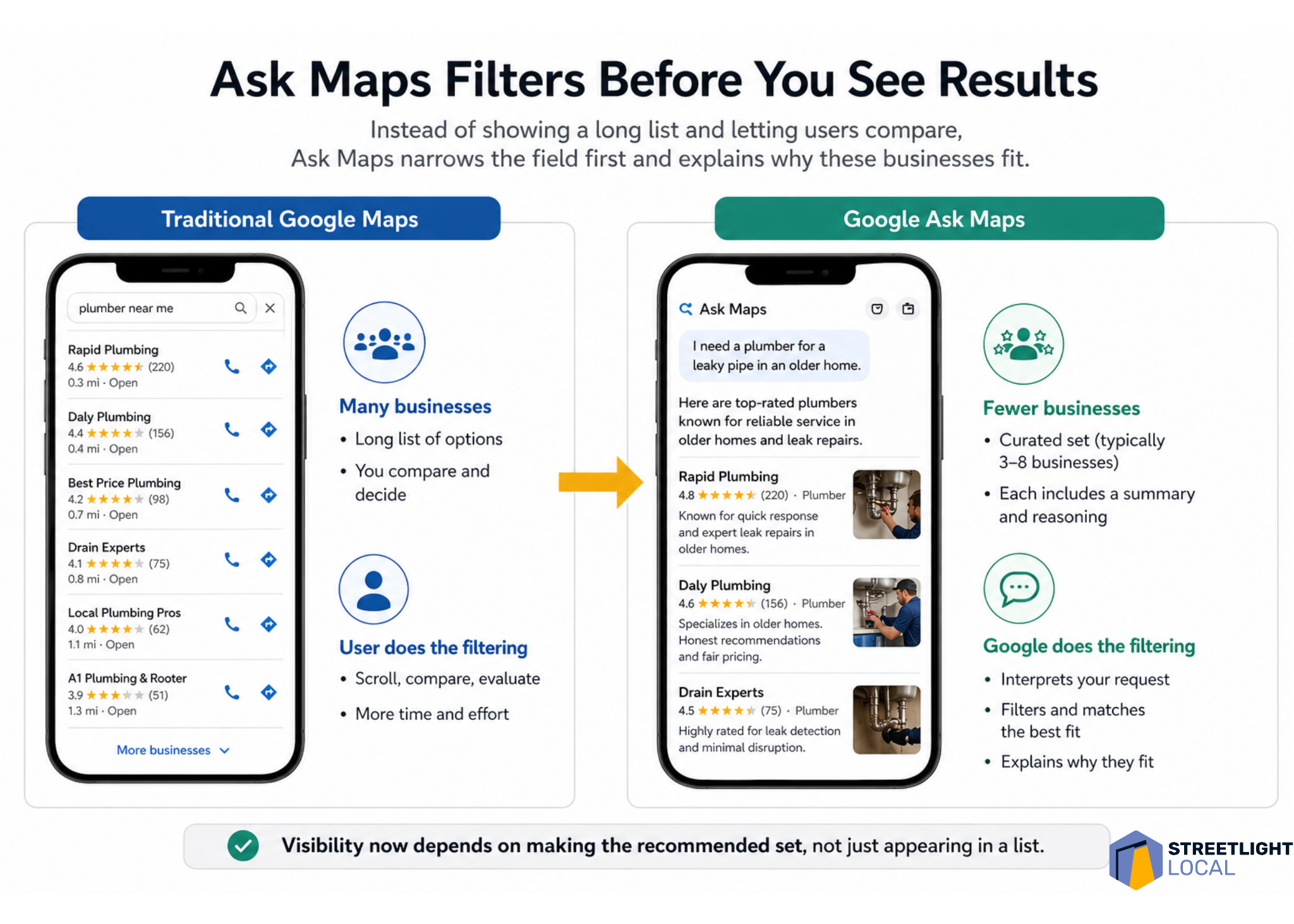
    One of the first things I notice about Ask Maps is how small the result set can be. In testing, it often showed around three to eight businesses, depending on the query. That feels very different from traditional Google Maps, where people can scroll through dozens of options and compare them on their own.

    With Ask Maps, much of that comparison happens earlier. Google filters the market first, interprets what the person is really asking for, and then presents a smaller group of businesses with an explanation of why each one fits.

    That means I have to think beyond the question of whether a business ranks. I also have to ask whether Google has enough confidence to include that business in a short recommendation set and explain why it belongs there.

    ```json
{
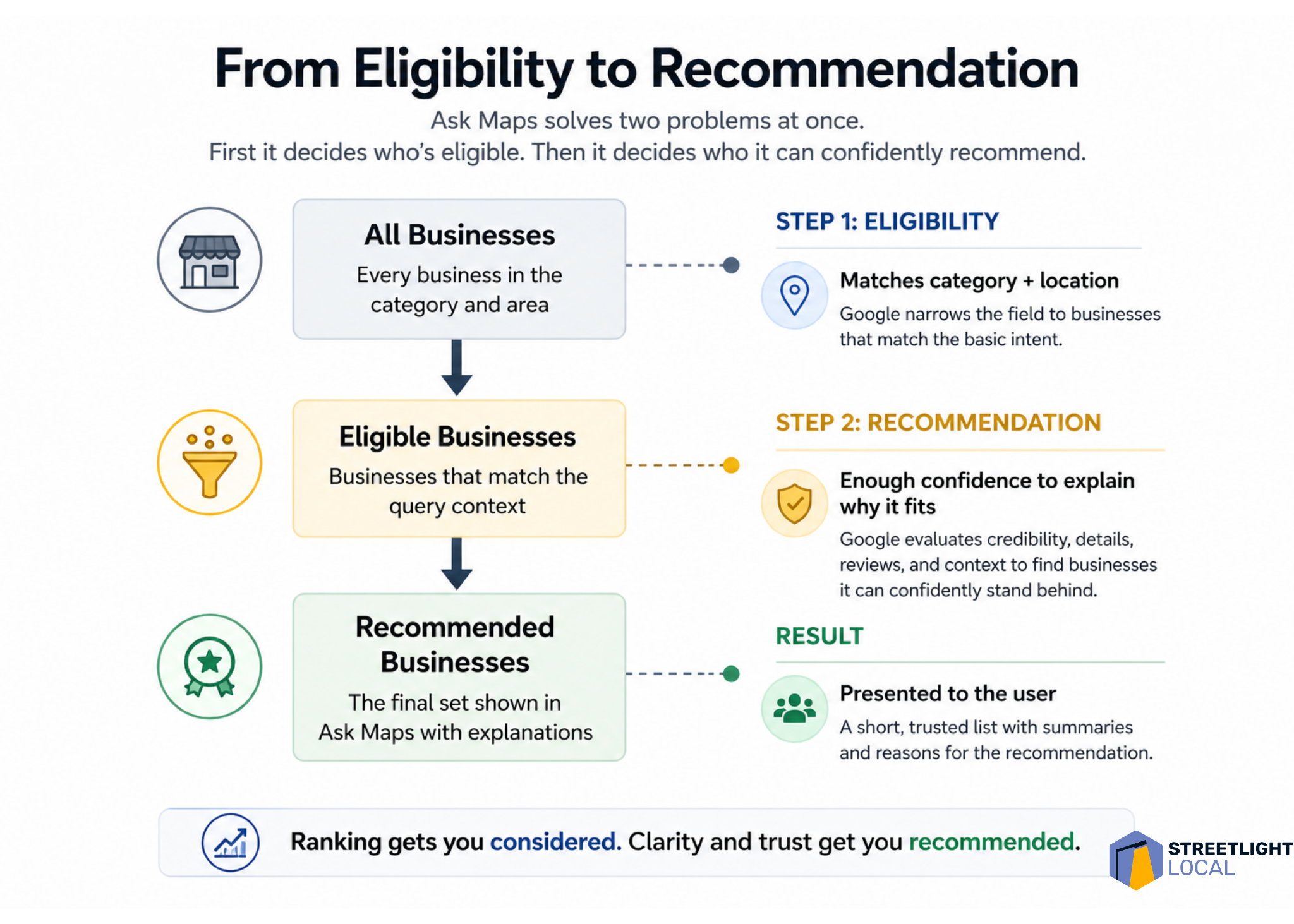
  "alt": "Flowchart illustrating Ask Maps process from eligibility to recommendation for businesses.",
  "caption": "Discover how Ask Maps efficiently determines business recommendations, ensuring clarity and trust in every listing.",
  "description": "This infographic explains the Ask Maps process from selecting eligible businesses to making confident recommendations. It shows three stages: all businesses, eligible businesses, and recommended businesses, detailing how Google evaluates category, location, credibility, and reviews. This visual provides a step-by-step guide to how trust and clarity improve business rankings and recommendations, branded by Streetlight Local."
}
```

    I think of this as a two-step problem. First, Google decides which businesses are eligible for the query. Then, it decides which eligible businesses it can confidently recommend.

    Ask Maps needs enough detail to explain the business

    Ask Maps does more than list businesses. It interprets and describes them. Even for simple searches, I often see businesses framed around qualities such as responsiveness, experience, specialization, professionalism, or the kinds of situations they seem best suited for.

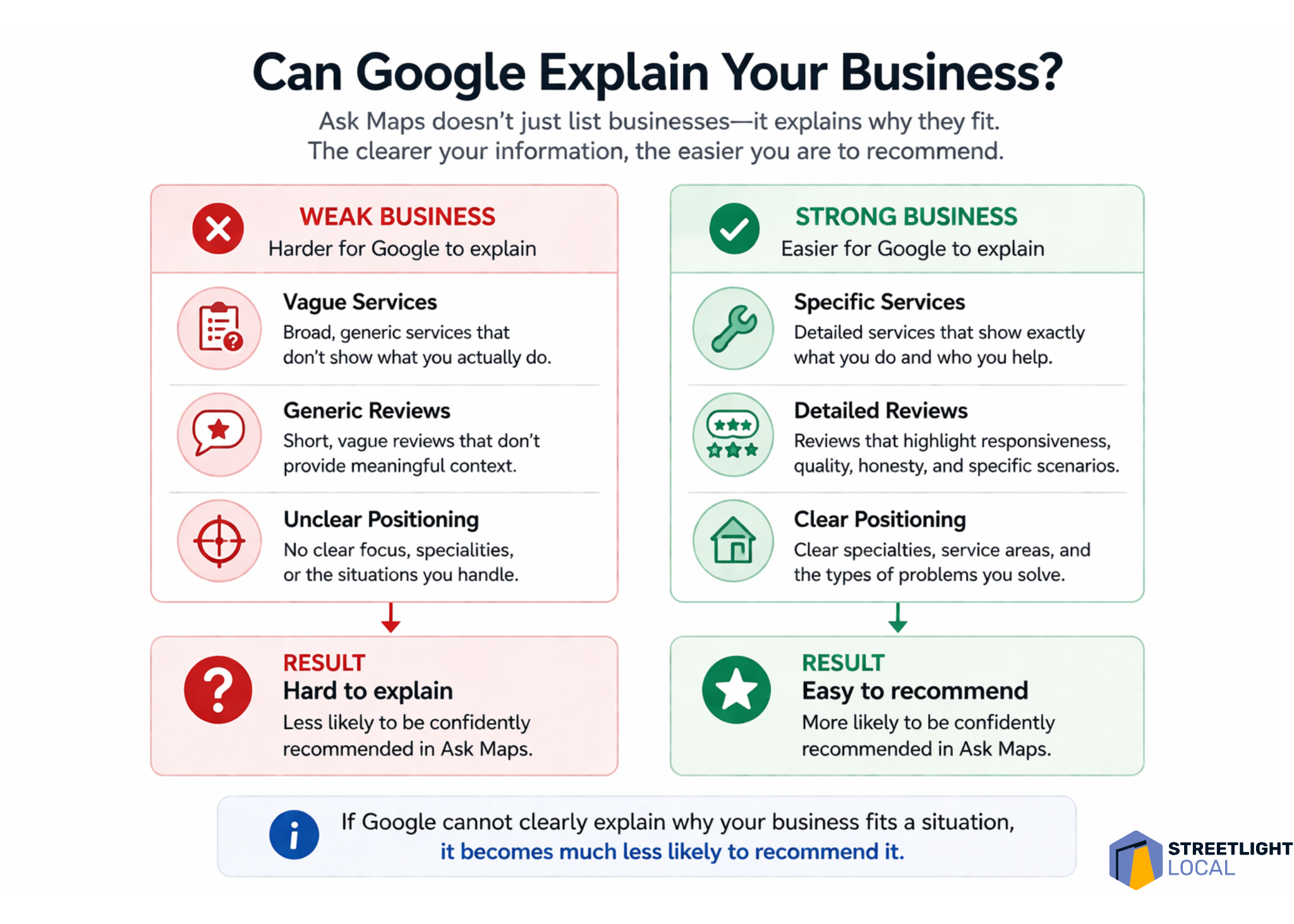
    That creates a different optimization challenge. It is not enough for Google to know that a business exists or that it offers a basic service. Google needs enough information to answer a more practical question: when should this business be recommended?

    To support that, I want Google to understand the types of jobs the business handles, the situations it commonly deals with, the concerns customers usually have, and how the business approaches those situations.

    If that information is vague, scattered, or inconsistent, Ask Maps has less to work with. When Google cannot clearly explain why a business fits a specific situation, I would expect that business to be less likely to appear as a recommendation.

    ```json
{
  "alt": "Comparison between Traditional Google Maps and Google Ask Maps with highlighted features and filtering process.",
  "caption": "Discover the efficiency of Google Ask Maps, a tool that pre-filters search results, providing users with top-rated options and reasons for selection.",
  "description": "This image illustrates the difference between Traditional Google Maps and Google Ask Maps interfaces. Traditional Maps display a long list of business options, requiring user filtering. In contrast, Ask Maps pre-filters results to show a curated list of top businesses with rationales. The image features two smartphones displaying both app interfaces and icons highlighting user experience differences. It emphasizes Ask Maps' efficiency in offering tailored recommendations, saving users time and effort."
}
```

    Google Business Profile becomes the identity layer

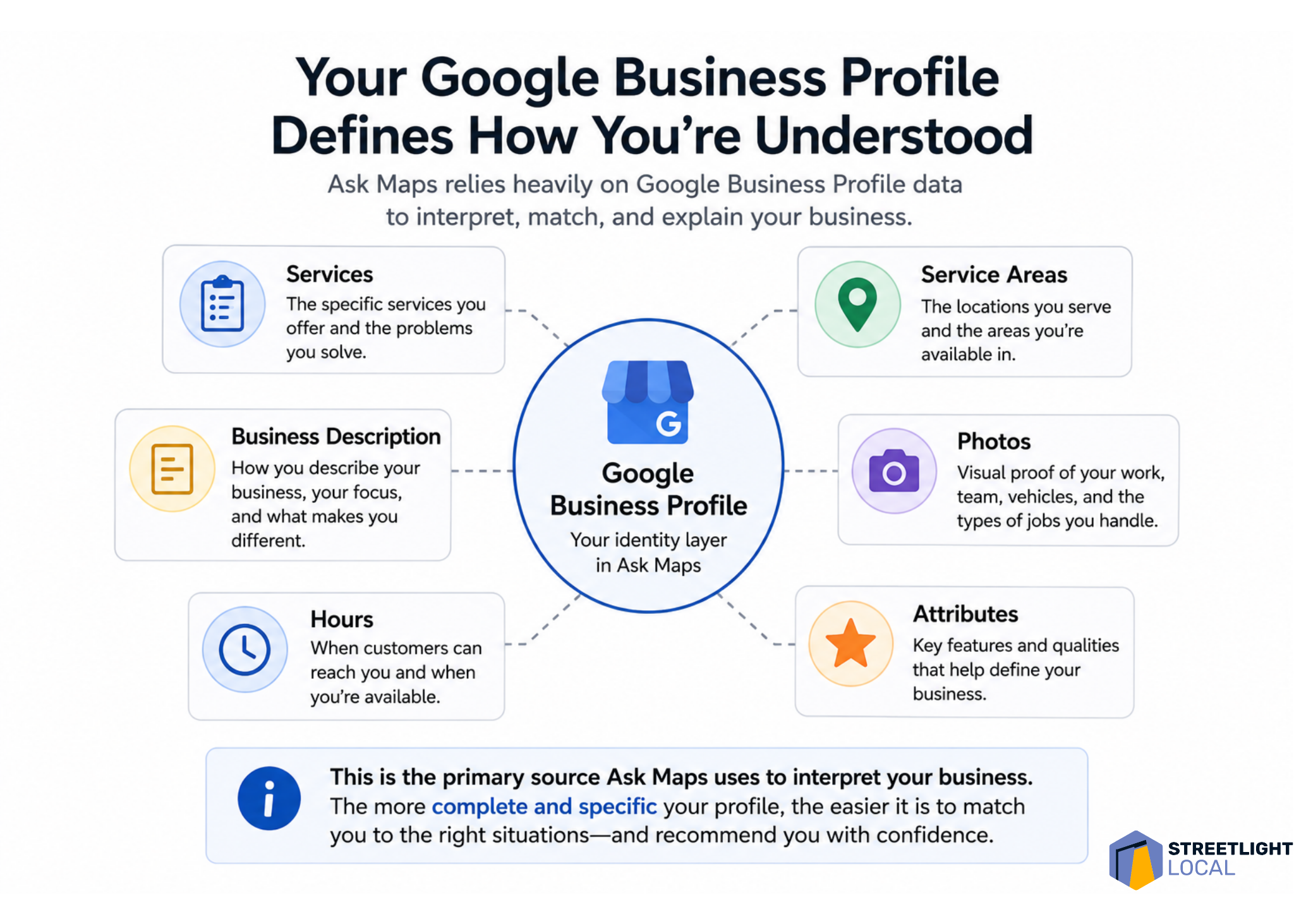
    For me, the Google Business Profile sits at the foundation of this whole process. In earlier-stage queries, Ask Maps appears to rely heavily on profile data, including business descriptions, services, reviews, ratings, hours, and operational details.

    Many businesses still treat their profile like a basic listing to fill out and keep current. That is necessary, but I do not think it is enough for an environment where Google is trying to describe and recommend businesses. The profile needs to communicate a clear, specific identity.

    A generic profile might say that a business offers plumbing, HVAC, electrical work, or another broad service. A stronger profile clarifies the kinds of problems it handles, the situations it is built for, and the details that make it useful to specific customers.

    For example, I would use the profile to reinforce details such as emergency availability, response times, specific repair or installation types, experience with older homes, complex systems, or common customer problems the business solves.

    That level of specificity gives Google more direct evidence. Instead of forcing the system to infer what the business is known for, I want the profile to make that identity clear.

    ```json
{
  "alt": "The CapmatchOne logo with a gradient circle and bold text.",
  "caption": "Discover innovation with the CapmatchOne logo, featuring sleek typography and a modern gradient circle.",
  "description": "The CapmatchOne logo features bold, modern typography coupled with a gradient circle, symbolizing connection and innovation. The sleek design conveys a sense of progress and creativity. This image can be used for branding or promotional purposes, appealing to audiences interested in innovative solutions and forward-thinking designs."
}
```

    Reviews shape positioning, not just credibility

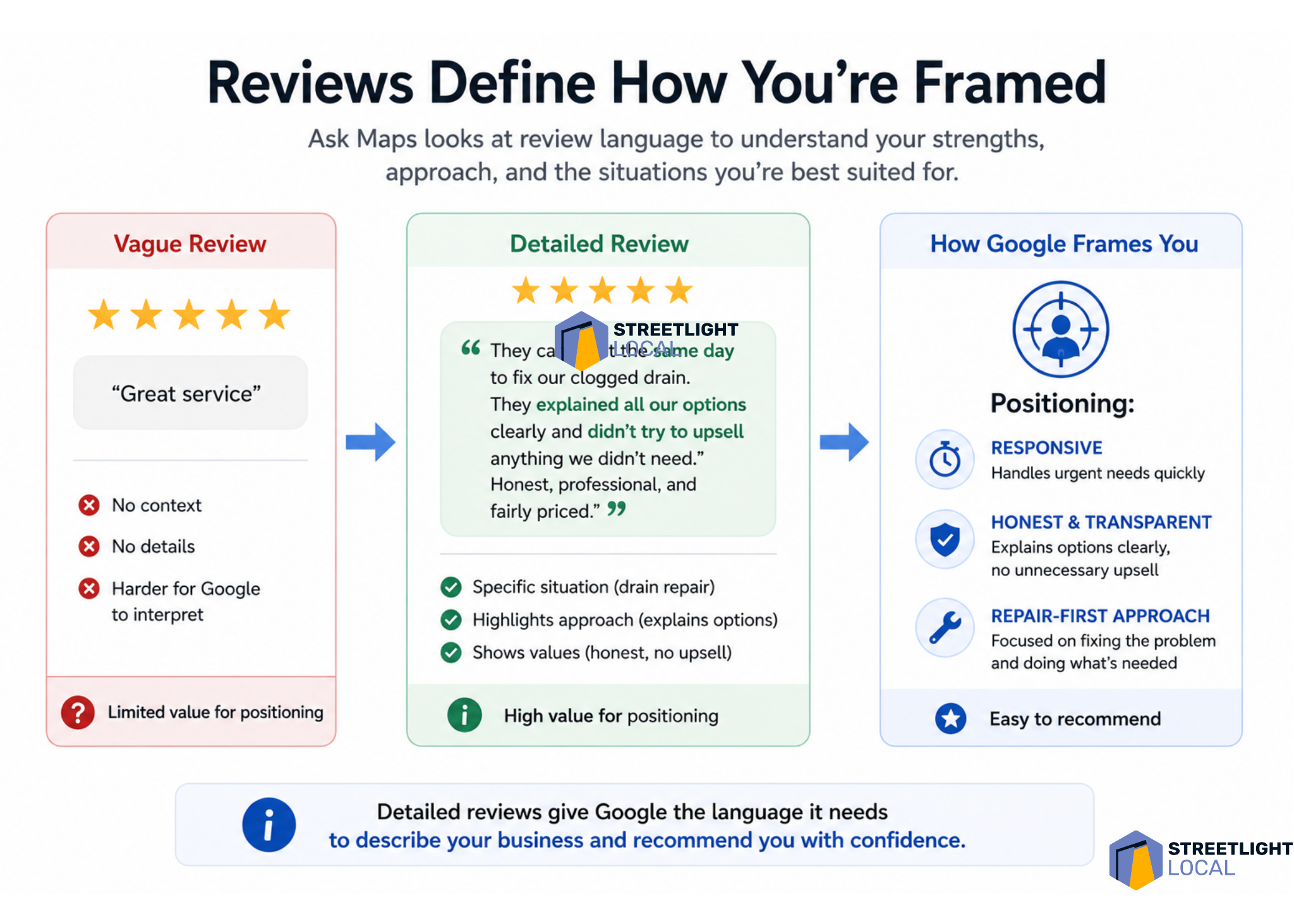
    Reviews have always mattered in local search, but I see them playing a more structured role in Ask Maps. Review language can show up in the way Google describes a business, especially around themes like responsiveness, honesty, communication, professionalism, and quality of work.

    That tells me reviews are doing more than supporting credibility. They are helping define how the business is positioned.

    I would still pay attention to rating, volume, and recency. But I would also look closely at what customers actually say. The language inside reviews can give Google useful context about what the business does, how it works, and what customers value about the experience.

    A vague review such as “great service” signals satisfaction, but it does not explain much. A detailed review that mentions a same-day response, a drain backup, clear communication about options, and a repair-focused solution gives Google several stronger signals about the business.

    Over time, those patterns accumulate. In that sense, I view reviews as one of the main ways Google learns what a local business is known for.

    ```json
{
  "alt": "Infographic contrasting weak versus strong business descriptions for Google explanations.",
  "caption": "Optimize your business presence on Google by crafting clear, specific descriptions and reviews. Strong positioning makes your business easier to recommend.",
  "description": "This infographic compares weak and strong business profiles for Google explanations. Weak businesses show vague services, generic reviews, and unclear positioning, leading to a 'hard to explain' result. In contrast, strong businesses provide specific services, detailed reviews, and clear positioning, resulting in an 'easy to recommend' status. Keywords include business clarity, Google explanation, and online presence optimization."
}
```

    Website content matters more when decisions get harder

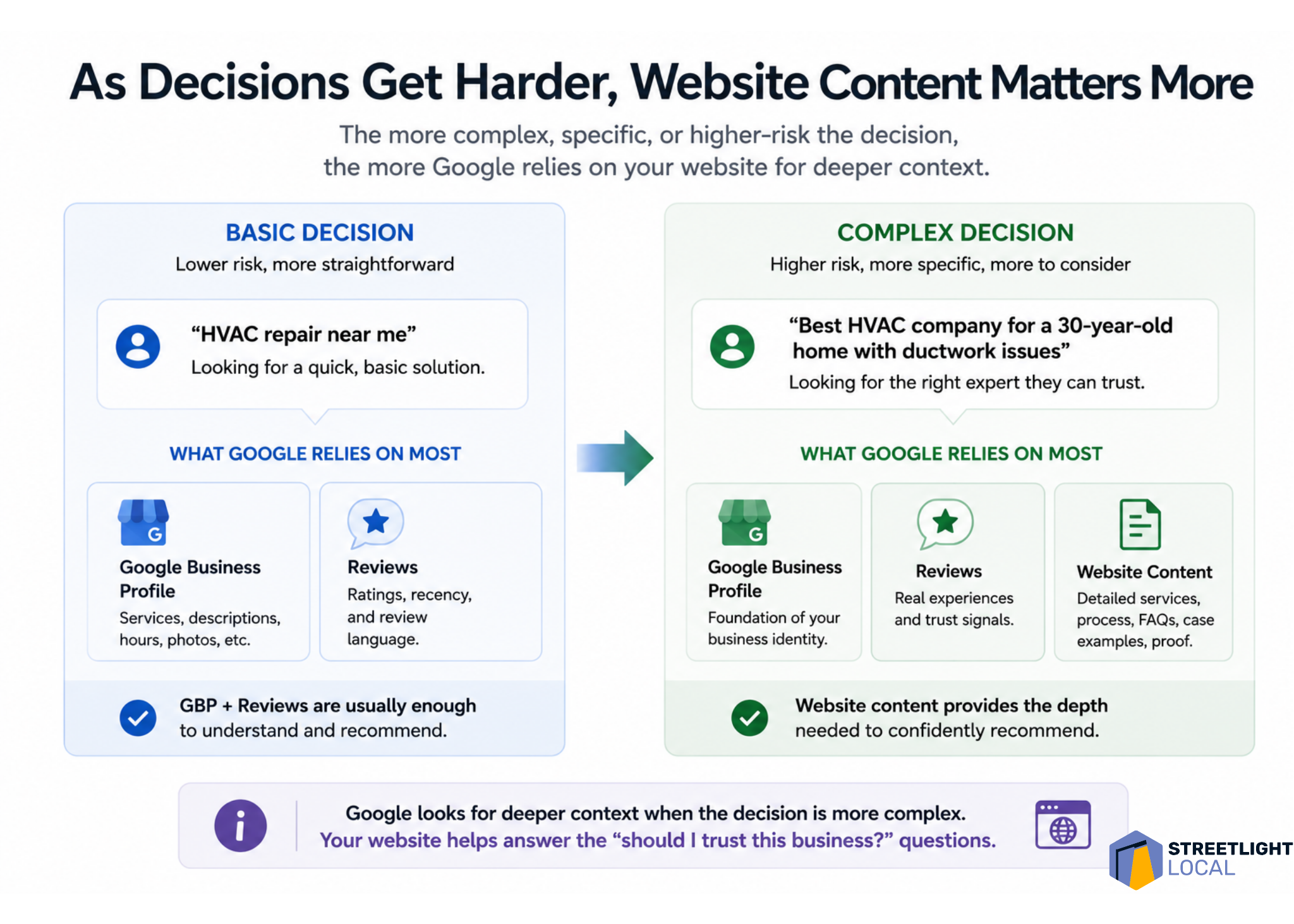
    I also see website content becoming more important as queries become more complex. For basic service searches, the Google Business Profile and reviews may carry a lot of the weight. But when the search involves higher cost, uncertainty, or trust, Google appears to look for deeper supporting evidence.

    That is where the website can help. Many service pages explain what a business offers and why it is qualified. That still matters, but it does not always match how people search when they are trying to make a difficult decision.

    In more situational searches, people are not just looking for a service. They are trying to understand a problem, compare options, reduce risk, and decide what to do next.

    That is why I would build content around the customer’s situation, not just around the service name. Stronger pages explain what leads to the problem, how to recognize it, what options are available, how to think through the decision, and what outcomes to expect.

    For example, a furnace repair page can go beyond a basic list of services. It can cover common symptoms, when repair makes sense, when replacement might be worth considering, and how a homeowner can evaluate the decision. That kind of content lines up more closely with the prompts Ask Maps is trying to interpret.

    ```json
{
  "alt": "Diagram illustrating the elements of a Google Business Profile, such as services, areas served, photos, and business description.",
  "caption": "Explore how your Google Business Profile shapes public understanding, highlighting services, service areas, and more for improved visibility.",
  "description": "This image presents a detailed diagram of a Google Business Profile, emphasizing how it defines business perception. Central to the diagram is the profile, surrounded by elements like Services, Service Areas, Business Description, Photos, and Attributes. Each component is essential for building a comprehensive profile that helps businesses stand out on Google Maps. The image underscores the importance of specificity and completeness in business profiles for improved match and recommendation accuracy."
}
```

    I also see a strong fit for jobs-to-be-done pages. Instead of organizing every page around a service category, I would create pages around the situation the customer is trying to solve and the decision they are working through.

    Trust signals matter more as risk increases

    As searches move from simple service needs into decision-making, trust becomes more important. When people mention cost, honesty, uncertainty, or fear of making the wrong choice, Ask Maps tends to highlight qualities such as transparency, fairness, careful workmanship, and clear communication.

    That makes sense to me because it reflects how people actually think in those moments. When someone faces an expensive repair or an unexpected issue, they are not only asking who can do the work. They are asking who they can trust to handle it correctly.

    I would support that trust with evidence across the business’s online presence. Reviews can show that customers felt respected and informed. Website content can explain the process. Examples of completed work can show experience. Clear “what to expect” sections can reduce uncertainty.

    The higher the perceived risk, the more supporting evidence matters. I want Google to see a consistent pattern that the business explains options clearly, avoids unnecessary pressure, handles similar situations, and leaves customers confident in the outcome.

    Infographic showing how detailed Google reviews help Ask Maps frame a local business as responsive, honest and repair-focused.
    Detailed customer reviews do more than boost ratings. They give Google Ask Maps the context it needs to understand, position and confidently recommend a local business.

    External signals should reinforce the same story

    For more complex or trust-heavy queries, Ask Maps may look beyond the Google Business Profile, reviews, and website. Third-party platforms, directories, and other public sources can help reinforce how Google understands a business.

    I do not take that to mean every external mention is equally important. I take it to mean consistency matters. If a business is described one way on its website, another way in reviews, and differently across directories or social platforms, the overall picture becomes harder to interpret.

    When those signals align, they strengthen each other. Business descriptions, services, customer experiences, types of work handled, and overall positioning should tell the same story wherever they appear.

    From a practical standpoint, I would not try to appear on every possible platform. I would make sure the important sources are accurate, credible, and consistent.

    I would optimize for evidence, not just keywords

    Infographic comparing basic and complex HVAC local searches, showing Google relies more on website content as decisions get harder.
    As local search decisions become more specific and higher risk, Google needs deeper signals from business profiles, reviews, and website content to recommend the right provider.
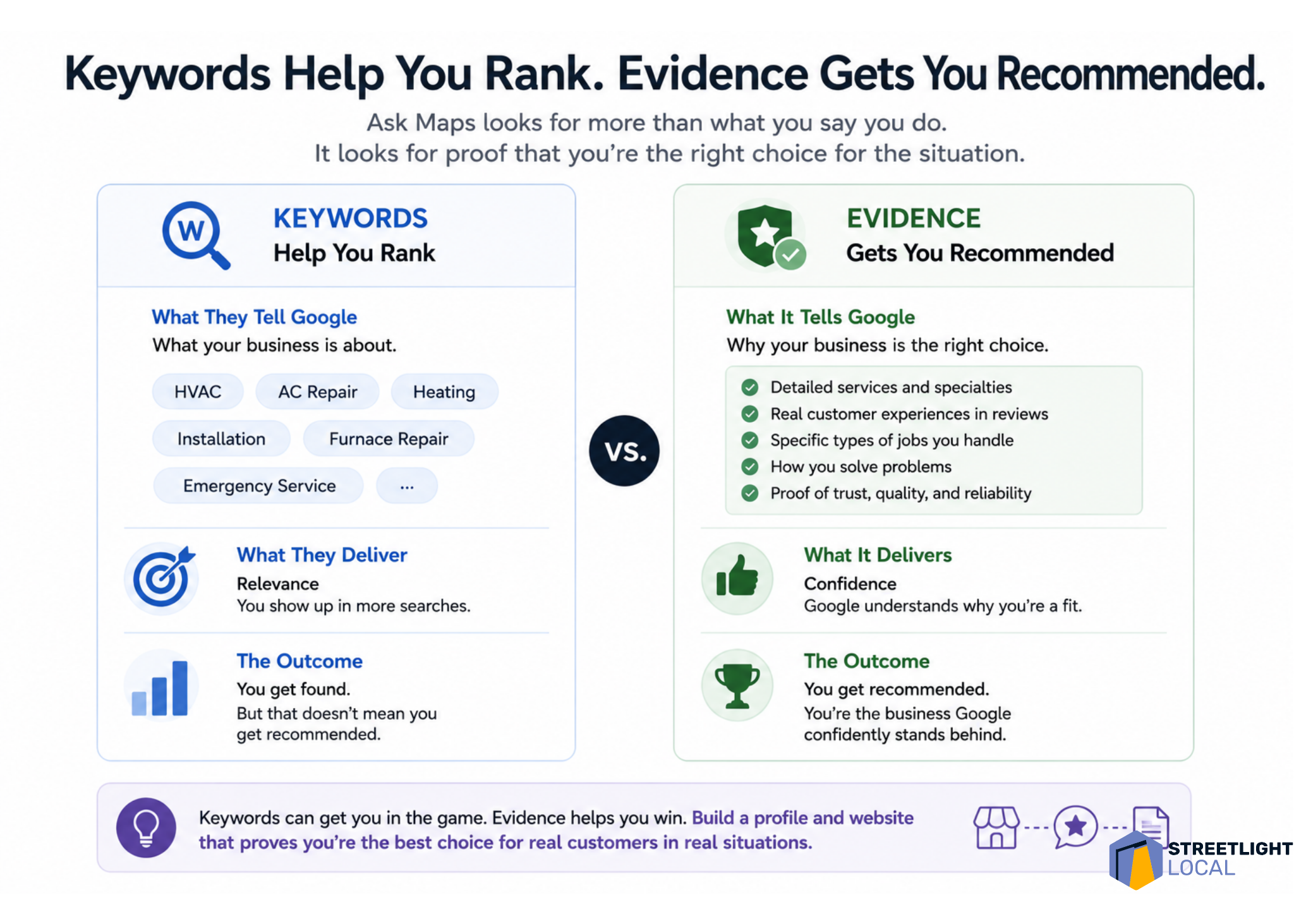
    Taken together, these patterns push me to think differently about optimization. Traditional local SEO often starts with keywords and rankings. Those still matter, but they do not fully explain what Ask Maps is doing.

    I find it more useful to think in terms of evidence. For a business to be recommended, Google needs enough information to understand what it does, what types of jobs it handles, what situations it fits, how customers experience it, and whether it can be trusted in higher-stakes decisions.

    Each source contributes something different. The Google Business Profile establishes the baseline identity. Reviews add real-world context. Website content provides depth and explanation. External sources help confirm the same picture.

    Individually, none of those elements tells the whole story. Together, they create a clearer and more consistent understanding of the business. That is where the shift from ranking to recommendation becomes most obvious: keywords can support relevance, but evidence supports recommendation.

    My practical framework for Ask Maps visibility

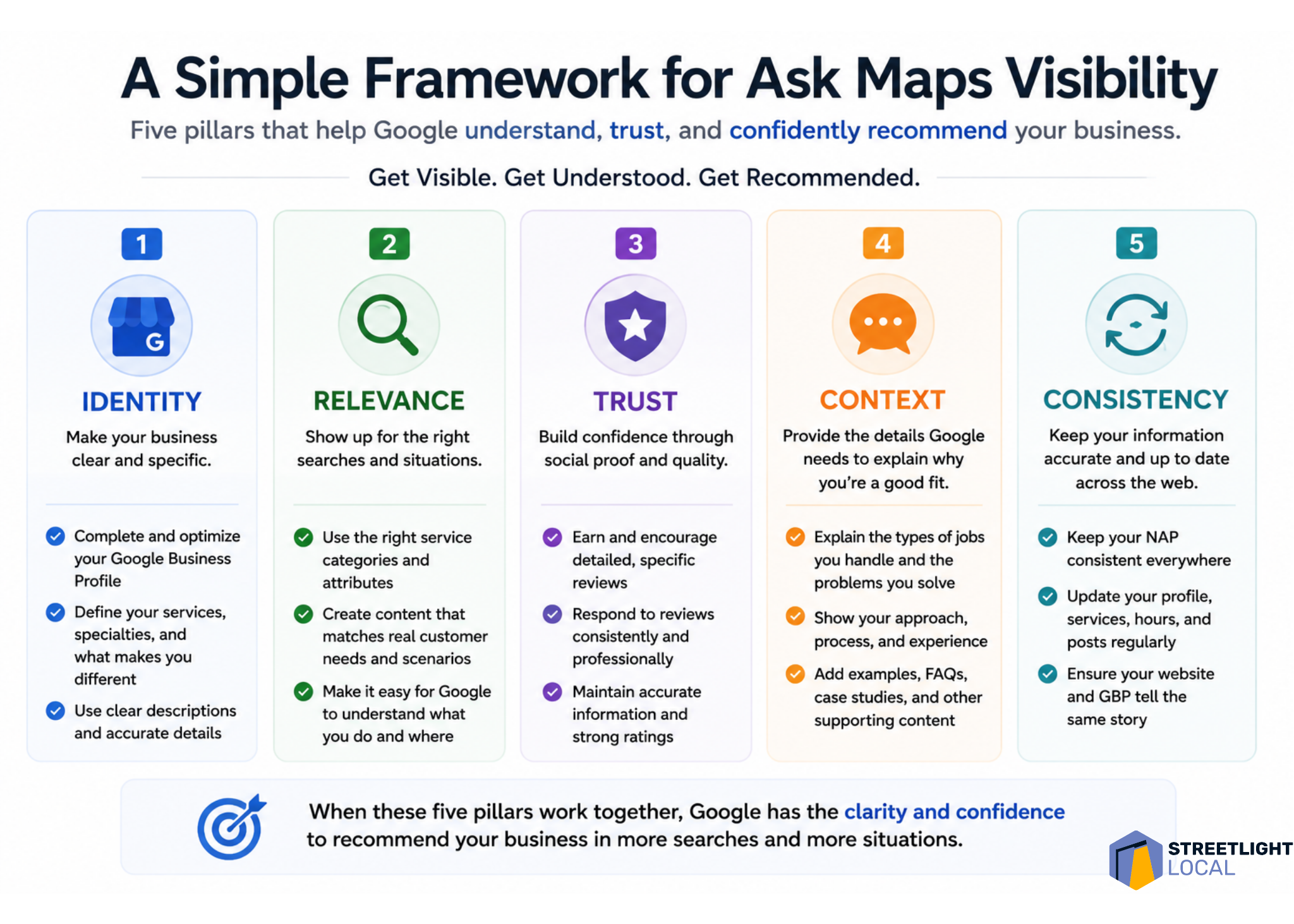
    When I evaluate a business for Ask Maps visibility, I would look at five areas: identity, relevance, trust, context, and consistency.

    Infographic comparing keywords and evidence for Google Ask Maps visibility, showing keywords help local SEO rankings while evidence earns recommendations.
    Google Ask Maps rewards more than keyword relevance. This visual shows why reviews, service details, trust signals, and real proof help local businesses get recommended.

    Identity asks whether Google can clearly understand what the business does and where it operates. Relevance asks whether the business can be matched to specific services and situations. Trust asks whether there is enough proof that customers feel confident choosing it.

    Context asks whether the content reflects the decisions customers are actually trying to make. Consistency asks whether different sources reinforce the same understanding of the business.

    I do not see this as a checklist to complete once. I see it as a practical way to evaluate how clearly and consistently a business is represented across the sources Ask Maps appears to use.

    What I would avoid

    With any new search feature, it is easy to overcorrect. I would avoid treating Ask Maps as an isolated channel that needs thin content, unnatural profile language, generic service-page duplication, or review language that feels forced.

    Those tactics may create more content, but they do not necessarily create more useful evidence. The better approach is to align more closely with how customers actually search, evaluate options, and make decisions.

    Infographic outlining five pillars for Google Ask Maps visibility: identity, relevance, trust, context, and consistency for local SEO recommendations.
    A practical local SEO framework shows how businesses can earn visibility in Google Ask Maps by clarifying identity, proving relevance, building trust, adding context, and staying consistent online.

    When the business presence reflects real customer needs clearly and consistently, it naturally creates the kinds of signals Ask Maps seems to rely on.

    What I still do not know about Ask Maps

    I would treat all of this as directional, not definitive. Ask Maps is still being tested and refined, and the system is not fully documented.

    The result structure can vary by query and test environment. The feature’s usability is also still changing. In many cases, users may still need to click into a Google Business Profile to call, book, or engage, rather than acting directly from the Ask Maps response.

    Measurement is another open issue. Right now, I do not see a clean way to isolate Ask Maps visibility or performance inside standard reporting tools. That makes it difficult to attribute calls, traffic, or conversions directly to this experience.

    I also would not assume the same signal weighting applies to every query. Google Business Profile data, reviews, website content, and external sources may all matter, but their relative importance likely changes based on the search intent and the complexity of the decision.

    The real shift is from ranking to recommendation

    I see Ask Maps as a version of local search where retrieval, evaluation, and decision support are moving closer together. Instead of making users search, compare, research, and decide across several steps, Google is trying to guide more of that process inside one experience.
    That changes the meaning of visibility. In Ask Maps, it is not enough for a business to simply appear. The business needs to be understood well enough for Google to explain why it fits the situation and trusted enough to be recommended.

    For businesses and SEOs, I would not respond by chasing a narrow trick. I would build a clearer, more complete, and more consistent representation of the business across the sources that shape Google’s understanding.

    The businesses most likely to benefit are the ones that are easiest to interpret, easiest to trust, and easiest to match to real-world customer needs.


    Inspired by this post on Search Engine Land.


    crushpress.ai community screenshot
  • Google Ask Maps: A Shift Towards Personalized Recommendations

    Google Ask Maps: A Shift Towards Personalized Recommendations

    I’ve noticed a fascinating shift in Google’s Ask Maps function—it’s transitioning from simple listings to offering more personalized recommendations. This change is not just about showcasing local businesses anymore; it’s about truly understanding user needs and suggesting the best options.

    The other day, I dug into some local service queries—think plumbers, electricians, HVAC services—and was amazed to find how Ask Maps narrows down options by user intent. It’s evaluating businesses based on factors like responsiveness and specialization, which feels fresh and user-focused.

    ```json
{
  "alt": "The CapmatchOne logo with a gradient circle and bold text.",
  "caption": "Discover innovation with the CapmatchOne logo, featuring sleek typography and a modern gradient circle.",
  "description": "The CapmatchOne logo features bold, modern typography coupled with a gradient circle, symbolizing connection and innovation. The sleek design conveys a sense of progress and creativity. This image can be used for branding or promotional purposes, appealing to audiences interested in innovative solutions and forward-thinking designs."
}
```

    What’s even more exciting is how Ask Maps frames these businesses. It’s not just a list; there’s guidance involved, which is a leap beyond traditional local retrieval methods. So, I decided to explore this by testing across five levels of local intent, ranging from simple searches to detailed conversational prompts.

    ```json
{
  "alt": "Comparison of Ask Maps recommendations and Google Business Profile actions for AC repair services.",
  "caption": "Explore how Ask Maps provides curated AC repair recommendations while actionable decisions await in the Google Business Profile.",
  "description": "This image illustrates the difference between Ask Maps recommendations and actions available on a Google Business Profile for AC repair services. The left side shows a smartphone displaying Ask Maps results with curated AI-generated summary, while the right side highlights actionable features like directions and call buttons in the full business profile. The presentation emphasizes interactive elements and user engagement, branded by Streetlight Local."
}
```

    As the complexity of queries increased, I saw a clear pattern: Ask Maps shifted from merely listing businesses to interpreting which ones truly fit the ask—and why. This is huge.

    ```json
{
  "alt": "Diagram showing how Ask Maps enhances local business queries beyond basic listings.",
  "caption": "Discover how Ask Maps transforms simple searches into detailed summaries using Google Business Profiles and reviews.",
  "description": "This image illustrates how Ask Maps enhances basic local business queries into insightful recommendations. Starting from a sample query for electricians in Sudbury, MA, the process shows transitioning from basic listings to recommendations, detailed business profiles, and review-based summaries. Highlighting these steps, the image explains how Ask Maps uses Google Business Profiles and review language to provide more comprehensive results. The image is branded with StreetLight Local's logo."
}
```

    This exploration pulled insights from specific locality tests, so while it’s directional, it’s not exhaustive across all markets or queries.

    ```json
{
  "alt": "Infographic showing how Ask Maps transforms queries into decision guides using smartphones.",
  "caption": "Discover how Ask Maps evolves a simple query into a guided decision-making tool, enhancing user experience with structured insights.",
  "description": "This infographic illustrates the process of Ask Maps transforming advisory queries into comprehensive decision guides. It shows four smartphones, each representing a step: Query, Guidance/Explanation, Decision Framework, and Recommended Businesses. The flow begins with a query about an outdated electric system, progresses by providing evaluation criteria, then narrows down options with decision frameworks, and finally lists local business recommendations. Aimed at guiding user choices, the system emphasizes explanation, evaluation, and categorization. Streetlight Local is credited below."
}
```

    The five-level intent model I developed was based on what I’ve learned about how people search for local services. I structured these not by traditional keyword categories but from simple inquiries to complex, conversational decision-making.

    ```json
{
  "alt": "Graphic illustrating four sources of information for Ask Maps: Google Business Profile, Business Websites, Reviews, Selective External Sources.",
  "caption": "Discover how Ask Maps gathers its information from diverse sources such as Google Business Profiles, professional reviews, business websites, and other external directories.",
  "description": "This infographic shows how Ask Maps compiles data, highlighting four primary sources: Google Business Profile, Reviews, Business Websites, and Selective External Sources like directories and educational content. This comprehensive method ensures a well-rounded information database. Arrows point from each source to a central map icon, illustrating the flow of data into Ask Maps. This visual is part of Streetlight Local's insights on information sourcing."
}
```

    At the basic level, requests start simple, like “I’m looking for an HVAC company nearby.”

    ```json
{
  "alt": "Infographic showing how Ask Maps mixes sources based on query type, including basic, specific service, situational, and advisory queries.",
  "caption": "Discover how Ask Maps tailors its source mix for different query types, from basic needs to advisory consultations. Get the most from your local search.",
  "description": "This infographic illustrates how Ask Maps customizes the mix of sources it uses according to four query types: Basic, Specific Service, Situational/Trust, and Advisory. Each category lists different needs—like finding an HVAC company or advice on a new furnace—and the respective sources such as GBP, reviews, websites, and educational content. Ideal for understanding local search strategies."
}
```

    Then, I experimented with queries involving more service specifics, like “I need an electrician to upgrade my panel in an older home.” This was fascinating as it introduced nuances into what I look for in search results.

    ```json
{
  "alt": "Infographic outlining strategies for businesses to enhance their online profiles, reviews, websites, and digital footprint.",
  "caption": "Discover key strategies to refine your business's digital presence, focusing on profiles, reviews, website content, and a broader digital footprint.",
  "description": "This infographic titled 'What Businesses Should Tighten Up Now' provides a comprehensive guide for businesses to improve their Google Business Profile, manage reviews, enhance website functionality, and expand their broader digital footprint. It includes actionable tips such as maintaining consistent business info across platforms and reinforcing brand perception. Keywords: business strategy, digital marketing, online presence, Google Business Profile, reviews, website optimization."
}
```

    The most interesting insights emerged from situational queries and those involving trust or decision-making, revealing how Ask Maps balances offering a realistic number of options with the depth of interpretation. The shifts were consistent: as we went from simple prompts to narratives, Ask Maps fine-tuned business selection and added layers of explanation.

    From this testing, I realized the intricate way Ask Maps processes information—using Google Business Profiles, reviews, and even external sources. While reviews dominated initial impressions, Ask Maps dives deeper on complex queries, pulling from business websites and informative content to guide users through decisions.

    Overall, the direction Ask Maps is heading could redefine our local search approach. If it continues evolving, it might influence how visibility is determined—not just by listing presence but by the ability to comprehensively understand and meet the user’s needs.
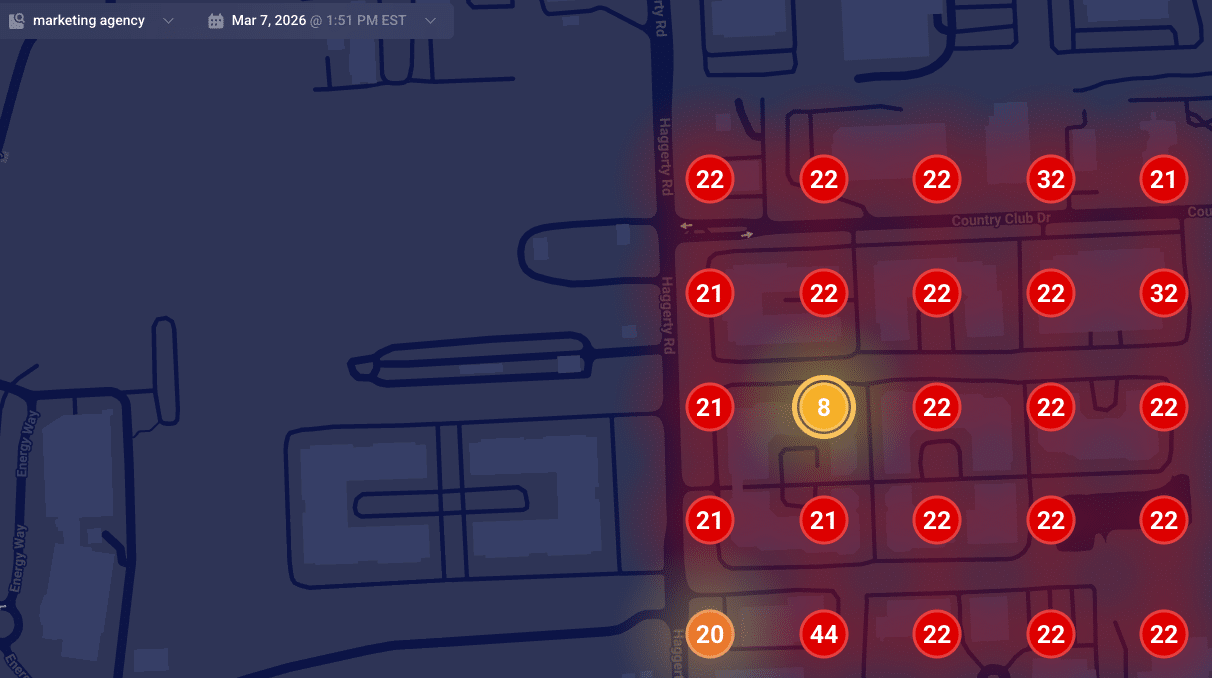

    Inspired by this post on Search Engine Land.


    crushpress.ai community screenshot
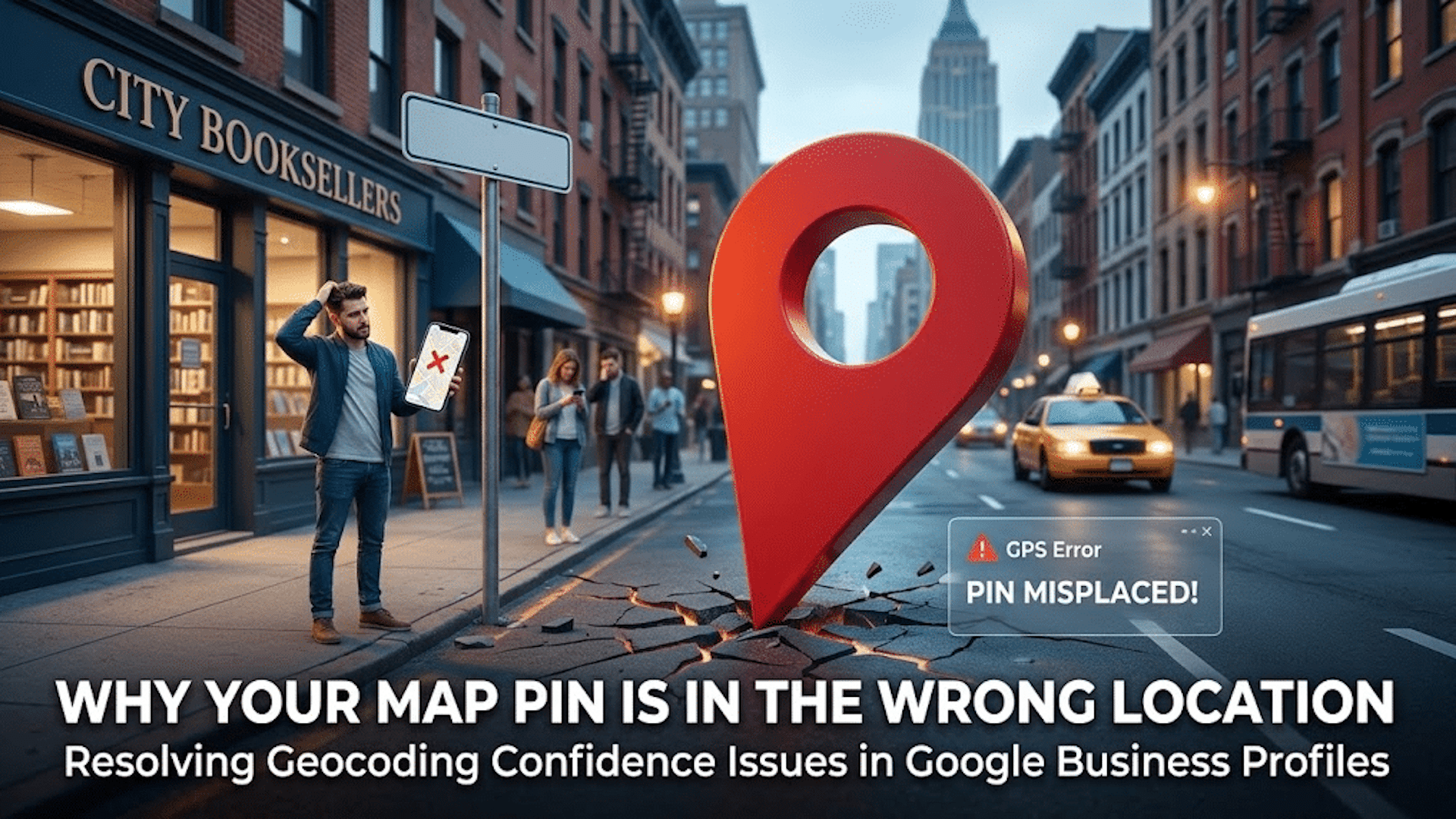
  • Boost Local SEO: Fix Your Google Map Pin for Better Rankings

    Boost Local SEO: Fix Your Google Map Pin for Better Rankings

    Your local business rankings might be suffering, and surprisingly, it could all be due to your map pin. Google’s placement of your business on their map significantly impacts your visibility, and addressing hidden addresses and setup issues is crucial.

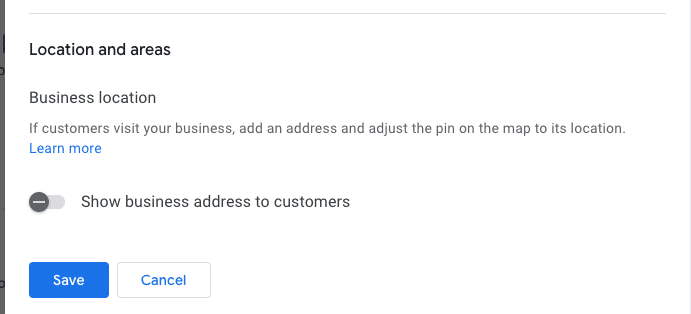
    I’ve often found myself engrossed in the ongoing debate within the local SEO community about the ‘hide address’ toggle for service area businesses (SABs). Many business owners consider this option a mere privacy setting, but it’s much more—a decision that affects how Google’s algorithm perceives your physical relevance.

    ```json
{
  "alt": "Settings interface for business location visibility with toggle option and save button.",
  "caption": "Easily manage the visibility of your business address with a simple toggle switch. Options to save or cancel changes make location management straightforward.",
  "description": "The image displays a digital settings interface focused on business location visibility. It features a toggle switch labeled 'Show business address to customers,' which is turned off. Below the toggle are 'Save' and 'Cancel' buttons for submitting changes. This screenshot is relevant for understanding business location management settings in online profiles or platforms. Keywords: business location, settings interface, visibility toggle, save button."
}
```

    Here are some questions to consider:

    ```json
{
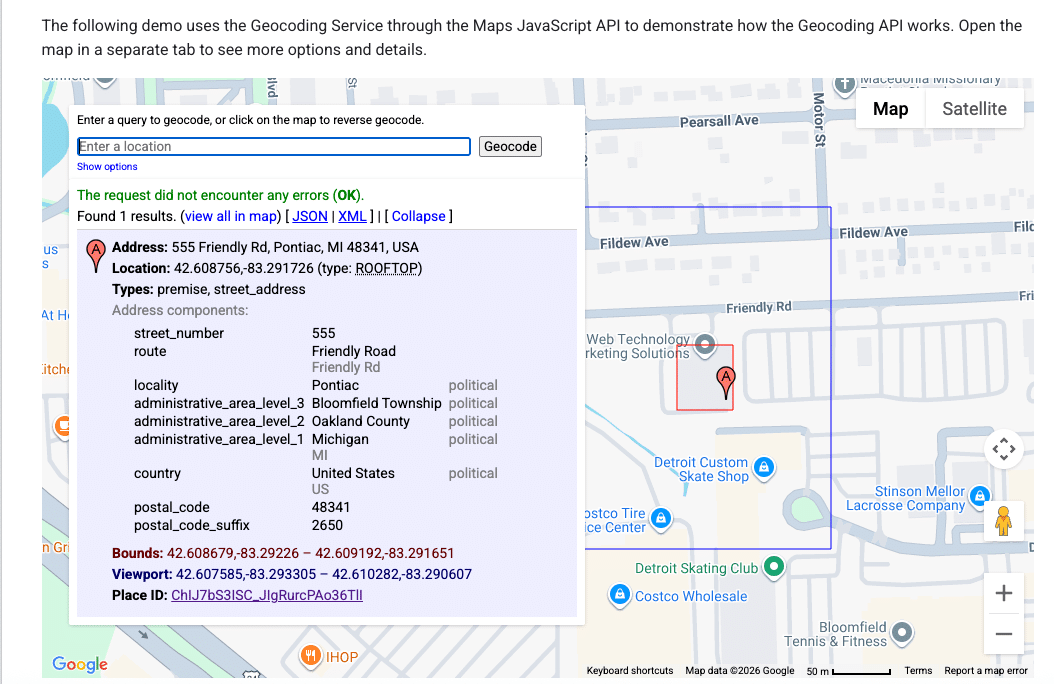
  "alt": "Geocoding service demo using Maps JavaScript API with address details and location on map.",
  "caption": "Explore the Maps JavaScript API with this geocoding demo, showcasing address details for 555 Friendly Rd, Pontiac, MI.",
  "description": "This image displays a geocoding service demo using the Maps JavaScript API. It highlights the detailed address of 555 Friendly Rd, Pontiac, MI 48341, USA. The interface shows the address components, coordinates (42.608756, -83.291726), and a map section indicating the location. The demo explains how to use geocoding for retrieving precise address information and viewing it on a map with options for different data formats like JSON and XML."
}
```
    • Does your defined service area affect your ranking?
    • Does hiding your street address impact your visibility in the local pack?
    • Is Google erasing that data, or does your map pin become an invisible anchor?
    ```json
{
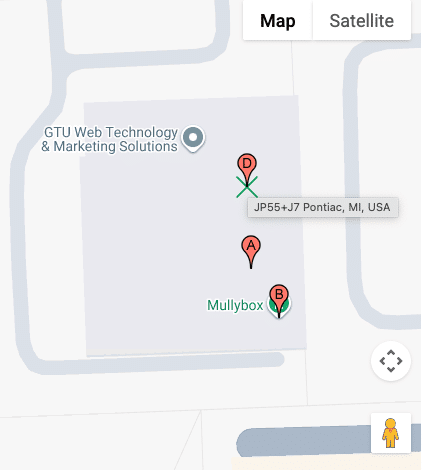
  "alt": "Map showing GTU Web Technology & Marketing Solutions and Mullybox with pinpoints in Pontiac, MI.",
  "caption": "Discover the location of GTU Web Technology & Marketing Solutions and Mullybox in Pontiac, MI, with this detailed map view.",
  "description": "This image displays a map highlighting GTU Web Technology & Marketing Solutions and Mullybox in Pontiac, MI. The map features pinpoints indicating specific locations labeled A, B, and D. The area is shown in a standard map view with street outlines and an overlay for easy navigation. This visual guide can help users find exact locations and understand the surrounding layout in Pontiac. Keywords: map, GTU Web Technology & Marketing Solutions, Mullybox, Pontiac, MI, location."
}
```

    These are foundational questions in understanding how proximity works when you choose to ‘hide’ on the map.

    ```json
{
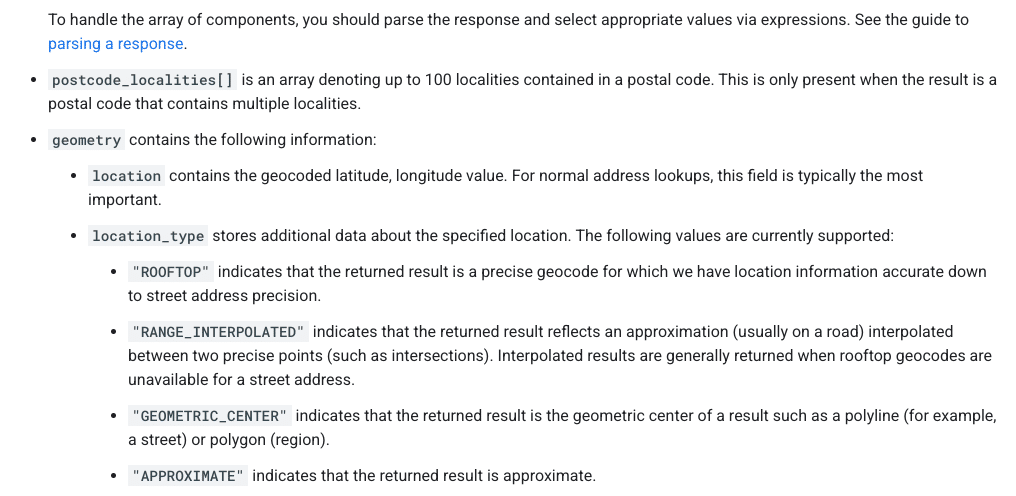
  "alt": "Guide on parsing response components with types like ROOFTOP and APPROXIMATE.",
  "caption": "Understanding Geocode Location Types: Dive into the specifics of parsing response components from postal code localities to precise geocodes.",
  "description": "This image provides detailed guidance on parsing response components in geolocation data. It highlights how to interpret arrays like postcode_localities, and explains geometry details that include location types such as ROOFTOP, RANGE_INTERPOLATED, GEOMETRIC_CENTER, and APPROXIMATE. This is crucial for understanding accuracy and the precision of geocoding results, aiding in effective data handling and utilization."
}
```

    How Google Determines Your Map Pin

    ```json
{
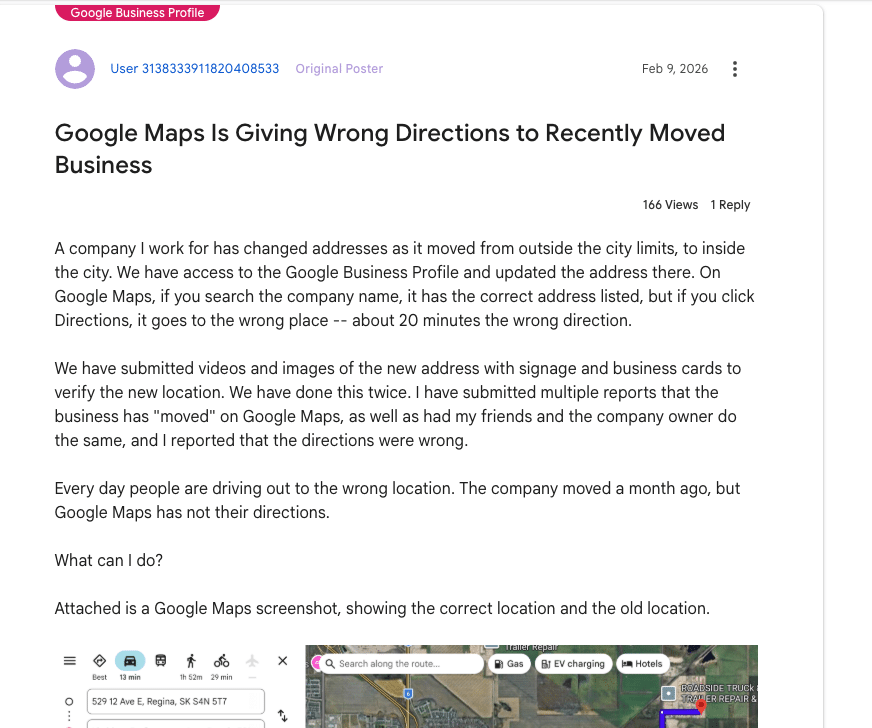
  "alt": "Forum post discussing Google Maps giving wrong directions after business address change.",
  "caption": "Frustration mounts as a business struggles with incorrect Google Maps directions following an address change, causing customers to get lost.",
  "description": "The image shows a forum post about issues with Google Maps providing incorrect directions to a business after its address change. Despite updating Google Business Profile, the directions lead 20 minutes off. Attached is a Google Maps screenshot indicating both old and new locations. The post has had 166 views and 1 reply, highlighting the frequent errors with directions and the efforts taken to rectify the situation."
}
```

    It’s essential to know that your address and map pin are not the same. Entering an address into your Google Business Profile doesn’t just place a pin; it’s processed through Google’s geocoding engine, comparing it against their database.

    ```json
{
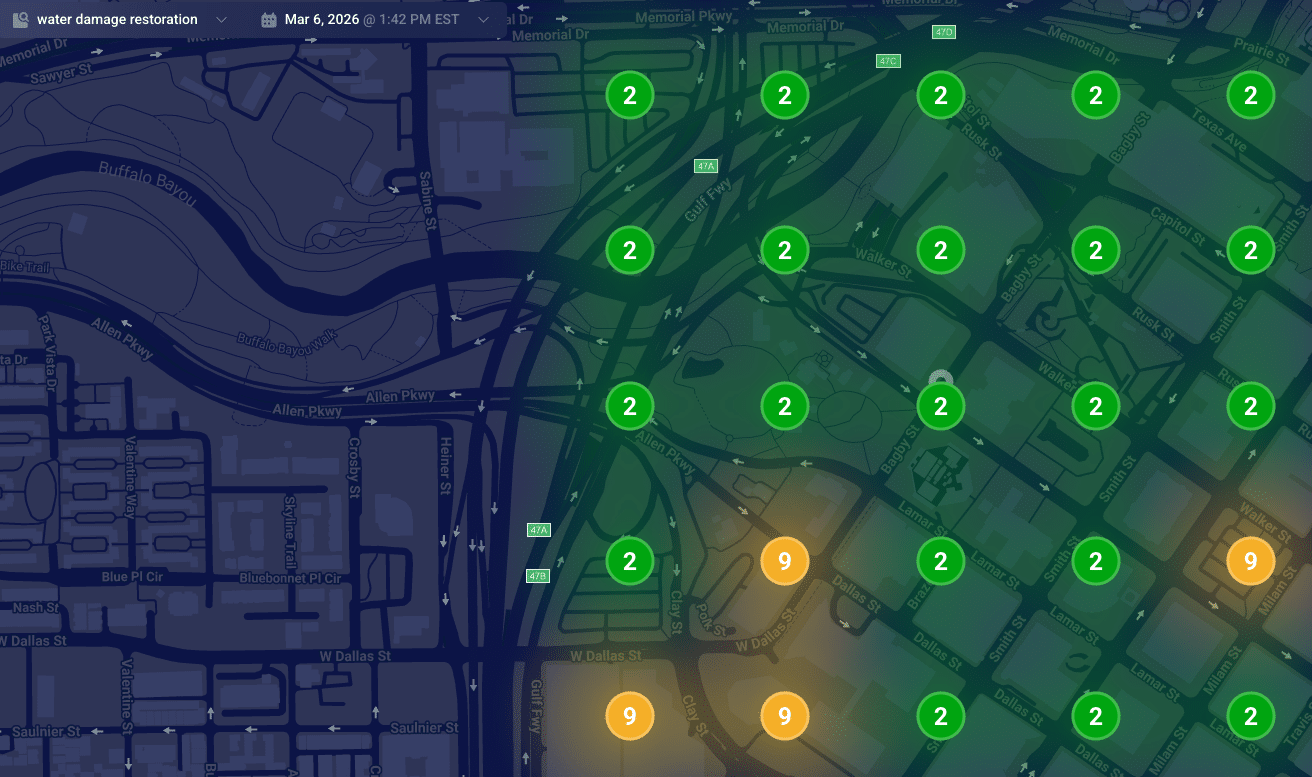
  "alt": "Heat map visualization of water damage restoration needs in an urban area, showing numbered zones with color coding.",
  "caption": "Explore this dynamic heat map illustrating water damage restoration priorities across a city with distinct color-coded zones.",
  "description": "This image represents a heat map of water damage restoration needs in an urban area on March 6, 2026, at 1:42 PM EST. The map features a darkened city street layout with numbered circular zones indicating priority levels. Green circles with the number '2' indicate low priority areas, while orange circles marked with '9' highlight higher urgency zones. This visualization aids in strategic planning for restoration services."
}
```

    Understanding Google’s data models is key to understanding why your pin might be misplaced:

    ```json
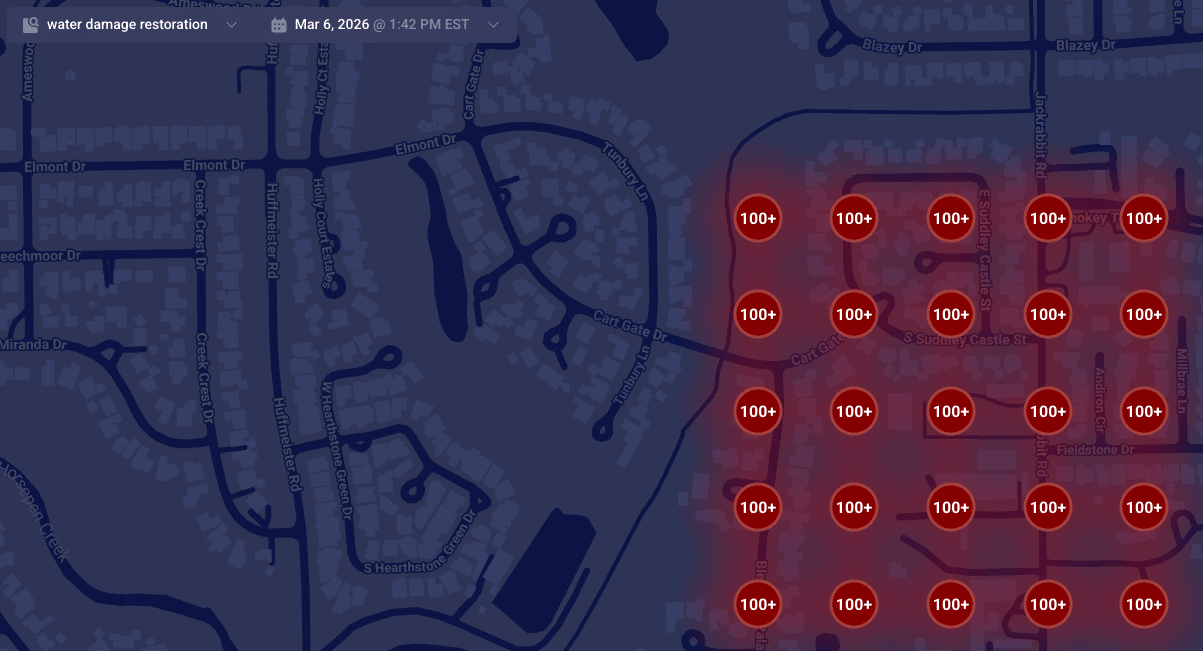
{
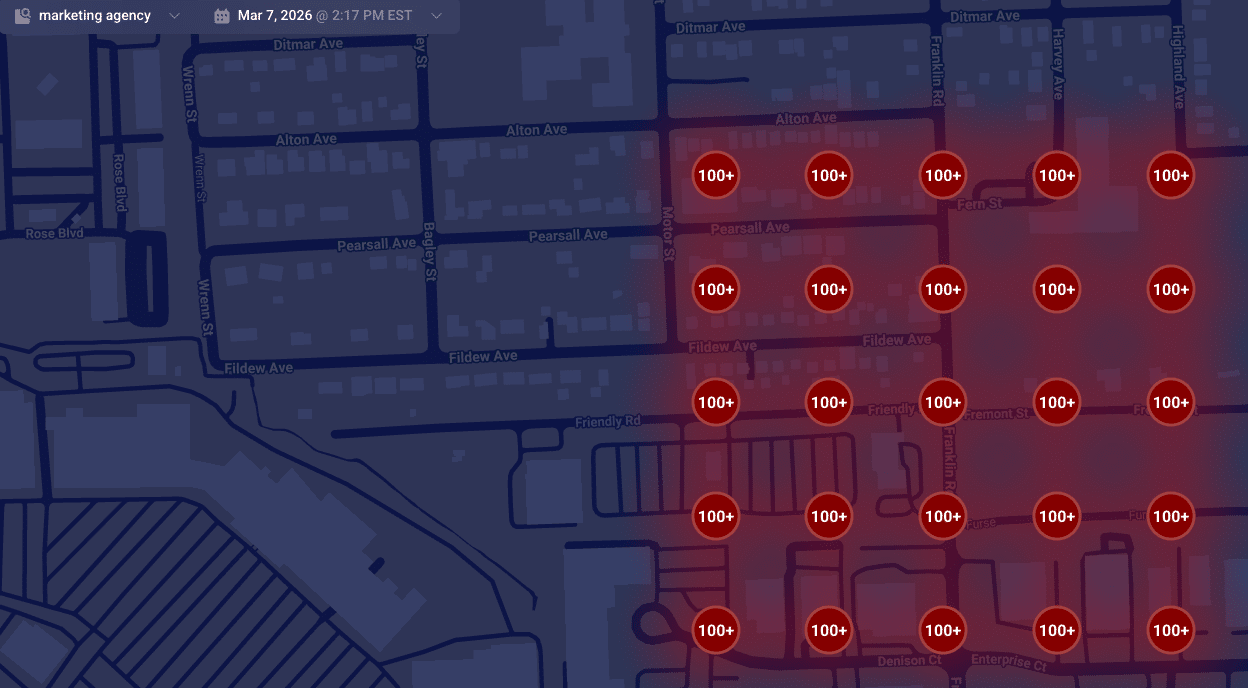
  "alt": "Map highlighting areas with over 100 instances of water damage restoration services.",
  "caption": "A map visualization displaying clusters of water damage restoration needs, with over 100 cases highlighted in red.",
  "description": "This map illustrates a dense concentration of water damage restoration demands in a residential area. Red circles marked with '100+' indicate regions with over 100 service instances. The map is set against a dark background, featuring roads and street names for context. This visualization aids in identifying service hotspots, essential for targeting restoration efforts efficiently."
}
```
    ```json
{
  "alt": "Heatmap showing numerical data points on a dark map layout.",
  "caption": "A vibrant heatmap reveals numerical trends across a dark-themed map, spotlighting key data points for insightful analysis.",
  "description": "This image showcases a heatmap overlaid on a map, displaying various data points marked with numbers. The numbers, like 8, 22, and 44, are highlighted within colored circles ranging from yellow to red, indicating varying data intensities. Designed for data visualization, it suggests a real-time analysis function, useful for trend analysis or strategic planning. The heatmap context is set against a dark map background, enhancing the visibility of the highlighted data points."
}
```

    When Google finds a reliable match, they place your pin accurately at your building’s rooftop. Understanding how these data models work can help explain why SABs sometimes rank differently in local searches.

    ```json
{
  "alt": "Map displaying high-density markers with '100+' in a red shaded area across various streets.",
  "caption": "This heat map reveals a high concentration area, with red-marked zones indicating significant density across streets like Pearsall Ave and Fildew Ave.",
  "description": "The map illustrates a geographic area with a high concentration of points marked '100+', shaded in red to indicate density. Streets such as Pearsall Ave, Fildew Ave, and Motor St are visible, providing a visual representation of congestion or population density. The interface is dated March 7, 2026, at 2:17 PM EST, possibly generated by a marketing agency tool, useful for spatial analysis or resource planning."
}
```

    Is Your Map Pin Placement Accidental?

    Don’t be mistaken, it’s not a bug but a failure in converting text to precise map coordinates. When this fails, your business may end up with a map pin that’s misplaced, affecting your local ranking authority.

    When unable to secure a high-confidence match from your building, Google defaults to using the city’s center as your pin’s fallback location, often causing your business to rank from a less relevant area.

    Suite Number Issues

    I’ve warned clients countless times about the pitfalls of including suite numbers in Address line 1. These numbers aren’t street-level data; embedding them can lead to geocoding conflicts, making your map pin default to a broader location like a city center.

    Properly Anchoring Your Map Pin

    For accurate map pin placement, ensure your address in Google’s system is geocoding-friendly. Keep unnecessary details out of the first address line and verify how Google reads your address using their developer tools.

    When addressing geocoding problems, prepare for possible re-verification requests. Stay consistent in your corrections until Google verifies your business’s precise location.


    Inspired by this post on Search Engine Land.


    crushpress.ai community screenshot
  • Explore the World Conversationally with Google’s ‘Ask Maps’

    Explore the World Conversationally with Google’s ‘Ask Maps’

    I’ve always loved exploring new places, and now Google Maps is making it even more exciting with its new feature, ‘Ask Maps.’ This AI-powered addition transforms the way I interact with maps by allowing me to simply ask questions and receive personalized recommendations.

    Google has introduced this conversational AI feature to assist us in navigating complex real-world queries. ‘Ask Maps’ leverages Google’s Gemini AI models to provide us with personalized, actionable answers tailored to our preferences and needs.

    What’s new and exciting? Now, I can ask questions like, “Is there a public tennis court with lights that I can play at tonight?” or “My phone battery is low — where can I quickly charge it nearby?” The magic of ‘Ask Maps’ is in its ability to give me a conversational response complete with a custom map view.

    Key capabilities include:

    • Personalized recommendations — Google Maps remembers my search and save history, which means it knows I love vegan restaurants before I even ask!
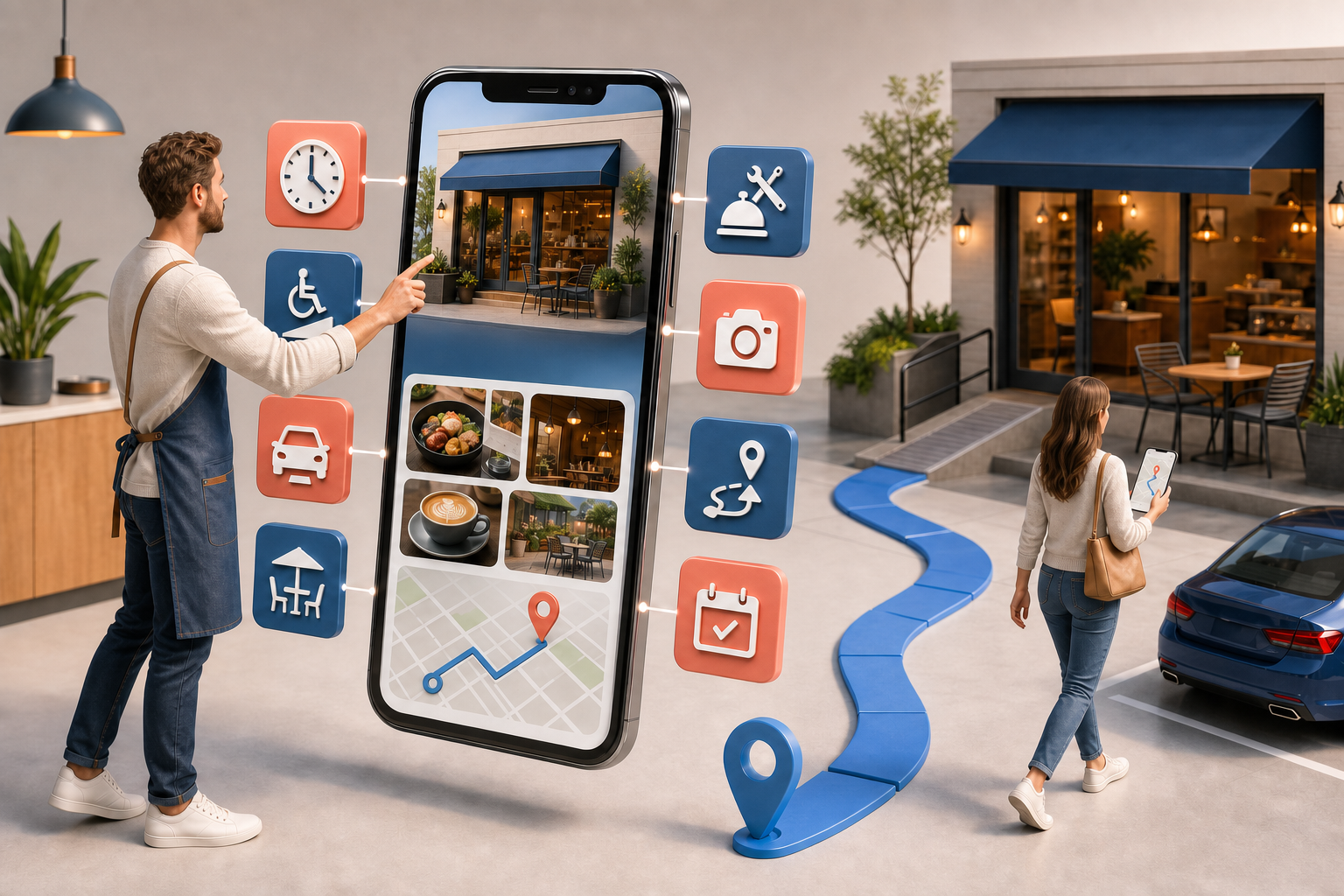
    • Trip planning — I can request recommended stops along my route and receive insightful details like directions, ETAs, and tips from over 500 million community contributors.
    • Direct action — I love how I can book reservations, save interesting places, or easily share them with friends right from the response.

    Why do I care? ‘Ask Maps’ is revolutionizing the way I discover places by shifting the focus from simple keyword searches to interactive, AI-driven recommendations. Businesses wanting to be noticed need rich, accurate, and engaging Google Maps profiles as this is the data utilized by Google’s AI for recommendation making.

    What to keep an eye on: ‘Ask Maps’ is already being rolled out in the U.S. and India for both Android and iOS, with desktop access coming soon. I’m excited about these advancements!

    What’s next? As AI plays a bigger role in how we find places, it’s crucial for advertisers and local businesses to keep their listings accurate and review-rich to make the most of Gemini’s capabilities. I’m looking forward to how this changes the landscape for businesses.


    Inspired by this post on Search Engine Land.

    crushpress.ai community screenshot
  • Effortlessly Manage Google Posts with New Scheduling & Multi-location Tools

    Effortlessly Manage Google Posts with New Scheduling & Multi-location Tools

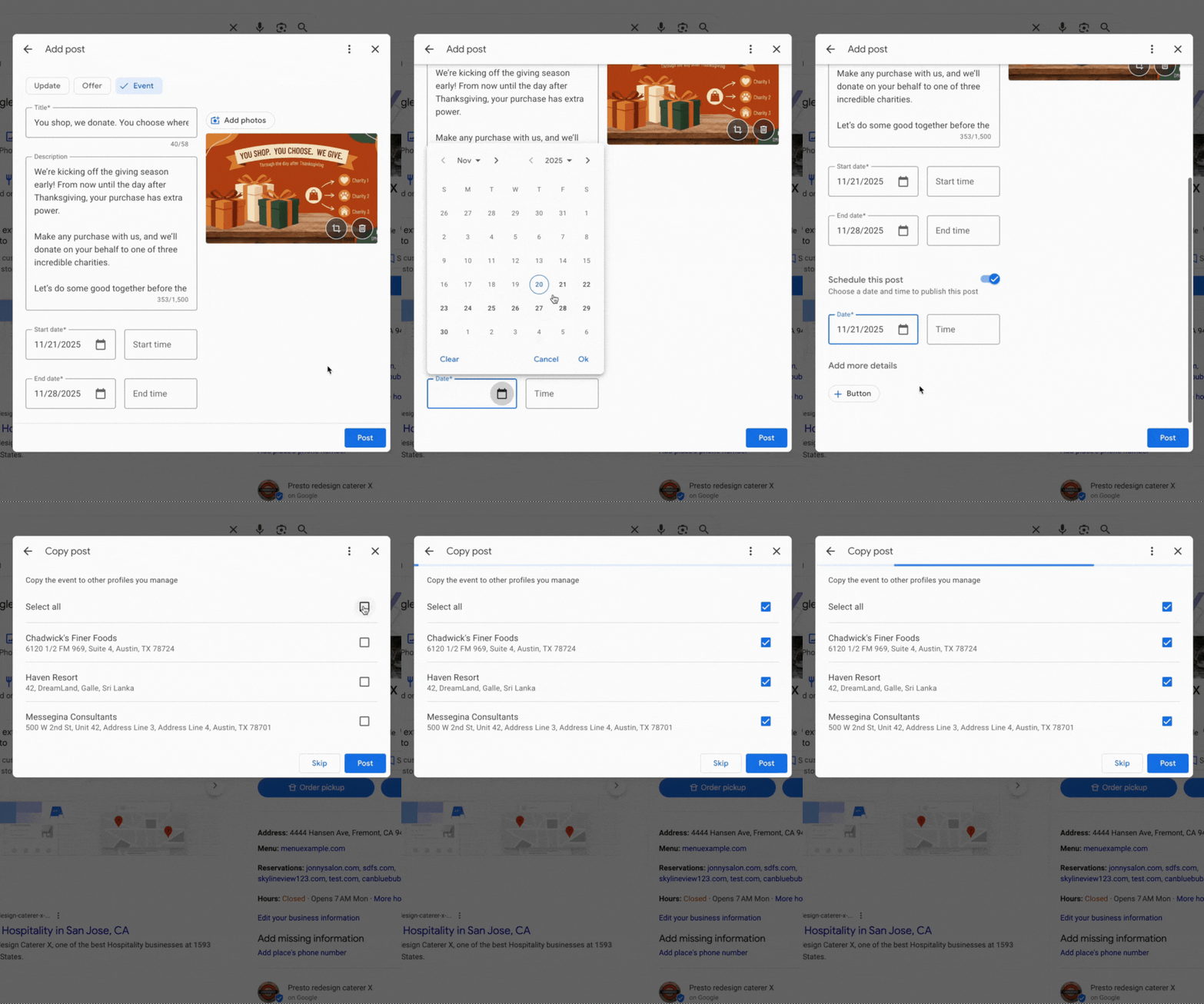
    I’m thrilled to share that Google Posts now includes features that support scheduling and multi-location publishing within Google Business Profiles. These updates are designed to make it easier for us to manage our Google Posts, whether they are for our businesses or clients.

    Scheduling. One exciting new feature when adding a Google Post within our Google Business Profiles is the option to “schedule this post.” We can now select the exact date and time when we want our posts to go live.

    Lisa Landsman from Google shared on LinkedIn, “Plan your entire week or month in advance! You can now schedule your Google Posts to go live automatically at the perfect time.”

    Multi-location publishing. If you, like me, manage several locations for a business, you’ll find the new multi-location feature incredibly convenient. It allows us to quickly copy Google Posts to some or all of our locations with just a click. Lisa Landsman explained, “Easily create a single post and apply it instantly to multiple business locations in one click.”

    ```json
{
  "alt": "Event post interface with title, description, and dates for a charitable shopping event.",
  "caption": "Join our Giving Season event: shop with us, and we'll donate on your behalf to a charity of your choice. Every purchase makes a difference!",
  "description": "This image displays an online post creation interface for an event themed 'You shop, we donate. You choose where.' The event promises to donate on customer purchases to one of three charities. It features a brown background image with wrapped gifts and charity icons. The start and end date fields are set from 11/21/2025 to 11/28/2025, encouraging community involvement in charitable giving during the holiday season."
}
```

    What it looks like. Here’s a GIF that shows this functionality in action:

    Why we care. I care about these updates because I know how busy businesses can be. Often, we don’t have the time to pause everything just to create a timely Google Post about an upcoming event or important message. Now, we can schedule these posts in advance and copy them effortlessly across locations we manage.

    As Lisa Landsman from Google pointed out, “We know the upcoming holiday season is a crucial, and hectic, time for your business. It’s also your biggest opportunity to get your events, offers, and updates in front of potential customers who are actively searching.”


    Inspired by this post on Search Engine Land.

    crushpress.ai community screenshot