I’m seeing Google roll out a new set of Demand Gen updates designed to help advertisers improve creative performance, reach more potential customers across YouTube, and measure campaign results with more clarity.
For me, the bigger story is that Demand Gen is becoming less about manually adapting assets and more about using AI-assisted tools to make creative work harder across Google’s most visual surfaces.
Demand Gen campaigns are built to drive discovery and conversions across Google’s visual placements. With these latest updates, I see Google trying to reduce creative friction while giving advertisers better visibility into what is actually moving performance.
Google says the enhancements arrive as YouTube continues to show value for customer acquisition. The company cited research from Measured showing that 72% of incremental conversions on YouTube come from new customers.
What’s new. I’m watching Demand Gen add expanded video resizing capabilities, giving advertisers the ability to automatically transform creative into more aspect ratios, including vertical-to-square, vertical-to-landscape, and square-to-landscape formats.
That matters because it should make it easier to adapt existing creative for different YouTube placements without having to produce every version manually from scratch.
Why I care. Expanded video resizing can help existing assets fit more YouTube inventory, Gemini can provide AI-powered recommendations before launch, and new web-to-app measurement can give marketers a clearer view of how Demand Gen campaigns influence app installs and return on ad spend.
Gemini joins the creative workflow. Google is also bringing Gemini-powered recommendations directly into the Demand Gen campaign creation process, which makes AI guidance part of the asset selection workflow instead of a separate optimization step.
When advertisers choose image and video assets, Gemini will offer automated suggestions for optimizing creative for YouTube. I see this as a way for marketers to improve asset choices before campaigns go live, rather than waiting for performance data after launch.
Better app measurement. Demand Gen now includes Web to App Acquisition Measurement, allowing advertisers to measure when web campaigns lead users to install an app.
The new reporting gives me a more complete way to evaluate campaign performance because it attributes app installs generated through Demand Gen campaigns. That should help advertisers better understand the full impact of their media spend.
The bottom line. I see Google’s latest Demand Gen updates as a practical combination of AI-powered creative guidance, more flexible video optimization, and broader measurement tools that can help advertisers improve performance while gaining clearer insight into customer acquisition.
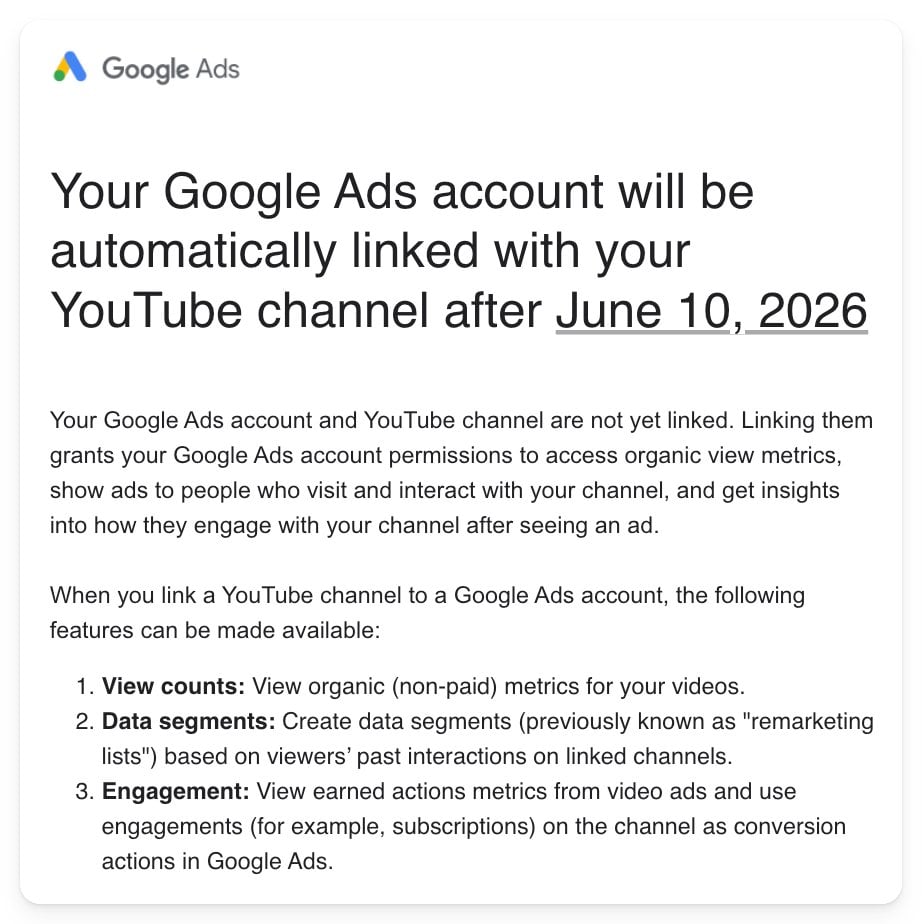
Starting June 10, I’ll enjoy seamless access to valuable YouTube engagement data through Google Ads, all thanks to an automated linking feature.
I received a notification from Google alerting me that my Google Ads accounts will soon be automatically linked to any associated YouTube channels. This change comes into effect on June 10, 2026, and eliminates the need for manual connections.
Now, without lifting a finger, I can access a world of video engagement data and targeting features directly through Google Ads.
Why it matters to me. By linking my YouTube channel, I can now dive into deeper insights and leverage more advanced targeting options that I might have otherwise overlooked.
With this automation, video data becomes a standard tool in my campaign optimization arsenal.
Take a closer look. I’ll have instant access to organic video metrics like view counts right within Google Ads.
I’m also able to create audience segments based on user interactions with my YouTube content, such as video views and channel engagement.
Extra benefits. This integration means I can track ‘earned actions’ like subscriptions or additional views spurred by my ads, making these interactions valuable conversion signals.
Such insights offer a clearer picture of how my video campaigns impact user behavior beyond mere clicks.
What I’m watching for. It’ll be fascinating to see how my measurement strategies evolve with the integration of organic and paid video data, and whether this encourages a broader adoption of engagement-based conversion tracking.
The bottom line. Google is making it impossible to ignore YouTube insights, turning automatic linking into a necessary step for honing targeting, measurement, and performance.
First spotted. Multiple advertisers, including myself, were informed by Google. Notable mentions are Menachem Ani, Hana Kobzová, and Arpan Banerjee.
Ever since learning about Google’s latest update to its YouTube and Discover Feed ad requirements, I’ve been intrigued by the clarification on election-related ads. This change, effective April 2026, doesn’t alter enforcement but provides much-needed transparency.
Why it matters. As someone navigating the complex landscape of YouTube and Discover ad placements, I understand how tightly regulated these spaces are. Historically, election ads have been surrounded by ambiguity. Now, the update helps clear up that confusion without imposing additional restrictions.
What’s new (and what’s not). It’s interesting to note that election ads are now clearly exempt from specific YouTube and Discover Feed ad requirements. However, no changes in enforcement mean that if compliance was achieved before, there’s no need for advertisers to shift gears.
Why we care. With this update, I’ve noticed how Google aims to eliminate the haze surrounding election ads on YouTube and Discover. Although these ads don’t need to meet placement-specific requirements, adherence to Google Ads policies remains essential, offering clearer guidance and more predictable campaign launches.
Zoom in. For election ad campaigns, this exemption is beneficial since these ads aren’t required to comply with the targeted YouTube and Discover Feed ad guidelines. However, advertisers must pass the Election Ads verification within the ad’s targeted region.
Between the lines. It’s vital to recognize this as a documentation clarification rather than a policy change. Google is distinguishing between the unique requirements for YouTube and Discover ads and its overarching ads policy framework.
What advertisers should do. If you’re running political campaigns, it’s crucial to maintain your verification status and continue adhering to Google Ads policies. Despite the exemption, keeping up with regulations is necessary for a smooth advertising process.
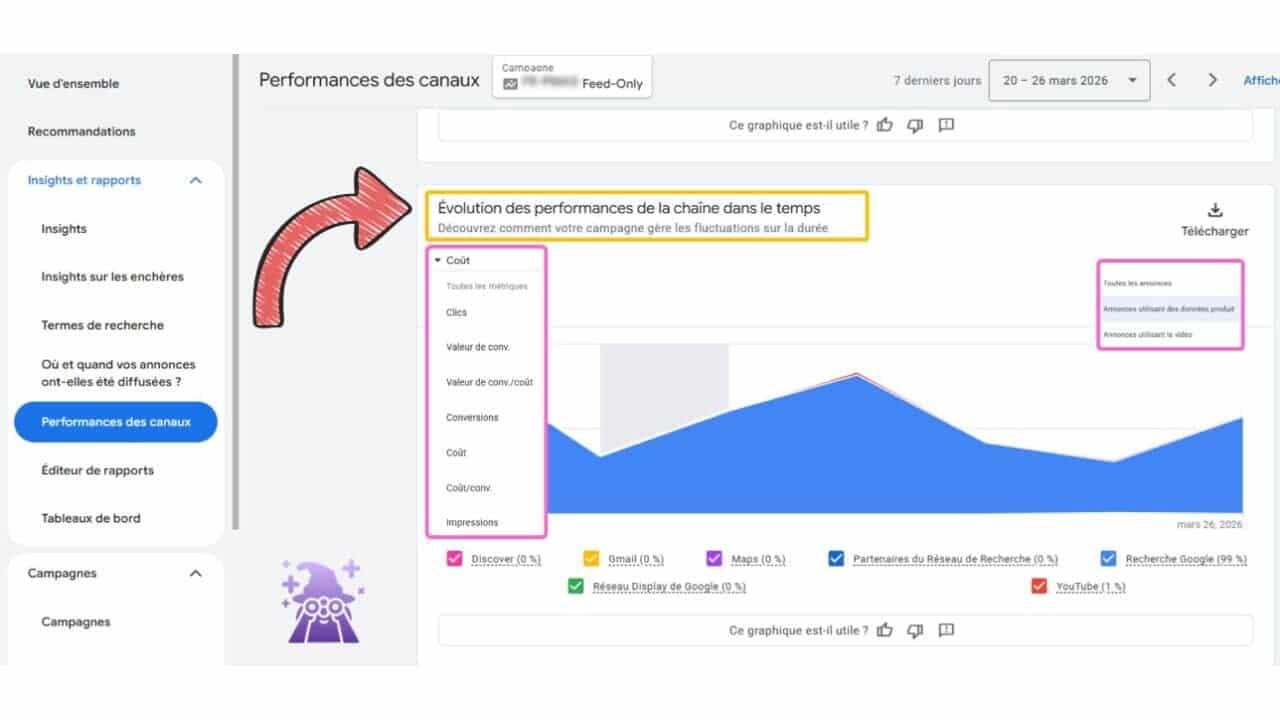
Recently, I discovered that Google has launched an exciting new feature for Performance Max campaigns. As an advertiser, I’m always on the lookout for tools that provide clearer insights, and this new channel performance timeline view does just that. It offers a comprehensive breakdown of how different channels like Search, YouTube, and Display contribute to my campaign results over time.
What’s New
The latest update introduces a timeline graph that showcases channel-level contributions over a selected period, complete with investment and performance filters. This means I can quickly identify which channels are excelling and which ones might need a bit more attention.
The chart features helpful visual cues—like a yellow box highlighting channel performance evolution over time, and a pink box indicating different ad types, such as All Ads, Ads Using Product Lists, and Ads Using Video.
Why I Care
Managing Performance Max campaigns across multiple channels often left me guessing about where my budget was working best. This new view provides valuable insights into channel-level trends, allowing me to adjust strategies or budgets more efficiently. If I notice YouTube underperforming while Search is thriving, I can now make informed decisions without relying purely on guesswork or exported data.
The Big Picture
This new view empowers me to evaluate PMAX performance more effectively, without relying solely on Google’s automated decisions. Now, I can see consistent underperformance or excellence across channels, which guides my budget and asset strategies moving forward.
The Bottom Line
Though it’s not full transparency, this update is a significant move in the right direction. I now have a more structured way to detect trend anomalies in PMax campaigns early and make necessary adjustments to optimize performance.
First Spotted
This feature was first noticed by Axel Falck, Head of Search at Le Mage du SEA, who shared his insights on LinkedIn.
During a recent study, I discovered that Reddit stands out as the most-cited domain in AI-generated answers. In fact, it’s ahead of heavyweights like YouTube and LinkedIn, thanks to an analysis of 30 million sources conducted by Peec AI, a tool specializing in AI search analytics.
The findings: I’ve learned that Reddit claims the top spot across various AI platforms including ChatGPT, Google AI Mode, Gemini, Perplexity, and AI Overviews. Top contenders YouTube, LinkedIn, Wikipedia, and Forbes are right behind. Platforms like Yelp and G2 frequently appear when searching for recommendations.
As I delved deeper into the research, it became clear which domains the AI models tend to lean on:
ChatGPT values Wikipedia, Reddit, and editorial sites like Forbes.
Google shows preference for platforms such as Facebook and Yelp.
Perplexity favors Reddit, LinkedIn, and G2 for queries within the B2B realm.
Why we care: The insight that resonated with me was the importance of having authority beyond just our own websites. Brands that consistently feature on reputable third-party platforms have a better chance of being cited by AI.
Why these sources? It’s fascinating to see how AI systems are wired to prioritize both authority and authentic user input:
I’ve found that Reddit excels because it mirrors genuine user discussions.
YouTube shines in video citations, owing to their comprehensive transcripts and descriptions.
Wikipedia not only serves real-time data but also acts as a foundation for training datasets.
About the data: The analysis spanned 30 million sources, providing a comprehensive look at how often domains are directly cited in AI answers, effectively revealing what shapes these responses.
We’re stepping into an era where the visibility of web content is spreading across a multitude of search and social platforms. Google has always been a force to reckon with, but it’s no longer the only player in the search experience. Video-based social media platforms like TikTok and community sites such as Reddit are carving out spaces as go-to search engines for their dedicated audiences.
This evolving landscape is reshaping how we consume news content. Google’s news SERP is adapting to the era of personalized query responses afforded by LLMs and the influence of social media platforms. To keep up, Google has introduced AI-powered SERP features like AI Overviews and AI Mode. These features prioritize content that is “helpful, reliable, and people-first,” drawing heavily from social media platforms.
As search and social media intertwine more closely than ever before, we need to embrace a new strategy. This involves creating newsroom teams comprising social media experts, SEO specialists, and AI enthusiasts working together towards a unified content visibility goal.
When I optimize news content for social platforms, I also consider the potential performance of these posts on the Google SERP. I’ll delve into optimizing specific SERP features, but first, let’s explore making news content friendly for social platforms.
First, let me offer some sanity tips. It’s tempting to optimize content for every social media platform, but I find it more effective to focus on one or two where my audience is active and my growth opportunities are highest. By reviewing analytics and conducting audience surveys, I can identify the platforms where my audience consumes news content.
Optimize News Content for Social Media Platforms
I begin by considering how my content might appear on different platforms. Here’s my breakdown of which content types work best on each platform and how they might appear on Google:
YouTube
Creating YouTube video content involves following video SEO best practices. With guidance from this comprehensive YouTube SEO guide, I create a successful video strategy by ensuring my video titles align with the content.
Google prioritizes YouTube’s search ranking through relevance, engagement, and quality. I make sure my metadata accurately reflects my video content to ensure it stands out as relevant in a search.
One trend I’ve noted is that older event content on YouTube continues to rank well on Google, even after related articles have faded. Similarly, explainer videos show longevity on the SERP.
Facebook
Facebook, though perhaps not as trendy as it once was, still reaches a diverse audience. This platform excels with community-based content and entertainment news that incites conversation.
Even though Facebook’s dedicated news tab was removed, its posts are becoming more visible on Google’s SERP, which might make it worth reconsidering from a search perspective.
X
Since Elon Musk’s takeover, X’s audience has shifted more to the political right, while its role as a hub for breaking news, live updates, and political content remains strong. Sports content also performs well here, especially in the U.S.
Instagram
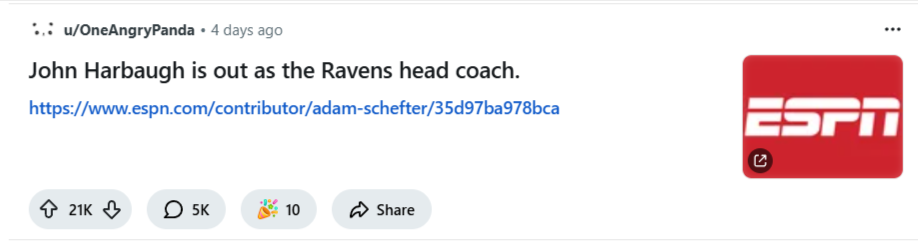
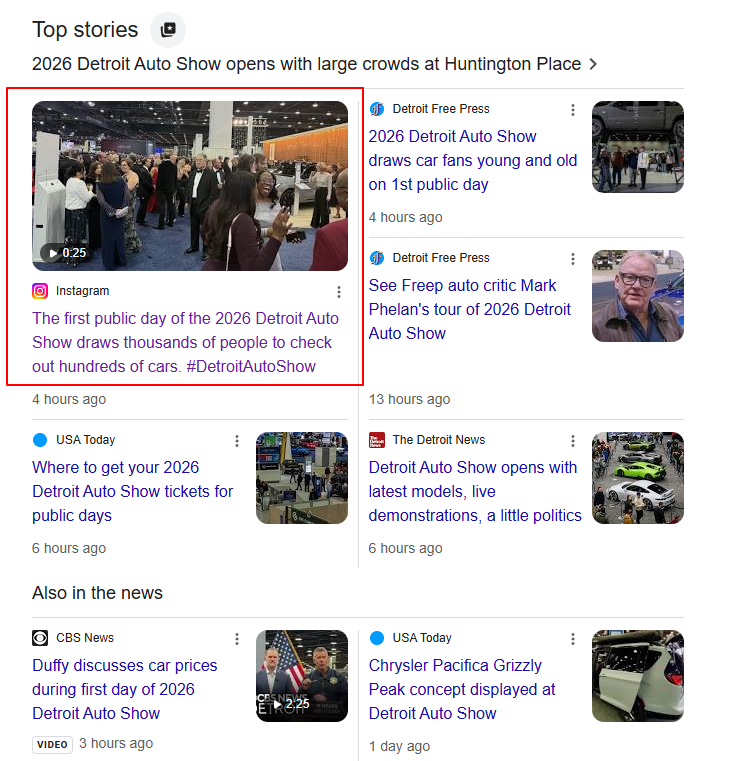
For Instagram, focusing on visually-driven stories, such as celebrity fashion and health topics, is key. The platform also performs well for sports highlights, often appearing in Google’s dedicated publisher carousel or “What people are saying.”
Reddit
Reddit’s unique user base requires a specific strategy to engage niche communities outside other platforms. Whether the content is about tech trends, health, or sports, it’s crucial to understand Reddit’s audience and adhere to its guidelines.
TikTok
The predominantly young, diverse user base on TikTok gravitates towards visual, conversational, and opinion-based content. Short-form videos that are authentic and engaging perform best.
Pinterest
Pinterest might be old-school, but it’s growing with Gen Z, making it ideal for lifestyle content. When I create on Pinterest, I focus on fashion, DIY, and motivational content, using high-quality visuals and a more relaxed posting schedule.
Social Content Opportunities by Google SERP Feature
Understanding how social content appears in different SERP features helps me maximize visibility. For instance, Top Stories capture breaking news while the “What people are saying” feature emphasizes emotionally engaging user-driven content.
Threat or Opportunity?
Instead of viewing social media content on Google’s SERPs as competition, we can leverage it as an opportunity to increase visibility. Our focus should be on integrating social-forward strategies to expand brand engagement and not solely relying on traditional SEO tactics.
If you publish health information, YouTube’s lead among domains cited in Google AI health answers can trigger the wrong response: produce more videos, copy the format already being cited, and assume visibility will follow. That conclusion goes beyond the evidence and creates real risk when the subject is treatment, cancer diets, laboratory results, or another decision that could affect someone’s care.
A better response is to make every important health claim inspectable. You need to know what the AI answer says, whether its citation supports that exact wording, which qualifiers survived summarization, and whether your own video and page tell the same medically reviewed story. Here is a practical way to do that without treating YouTube as either a shortcut to AI visibility or an inherently unreliable format.
Read the YouTube number without drawing the wrong conclusion
Across 50,807 health-related searches in Germany, AI Overviews appeared for more than 82% of the inquiries examined. That level of coverage matters because an AI-generated summary can become the first layer of health information a searcher sees, before any hospital page, journal, association, or video is opened.
YouTube accounted for 4.43% of all citations and was the most-cited individual domain. The percentage and the ranking need to be read together. YouTube led a fragmented field; it did not supply most health citations. A 4.43% citation share is evidence of meaningful visibility, not evidence that Google prefers every video over every medical page.
The credibility mix is more consequential. Only 34.45% of citations came from sources classified as more reliable medical sources, while nearly two-thirds were classified as lacking strong medical or evidence-based credibility. Academic journals and government health organizations together represented only about 1% of citations. Those classifications do not prove that every citation outside the medical group was wrong, but they expose a large verification problem.
AI citations also followed a different pattern from conventional rankings. YouTube placed first by AI citation frequency but only 11th in organic results, and just 36% of pages cited by AI appeared in Google’s organic top 10. You therefore cannot use top-10 rankings as a complete proxy for AI visibility. You also cannot assume that an AI citation proves a page or video is the strongest medical result.
These figures are observational. They do not reveal a YouTube ranking factor, prove why a particular citation was selected, or establish a permanent worldwide pattern beyond the German query set examined. Google has also disputed whether selected examples of risky advice were fairly represented in context and maintains that AI Overviews generally link to trustworthy material. For publishers, that disagreement makes context checking more important, not less.
Key takeaways
YouTube was the leading cited domain, but its 4.43% share does not mean video supplied most health information.
AI citation visibility and top-10 organic visibility are related measures, not interchangeable ones.
A platform is a container, not a medical credibility signal. Evaluate the speaker, evidence, wording, scope, and review process.
Your goal should be a claim that remains accurate when extracted, summarized, and separated from the rest of the page or video.
Audit the health claim, not just the cited domain
A domain-level report can tell you where citations concentrate. It cannot tell you whether a specific AI sentence is supported. That requires a claim-level audit. Use the following process for queries tied to diagnosis, treatment, medication, diet during a serious illness, test interpretation, or another decision with a meaningful health consequence.
Capture the complete answer. Record the exact query, wording of the AI Overview, locale, capture date, every citation, and the sentence or passage attached to each citation. Do not save only the part that mentions your brand.
Break the answer into individual claims. Separate definitions, causal statements, recommendations, thresholds, and statements about who is affected. One paragraph may contain several claims even when Google attaches only one citation.
Map every claim to its alleged support. Ask whether the cited destination supports the exact statement, merely discusses the same topic, or contradicts the summary once its qualifications are restored.
Inspect the video beyond its title. Identify the speaker, relevant credentials, publisher, publication or review date, transcript, references, and the surrounding segment. A title or short extracted passage can sound more certain than the full explanation.
Check the missing qualifiers. Look for the population, condition, stage, exclusions, uncertainty, and boundary between general education and individualized advice. A summary can preserve the main clause while dropping the words that made it safe.
Compare AI and organic visibility separately. Record whether the cited URL appears in the top 10, but do not automatically reject it when it does not. With only 36% overlap in the examined results, organic position is useful context rather than a verdict on the AI citation.
Assign a risk owner. SEO can document the extraction problem, but a qualified medical reviewer should decide whether a consequential health claim is clinically supportable. Keep that approval attached to the exact claim and version reviewed.
A simple red, amber, and green workflow helps you decide what to fix first:
Red: The answer could prompt someone to start or stop treatment, alter a medically significant diet, treat a laboratory result as a diagnosis, or delay professional care, and the citation does not clearly support the action. Escalate it for medical review and do not amplify the claim while that review is unresolved.
Amber: The central point may be supportable, but the AI answer loses a population, limitation, uncertainty, or other qualifier. Rewrite the source material so the qualifier travels with the claim rather than appearing several sentences later.
Green: The claim is narrow, educational, supported by the destination, and represented with its material context intact. Continue monitoring it because the wording or citation set can change.
These colors are editorial priority labels, not clinical validity scores. If you are personally deciding whether to change a treatment, cancer-related diet, or interpretation of a liver blood test, an AI Overview and its cited video are not substitutes for a qualified clinician who knows your situation.
Build a claim package that remains credible outside YouTube
The useful unit of health publishing is not the video, page, or schema record. It is the claim package: a bounded answer, the evidence supporting it, the person accountable for reviewing it, the people to whom it applies, and the caveats required to keep it accurate. Video can carry that package well, but only if its authority survives outside the platform.
Make the spoken answer safe to extract
State the question and answer in the narration. Do not leave the key qualification only in the description, a pinned comment, or an end card.
Keep the caveat beside the claim. If a recommendation applies only to a defined group or depends on professional assessment, say that in the same spoken passage. Distance makes it easier for summarization to separate the claim from its boundary.
Identify who is speaking and reviewing. Give relevant, verifiable credentials and distinguish the presenter from the medical reviewer when they are different people.
Separate education from individualized direction. Explain what a term, test, or treatment generally means without implying that the viewer has a diagnosis or should change care based on the video alone.
Expose the evidence trail. Put supporting references in the description and make clear which reference supports which major claim. A generic reading list is harder to audit.
Correct the transcript and captions. Names of conditions, tests, treatments, and qualifications are precisely where automated transcription errors can distort meaning. The transcript should match the reviewed spoken version.
Review clips as independent objects. A short clip may circulate without the full video’s introduction or disclaimer. It must retain any qualifier necessary to prevent the excerpt from becoming misleading.
Give the video a companion page with the same accountable answer
The companion page should not be a thin transcript built only to host an embed. It should let a reader verify the claim without watching the video and let an editor detect when the page and video have drifted apart.
Place the reviewed answer and its material limitation in the same section as the embedded video.
Show who wrote, presented, and medically reviewed the material. Do not collapse those roles into one vague byline.
Display the review date and update both assets when a substantive claim changes. A fresh page date attached to an unchanged old video creates false alignment.
Attach evidence to the claim it supports. Avoid sending readers through a long references list to guess which item belongs to which statement.
Use headings that reflect real questions, then answer each question directly before expanding on it. This improves clarity even when no AI system cites the page.
Check that the video’s title, thumbnail, description, transcript, page summary, and structured data all describe the same scope. A broad title paired with a heavily qualified answer invites misinterpretation.
JSON-LD can clarify the visible video’s title, creator, publication details, and relationship to the page. It cannot turn an unsupported claim into medical evidence. Keep every structured value consistent with what a user can see, and never mark up credentials, reviewers, dates, or medical relationships that the page does not truthfully establish.
Measure AI citations without manufacturing a success story
A citation dashboard becomes misleading when several different denominators are labeled citation rate. Define each metric before you compare a page, video, competitor, or reporting period.
Metric
Calculation
What it tells you
AI Overview coverage
Queries showing an AI Overview divided by all queries checked
How often the feature appears for your tracked query set
Owned citation presence
Queries citing one of your assets divided by queries showing an AI Overview
How often your content enters an available AI answer
Owned citation share
Your citation appearances divided by all citation appearances captured
Your portion of the citation pool under the same counting method
Video citation mix
Cited videos divided by all cited assets in your dataset
Whether video is over- or underrepresented in your own topic set
Context fidelity
Owned citations represented accurately divided by all owned citation appearances reviewed
Whether visibility preserves the meaning and limitations of your content
Organic overlap
AI-cited URLs also appearing in the organic top 10 divided by all AI-cited URLs
How much AI sourcing overlaps with conventional ranking visibility
The reported 4.43% YouTube figure used all citations as its denominator. Do not compare it with the percentage of queries containing a YouTube link or the percentage of cited domains that are video platforms; those answer different questions. Preserve citation appearances, unique URLs, unique domains, and queries as separate counts.
Track the same query set and locale with a consistent capture method. Record the page and video independently, even when they belong to one claim package. When visibility changes after an update, treat the result as an observation rather than proof that a transcript edit, schema field, embed, or review note caused the change.
Most importantly, do not count every citation as a win. An AI answer that cites your asset while stripping away a crucial limitation can create more reputational and health risk than no citation at all. Context fidelity belongs beside visibility in every report sent to editorial, medical, legal, or leadership teams.
Choose the next publishing move by consequence, not format
You do not need to convert your entire health library into video. Start with a bounded set of ten queries where a misleading answer could affect treatment, diet during a serious illness, test interpretation, or a decision to seek professional care. That set is small enough for claim-level review and important enough to reveal whether your current process protects users.
Capture each AI Overview, its citations, and the corresponding organic top 10.
Split every answer into claims and apply the red, amber, or green editorial label.
Select the highest-consequence unsupported or decontextualized claim, regardless of whether its current citation is a video or page.
Create or revise one medically reviewed claim package: spoken answer, transcript, companion page, evidence mapping, reviewer ownership, and accurate structured data.
Recheck the same query set after publication, keeping the denominator and locale unchanged.
If the asset gains a citation, verify the summarized wording before reporting success. If it does not, keep the improved content; the safety and clarity gains still matter to every person who reaches it directly.
YouTube’s citation lead is a reason to inspect video more carefully, not a reason to imitate it blindly. Make your next health answer narrow enough to verify, complete enough to survive extraction, and accountable to a qualified reviewer. Then measure whether Google cites the right claim in the right context.
Google Ads has introduced exciting updates to its Creator Partnerships, making it easier for me to manage collaborations with YouTube talents on a larger scale.
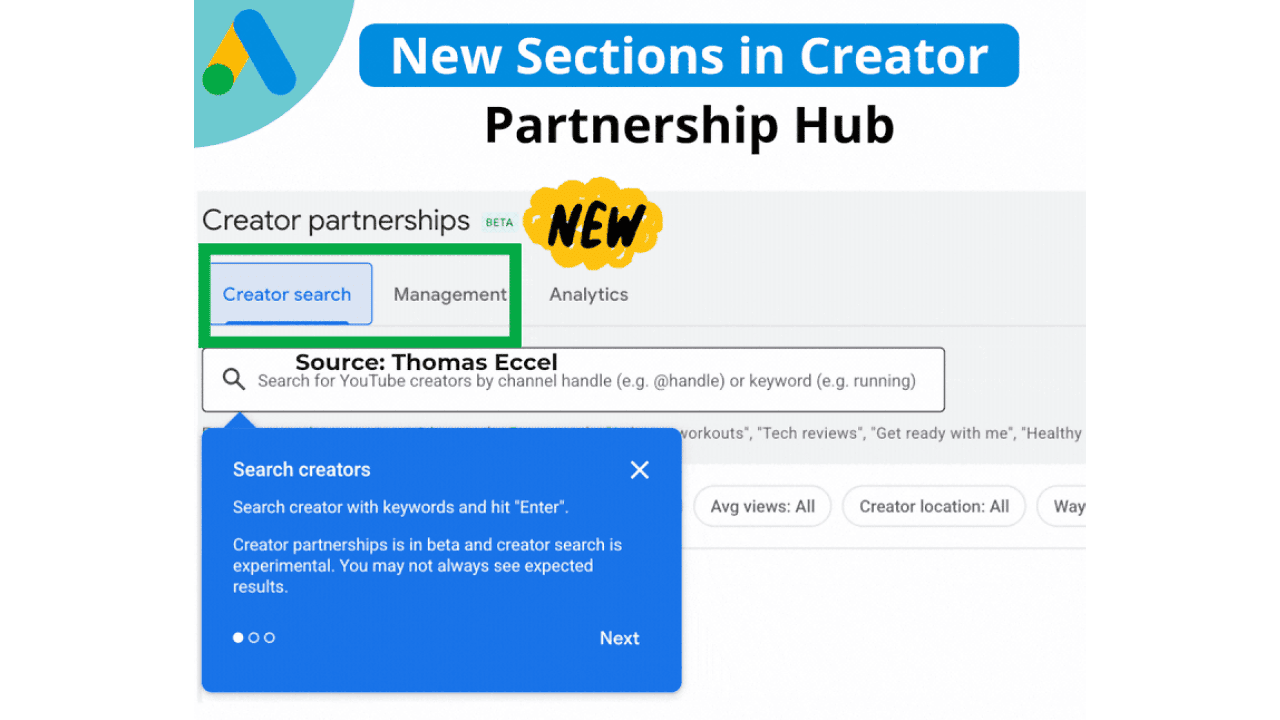
With the introduction of Creator Search, I can now effortlessly find YouTube creators by utilizing keywords or channel handles. This tool allows me to refine my search based on subscriber count, average views, location, and their availability for contact. It’s a game-changer, significantly cutting down the manual work involved in discovering and reaching out to creators.
In addition to the search feature, Google has unveiled a new Management section. This centralizes all communications with creators, allowing me to view their names, the status of inquiries, subjects, the latest updates, and scheduled response dates—all in one place with the convenience of direct email access.
Why this matters to me. As creator-led campaigns become a core aspect of media strategies, having better tools to identify the right collaborators and maintain organized partnerships is crucial. The latest enhancements to Google Ads’ Creator Partnerships (beta) cater to these needs perfectly.
First sightings. This update made headlines when Google Ads Specialist Thomas Eccel shared it on LinkedIn, making industry professionals eager to explore its capabilities.
The big picture. These upgrades are pushing Creator Partnerships closer to a comprehensive workflow tool, aiding teams like mine to manage creator collaborations with the same efficiency and accountability that we apply to other paid media endeavors.
Bottom line. By enhancing both discovery and organization, Google’s updates to Creator Partnerships empower me to execute creator campaigns at scale with ease.
I recently discovered a game-changing update from Google that’s bound to catch the attention of many advertisers. Google’s Performance Max now allows me to upload video files directly in the “Edit assets” panel, simplifying the campaign setup process significantly. What’s even better? I don’t need a YouTube channel or Shared Library for this.
Here’s the scoop. This handy feature pops up as an “Upload” tab in the Google Ads UI, making it super easy to add video assets during PMax campaign creation. Just a simple drag-and-drop, and I’m set to move on, especially helpful if I’m new to video advertising.
In the YouTube ad setup, I’ll find a clear, highlighted box prompting me to drop in my video file, smoothing out what used to be a more complicated process.
How does it work? These video files are stored in a Google-managed channel, not on my personal YouTube account. While they’re usable in ads, they don’t function like typical YouTube uploads, which might affect how I manage my content.
Why it matters to me. This update is a boon if I don’t have a YouTube presence or need a quick way to upload video assets. However, I should be mindful of the trade-offs: I’ll have no analytics, no remarketing capabilities, no metadata access, and crucially, I won’t own the assets long-term. It’s a convenient option for quick setups, but I must proceed with caution and ideally upload through a proper brand channel when possible.
Important limitations. Using this method imposes several restrictions:
No YouTube Analytics
No remarketing audiences
No metadata editing
No custom thumbnails
No ability to appeal rejections or restrictions
No brand-channel presence or asset ownership
How I found out. The first mention of this update came from Web Marketing Consultant Dario Zannoni, who shared it on LinkedIn. I appreciated his insights into how this could change my advertising approach.
The takeaway. This feature is a great shortcut if I’m in a hurry or don’t have a robust YouTube setup. Still, maintaining best practices by using my official brand channel ensures I preserve analytics, gather audience data, and retain creative control.
Recently, I’ve noticed Google has started automatically linking YouTube channels with Google Ads accounts. This innovation allows advertisers like me to quickly tap into valuable audience data, though it does require careful permission management.
When Google’s system detects a strong connection between a YouTube channel and a Google Ads account, it takes action by linking them. This gives us richer audience signals without us having to do a manual setup.
What’s happening now? Google will set up these links automatically if a strong relationship is identified, notifying us 30 days in advance. This email notification allows us to decide whether to opt out or connect sooner.
How does it work?
During the 30-day period, if no one opts out, the link will be completed automatically. If I manage both accounts, I can even connect them immediately. There’s flexibility here, too, as I can always adjust permissions or unlink later if needed.
Why this matters to us. This development simplifies how we, as advertisers, access YouTube audience data. It makes it straightforward to target viewers and construct data segments. However, it also introduces uncertainties about control over our assets and the permissions we’ve set.
Benefits for advertisers. Once linked, I can:
Use YouTube interactions to run more effective ads.
Leverage organic views and earned actions for performance insights.
Create data segments from how audiences engage with my channel.
Consider channel engagement as conversion activities, like subscriptions.
Limitations I’ve noticed
Channel owners gain no control over the actual Google Ads account.
Copy or edit capabilities for channel videos are not given to advertisers.
If personalized ads are disabled, audience data reports are also turned off.
Restrictions on Video Ads Certification (VAC) are still applicable; removal of these is specific to the linked Ads account.
Managing these links. If I, as an admin, choose to opt out, I can easily do so through the links provided in the notification emails from Google. If opted out, the link won’t be made. Meanwhile, manual linking can always be done via the traditional Google Ads settings menu.
Initial discovery. The new auto-linking feature was first highlighted by Hana Kobzová, founder of PPC News Feed. More on this can be read here.
Final thoughts. With Google’s new auto-linking, we as advertisers can enjoy less setup hassle and better YouTube performance insights. However, it’s crucial to monitor our notifications to ensure that data sharing aligns with our privacy preferences and company policies.