
When I work on a site built with a framework like Next.js, Nuxt, SvelteKit, or a similar JavaScript framework, I pay close attention to hydration. It is the step that turns server-rendered HTML into an interactive page, but it is often explained in a way that does not connect clearly to SEO.
I think hydration is easier to understand when I separate content from behavior. The content may already be visible, but the page may not be fully usable until the browser finishes connecting that content to the JavaScript behind it.
What I mean by hydration
Hydration is the process where JavaScript in the browser takes over the static HTML that was built on the server. The server sends a complete page first, and then the framework attaches the logic that makes buttons, menus, forms, filters, and other interactive pieces actually work.
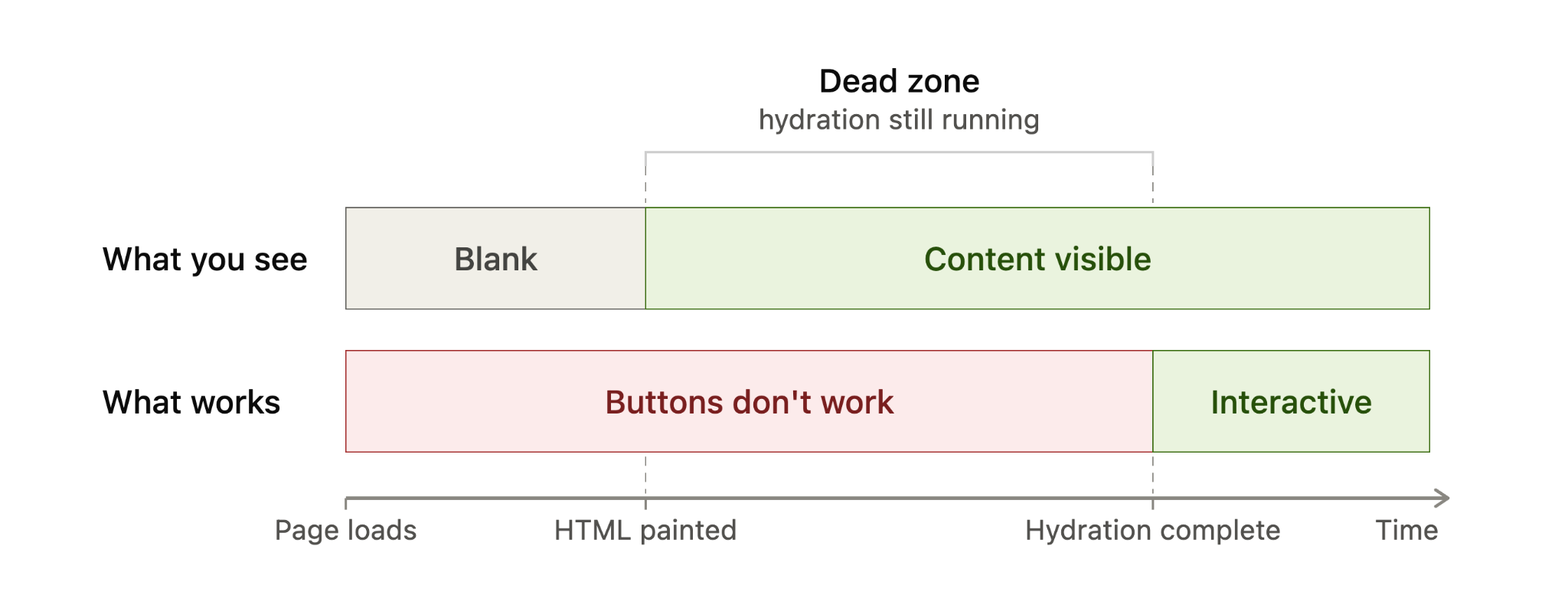
Here is how I usually explain the sequence. First, the server builds the page and sends fully formed HTML to the browser. I can see the content quickly, but the page is not interactive yet. Then the framework loads, walks through the existing HTML, attaches event listeners, and reconnects the visible markup to the application logic. Once that is done, the page behaves like a normal interactive app.
This is why server-rendered HTML can feel fast at first. It can paint quickly and often helps with first impressions and Largest Contentful Paint (LCP). The tradeoff is that, with traditional hydration, the page may appear ready before it is actually usable.
Hydration adds interactivity, not content
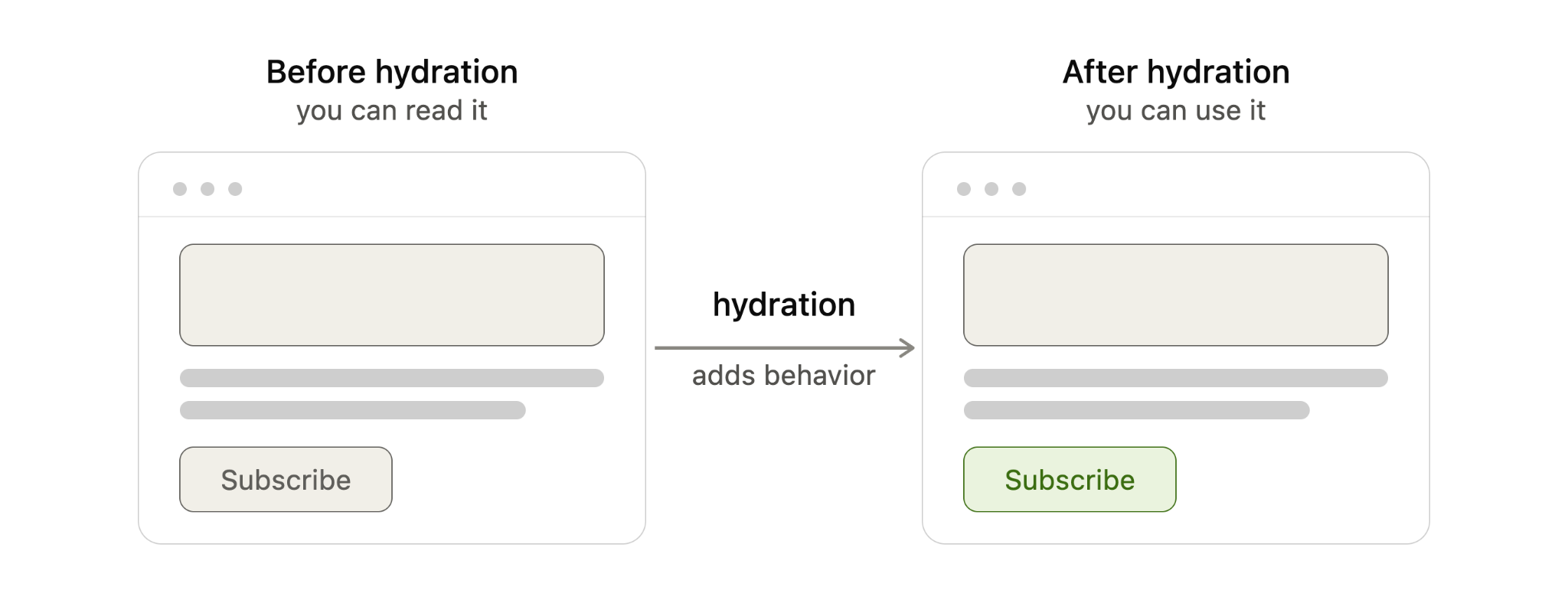
The most important distinction I keep in mind is this: hydration does not add the main content to the page. The text, images, and layout should already be present in the server-rendered HTML. Hydration only adds behavior by wiring that HTML to the JavaScript that responds to clicks, typing, taps, and other user actions.
Put simply, before hydration I can read the page. After hydration, I can use it.
I also avoid confusing hydration with the rendering pattern itself. Server-side rendering (SSR), static site generation (SSG), and client-side rendering (CSR) describe where and when the page is built. Hydration describes what happens after server-rendered or statically generated HTML reaches the browser and needs to become interactive.
From an SEO perspective, that distinction matters. When a page uses SSR or SSG correctly, the core content is already in the initial HTML. Google can discover and index that content from the HTML before depending on a JavaScript render step, which is generally more reliable than sending a mostly empty client-rendered shell.
When I see hydration become an SEO problem
Most of the time, I do not treat hydration itself as an SEO problem. It becomes a problem when hydration breaks, usually because the HTML created on the server does not match what the framework expects to create in the browser.
That kind of mismatch can happen when content depends on browser-only APIs such as localStorage, when a value changes between server and client rendering such as new Date(), when a third-party script or browser extension changes the DOM before hydration finishes, or when invalid HTML causes the browser to rewrite the structure before the framework can attach to it.
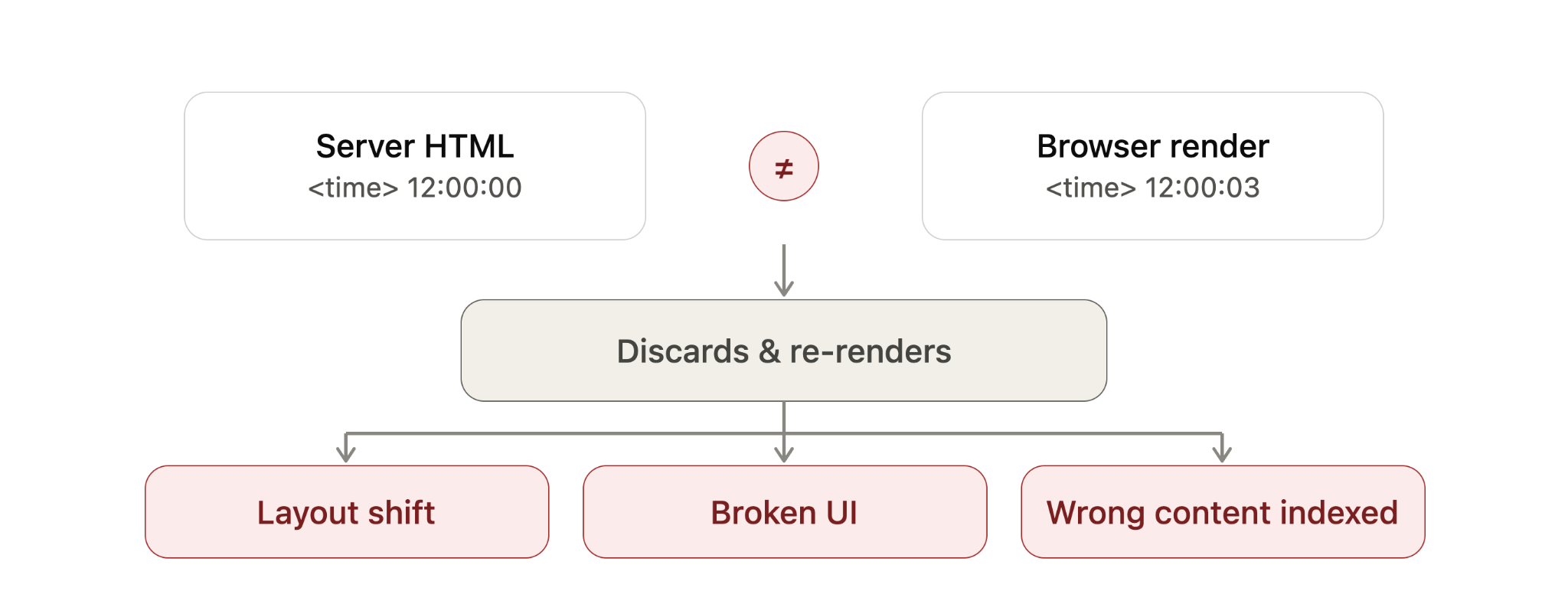
When the two versions do not line up, the framework may throw away the mismatched section and re-render it in the browser. The exact behavior depends on the framework, but the SEO and performance risks are similar.
For example, if a <time> value is generated with new Date(), the server may output one value while the browser generates another. That mismatch can force a re-render, even though the page appeared to load correctly at first.
I worry about this because it can hurt the page in several ways. A re-render can make the page feel sluggish, which can affect Interaction to Next Paint (INP). It can shift the layout, which can affect Cumulative Layout Shift (CLS). It can also break user actions if event listeners fail to attach properly, leaving buttons, menus, or forms unresponsive.
In severe cases, Google may read the raw server HTML before JavaScript finishes rendering and then index content that visitors never actually see after the page re-renders. That is the scenario I want to avoid most: search engines and users experiencing different versions of the same page.
The fix is usually not an SEO trick. It is a development fix. I want the underlying mismatch removed by using valid HTML, avoiding browser-only logic during server rendering, stabilizing values that change between server and client, and controlling third-party scripts that alter the DOM too early.
How I spot hydration problems on a live site
Hydration errors are usually easier to catch in development than on a live site, but I still look for a few practical signals. I start with the browser’s Developer Tools console and check for hydration warnings, JavaScript errors, or framework-specific mismatch messages.
Then I watch the page load carefully. If content flickers, shifts, disappears, reappears, or stays unresponsive for longer than expected, I treat that as a sign worth investigating.
I also use Google Search Console’s URL Inspection tool on important templates to see how Google renders the page. For larger sites, I prefer crawling with JavaScript rendering enabled in tools like Screaming Frog or Sitebulb so I can compare rendered output against raw HTML at scale.
How I think about different hydration approaches
Modern frameworks handle hydration in different ways, and I think of those differences as a balance between performance, interactivity, and how much JavaScript must run in the browser.
Full hydration means the entire page hydrates in one pass. It is straightforward, but it usually ships the most JavaScript and asks the browser to do the most main-thread work. Next.js Pages Router is a common example of this model.

Partial hydration hydrates only the interactive pieces, often called islands. Static sections remain plain HTML and do not need client-side JavaScript. Astro’s islands architecture is a well-known example of this approach.
Progressive hydration hydrates the page in pieces over time. A framework may hydrate sections as they scroll into view or as browser resources become available. Angular’s incremental hydration follows this general pattern.
React Server Components take a different path by letting some components render entirely on the server and ship no client-side JavaScript for those server-only parts. In those cases, there is nothing for the browser to hydrate for that portion of the page. Next.js App Router uses this model.
Resumability goes further by trying to skip hydration entirely. Instead of re-running components on load, the page resumes from the state the server already produced. Qwik is the main example here, although I still view it as newer and less battle-tested than some of the older patterns.
When I compare these techniques, I look at what hydrates, how much JavaScript ships, and how much work the browser must do. Full hydration touches the entire page and usually ships the most JavaScript. Partial hydration touches only interactive components and ships less. Progressive hydration spreads the work over time. React Server Components reduce hydration for server-only parts. Resumability aims to avoid hydration altogether.
What this means for my SEO work
I do not assume hydration is bad for SEO. In most cases, it is simply part of how modern server-rendered and statically generated sites become interactive.
What I do watch closely is whether the server HTML and the browser-rendered version agree. If they do, hydration is usually a performance and user experience consideration. If they do not, hydration can become a visibility problem, especially when Google indexes a version of the page that users never see.
Newer frameworks reduce some of this risk by shipping less JavaScript and doing less work in the browser, but they do not remove the need for careful implementation. For me, the practical takeaway is simple: make sure the important content is present in the initial HTML, keep server and client output consistent, and test how search engines actually render the page.
Inspired by this post on Search Engine Land.


