I’m watching YouTube take a bigger step into conversational search by expanding Ask YouTube to signed-in U.S. desktop viewers who are 13 and older. What started as a Premium-only experiment is now reaching a much broader audience.
What is Ask YouTube? I see Ask YouTube as YouTube’s AI-powered search layer. Instead of typing a traditional keyword query and scanning a list of videos, I can ask a natural-language question in the YouTube search bar and get an AI response that may include text, video clips, long-form videos, Shorts, and suggested follow-up prompts.
Access is expanding. When YouTube announced the test in April, Ask YouTube was limited to U.S. YouTube Premium members who were 18 and older and opted in through youtube.com/new. On July 6, YouTube expanded it to signed-in U.S. viewers 13 and older using English-language searches on desktop.
Signed-out viewers and supervised accounts are still excluded for now. YouTube also said it plans to bring the feature to more devices, languages, and users worldwide in the coming months.
Standard YouTube Search is not going away. If I land on an Ask YouTube results page and want the usual video results, I can click All or return to the Home page. That means Ask YouTube remains a separate search option, not a full replacement for traditional YouTube Search.
Views still count for creators. YouTube said videos featured inside Ask YouTube responses can give creators another path to discovery. Views from Shorts, videos, and previews shown in Ask YouTube responses count toward total view metrics and YouTube Partner Program eligibility.
I also noticed that featured videos display the video title and channel name, which matters for attribution and visibility. For creators, YouTube’s guidance is clear: publish unique, high-quality content with descriptive titles and clear chapters so its systems can better match video segments to viewer questions.
A bold Google logo sits atop layered, colorful digital documents, evoking the fast-moving world of search marketing, ad formats, campaign assets, and platform updates.
Why I care. YouTube is putting conversational AI search in front of a much larger group of U.S. desktop users. If I’m creating or optimizing video content, this raises the value of clear titles, useful chapters, and segments that directly answer specific questions.
For SEO and content teams, this is another reminder that discovery is shifting from simple keyword matching toward answer-based experiences. The videos most likely to benefit are the ones that make it easy for YouTube to understand what each section covers and which viewer questions it solves.
What it looks like. YouTube shared a GIF showing Ask YouTube in action, where users can ask a question, review AI-assisted results, and continue with follow-up prompts.
I recently delved into the intricate world of Google Discover, uncovering how its 20 pipelines and 42 million cards shape the landscape for publishers. This exploration reveals how trends, news, videos, and advertisements flow through the digital pipelines, achieving broadcast-level reach for some content.
Metehan Yesilyurt’s SDK analysis brought the pipeline names to my attention, and I meticulously collected data over three months to decipher each pipeline’s function—including volume, reach, timing, and dominance. Let’s dive into what the examination of 42 million cards reveals about Discover’s inner framework.
Our journey took three months (December 2025 – February 2026), where I analyzed real Discover feeds from hundreds of devices. The result was the analysis of 42 million feed cards intricately linked to their selecting pipelines.
This analysis built on existing knowledge from the SDK, as you might have encountered in Metehan’s SDK Analysis. My objective was to illuminate what each pipeline actively accomplishes—how much content it picks, how many devices view it, the pace at which it operates, and which publishers it highlights. That’s the story my data tells.
Four metrics were computed for every pipeline:
Reach — the percentage of devices showing each URL daily
Speed — the median age of articles when they appear
Exclusivity — the percentage of URLs exclusive to the pipeline
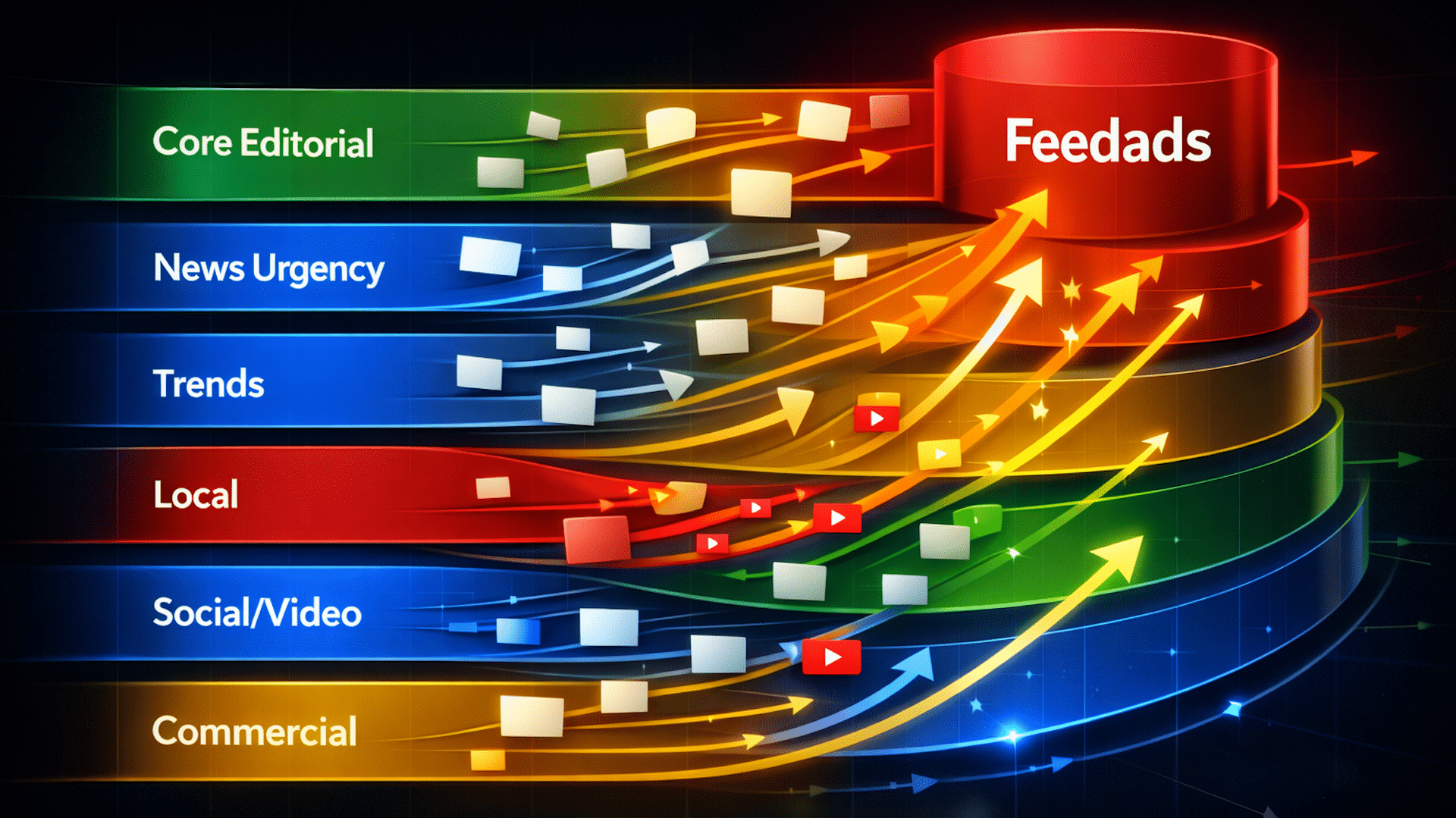
Diving deeper, many believe Discover operates on just one recommendation algorithm. However, our results tell a different tale—a sophisticated system with six layers, each with its unique logic, pace, and audience.
The six layers include:
Core editorial — various content types leading with editorial consistency.
News urgency — swift distribution of must-see news content.
Trends — pipelines dedicated to detecting and maintaining trends.
Local/geo — focusing on geotargeted stories and content.
Social/video — elevating YouTube video content into prominence.
Commercial — enhancing advertisements’ reach through platforms like YouTube.
In my exploration, I found peculiarities unique to the English Discover feed, including a YouTube content journey expanding through three successive pipelines. This system brings significant amplification to the reach of content that passes through it.
English Discover has also incorporated AI Overviews, an AI-generated summary, although this has been limited to English feeds only. Furthermore, a surprising revelation was the systemic under-representation of Premier League content across numerous pipelines, unlike other sports.
In conclusion, the Discover ecosystem continually evolves. Observing these changes provides valuable insights into the system’s architecture and potential influential power for publishers.
Data Source: 42 million Discover cards from December 2025 to February 2026. Analysis by 1492.vision with recognition to Metehan Yesilyurt for his work on Google SDK analysis.
A quick five-minute video can offer more data to a large language model than many blog posts. Here’s how I can enhance my brand’s visibility for AI data retrieval.
With OpenAI’s significant deal with Disney, web scraping is undergoing a transformation. This agreement lets OpenAI employ high-fidelity, human-verified cinematic content to minimize AI inaccuracies.
These opportunities enhance my brand’s visibility and recognition, as AI models crave high-quality data. Video becomes a crucial asset for my brand in this evolving landscape.
Here’s why video is becoming the AI’s truth source and how I can leverage it to defend my brand’s identity.
Brand drift in AI occurs when an AI doesn’t have specific data about my brand, leading it to piece together my brand’s story from generalized information.
This interpolation risks creating misleading brand narratives. Imagine a situation where an AI inaccurately describes my SaaS company’s product features because it lacks precise data.
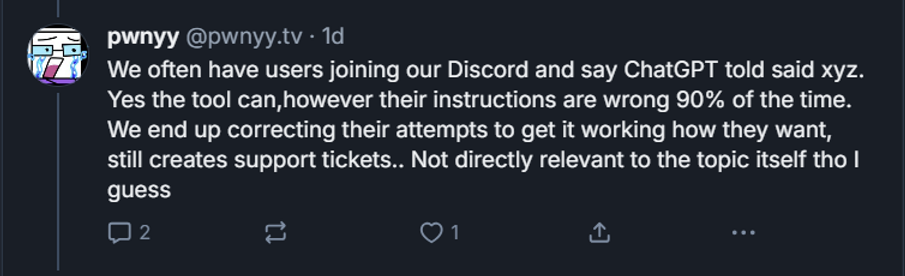
Streamer.bot faced a similar issue, with AI-generated instructions that were confidently incorrect, creating unnecessary confusion and workload.
Even local businesses are affected. A restaurant owner reported repeated inaccuracies shared by Google AI about their menu in an article.
Providing a canonical truth source, like video, prevents AI from distorting my brand’s message.
Authoritative videos carry significant semantic value, offering detailed transcripts and visual proof that establish a solid truth source, helping avoid misinformation from any other platforms.
Videos pack high data with nuance, offering multiple layers of communication through visuals, sound, and text.
Studios such as Berlin-based Impolite produce high-quality videos to help brands retain their identity, preventing brand drift by offering rich data sources for AI.
For instance, Karman’s “The Space That Makes Us Human” project showcases expert-led video that serves as an authentic truth source for brands.
Authenticity now acts as a crucial technical signal. Verification ensures that AI models can trust the provenance of a video.
Real-world footage is the ultimate high-trust data source. AI-generated videos typically lack the real-world’s dynamic intricacies.
Organizations like the Coalition for Content Provenance and Authenticity (C2PA) and the Content Authenticity Initiative (CAI) enhance digital content transparency.
These entities allow brands to digitally sign videos, establishing a trustworthy indicator for AI models versus unsigned content.
Similarly, I can understand more about media verification, establishing an unbroken chain of evidence from creation to consumption.
On LinkedIn, a “CR” mark on media indicates its origin and editing history, boosting content authority and authenticity.
Google’s integration of C2PA signals ensures AI-related policies are reflected in search and ads, maintaining accurate representation and disclosure.
In content marketing, adopting C2PA helps me safeguard against misinformation, acting as a quality assurance measure.
If necessary, I can utilize Sony’s camera authenticity solutions to embed real-time digital signatures in media, proving it’s genuine and trustworthy.
C2PA-compliant editing tools allow me to create a manifest detailing all edits and tools used, preserving the content’s integrity.
A cryptographic seal verifies the content’s integrity, alerting AI to broken data chains, ensuring only accurate information is spotlighted.
Given the content overload today, traditional verification methods struggle, but verified subject matter experts (SMEs) stand out as credible sources online.
By pairing expert insights with video evidence, brands provide AI with authentic, non-replicable authority that audiences trust.
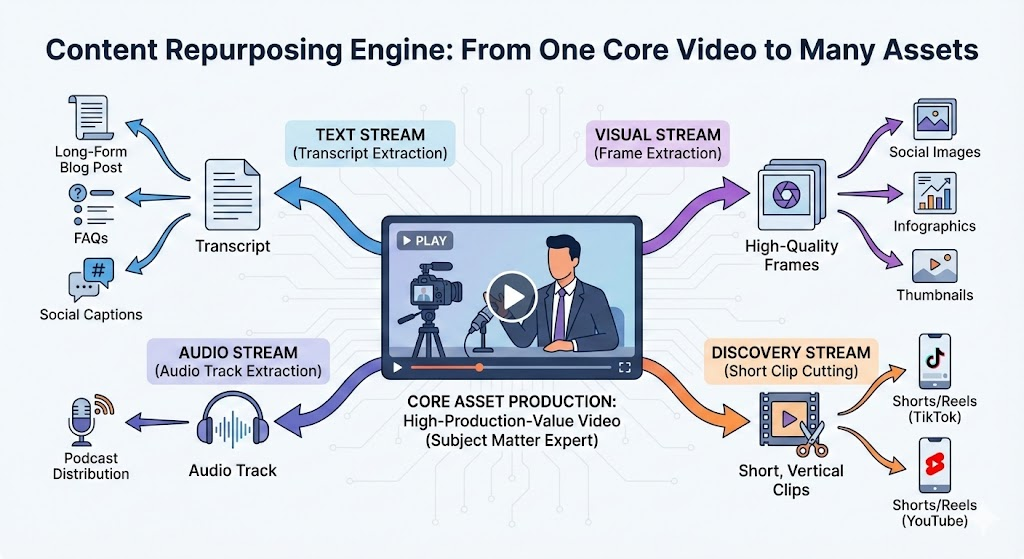
Incorporating video as central content captures nuanced details, giving birth to high-quality content across various media platforms.
Repurposing video into text, images, audio, and social media content builds an authority loop, increasing the probability of data retrieval by AI models.
I should predict where AI might misrepresent my brand and utilize verified expert voices and video documentation to address potential misinformation.
It remains vital for me to focus on context over mere compliance in brand building through high-fidelity, cryptographically signed video, safeguarding identity and authenticity.
The mandate is simple: Record reality. Ensuring I provide a verifiable video record prevents AI from creating false narratives about my brand.
Video is undeniably one of the most compelling and information-rich marketing tools I have at my disposal.
While text can convey a message, video brings it to life, offering emotional depth and context like nothing else.
For AI, these videos are a treasure trove of data, enabling precise information processing and understanding.
There was a time when video perplexed search engines, but today, AI can effectively ‘watch’ and decode video content by breaking it down into visual, auditory, and textual streams.
Join me as I dive into optimizing videos for AI to maximize visibility and accuracy.
Why Video Matters in AI: Contextual Density Optimization
Back in the day, understanding a video relied heavily on meta descriptions like titles, tags, and transcripts. Now, video files themselves directly inform AI training.
AI models such as Gemini 1.5 Pro ‘view’ videos through discrete tokenization, translating video content into an understandable language.
AI performs three key functions when processing video:
Seeing: It captures snapshots at set intervals to interpret on-screen actions.
Hearing: It analyzes audio far beyond words, capturing emotions and background nuances.
Connecting: By associating actions like someone holding a wrench with the word “wrench,” it creates meaningful links.
Precision and quality are crucial—videos that focus on specific, clear data, or what’s termed content granularity, have a stronger impact than drawn-out ones.
AI can even glean ‘silent’ information, like:
Text on presentation slides
Product labels in demos
A presenter’s facial expressions
These elements translate videos into a language that AI understands. A blurry video or unclear audio could lead AI to erroneously favor a clearer competitor source.
Preventing AI Misunderstandings About Your Business
Sometimes AI may fill in gaps about my brand using competitor data.
For instance, if competitors offer trials and I don’t, AI might incorrectly assume I follow the same practice, leading to brand drift.
High-quality video is an effective remedy, serving as factual ground truth that prevents speculative guessing by AI.
Nuance: Videos featuring expert insights on complex services provide details often missing in written content.
Correction: Fresh videos replace outdated AI knowledge, updating its understanding.
Trust: AI is less inclined to guess with high-trust visual signals.
Tip: Incorporate video transcripts and audio into RAG systems to ensure AI accurately narrows your brand narrative.
How AI Engages with Videos
With models like Gemini 1.5 Pro, AI processes text, images, and audio simultaneously.
Other AIs depend on distinct specialized models for processing, which handle each element separately.
No matter how AI interacts with my videos, its performance improves with structured text—carefully review transcripts, optimize titles, and ensure captions are spot-on.
FYI: Gemini 1.5 Pro can process entire movies or webinars without trouble, tokenizing video content at 300 tokens per second.
This one-frame-per-second sampling influences video editing trends like smash cuts, popular on platforms like TikTok and Instagram Reels, but these may not mesh well with AI’s need for clarity.
Fast edits risk missing important visual information; frames should be visible long enough for accurate sampling.
Revisit “slow TV” to maintain visual clarity in technical content, with slow pans and deliberate scene changes.
Even with cutting-edge AI, elements like facial recognition and text scanning (OCR) are vital in decoding video content.
Key focus areas include:
Resolution and Readability
Avoid blurry videos as OCR struggles with anything below 360p despite super-resolution techniques. Aim for crisp 1080p for optimal results.
Contrast and Font Selection
For machine readability, choose bold fonts like Arial or Helvetica on a high-contrast background, such as white on black.
Visual Anchors
Clear visual anchors help AI visualize and connect information, whether it’s the UI of software or rotating a physical product for spatial understanding.
Audio Layers
My voice in a video shapes the message. AI analyzes patterns and emphasis to identify significant content.
Advanced models process audio like text, converting speech via ASR models.
Speaker Identification: Clarify speakers to enhance AI understanding.
Audio Bolding: Use pauses like punctuation to emphasize key points.
Consistency: Align spoken and visual content for cohesive messaging.
Tip: Sync scripts with visuals for cohesive communication.