Tag: Indexing

  • What Google’s Indexing API Really Tells Job Boards

    What Google’s Indexing API Really Tells Job Boards

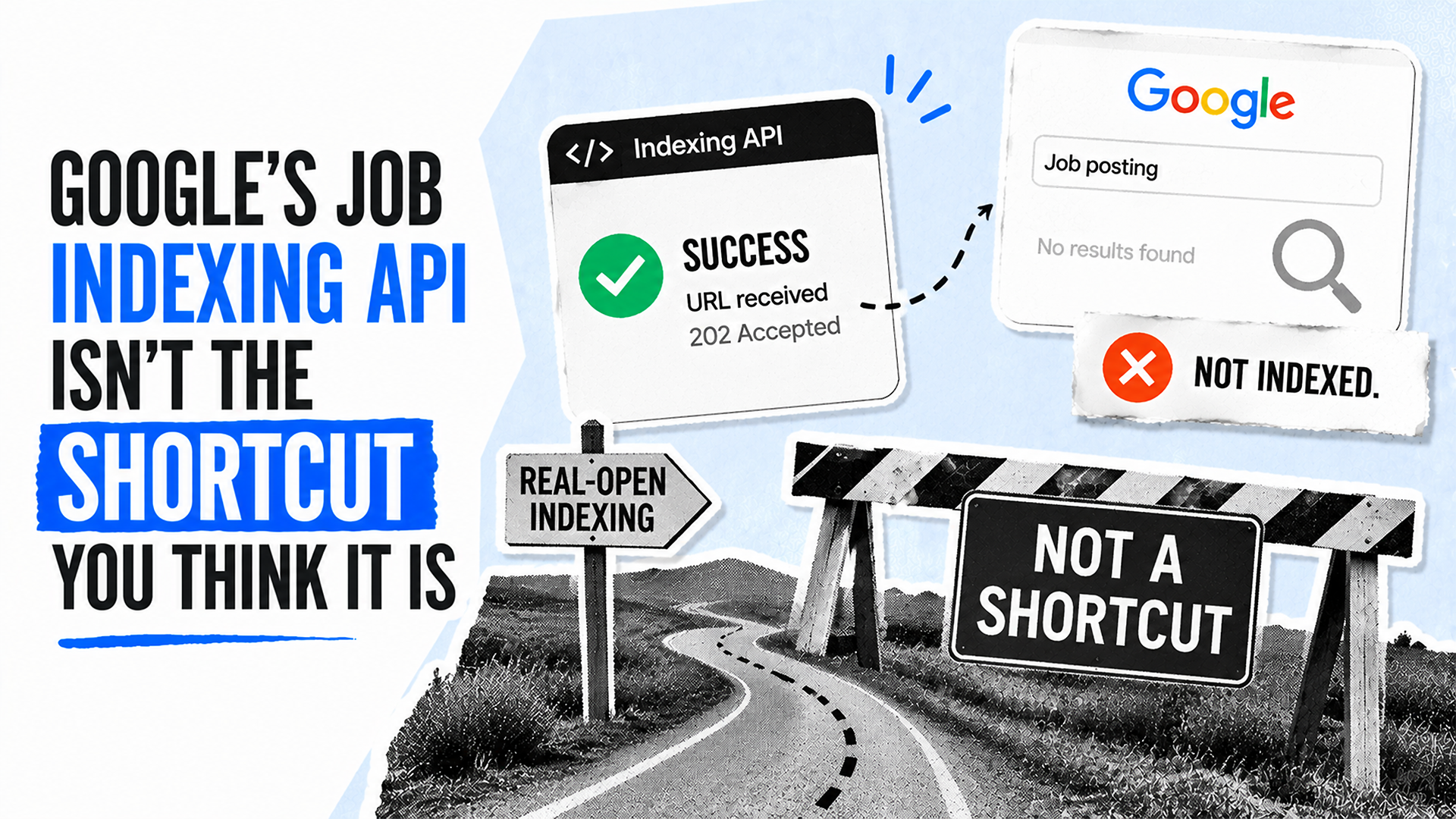
    Job listings have a timing problem: they can change or expire before ordinary crawling catches up. Google’s Indexing API appears to solve that problem by accepting notifications when eligible pages are created, updated, or removed.

    The important limitation is that an accepted request confirms delivery of a notification, not the outcome a job board ultimately needs. Understanding that distinction helps teams measure the API accurately and avoid treating clean server responses as proof of search visibility.

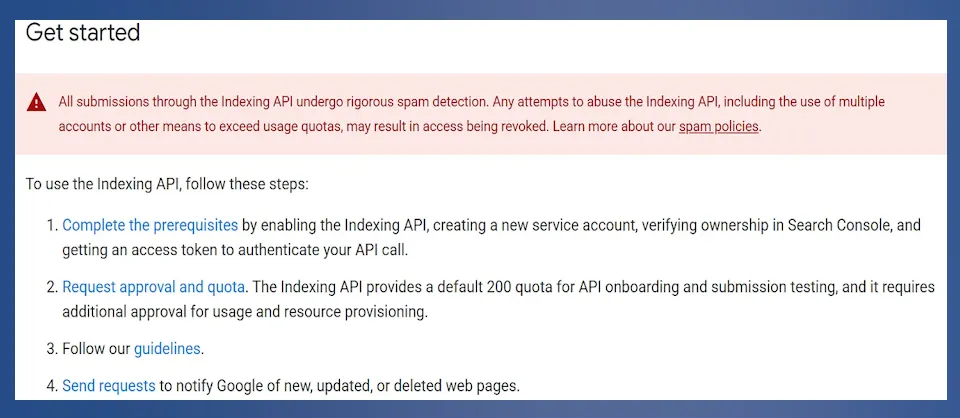
    Indexing API "Get started" page with a spam warning and four setup steps.
    A "Get started" panel warns that submissions undergo spam detection, then lists prerequisites, approval and quota requests, guidelines, and request submission.

    A notification is only the first event in the chain

    According to Search Engine Land, a successful API request means Google received the submission. It does not establish that Google crawled the page, added it to the index, displayed it in the Google Jobs experience, or generated traffic from it.

    Dark API metrics table showing requests, error rates, and median and 95th-percentile latency for three services.
    A filtered metrics table lists 204 Web Search Indexing API requests, 36 reCAPTCHA Enterprise API requests, and one Gemini for Google Cloud API request.

    Those are separate stages with separate evidence requirements:

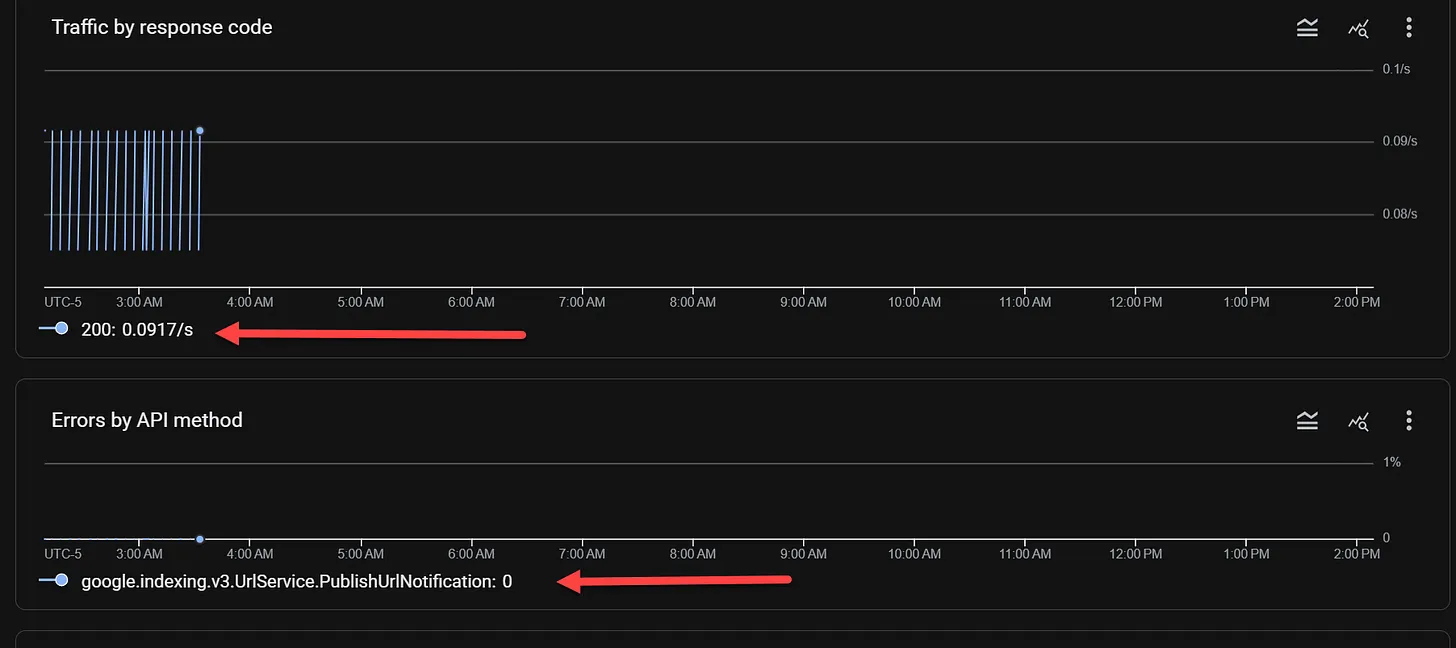
    Dark dashboard charts show HTTP 200 traffic at 0.0917/s and zero API errors, with red arrows pointing to the legends.
    Two dark monitoring charts display intermittent HTTP 200 traffic near 3:00 AM and zero errors for the listed PublishUrlNotification API method.
    • Submitted: The site’s system sent a notification.
    • Accepted: Google returned a successful response to that request.
    • Crawled: Google fetched the page.
    • Indexed: Google made the page eligible to appear in search.
    • Visible and productive: The listing earned impressions, clicks, or conversions.

    A reliable reporting setup should preserve these distinctions. Otherwise, an operational metric such as API acceptance can be mistaken for an SEO result.

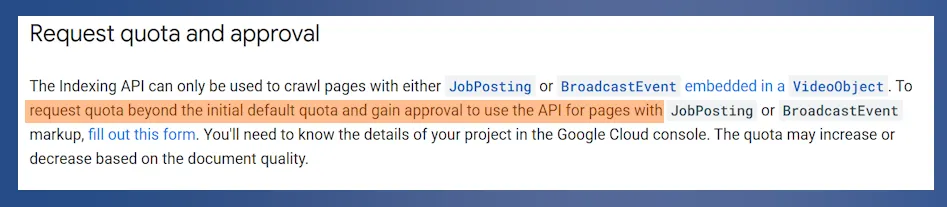
    Documentation excerpt titled "Request quota and approval" with a quota request sentence highlighted in orange.
    A documentation excerpt says the Indexing API is limited to JobPosting or BroadcastEvent pages and directs users to submit a form for more quota and approval.

    Key takeaways

    • The Indexing API is restricted to eligible job-posting and livestream pages; it is not a general acceleration tool for arbitrary URLs.
    • An HTTP 200 response confirms receipt, not crawling, indexing, removal, ranking, or traffic.
    • Notification metadata describes submissions rather than the current index status of a page.
    • Quota availability and successful test requests do not necessarily prove that an account has production access.
    • Job boards should validate structured data, API behavior, and search status as separate layers.

    The API has a narrow, defined scope

    Search Engine Land reports that Google permits the API for pages carrying JobPosting structured data and for livestream pages using BroadcastEvent within a VideoObject. Blog posts, product pages, category archives, service pages, and other ordinary URLs are outside that stated use.

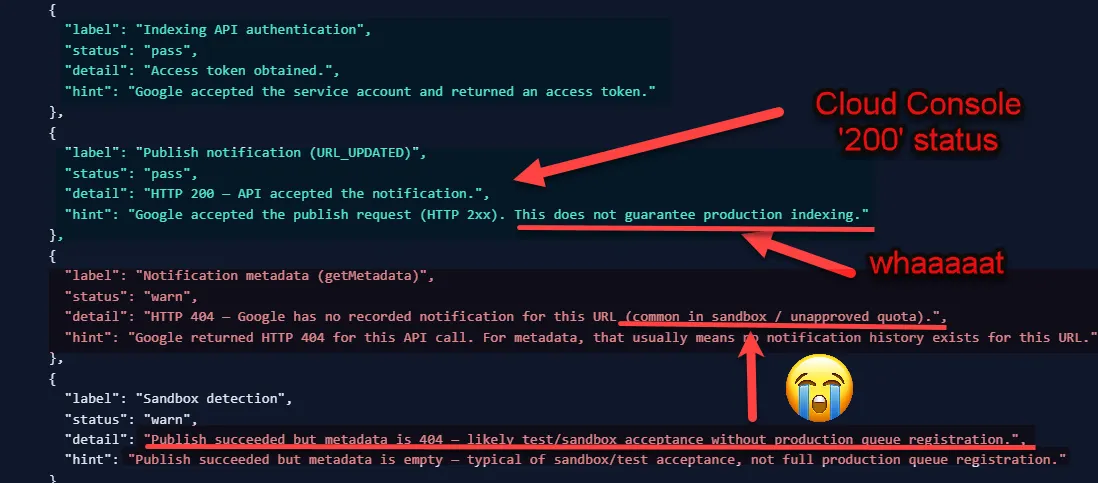
    Annotated API results show HTTP 200 publish success, a 404 metadata warning, red arrows, and a crying emoji.
    A dark code-style report contrasts a passed URL_UPDATED request and HTTP 200 response with a getMetadata HTTP 404 warning, highlighted by red arrows, "whaaaaaat," and a crying emoji.

    For an eligible job page, the two relevant notification types are straightforward. URL_UPDATED can be sent when a listing is published or meaningfully changed. URL_DELETED can be sent when the listing has been removed and should no longer remain indexed.

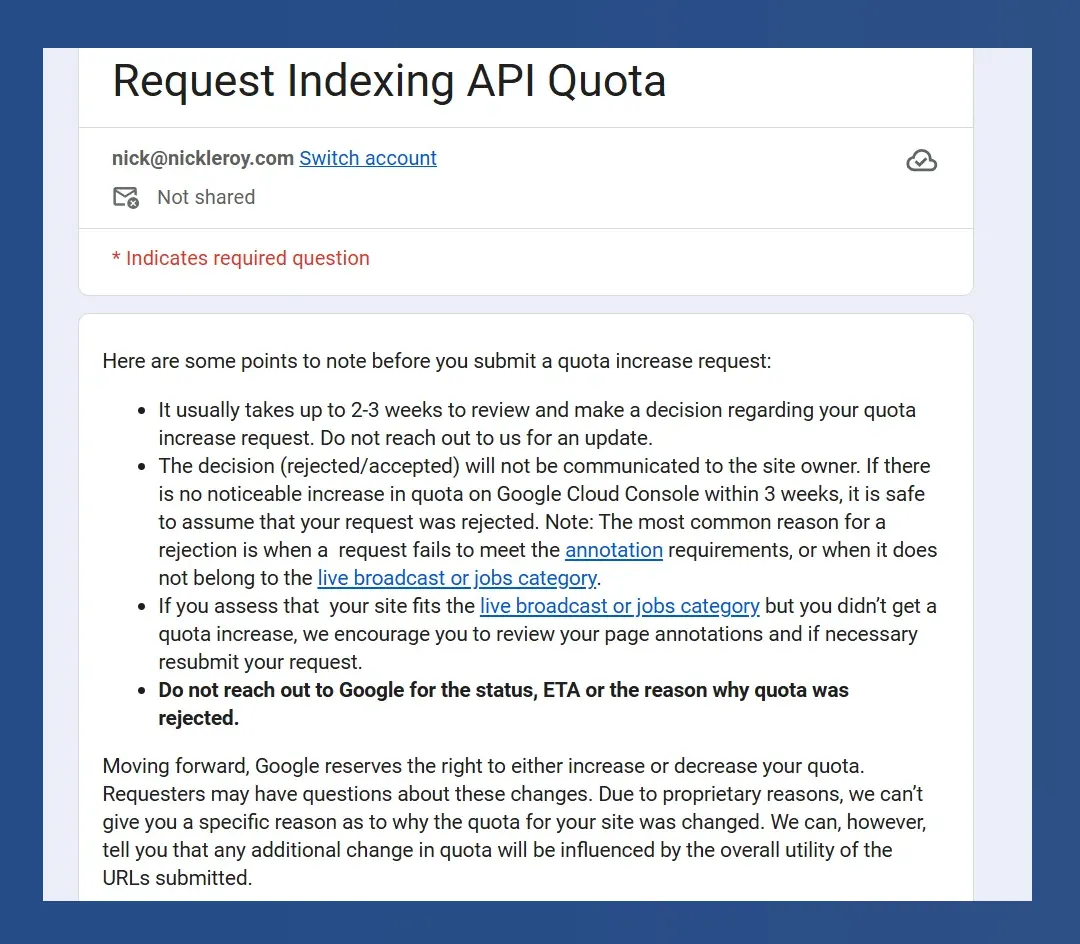
    Request Indexing API Quota form with notes on review times, eligibility, rejections, and quota changes.
    A Request Indexing API Quota form says reviews usually take two to three weeks and warns that annotation and eligible-content requirements must be met.

    Even here, the request is not a command. The source notes that Google’s documentation says the company may recrawl a URL after an accepted update request and may remove one after an accepted deletion request. That wording preserves Google’s control over what happens next.

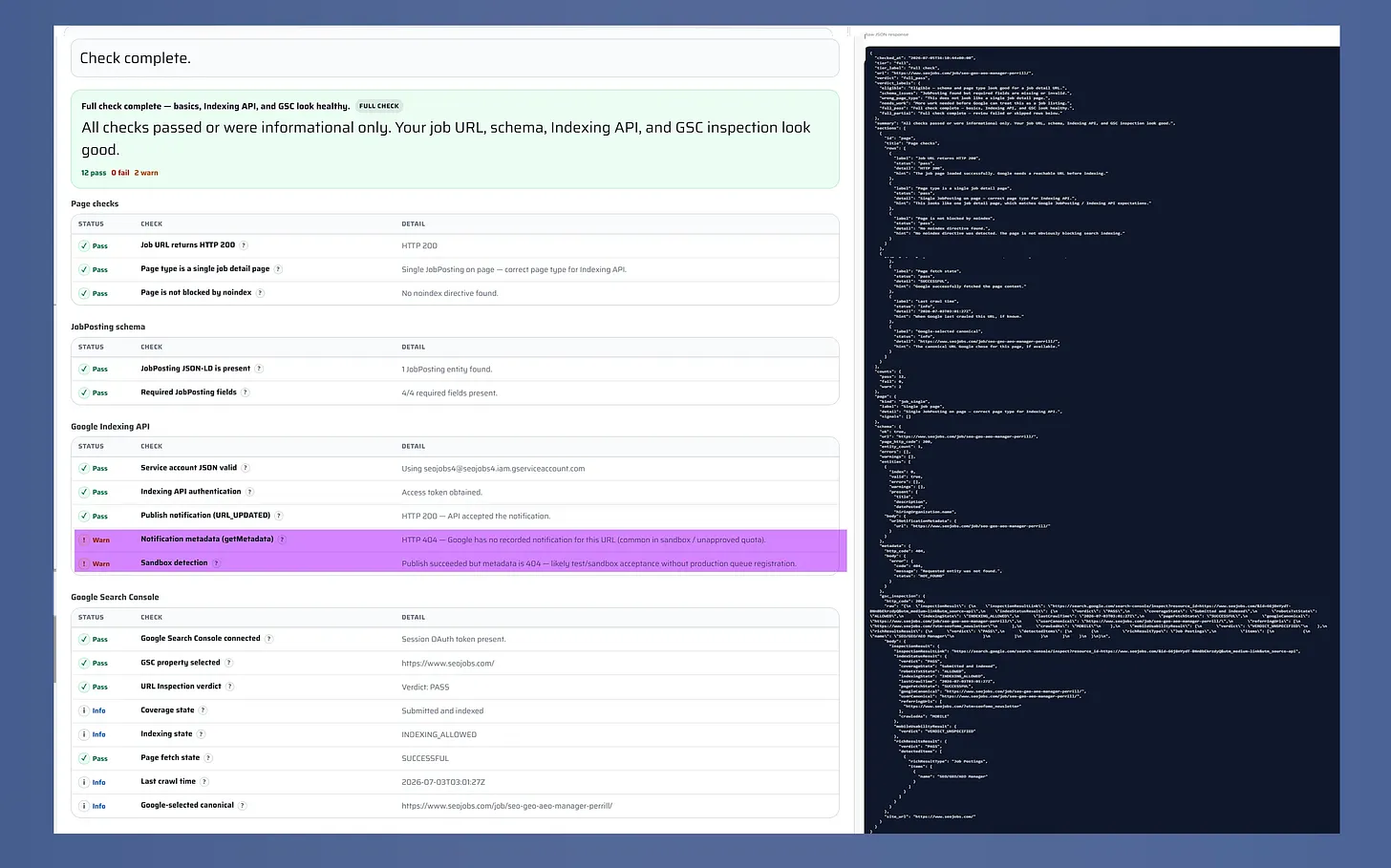
    Job indexing health check with passing results, two warnings, and a raw JSON response.
    A completed job indexing health check shows 12 passes, no failures, and two warnings beside a dark panel containing the full raw JSON response.

    Metadata, sandbox access, and quotas require careful reading

    The API’s getMetadata capability can help confirm the history of update and deletion notifications for a URL. It cannot answer the larger question of whether that URL is currently crawled, indexed, removed, or receiving exposure. Metadata is therefore useful for diagnosing the submission pipeline, but it is not an index-status report.

    ```json
{
  "alt": "SEO For Lunch newsletter promotion with Nick Leroy smiling in checkered shirt.",
  "caption": "Join Nick Leroy for a fresh take on SEO with the #SEOForLunch newsletter—bringing actionable insights straight to your inbox.",
  "description": "This image promotes the #SEOForLunch newsletter by Nick Leroy, featuring a smiling Nick in a checkered shirt against a blue graphic background. The design includes a plate graphic with 'Not Your Average Table Talk' and emphasizes SEO insights, inviting viewers to subscribe at seoforlunch.com. Keywords: SEO, Nick Leroy, newsletter, marketing, insights."
}
```

    Access also has an onboarding dimension. Search Engine Land says Google’s quickstart documentation describes a default quota of 200 requests for onboarding and submission testing, with further approval required for usage and resource provisioning. A visible quota or apparently successful test can therefore create confidence without demonstrating full production service.

    Futuristic web browser and analytics dashboard overlap amid neon data streams, illustrating the convergence of SEO, PPC and AI-driven search marketing.
    Organic visibility, paid media and artificial intelligence merge into one connected search ecosystem, where vivid data streams link a creative website with a powerful analytics dashboard.

    The source also reports approval delays, but the evidence should be treated as observational rather than definitive. The article’s author said two job-board requests had received no response after six months in 2026. Alexander Chukovski reportedly said none of the job boards he worked with over roughly 10 to 12 months received a response. These accounts suggest that approvals may have become harder to obtain, but they do not prove that Google has stopped processing every request.

    How job boards can validate the system responsibly

    A practical audit should test the implementation in layers rather than seeking one all-purpose success signal:

    1. Confirm that the URL represents a supported job posting and contains the required structured data.
    2. Verify that update and deletion requests use the appropriate notification type.
    3. Record response codes and notification metadata as evidence of API delivery only.
    4. Check crawling, indexing, and search performance through appropriate search diagnostics instead of inferring them from the API response.
    5. Track expired listings separately so removal can be verified rather than assumed.

    The source highlights a free Job Indexing Health Check on SEOJobs.com that can review job schema and, in its fuller mode, API and Google Search Console responses. Whether teams use that tool or their own diagnostics, the sound approach is the same: measure each stage according to what its evidence can actually prove.

    For job boards, the API can remain a useful notification channel. Its value becomes clearer, not weaker, once acceptance is treated as the beginning of verification rather than the finish line.


    Inspired by this post on Search Engine Land.


    crushpress.ai community screenshot
  • Hydration and SEO: What I Watch Before Rankings Slip

    Hydration and SEO: What I Watch Before Rankings Slip

    When I work on a site built with a framework like Next.js, Nuxt, SvelteKit, or a similar JavaScript framework, I pay close attention to hydration. It is the step that turns server-rendered HTML into an interactive page, but it is often explained in a way that does not connect clearly to SEO.

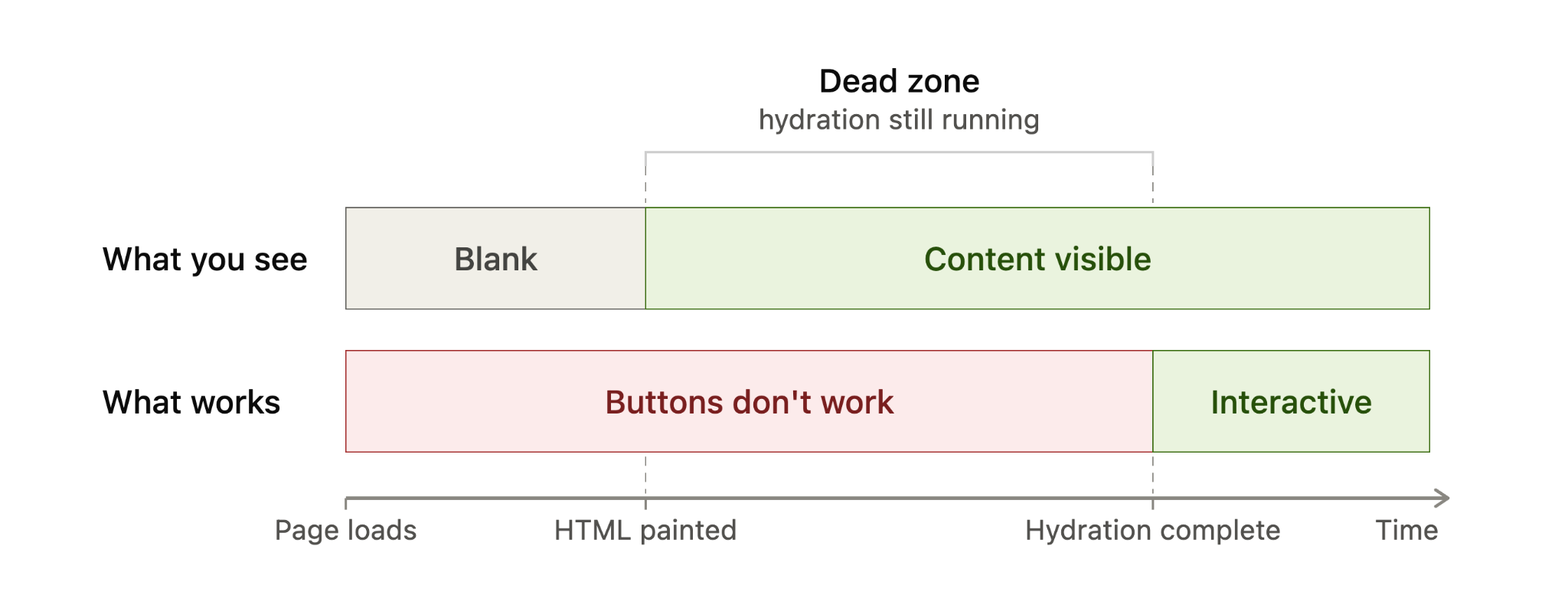
    I think hydration is easier to understand when I separate content from behavior. The content may already be visible, but the page may not be fully usable until the browser finishes connecting that content to the JavaScript behind it.

    What I mean by hydration

    Hydration is the process where JavaScript in the browser takes over the static HTML that was built on the server. The server sends a complete page first, and then the framework attaches the logic that makes buttons, menus, forms, filters, and other interactive pieces actually work.

    Here is how I usually explain the sequence. First, the server builds the page and sends fully formed HTML to the browser. I can see the content quickly, but the page is not interactive yet. Then the framework loads, walks through the existing HTML, attaches event listeners, and reconnects the visible markup to the application logic. Once that is done, the page behaves like a normal interactive app.

    This is why server-rendered HTML can feel fast at first. It can paint quickly and often helps with first impressions and Largest Contentful Paint (LCP). The tradeoff is that, with traditional hydration, the page may appear ready before it is actually usable.

    Hydration adds interactivity, not content

    The most important distinction I keep in mind is this: hydration does not add the main content to the page. The text, images, and layout should already be present in the server-rendered HTML. Hydration only adds behavior by wiring that HTML to the JavaScript that responds to clicks, typing, taps, and other user actions.

    Timeline diagram showing server-rendered HTML becomes visible before hydration, while buttons remain inactive until hydration completes.
    A hydration timeline shows the gap between content appearing and a page becoming usable: HTML is visible first, but buttons only work after hydration completes.

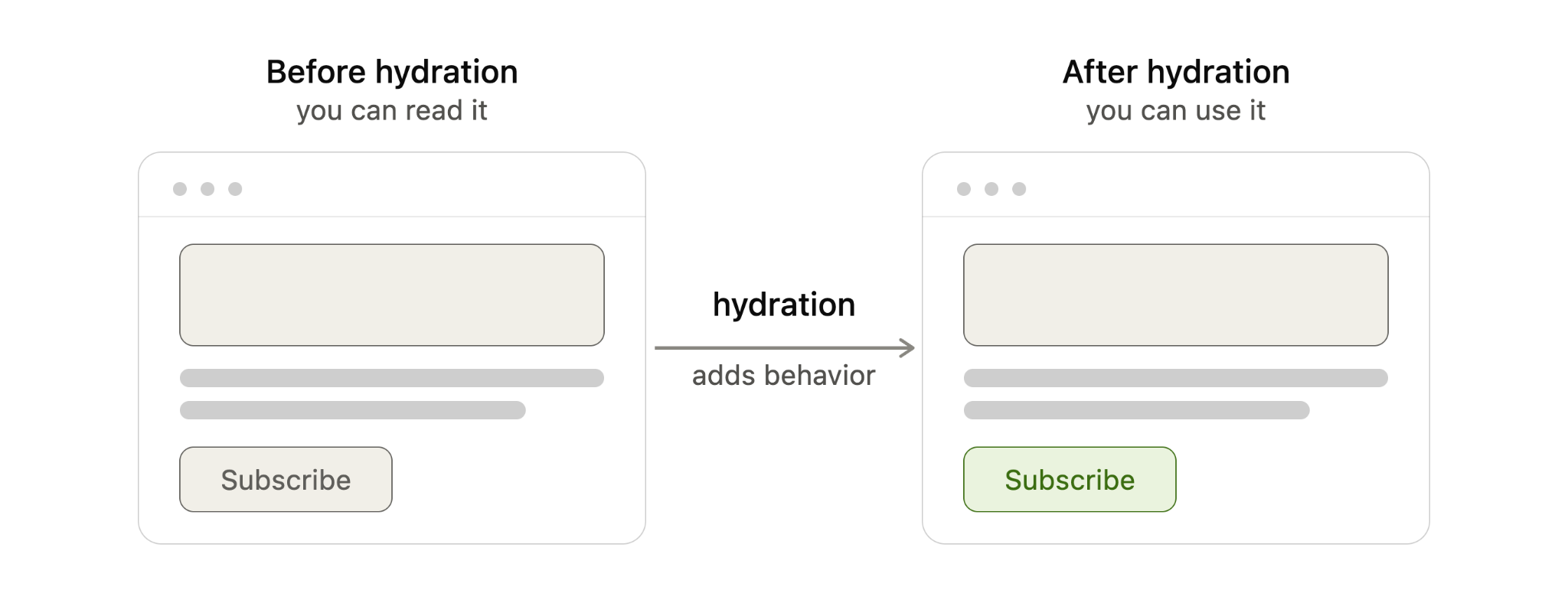
    Put simply, before hydration I can read the page. After hydration, I can use it.

    I also avoid confusing hydration with the rendering pattern itself. Server-side rendering (SSR), static site generation (SSG), and client-side rendering (CSR) describe where and when the page is built. Hydration describes what happens after server-rendered or statically generated HTML reaches the browser and needs to become interactive.

    From an SEO perspective, that distinction matters. When a page uses SSR or SSG correctly, the core content is already in the initial HTML. Google can discover and index that content from the HTML before depending on a JavaScript render step, which is generally more reliable than sending a mostly empty client-rendered shell.

    When I see hydration become an SEO problem

    Most of the time, I do not treat hydration itself as an SEO problem. It becomes a problem when hydration breaks, usually because the HTML created on the server does not match what the framework expects to create in the browser.

    That kind of mismatch can happen when content depends on browser-only APIs such as localStorage, when a value changes between server and client rendering such as new Date(), when a third-party script or browser extension changes the DOM before hydration finishes, or when invalid HTML causes the browser to rewrite the structure before the framework can attach to it.

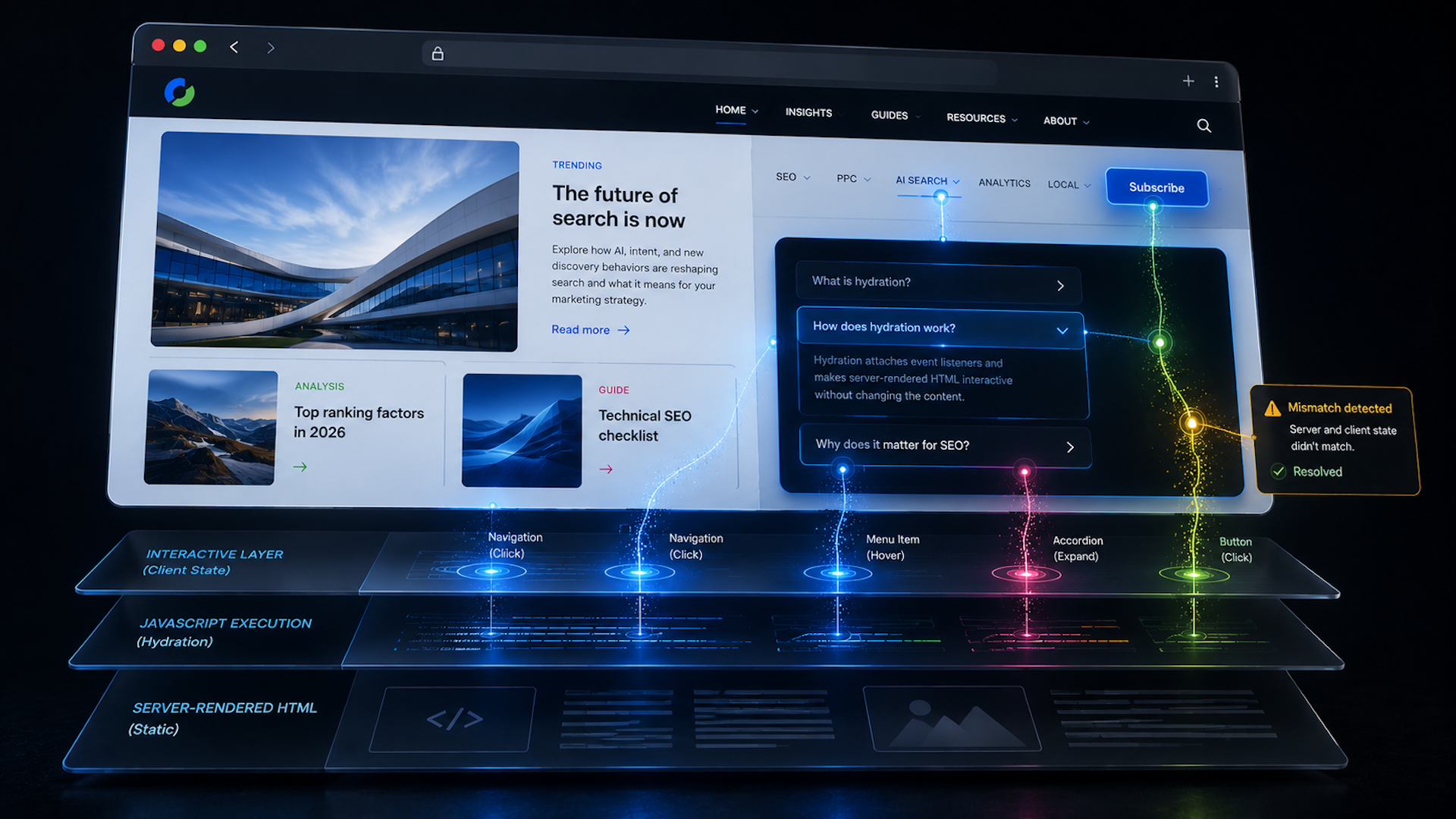
    Diagram comparing web page before and after hydration, showing JavaScript hydration adds behavior to make a subscribe button interactive.
    Before hydration, a server-rendered page can be read but not used; after hydration, JavaScript adds behavior so elements like the Subscribe button respond.

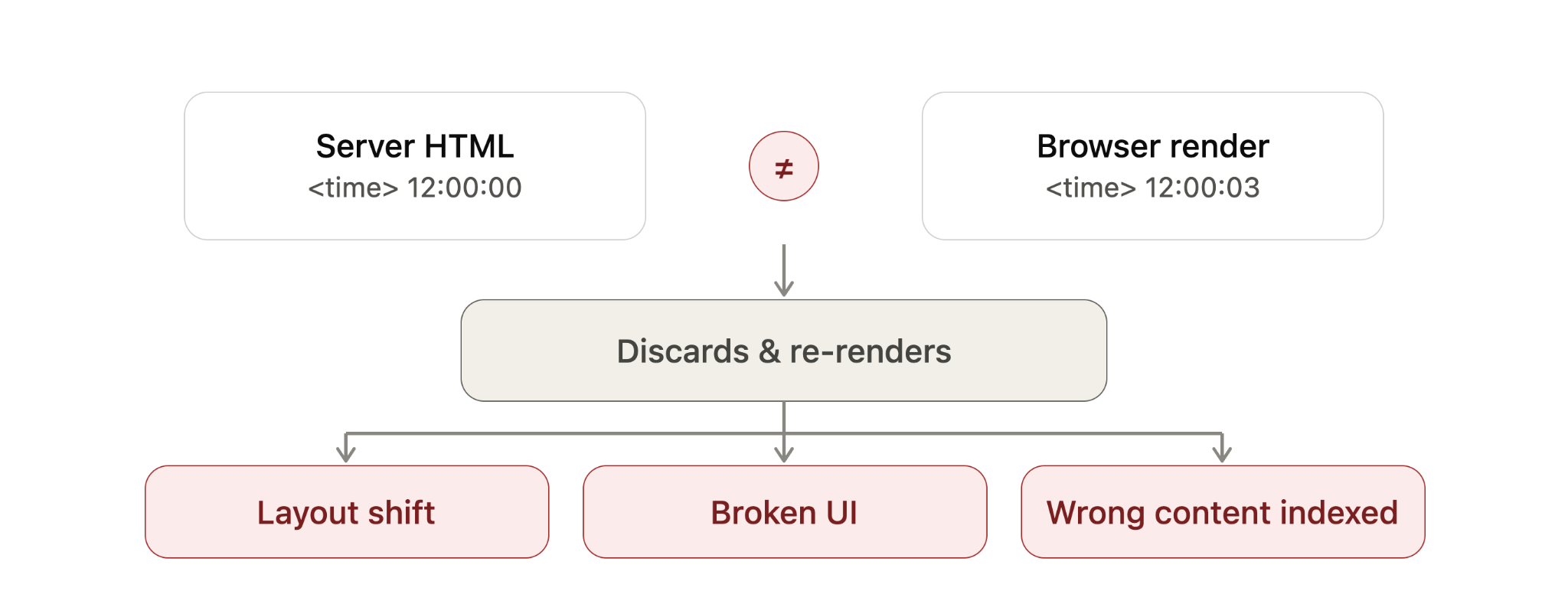
    When the two versions do not line up, the framework may throw away the mismatched section and re-render it in the browser. The exact behavior depends on the framework, but the SEO and performance risks are similar.

    For example, if a <time> value is generated with new Date(), the server may output one value while the browser generates another. That mismatch can force a re-render, even though the page appeared to load correctly at first.

    I worry about this because it can hurt the page in several ways. A re-render can make the page feel sluggish, which can affect Interaction to Next Paint (INP). It can shift the layout, which can affect Cumulative Layout Shift (CLS). It can also break user actions if event listeners fail to attach properly, leaving buttons, menus, or forms unresponsive.

    In severe cases, Google may read the raw server HTML before JavaScript finishes rendering and then index content that visitors never actually see after the page re-renders. That is the scenario I want to avoid most: search engines and users experiencing different versions of the same page.

    The fix is usually not an SEO trick. It is a development fix. I want the underlying mismatch removed by using valid HTML, avoiding browser-only logic during server rendering, stabilizing values that change between server and client, and controlling third-party scripts that alter the DOM too early.

    Diagram showing a hydration mismatch where server HTML time differs from browser render, causing re-render, layout shift and SEO indexing issues.
    When server HTML and browser-rendered content disagree, hydration may discard and rebuild the page, creating layout shifts, broken UI and potential SEO indexing problems.

    How I spot hydration problems on a live site

    Hydration errors are usually easier to catch in development than on a live site, but I still look for a few practical signals. I start with the browser’s Developer Tools console and check for hydration warnings, JavaScript errors, or framework-specific mismatch messages.

    Then I watch the page load carefully. If content flickers, shifts, disappears, reappears, or stays unresponsive for longer than expected, I treat that as a sign worth investigating.

    I also use Google Search Console’s URL Inspection tool on important templates to see how Google renders the page. For larger sites, I prefer crawling with JavaScript rendering enabled in tools like Screaming Frog or Sitebulb so I can compare rendered output against raw HTML at scale.

    How I think about different hydration approaches

    Modern frameworks handle hydration in different ways, and I think of those differences as a balance between performance, interactivity, and how much JavaScript must run in the browser.

    Full hydration means the entire page hydrates in one pass. It is straightforward, but it usually ships the most JavaScript and asks the browser to do the most main-thread work. Next.js Pages Router is a common example of this model.

    Neon Google search bar with microphone icon over a futuristic digital data background, representing search technology and SEO updates.
    A glowing Google search bar cuts through streams of digital data, capturing the fast-moving world of search, shopping visibility, and SEO innovation.

    Partial hydration hydrates only the interactive pieces, often called islands. Static sections remain plain HTML and do not need client-side JavaScript. Astro’s islands architecture is a well-known example of this approach.

    Progressive hydration hydrates the page in pieces over time. A framework may hydrate sections as they scroll into view or as browser resources become available. Angular’s incremental hydration follows this general pattern.

    React Server Components take a different path by letting some components render entirely on the server and ship no client-side JavaScript for those server-only parts. In those cases, there is nothing for the browser to hydrate for that portion of the page. Next.js App Router uses this model.

    Resumability goes further by trying to skip hydration entirely. Instead of re-running components on load, the page resumes from the state the server already produced. Qwik is the main example here, although I still view it as newer and less battle-tested than some of the older patterns.

    When I compare these techniques, I look at what hydrates, how much JavaScript ships, and how much work the browser must do. Full hydration touches the entire page and usually ships the most JavaScript. Partial hydration touches only interactive components and ships less. Progressive hydration spreads the work over time. React Server Components reduce hydration for server-only parts. Resumability aims to avoid hydration altogether.

    What this means for my SEO work

    I do not assume hydration is bad for SEO. In most cases, it is simply part of how modern server-rendered and statically generated sites become interactive.

    What I do watch closely is whether the server HTML and the browser-rendered version agree. If they do, hydration is usually a performance and user experience consideration. If they do not, hydration can become a visibility problem, especially when Google indexes a version of the page that users never see.

    Newer frameworks reduce some of this risk by shipping less JavaScript and doing less work in the browser, but they do not remove the need for careful implementation. For me, the practical takeaway is simple: make sure the important content is present in the initial HTML, keep server and client output consistent, and test how search engines actually render the page.


    Inspired by this post on Search Engine Land.


    crushpress.ai community screenshot
  • Fabrice Canel Leaves Microsoft Bing After Iconic Run

    Fabrice Canel Leaves Microsoft Bing After Iconic Run

    After nearly 30 years at Microsoft, I am seeing one of Bing’s most influential search leaders close a remarkable chapter. Fabrice Canel announced that he is retiring from Microsoft, writing on LinkedIn, “I am retiring from Microsoft, effective today July 1st.” He also reflected, “Today marks nearly 30 years with Microsoft. Thirty years…”

    When I think about Fabrice Canel’s impact, I think first about the foundation of Microsoft Bing Search. He was responsible for indexing at Bing, including crawling, URL discovery, content selection, and content processing. Those areas are core to how search engines understand the web, and Fabrice helped shape them at massive scale.

    He was also the person behind the IndexNow initiative, and he played a major role in creating and powering Bing Webmaster Tools. For anyone working in SEO, publishing, or technical search, those contributions matter because they helped make discovery, indexing, and webmaster communication faster and more practical.

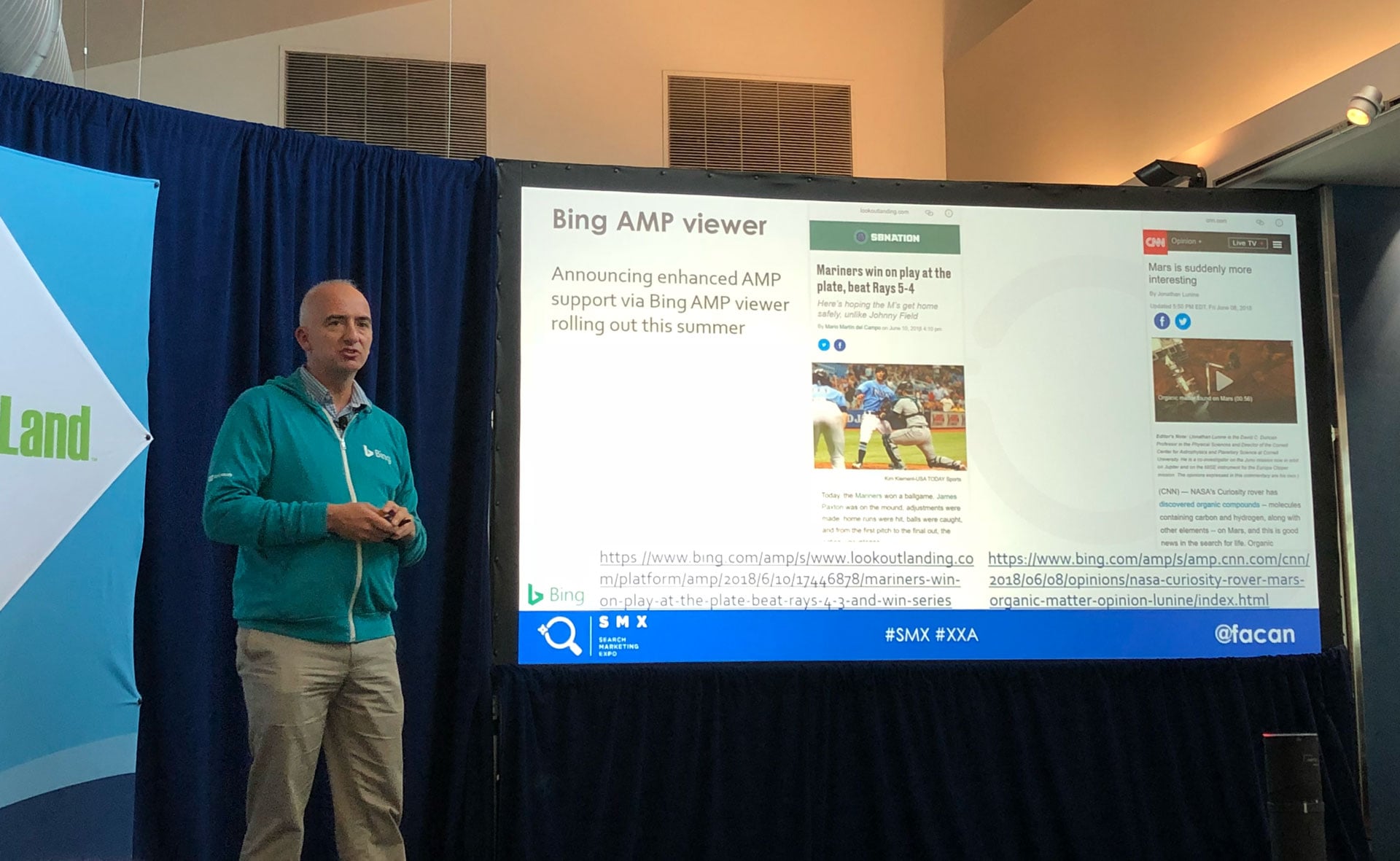
    I have watched Fabrice contribute far beyond product work. He has spoken at countless industry events, including SMX, and has written extensively about how search works, how sites can perform better in Bing, and how search is evolving with generative AI. He helped run one of the world’s most important search engines, while also giving the SEO community tools, education, and direct insight.

    In his retirement message, Fabrice addressed fellow Microsoftees, engineers, attorneys, marketers, webmasters, publishers, SEO champions, product leaders, journalists, people across search and AI, and even friends at Google. His note was warm, personal, and full of gratitude for the people who shaped his Microsoft journey.

    He described his three decades at Microsoft as a wonderful adventure, from solving real business problems with IndexNow to helping webmasters and publishers thrive in the constantly changing world of SEO and AI. He thanked colleagues, partners, publishers, and the people he trained and mentored, saying they are ready to carry the mission forward.

    Fabrice also shared that, after many conversations with family and friends, he decided to take advantage of Microsoft’s Voluntary Retirement Program. His message ended with the same sense of warmth and storybook style that many in the industry have come to associate with him: gratitude for Microsoft, confidence in the Bing team’s future, and a final wish that everyone stay curious, keep innovating, and make content easier to find.

    Why do I care so much about this? Because Fabrice has been a true friend to the search industry. His work will live on through the products, systems, and initiatives he helped create, and his willingness to share knowledge has made a lasting difference for SEOs, publishers, developers, and search professionals.

    I know Fabrice has trained a team to continue the work, and I believe Bing remains in good hands. Still, I would be lying if I said I am not sad to see him retire. It has been an honor to work with him and learn from him over the years, and his legacy at Microsoft Bing will be felt for a long time.


    Inspired by this post on Search Engine Land.


    crushpress.ai community screenshot
  • TurboQuant: Revolutionizing AI with Entity-Driven SEO

    TurboQuant: Revolutionizing AI with Entity-Driven SEO

    I believe the launch of TurboQuant will revolutionize AI and SEO as we know it. This cutting-edge algorithm from Google drastically reduces the computing power and energy needs by allowing the massive compression of LLMs and vector search engines.

    Imagine using six times less memory and achieving eight times the speed without compromising accuracy. That’s how TurboQuant dramatically lowers the cost of running AI tasks.

    As search engines evolve from simply listing links on a SERP to providing immediate AI-generated overviews, it’s crucial for us in the SEO industry to adapt. We need to focus on creating meaningful, trustworthy content and understand its impact on searches.

    Before AI became prevalent, SEO was grounded in basic keywords and topics, which inefficiently represented user intent. High costs and energy consumption hindered mapping true meaning across the web, but now TurboQuant uses an advanced compression method, PolarQuant, to transform data into manageable coordinates. This breakthrough allows Google to process complex ideas far more efficiently.

    TurboQuant can match exact search meanings in real time, thanks to its ability to understand user intent using past searches and real-world contexts.

    The near-zero indexing lead time of TurboQuant eradicates delays between publication and ranking. Trusted publishers will gain instant recognition for their expertise, while the system also blocks manipulation and spam from appearing.

    We must prepare for the fast-approaching era where AI summaries become the norm in responding to most queries. Thin content, which adds no original value, will vanish because AI can now summarize the web almost instantly, making unique viewpoints and genuine data irreplaceable.

    Developing trust and authority with original thoughts, data, and experiences will prove essential, as AI-generated summaries merely consolidate existing information.

    ```json
{
  "alt": "The CapmatchOne logo with a gradient circle and bold text.",
  "caption": "Discover innovation with the CapmatchOne logo, featuring sleek typography and a modern gradient circle.",
  "description": "The CapmatchOne logo features bold, modern typography coupled with a gradient circle, symbolizing connection and innovation. The sleek design conveys a sense of progress and creativity. This image can be used for branding or promotional purposes, appealing to audiences interested in innovative solutions and forward-thinking designs."
}
```

    The focus of our SEO strategies should be to become a source AI recommends reliably, not just rankings based on keywords. TurboQuant maintains a more reliable index of facts by validating them against its real-time knowledge base.

    This new system tracks a brand’s strength across various platforms, reinforcing the necessity of improving our knowledge graph as a trusted source.

    With TurboQuant handling vast information without delays, hyper-personalization is set to explode in ways we’ve previously not imagined. AI agents could remember extensive user interactions to provide extensive personalization.

    TurboQuant’s capability to integrate various signals into a cohesive perception of a brand’s value demands a strategic shift toward consistent, omnichannel representation.

    We’ve prioritized quantity over quality for far too long in this industry. TurboQuant signals the end of this era, as it necessitates creating high-quality, meaningful content that establishes us as trusted entities.

    Delivering a reliable message with a clear voice will guide how our messages are distributed and our brand credibility.


    Inspired by this post on Search Engine Land.


    crushpress.ai community screenshot