Tag: Google Tag Manager

  • Boost Your Funnel: Tackle Signal Decay & Maximize Performance

    Boost Your Funnel: Tackle Signal Decay & Maximize Performance

    Have you ever wondered why those campaigns designed to introduce customers to your brand seem to get the least credit when it comes to driving revenue? Let me walk you through how to reclaim those lost conversion signals.

    In today’s digital world, conversion signals are fading from our marketing data. Personally, I’ve noticed it’s costing businesses money.

    Factors like ad blockers, strict privacy laws, and the decline of cookies are hiding crucial conversion data. According to a Deloitte study, this can cost businesses as much as $203 million annually. That’s a staggering figure!

    For most brands, the journey from discovery to purchase is obscured, and this isn’t just an irritating data issue. If left unaddressed, it can prevent new customers from discovering your brand.

    It surprised me how many marketers don’t realize they’re basing decisions on incomplete data. They see top-of-funnel campaigns underperforming and shift budgets elsewhere, unaware that this could trigger a negative cycle.

    When traffic diminishes further due to algorithmic reactions, ad investments dwindle, and new customer acquisition slows, it results in a downward spiral that’s tough to reverse.

    To avoid this, rather than focusing solely on creative strategies or bigger budgets, I believe prioritizing data hygiene will offer a competitive edge by 2026. Feeding better data to Google’s algorithm can transform those top-of-funnel activities into effective customer acquisition channels.

    Why Signal Loss Hurts Discovery Channels First

    YouTube usually sits at the top of the funnel, where attribution is weakest. Unfortunately, this makes it an easy target for budget cuts because of incomplete performance data, despite its crucial role in product discovery and brand research.

    According to Google research, “YouTube is the No. 1 platform viewers turn to for brand or product research.”

    • “YouTube is the No. 1 platform viewers turn to when they want to research, vet, or make a decision about a brand or product.”

    Yet, the decay of conversion signals detrimentally impacts YouTube’s performance as a marketing channel. It often acts as the initial touchpoint, with users making purchases off-platform, disrupting the signal flow.

    Haus Research found that Google’s advertising tools underreport YouTube’s true impact by 70% or more. With improved measurement setups, advertisers can capture those missing signals, allowing for a more accurate assessment of YouTube and similar platforms.

    Closing the Cross-Device Gap with Enhanced Conversions

    Think about how often you watch TV while holding your phone. You might see a commercial, Google it on your phone, and complete the purchase on desktop days later. This cross-device journey complicates tracking with standard cookie-based tagging methods.

    Enhanced conversions tackle this issue by adding a layer of hashed first-party data, like an email, which Google uses to connect conversions to ad interactions securely.

    Incorporating enhanced conversions into analytics provides insights into purchase paths that begin on YouTube and conclude off-platform, highlighting YouTube’s effectiveness in driving conversions that might otherwise be missed.

    ```json
{
  "alt": "The CapmatchOne logo with a gradient circle and bold text.",
  "caption": "Discover innovation with the CapmatchOne logo, featuring sleek typography and a modern gradient circle.",
  "description": "The CapmatchOne logo features bold, modern typography coupled with a gradient circle, symbolizing connection and innovation. The sleek design conveys a sense of progress and creativity. This image can be used for branding or promotional purposes, appealing to audiences interested in innovative solutions and forward-thinking designs."
}
```

    Training the Algorithm with Offline Conversions

    Consider viewing a YouTube ad for an expensive item—something you’re not comfortable purchasing online. You close the ad only to call the seller later. Cookie-based tagging often fails to track such valuable conversions back to their origin.

    This tracking gap extends to lead generation campaigns too. Offline conversions connect CRM and call data back to Google, training the algorithm to follow which leads convert rather than just form completions, enabling smart bidding to optimize for actual revenue outcomes.

    Get the newsletter search marketers rely on.


    Defining New Top-of-Funnel Signals with Micro Conversions

    Enhanced conversions and offline tracking can retrieve lost signals, but sometimes, top-of-funnel campaigns like YouTube lack sufficient conversion data for the algorithm. That’s where micro conversions come in, feeding necessary data for ad optimization.

    Micro conversions provide early signals—like video views, adding items to a cart, or time spent on a page—allowing campaigns that lack purchase-level data to still improve performance. Depending on the campaign’s position in the funnel, you might prioritize engagement signals or actions like cart additions.

    Without these intermediate signals, distinguishing effective upper-funnel activities from wasted efforts becomes challenging. Micro conversions empower you to treat top-of-funnel actions like any other campaign, enabling data-driven decisions on what’s working.

    Recovering Lost Signals with Google Tag Gateway

    The final piece in maintaining data hygiene is recovering blocked conversion signals before they reach Google. Browsers like Safari and Firefox restrict third-party tracking, contributing to massive signal decay during online purchases.

    Google introduced Google Tag Gateway (GTG) to help reclaim lost data. GTG uses server-side technology to load tracking tags from your site’s domain instead of Google’s, bypassing some blockers.

    Google reports an 11% signal uplift for GTG users compared to advertisers not using the tech. GTG also benefits advertisers with faster page speeds, enhancing Google’s landing page experience score and reducing click costs.

    Setting up GTG is straightforward, especially if you’re on a content delivery network like Cloudflare, and it can significantly enhance your data infrastructure.

    Your Data Infrastructure is Your Competitive Advantage

    Conversion signal decay affects every brand selling online, but recognizing the real underlying problem is crucial: signal distortion from cross-device behavior, offline conversions, ad blockers, and low top-of-funnel signal volume distorts actual purchase behavior.

    Armed with inaccurate data, many opt to tweak creatives, cut budgets, or inadvertently drop channels like YouTube, which secretly contribute to discovery. This leads to a detrimental downward spiral.

    In 2026, those excelling won’t merely skirt around issues but will implement advanced data hygiene methods to feed lost data back into Google’s algorithm, gaining an edge over competitors.

    To run more successful ads, prioritizing data improvements is key. Everything else tends to fall into place thereafter.


    Inspired by this post on Search Engine Land.


    crushpress.ai community screenshot
  • Streamline Google Ads with Tag Manager Controls Built-In

    Streamline Google Ads with Tag Manager Controls Built-In

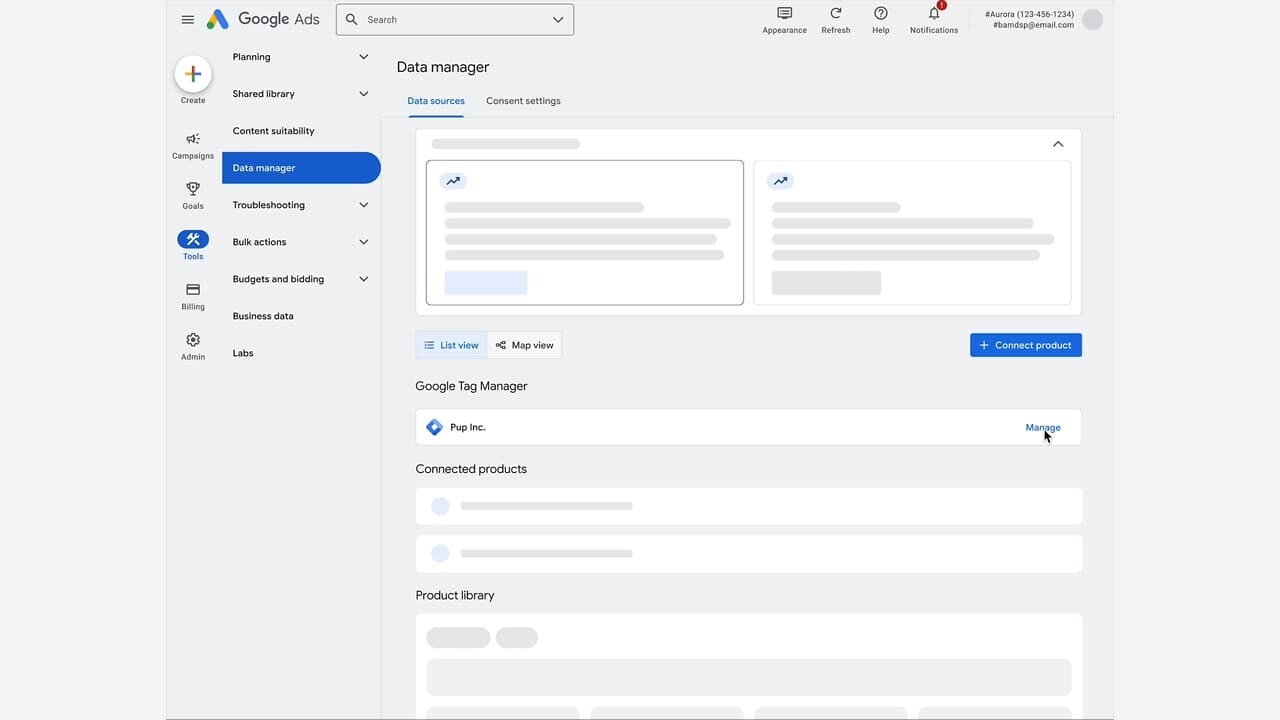
    Have you ever wished for a simpler way to manage your Google Ads tags? Well, it seems Google might just be offering a solution soon. They’re pulling the Google Tag Manager interface directly into Google Ads, which could make tracking and tag management far easier.

    What’s happening. Recently, in Google Ads, I noticed a new “Manage” option within the Data Manager section. This feature opens Tag Manager controls without the need to leave the platform.

    The update came to light thanks to Marthijn Hoiting and Adriaan Dekker. They shared screenshots revealing elements of Tag Manager seamlessly embedded within the Google Ads interface.

    Why this matters. If you’ve ever grappled with tag setup and troubleshooting, you know how it often involves juggling multiple tools and navigating technical handoffs.

    With Tag Manager now integrated into Google Ads, the process could become less complicated, especially for smaller teams or advertisers without dedicated developers at their side.

    Zoom in. When exploring inside the Data Manager interface, you will find connected data sources, including Tag Manager, which allows you to handle management actions right within Google Ads.

    ```json
{
  "alt": "Google Ads data manager interface with options for data sources and tags.",
  "caption": "Explore the comprehensive Google Ads data manager, where you can oversee data sources and manage connected products effortlessly.",
  "description": "The image shows the Google Ads data manager interface, featuring menu options like Planning, Campaigns, and Tools. The main section highlights data sources and Google Tag Manager, allowing users to manage products efficiently. The interface provides a user-friendly environment for organizing ad-related data, with options for viewing in list or map formats. Ideal for marketers and analysts to streamline their advertising processes."
}
```

    This suggests a move by Google towards a more unified measurement workflow, streamlining tagging, data connections, and campaign setup.

    Between the lines. This change aligns with Google’s broader objective of simplifying measurement and enhancing data accuracy, a goal that has become critical amidst privacy transformations and signal loss.

    It’s also part of Google’s effort to make tagging more accessible without requiring extensive technical setups.

    What to watch:

    • Will the full Tag Manager functionality be fully embedded or remain partial?
    • How will this update impact workflows between marketers and developers?
    • Will this new method become the standard for managing tags among advertisers?

    Bottom line. Google is subtly narrowing the gap between campaign setup and measurement, positioning tagging closer to the actual management of ads.

    First seen. This interesting development was initially reported by Adrian Dekker on LinkedIn, crediting Marthijn Hoiting, a Data and Analytics specialist, for the discovery.


    Inspired by this post on Search Engine Land.

    crushpress.ai community screenshot
  • Streamline Conversion Tracking with Google’s New GTM Integration

    Streamline Conversion Tracking with Google’s New GTM Integration

    There’s some exciting news from Google Ads that I believe will make our lives a lot easier! A new integration with Google Tag Manager could revolutionize how we set up conversion tracking, making the process quicker and much less error-prone.

    Google is working on simplifying one of the trickiest parts of setting up campaigns—conversion tracking—by minimizing the need for manual tag implementation. This change is something I’ve been eagerly waiting for!

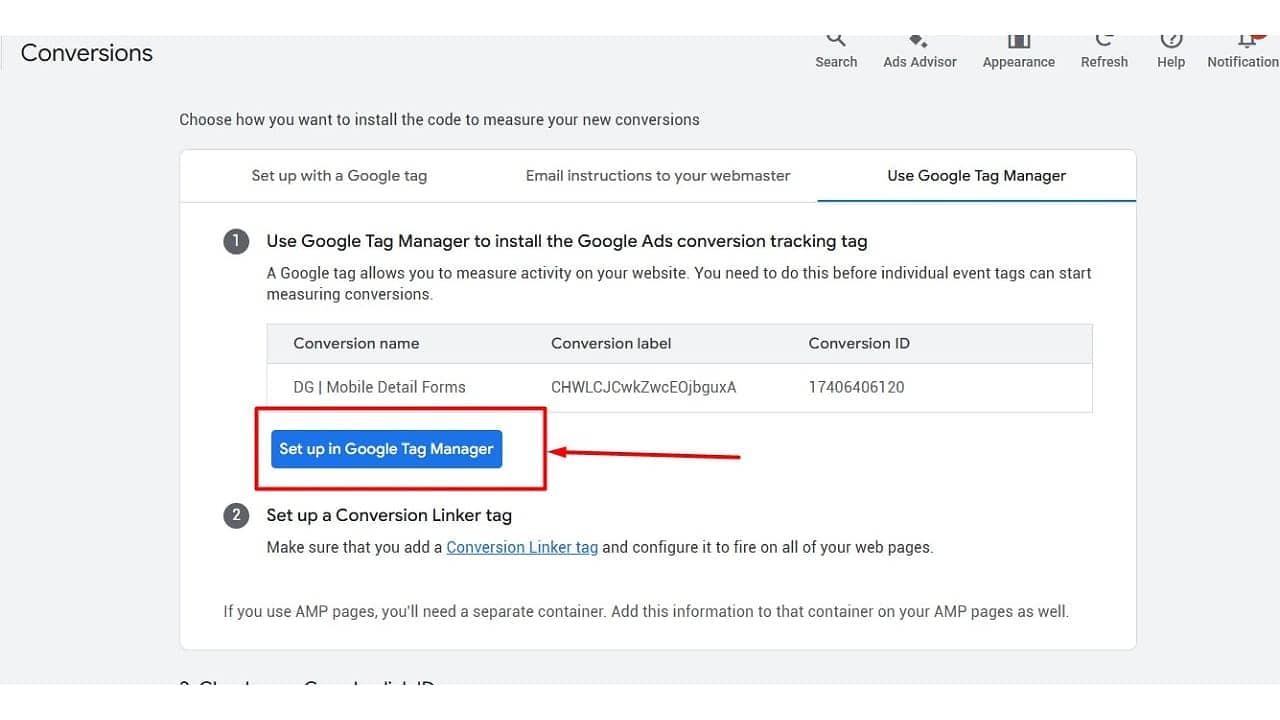
    Driving the news. During the conversion setup flow in Google Ads, there’s a new option being tested: “Set up in Google Tag Manager.” This was highlighted in screenshots shared by Google Ads Specialist, Natasha Kaurra. I must say, it looks very promising.

    This feature appears right alongside the existing installation methods and provides us with the ability to push conversion tracking setups directly into Google Tag Manager.

    What’s new. Instead of having to manually copy conversion IDs and labels between platforms—which can be quite tedious—we can now click a new button that opens a pre-filled tag setup inside GTM. I can already see this saving us so much time.

    This update means:

    ```json
{
  "alt": "Google Tag Manager setup screen for conversion tracking.",
  "caption": "Streamline your marketing efforts with Google Tag Manager's conversion tracking setup, guiding you step-by-step through the process.",
  "description": "This image shows a screen from Google Tag Manager, guiding users on setting up conversion tracking tags for Google Ads. The screen highlights options to install the tracking tag, a table with conversion details, and a button labeled 'Set up in Google Tag Manager'. Essential for optimizing website activity measurement and enhancing advertising effectiveness."
}
```
    • fewer manual steps,
    • less room for implementation errors,
    • and faster deployment across accounts.

    Why we care. As you know, conversion tracking is critical for measuring our campaign performance. This new update significantly reduces the chances of errors and speeds up the implementation between Google Ads and Google Tag Manager, ensuring our data is accurate from the start. Reliable data means we can optimize better and make more informed decisions.

    How it works. From the initial screenshots, it seems that users are prompted to select a GTM container, and a suggested tag configuration is then surfaced, ready for publishing. This could be a game-changer for agencies like ours managing multiple clients, working across several containers, or tackling complex tagging setups.

    The bottom line. Even though it’s just a small UI change, it’s set to have a huge impact! This new feature will make it much easier for us to get conversion tracking right from the get-go.

    First seen. This update was originally shared by PPC News Feed, who credited Google Ads Specialist Natasha Kaurra for spotting it. Don’t you just love how our community stays on top of things?


    Inspired by this post on Search Engine Land.

    crushpress.ai community screenshot
  • Effortless Meta Pixel Setup with New GTM Template

    Effortless Meta Pixel Setup with New GTM Template

    As someone who manages ad campaigns across various platforms, I’m thrilled to share that Meta has launched a new template for Google Tag Manager! This makes setting up the Pixel incredibly simple, ensuring smoother cross-platform tracking with more consistency for advertisers like us.

    Meta Platforms is committed to reducing the technical challenges we face, especially when juggling campaigns on different platforms. This new update is a step towards minimizing those hurdles.

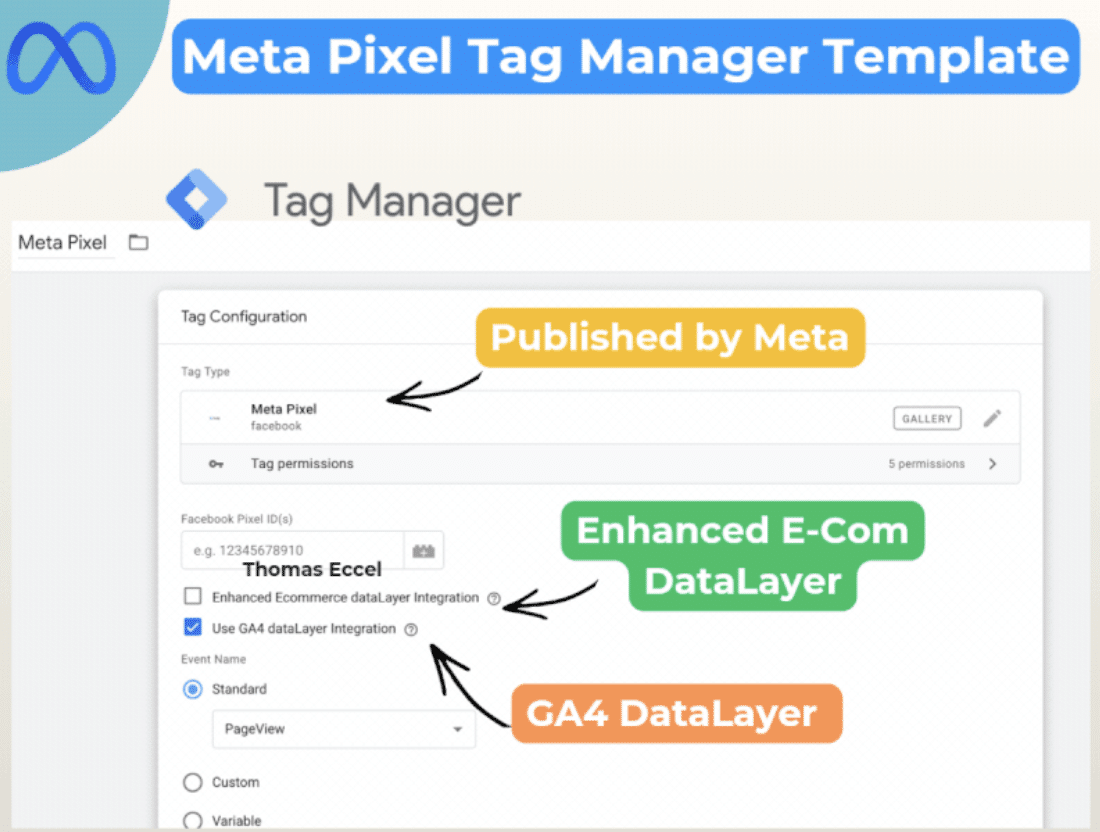
    What’s happening. Meta has unveiled an official Pixel template within Google Tag Manager. This effectively replaces the need to rely on third-party or community-generated solutions.

    Meta GTM template

    How it works. This template takes advantage of our existing GA4 dataLayer, allowing us to utilize pre-configured events for Google Analytics 4 without needing to rebuild our tracking systems. It also makes mapping enhanced e-commerce events automatic, such as purchases and add-to-cart actions, which means we don’t have to worry about redundant tagging.

    Why we care. The simplified setup reduces the time we spend implementing these systems while lowering the risk of tracking errors. This ensures our campaigns run smoothly across Google and Meta platforms.

    ```json
{
  "alt": "Meta Pixel Tag Manager Template with configuration details and DataLayer options for GA4 and Enhanced E-Commerce.",
  "caption": "Discover how the Meta Pixel Tag Manager Template simplifies your data tracking with options for Enhanced E-Commerce and GA4 DataLayer integrations.",
  "description": "This image showcases the Meta Pixel Tag Manager Template interface, highlighting its features for configuring tag types and data tracking. The template offers options for Enhanced E-Commerce DataLayer and GA4 DataLayer integrations. Published by Meta, it provides a streamlined approach for managing Facebook Pixel IDs and event tracking, crucial for optimizing digital marketing strategies. Keywords: Meta Pixel, Tag Manager, GA4, Enhanced E-Commerce, DataLayer."
}
```

    What to watch. I’m curious to see if this user-friendly setup encourages more advertisers to adopt Meta Pixel tracking and whether it will lead to similar integrations in the future.

    Bottom line. By removing one of the biggest pain points in ad tracking, Meta is making it quicker and simpler for us to gain reliable insights across various platforms.

    First seen. This update was discovered by Paid Media expert Thomas Eccel, who highlighted it on LinkedIn.


    Inspired by this post on Search Engine Land.


    crushpress.ai community screenshot