I’m tracking a growing Google Business Profile issue after several days of complaints from businesses that say reviews have disappeared from their local listings. Google has now confirmed that it is investigating the reports, and in some cases, review submissions on affected profiles appear to be paused.
What Google said. Google told us that when its systems detect suspicious review activity, it may take several actions, including removing reviews and temporarily pausing reviews on a profile to prevent further abuse. Google also said it is investigating the issue and will restore any reviews that were incorrectly removed.
What I’m seeing. As I documented on the Search Engine Roundtable, there are dozens of complaints in the Google Business Profile Forums from business owners and local SEOs who say their reviews have mysteriously vanished. In some cases, businesses are also unable to receive new reviews on their local listings.
From what I can tell, Google’s review spam detection systems may be identifying certain patterns and aggressively removing or blocking reviews on suspected Google Business Profiles. What remains unclear is whether this is tied to spammers abusing some profiles, a recent algorithmic adjustment, or Google’s systems becoming overly sensitive.
More details. Amy Toman, a volunteer Google Product Expert for Google Business Profiles, shared on LinkedIn that businesses or clients affected by this issue can post in the forum if they want to, but Google is already aware of the problem and working on it. She also noted that no timeline for a resolution has been provided yet.
She said she is seeing a new pattern where, after fake or spam reviews are reported, some Google listings receive a review block and all reviews are hidden. In at least one case, she said the rating was reduced to 0.
Why I care. If I noticed a sudden drop in reviews or stopped receiving new reviews this week, I would consider this issue a likely explanation. For local businesses, reviews can directly affect trust, visibility, and customer decisions, so even a temporary review disruption can be frustrating.
Google is investigating, and I’m watching to see whether missing reviews are restored and whether affected Google Business Profiles can begin receiving new reviews again.
I see Google Ask Maps changing local visibility in a meaningful way. Instead of showing people a long list of nearby businesses and leaving them to sort through everything, Ask Maps narrows the options, interprets the searcher’s intent, and explains why certain businesses look like a strong fit.
That changes how I think about local SEO. Visibility is no longer only about ranking somewhere near the top of a long results list. It is increasingly about whether Google understands a business well enough to recommend it with confidence.
I would not treat Ask Maps as a separate optimization channel or a brand-new tactic to chase. I would focus on making the business easier for Google to understand, easier to match to real customer situations, and easier to trust. The foundations of local SEO still matter, but the way those signals work together matters even more.
Visibility in Ask Maps starts with filtering
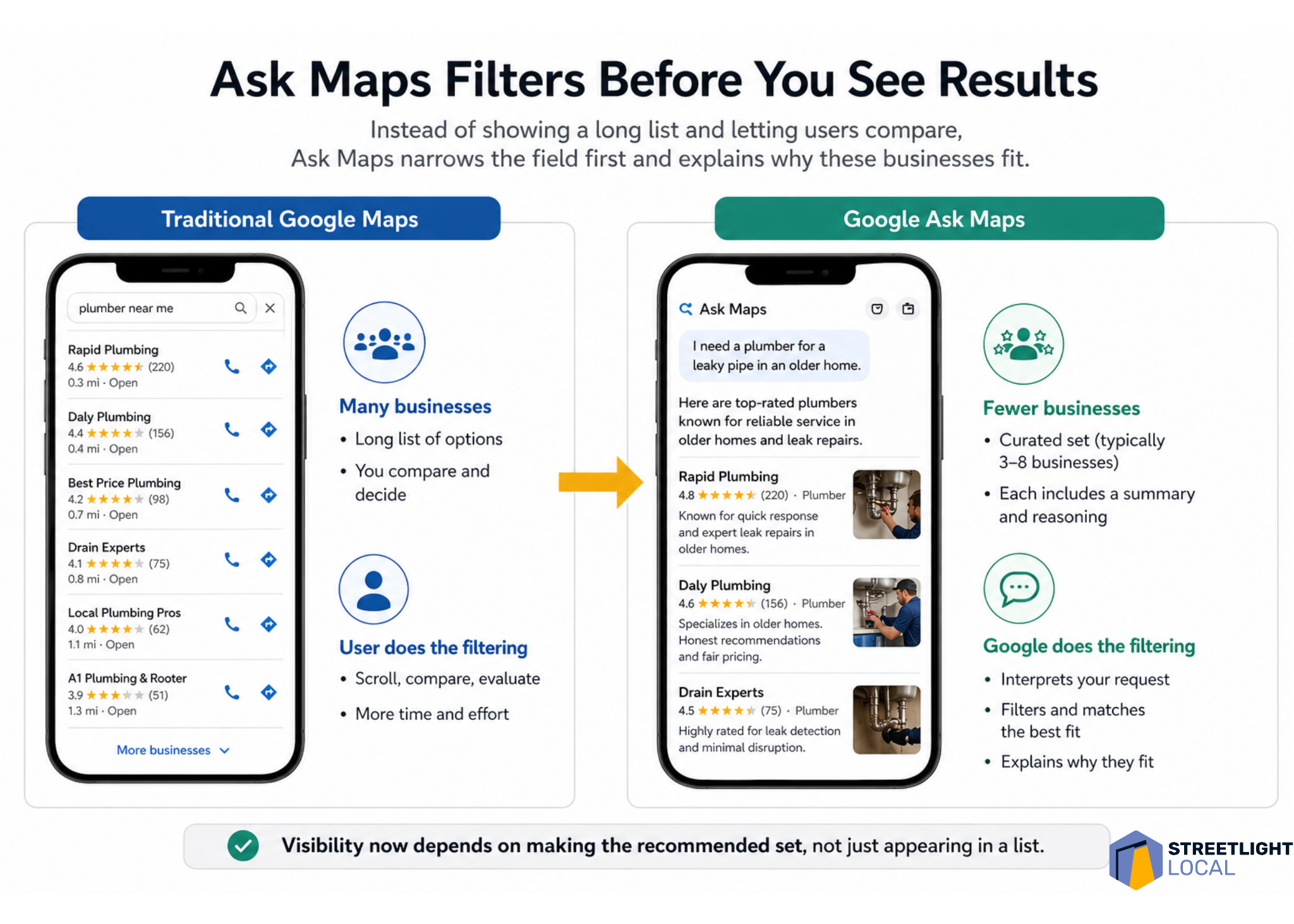
One of the first things I notice about Ask Maps is how small the result set can be. In testing, it often showed around three to eight businesses, depending on the query. That feels very different from traditional Google Maps, where people can scroll through dozens of options and compare them on their own.
With Ask Maps, much of that comparison happens earlier. Google filters the market first, interprets what the person is really asking for, and then presents a smaller group of businesses with an explanation of why each one fits.
That means I have to think beyond the question of whether a business ranks. I also have to ask whether Google has enough confidence to include that business in a short recommendation set and explain why it belongs there.
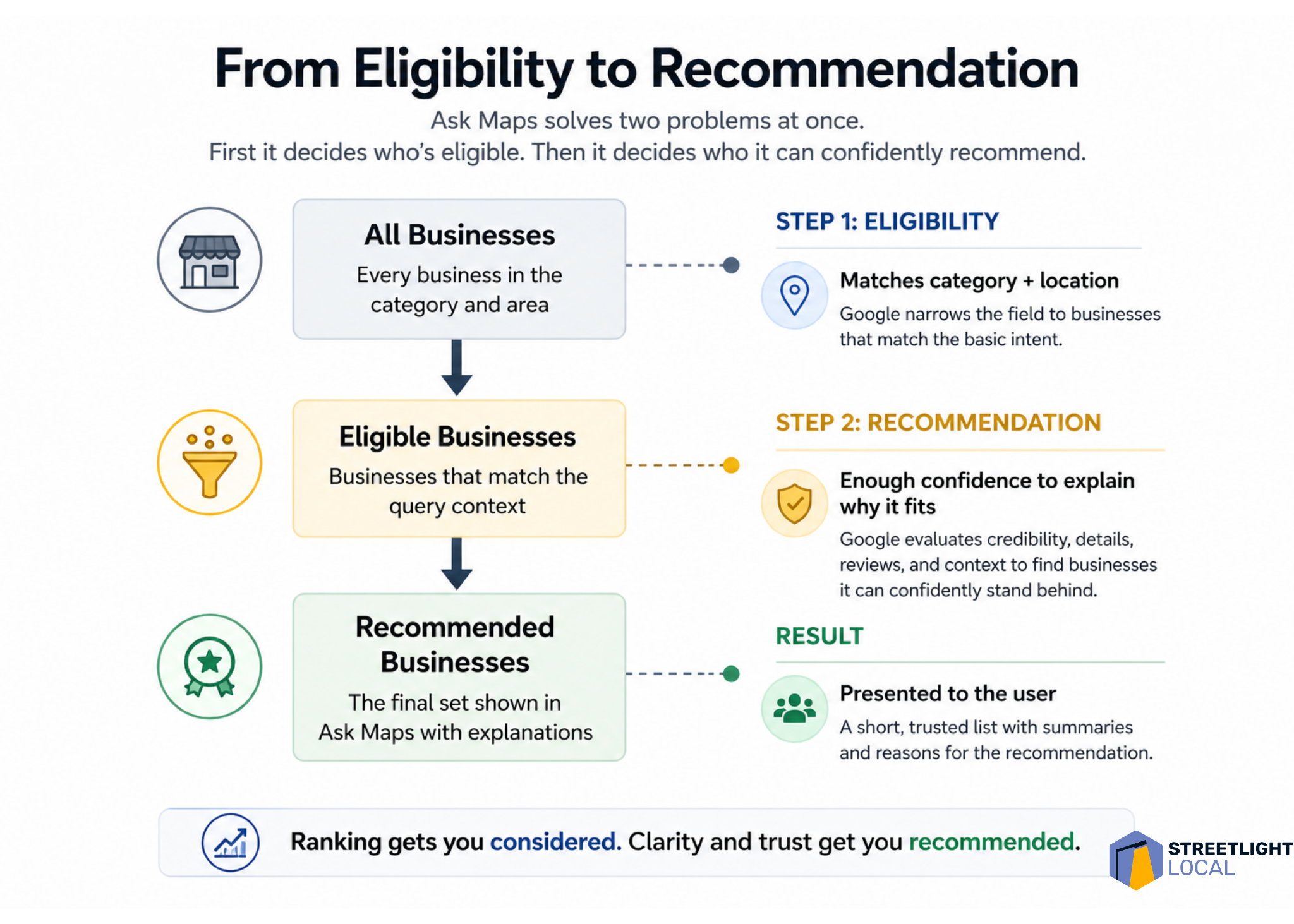
I think of this as a two-step problem. First, Google decides which businesses are eligible for the query. Then, it decides which eligible businesses it can confidently recommend.
Ask Maps needs enough detail to explain the business
Ask Maps does more than list businesses. It interprets and describes them. Even for simple searches, I often see businesses framed around qualities such as responsiveness, experience, specialization, professionalism, or the kinds of situations they seem best suited for.
That creates a different optimization challenge. It is not enough for Google to know that a business exists or that it offers a basic service. Google needs enough information to answer a more practical question: when should this business be recommended?
To support that, I want Google to understand the types of jobs the business handles, the situations it commonly deals with, the concerns customers usually have, and how the business approaches those situations.
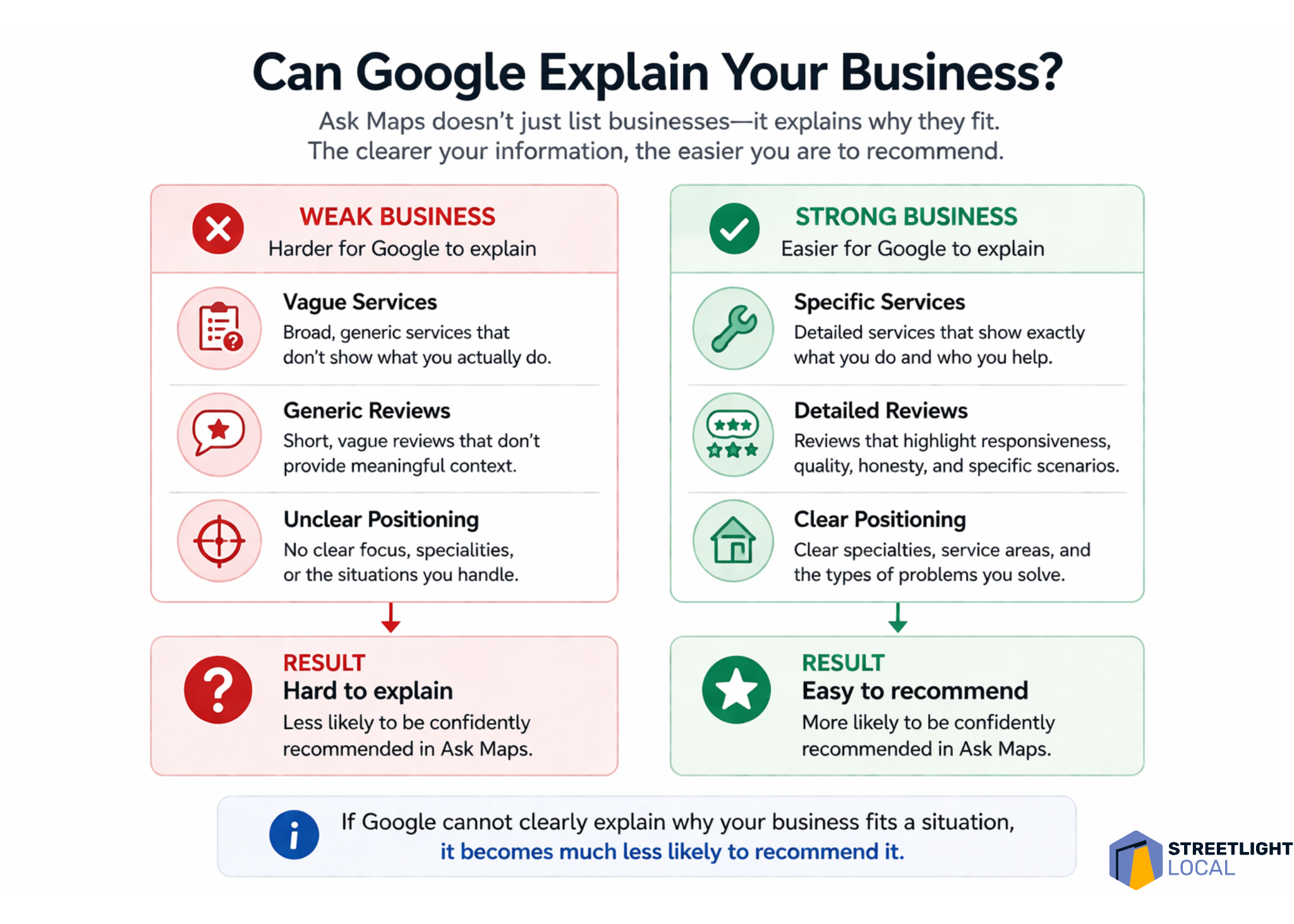
If that information is vague, scattered, or inconsistent, Ask Maps has less to work with. When Google cannot clearly explain why a business fits a specific situation, I would expect that business to be less likely to appear as a recommendation.
Google Business Profile becomes the identity layer
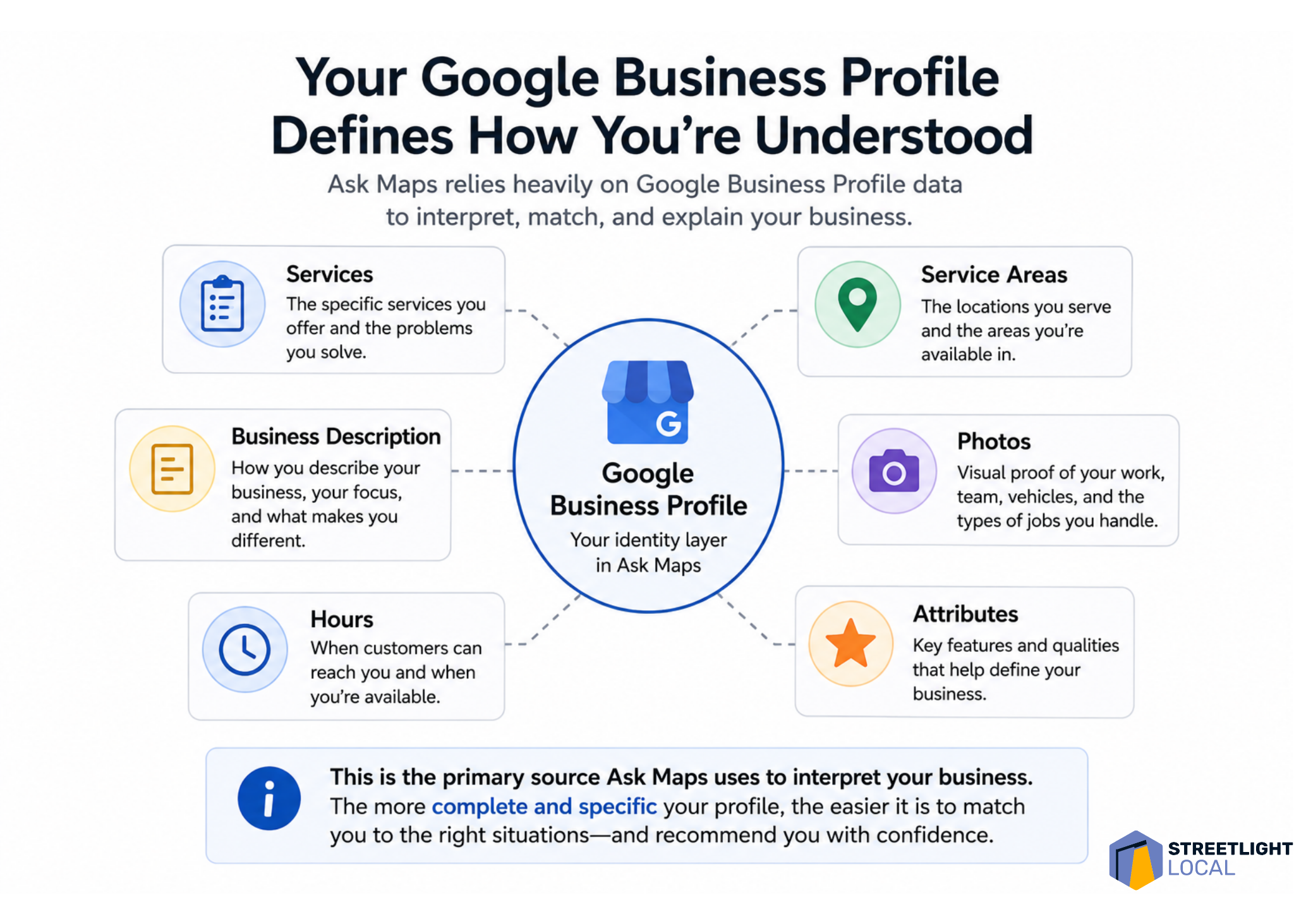
For me, the Google Business Profile sits at the foundation of this whole process. In earlier-stage queries, Ask Maps appears to rely heavily on profile data, including business descriptions, services, reviews, ratings, hours, and operational details.
Many businesses still treat their profile like a basic listing to fill out and keep current. That is necessary, but I do not think it is enough for an environment where Google is trying to describe and recommend businesses. The profile needs to communicate a clear, specific identity.
A generic profile might say that a business offers plumbing, HVAC, electrical work, or another broad service. A stronger profile clarifies the kinds of problems it handles, the situations it is built for, and the details that make it useful to specific customers.
For example, I would use the profile to reinforce details such as emergency availability, response times, specific repair or installation types, experience with older homes, complex systems, or common customer problems the business solves.
That level of specificity gives Google more direct evidence. Instead of forcing the system to infer what the business is known for, I want the profile to make that identity clear.
Reviews shape positioning, not just credibility
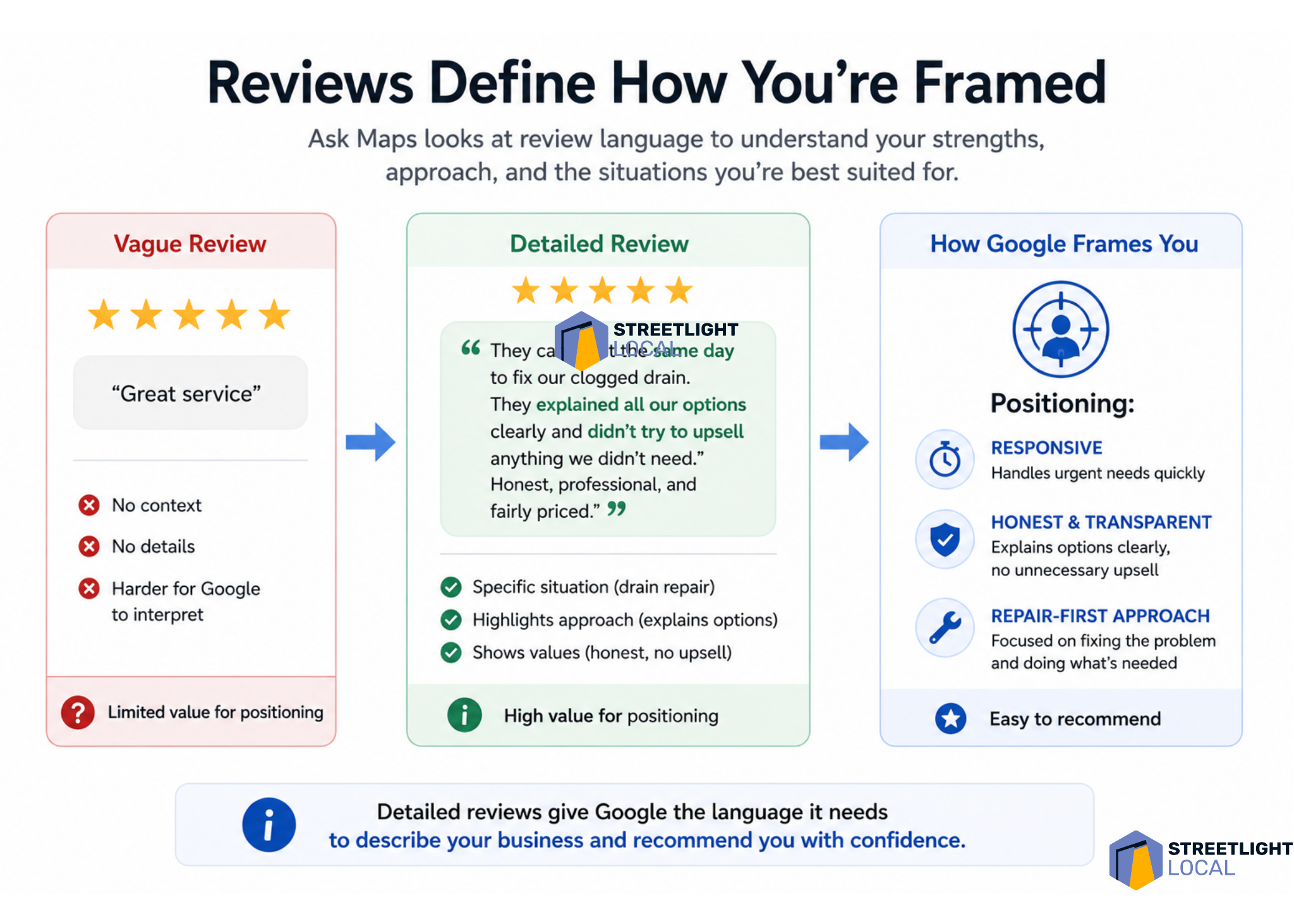
Reviews have always mattered in local search, but I see them playing a more structured role in Ask Maps. Review language can show up in the way Google describes a business, especially around themes like responsiveness, honesty, communication, professionalism, and quality of work.
That tells me reviews are doing more than supporting credibility. They are helping define how the business is positioned.
I would still pay attention to rating, volume, and recency. But I would also look closely at what customers actually say. The language inside reviews can give Google useful context about what the business does, how it works, and what customers value about the experience.
A vague review such as “great service” signals satisfaction, but it does not explain much. A detailed review that mentions a same-day response, a drain backup, clear communication about options, and a repair-focused solution gives Google several stronger signals about the business.
Over time, those patterns accumulate. In that sense, I view reviews as one of the main ways Google learns what a local business is known for.
Website content matters more when decisions get harder
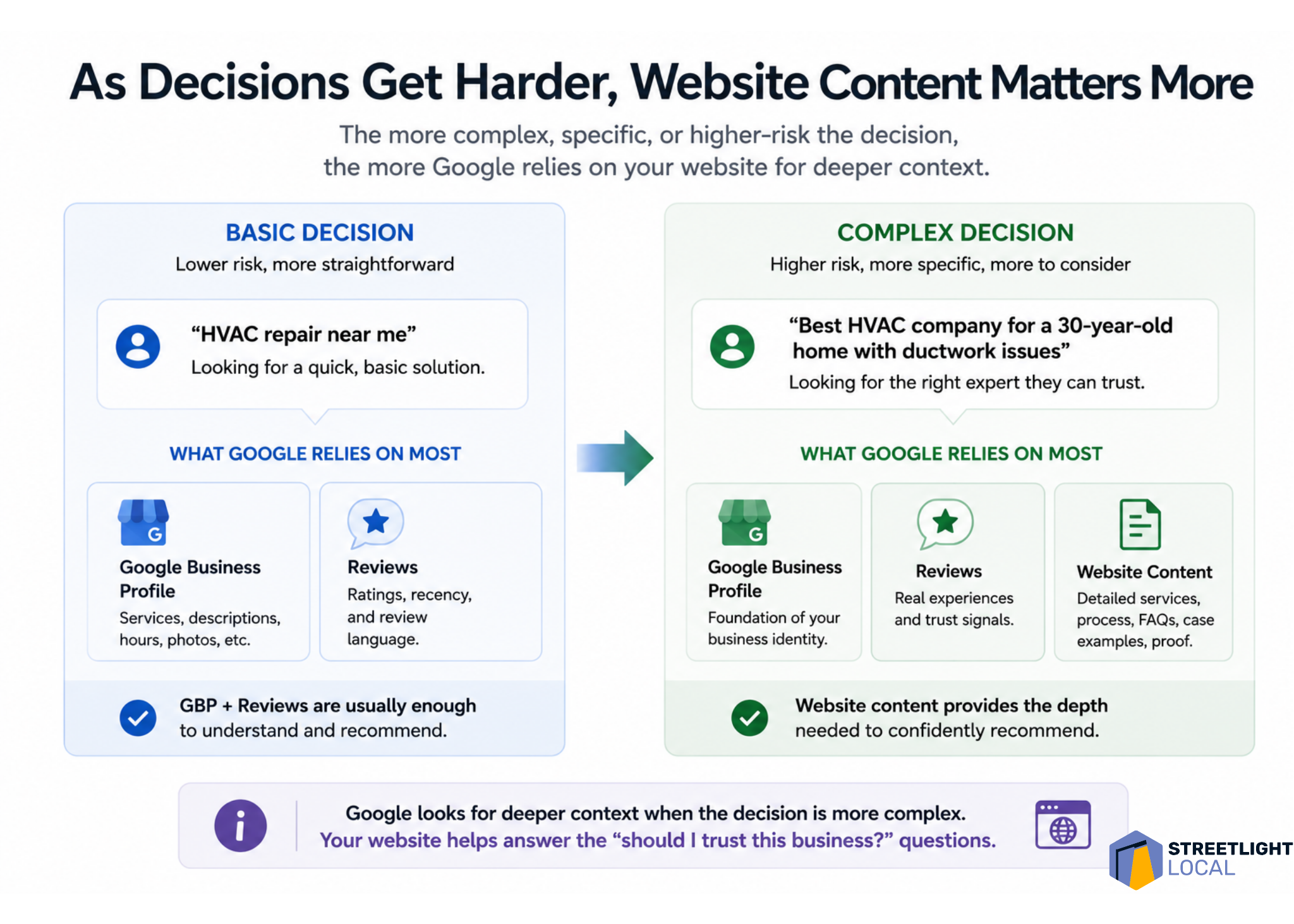
I also see website content becoming more important as queries become more complex. For basic service searches, the Google Business Profile and reviews may carry a lot of the weight. But when the search involves higher cost, uncertainty, or trust, Google appears to look for deeper supporting evidence.
That is where the website can help. Many service pages explain what a business offers and why it is qualified. That still matters, but it does not always match how people search when they are trying to make a difficult decision.
In more situational searches, people are not just looking for a service. They are trying to understand a problem, compare options, reduce risk, and decide what to do next.
That is why I would build content around the customer’s situation, not just around the service name. Stronger pages explain what leads to the problem, how to recognize it, what options are available, how to think through the decision, and what outcomes to expect.
For example, a furnace repair page can go beyond a basic list of services. It can cover common symptoms, when repair makes sense, when replacement might be worth considering, and how a homeowner can evaluate the decision. That kind of content lines up more closely with the prompts Ask Maps is trying to interpret.
I also see a strong fit for jobs-to-be-done pages. Instead of organizing every page around a service category, I would create pages around the situation the customer is trying to solve and the decision they are working through.
Trust signals matter more as risk increases
As searches move from simple service needs into decision-making, trust becomes more important. When people mention cost, honesty, uncertainty, or fear of making the wrong choice, Ask Maps tends to highlight qualities such as transparency, fairness, careful workmanship, and clear communication.
That makes sense to me because it reflects how people actually think in those moments. When someone faces an expensive repair or an unexpected issue, they are not only asking who can do the work. They are asking who they can trust to handle it correctly.
I would support that trust with evidence across the business’s online presence. Reviews can show that customers felt respected and informed. Website content can explain the process. Examples of completed work can show experience. Clear “what to expect” sections can reduce uncertainty.
The higher the perceived risk, the more supporting evidence matters. I want Google to see a consistent pattern that the business explains options clearly, avoids unnecessary pressure, handles similar situations, and leaves customers confident in the outcome.
Detailed customer reviews do more than boost ratings. They give Google Ask Maps the context it needs to understand, position and confidently recommend a local business.
External signals should reinforce the same story
For more complex or trust-heavy queries, Ask Maps may look beyond the Google Business Profile, reviews, and website. Third-party platforms, directories, and other public sources can help reinforce how Google understands a business.
I do not take that to mean every external mention is equally important. I take it to mean consistency matters. If a business is described one way on its website, another way in reviews, and differently across directories or social platforms, the overall picture becomes harder to interpret.
When those signals align, they strengthen each other. Business descriptions, services, customer experiences, types of work handled, and overall positioning should tell the same story wherever they appear.
From a practical standpoint, I would not try to appear on every possible platform. I would make sure the important sources are accurate, credible, and consistent.
I would optimize for evidence, not just keywords
As local search decisions become more specific and higher risk, Google needs deeper signals from business profiles, reviews, and website content to recommend the right provider.
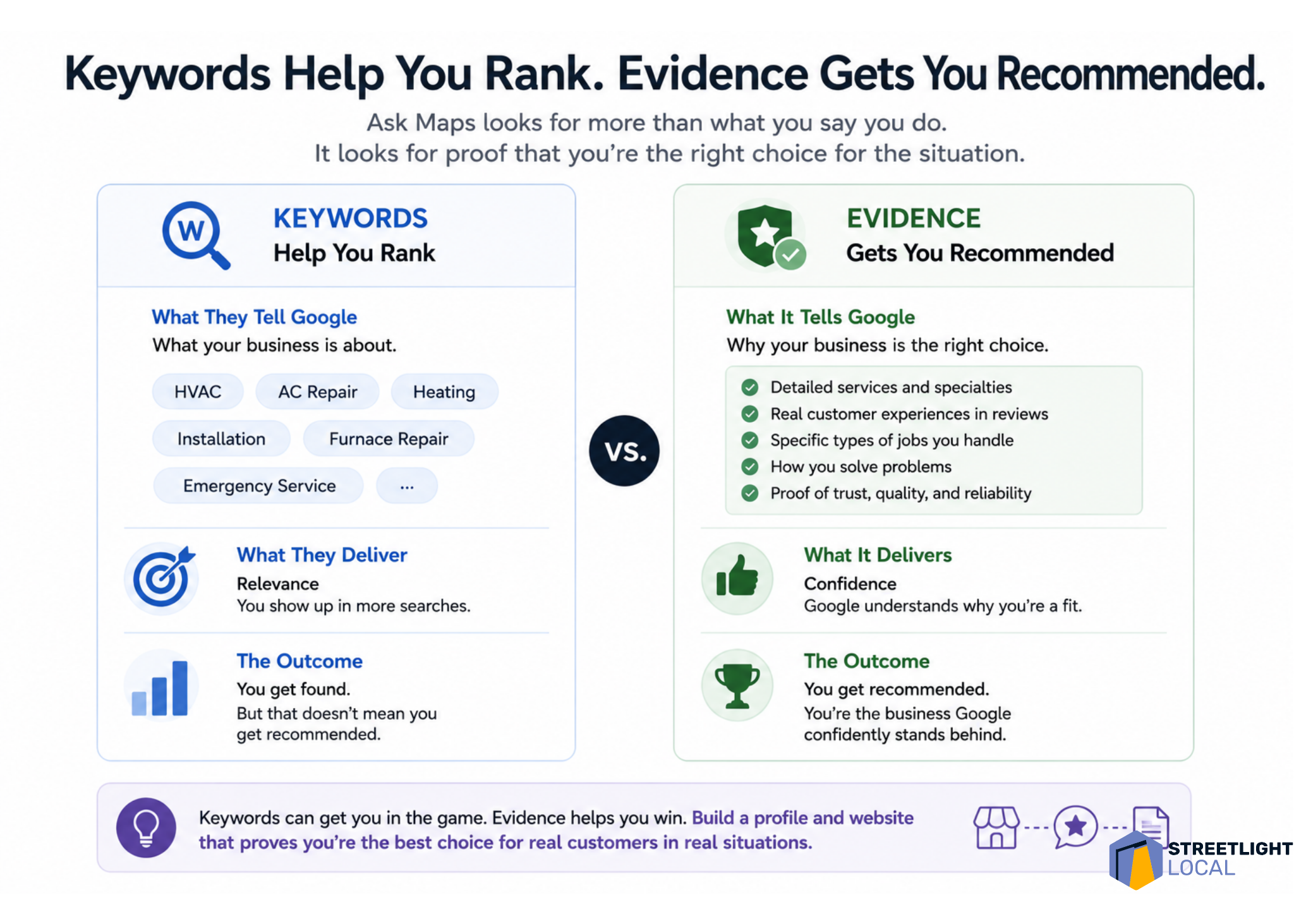
Taken together, these patterns push me to think differently about optimization. Traditional local SEO often starts with keywords and rankings. Those still matter, but they do not fully explain what Ask Maps is doing.
I find it more useful to think in terms of evidence. For a business to be recommended, Google needs enough information to understand what it does, what types of jobs it handles, what situations it fits, how customers experience it, and whether it can be trusted in higher-stakes decisions.
Each source contributes something different. The Google Business Profile establishes the baseline identity. Reviews add real-world context. Website content provides depth and explanation. External sources help confirm the same picture.
Individually, none of those elements tells the whole story. Together, they create a clearer and more consistent understanding of the business. That is where the shift from ranking to recommendation becomes most obvious: keywords can support relevance, but evidence supports recommendation.
My practical framework for Ask Maps visibility
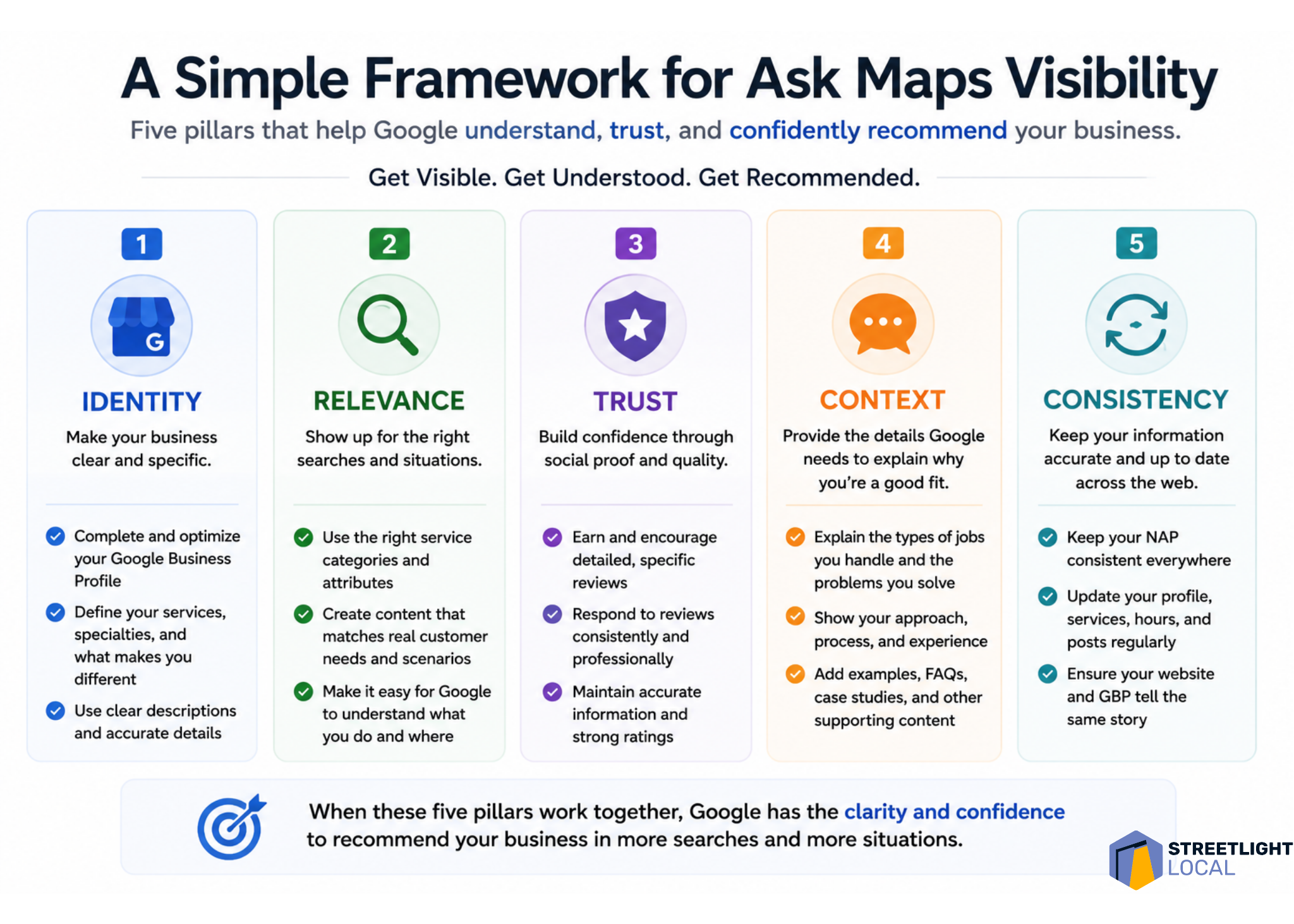
When I evaluate a business for Ask Maps visibility, I would look at five areas: identity, relevance, trust, context, and consistency.
Google Ask Maps rewards more than keyword relevance. This visual shows why reviews, service details, trust signals, and real proof help local businesses get recommended.
Identity asks whether Google can clearly understand what the business does and where it operates. Relevance asks whether the business can be matched to specific services and situations. Trust asks whether there is enough proof that customers feel confident choosing it.
Context asks whether the content reflects the decisions customers are actually trying to make. Consistency asks whether different sources reinforce the same understanding of the business.
I do not see this as a checklist to complete once. I see it as a practical way to evaluate how clearly and consistently a business is represented across the sources Ask Maps appears to use.
What I would avoid
With any new search feature, it is easy to overcorrect. I would avoid treating Ask Maps as an isolated channel that needs thin content, unnatural profile language, generic service-page duplication, or review language that feels forced.
Those tactics may create more content, but they do not necessarily create more useful evidence. The better approach is to align more closely with how customers actually search, evaluate options, and make decisions.
A practical local SEO framework shows how businesses can earn visibility in Google Ask Maps by clarifying identity, proving relevance, building trust, adding context, and staying consistent online.
When the business presence reflects real customer needs clearly and consistently, it naturally creates the kinds of signals Ask Maps seems to rely on.
What I still do not know about Ask Maps
I would treat all of this as directional, not definitive. Ask Maps is still being tested and refined, and the system is not fully documented.
The result structure can vary by query and test environment. The feature’s usability is also still changing. In many cases, users may still need to click into a Google Business Profile to call, book, or engage, rather than acting directly from the Ask Maps response.
Measurement is another open issue. Right now, I do not see a clean way to isolate Ask Maps visibility or performance inside standard reporting tools. That makes it difficult to attribute calls, traffic, or conversions directly to this experience.
I also would not assume the same signal weighting applies to every query. Google Business Profile data, reviews, website content, and external sources may all matter, but their relative importance likely changes based on the search intent and the complexity of the decision.
The real shift is from ranking to recommendation
I see Ask Maps as a version of local search where retrieval, evaluation, and decision support are moving closer together. Instead of making users search, compare, research, and decide across several steps, Google is trying to guide more of that process inside one experience.
That changes the meaning of visibility. In Ask Maps, it is not enough for a business to simply appear. The business needs to be understood well enough for Google to explain why it fits the situation and trusted enough to be recommended.
For businesses and SEOs, I would not respond by chasing a narrow trick. I would build a clearer, more complete, and more consistent representation of the business across the sources that shape Google’s understanding.
The businesses most likely to benefit are the ones that are easiest to interpret, easiest to trust, and easiest to match to real-world customer needs.
Your local business rankings might be suffering, and surprisingly, it could all be due to your map pin. Google’s placement of your business on their map significantly impacts your visibility, and addressing hidden addresses and setup issues is crucial.
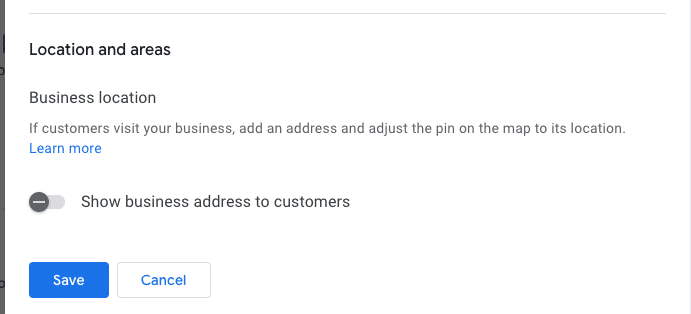
I’ve often found myself engrossed in the ongoing debate within the local SEO community about the ‘hide address’ toggle for service area businesses (SABs). Many business owners consider this option a mere privacy setting, but it’s much more—a decision that affects how Google’s algorithm perceives your physical relevance.
Here are some questions to consider:
Does your defined service area affect your ranking?
Does hiding your street address impact your visibility in the local pack?
Is Google erasing that data, or does your map pin become an invisible anchor?
These are foundational questions in understanding how proximity works when you choose to ‘hide’ on the map.
How Google Determines Your Map Pin
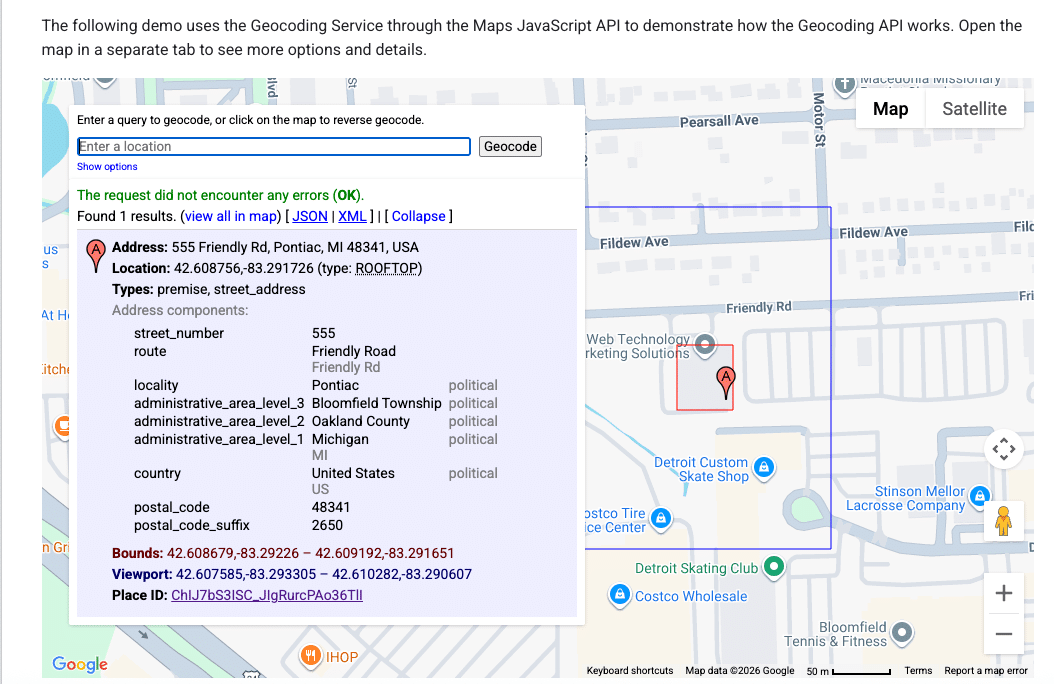
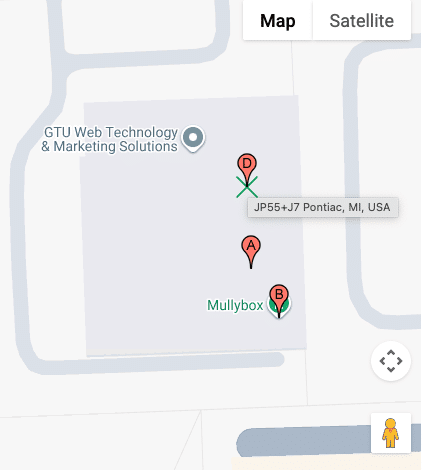
It’s essential to know that your address and map pin are not the same. Entering an address into your Google Business Profile doesn’t just place a pin; it’s processed through Google’s geocoding engine, comparing it against their database.
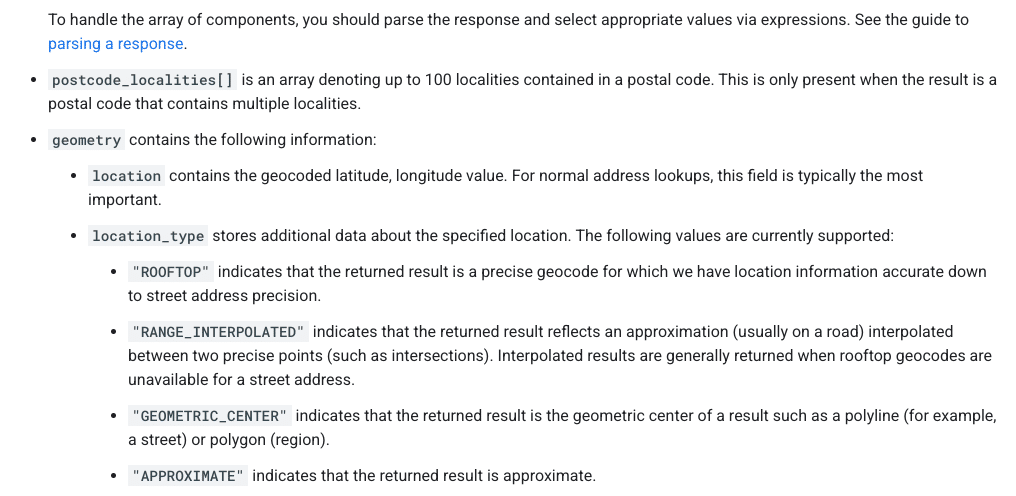
Understanding Google’s data models is key to understanding why your pin might be misplaced:
When Google finds a reliable match, they place your pin accurately at your building’s rooftop. Understanding how these data models work can help explain why SABs sometimes rank differently in local searches.
Is Your Map Pin Placement Accidental?
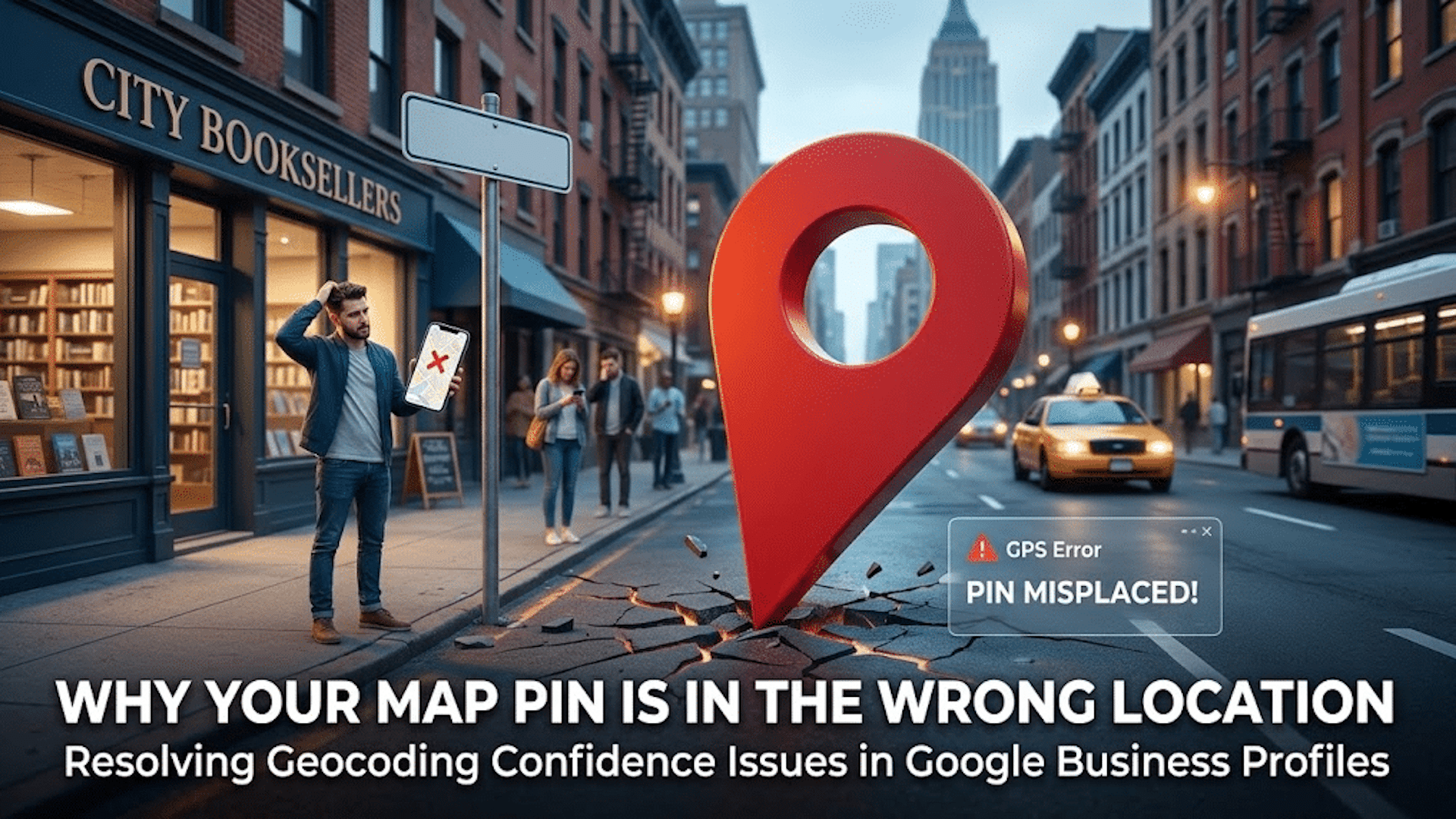
Don’t be mistaken, it’s not a bug but a failure in converting text to precise map coordinates. When this fails, your business may end up with a map pin that’s misplaced, affecting your local ranking authority.
When unable to secure a high-confidence match from your building, Google defaults to using the city’s center as your pin’s fallback location, often causing your business to rank from a less relevant area.
Suite Number Issues
I’ve warned clients countless times about the pitfalls of including suite numbers in Address line 1. These numbers aren’t street-level data; embedding them can lead to geocoding conflicts, making your map pin default to a broader location like a city center.
Properly Anchoring Your Map Pin
For accurate map pin placement, ensure your address in Google’s system is geocoding-friendly. Keep unnecessary details out of the first address line and verify how Google reads your address using their developer tools.
When addressing geocoding problems, prepare for possible re-verification requests. Stay consistent in your corrections until Google verifies your business’s precise location.