Tag: AI Assistants

  • AI Coding Assistant Market Share: Who Leads in 2026?

    AI Coding Assistant Market Share: Who Leads in 2026?

    If you are choosing an AI coding assistant for yourself or your development team, the headline answer is clear: Claude Code leads the October 2026 primary-tool market at 29.4%, ahead of GitHub Copilot at 22.7%. That does not automatically make Claude Code the right purchase. The aggregate ranking hides large differences between startups and enterprises, terminal users and IDE users, and the assistant you open versus the model that actually generates the code.

    The useful question is not simply which product is biggest. It is which market signal applies to your environment, what the rapid move toward coding agents changes, and how much weight market share should carry in your evaluation. Here is how to read the numbers without turning popularity into a substitute for testing.

    Read primary-tool share as a competitive signal, not total adoption

    The October estimate measures the percentage of professional developers who name a product as their primary AI coding assistant: the one they use most often to write, edit, or review production code. It does not count every tool a developer has tried, every installed extension, total seats, vendor revenue, or the volume of code generated.

    That distinction matters because many developers use two or three assistants. A developer might rely on Claude Code for repository-wide implementation, keep GitHub Copilot enabled for inline completion, and occasionally send a background task to Codex. Only the tool used most often receives that developer’s primary-tool share.

    The estimate combines an August 4 to September 26, 2026 survey of 2,350 professional developers in North America and Europe with publicly disclosed seat and usage figures. The responses were normalized into a market model. That makes the results useful for understanding competition among leading products, but they are not a worldwide census or a direct measure of software quality.

    Use the rankings to build a shortlist, understand where workflows are moving, and challenge an outdated default. Do not use them alone to approve a company-wide rollout.

    Key takeaways

    • Claude Code leads with 29.4% of primary-tool share in October 2026; GitHub Copilot follows at 22.7%, Cursor at 13.1%, and OpenAI Codex at 11.8%.
    • The four largest assistants hold 77.0% combined, up from 71.2% in January 2026.
    • Terminal and CLI agents are now the largest interface category, rising from 21.3% in January to 38.6% in October.
    • Company size changes the ranking: Claude Code leads among startups, while GitHub Copilot leads at companies with more than 5,000 employees.
    • Product share and model share are different. Claude models account for 47.3% of model-family coding usage because they are available through products beyond Claude Code.
    • Market share can tell you which tools deserve evaluation. Only a controlled test against your repositories, policies, and workflows can tell you which one deserves deployment.

    The October leaderboard shows both concentration and disruption

    Large central technology nodes and smaller fast-moving nodes compete inside a glowing circular digital arena.

    The October 2026 primary-tool snapshot puts two terminal-oriented agents in the top four and shows substantial movement since January. The change column uses percentage points, not percent growth.

    RankAI coding assistantDeveloperPrimary interfaceOctober 2026 shareChange since January
    1Claude CodeAnthropicTerminal agent29.4%+10.9 points
    2GitHub CopilotMicrosoft / GitHubIDE extension22.7%-7.8 points
    3CursorAnysphereAI-native IDE13.1%-4.9 points
    4OpenAI CodexOpenAITerminal and cloud agent11.8%+7.6 points
    5Google Antigravity and Gemini Code AssistGoogleAI-native IDE5.6%+1.1 points
    6JetBrains AI and JunieJetBrainsIDE extension4.3%-0.6 points
    7WindsurfCognitionAI-native IDE2.9%-1.9 points
    8Amazon Q Developer and KiroAmazonIDE extension2.6%-0.8 points
    9OpenCodeOpen sourceTerminal agent2.4%+1.6 points
    10ClineOpen sourceIDE extension1.7%-0.5 points
    –All other toolsVariousVarious3.5%-4.7 points

    Claude Code’s lead is meaningful because it is paired with the largest gain in the table. OpenAI Codex has the second-largest increase and has nearly tripled its primary-tool share since January. Copilot and Cursor remain substantial products, but both have lost share while agent-oriented tools have gained it.

    The top four products now account for 77.0% of primary-tool usage, compared with 71.2% in January. That is evidence of concentration within this definition of the market. It is not evidence that the category has settled: the order inside that concentrated group has changed quickly.

    The five-quarter trajectory is more useful than a single rank

    Quarterly averages smooth out the monthly movement and show that the change in leadership was not a one-month fluctuation. They also explain why the Q3 values below differ slightly from the October snapshot.

    AssistantQ3 2025Q4 2025Q1 2026Q2 2026Q3 2026
    GitHub Copilot36.2%33.4%30.1%26.0%23.1%
    Claude Code7.9%12.6%19.2%24.8%28.7%
    Cursor19.4%19.9%17.6%15.2%13.5%
    OpenAI Codex1.8%3.1%4.6%8.3%11.2%
    Google3.6%4.1%4.0%4.9%5.4%

    Claude Code passed GitHub Copilot between Q2 and Q3 2026. Copilot declined in every quarter shown, while Claude Code rose in every quarter. Cursor peaked at 19.9% in Q4 2025 and then declined for three consecutive quarters. Codex accelerated most sharply after Q1 2026, moving from 4.6% to 8.3% in Q2 and 11.2% in Q3. Google’s movement was steadier, ending Q3 at 5.4%.

    For a buyer, sustained direction deserves more weight than a narrow difference in one snapshot. A rising product is more likely to receive integrations, community attention, training material, and internal advocacy. A falling product can still be the best operational fit, especially when its decline reflects a changing interface preference rather than a failure of the product itself.

    The decisive change is from suggestions to delegated tasks

    A developer moves from receiving one code suggestion to supervising AI agents that coordinate coding, testing, and deployment tasks.

    The market is not merely swapping one vendor for another. Developers are changing how they interact with coding AI. Inline completion asks an assistant to help with the next fragment of code. An agent can receive a broader goal, inspect multiple files, make coordinated edits, run commands or tests, and return a larger unit of work for review.

    The interface numbers capture that shift. Tools that support several interfaces are assigned to the one each respondent uses most often, so the categories describe dominant behavior rather than permanent product boundaries.

    Interface typeJanuary 2026 shareOctober 2026 shareChange
    Terminal / CLI agent21.3%38.6%+17.3 points
    IDE extension41.2%29.4%-11.8 points
    AI-native IDE24.8%17.9%-6.9 points
    Cloud / background agent5.1%9.2%+4.1 points
    Browser-based app builder7.6%4.9%-2.7 points

    Terminal and CLI agents gained 17.3 points between January and October, becoming the largest interface category at 38.6%. Cloud and background agents also gained share. IDE extensions fell from 41.2% to 29.4%, while AI-native IDEs fell from 24.8% to 17.9%.

    This does not mean the IDE is disappearing. IDE extensions still represent nearly three in ten primary workflows, and many agent users review the resulting code in an editor. It means that an evaluation built entirely around autocomplete quality is now incomplete.

    Your test set should include the work agents are being asked to own: a change that touches several files, a bug whose cause is not identified in the prompt, a refactor that must preserve behavior, and a review task that requires following repository conventions. Record whether the assistant finds the right context, makes coherent changes, validates them, and leaves an understandable diff. A fast completion is not useful if the developer spends longer discovering and correcting hidden mistakes.

    Agent capability also changes the risk boundary. If a tool can execute commands, modify many files, access external systems, or open pull requests, test it first in a protected branch or isolated environment. Apply the least permissions it needs, keep credentials out of its context, require review before merge, and let your normal test and security controls judge the output. The specific downside is larger than a poor inline suggestion: an agent can propagate a wrong assumption across a repository or act on an unintended resource.

    Your company size and model layer change the apparent winner

    The overall ranking is least reliable when it is treated as though every buyer faces the same constraints. The split by employer size shows four materially different markets.

    Company sizeClaude CodeGitHub CopilotCursorOpenAI CodexAll other tools
    Startup, 1-50 employees36.8%9.7%21.4%15.2%16.9%
    Small business, 51-50033.1%17.5%16.2%13.4%19.8%
    Mid-market, 501-5,00027.9%25.8%11.7%10.9%23.7%
    Enterprise, more than 5,00022.4%35.6%8.3%9.1%24.6%

    Claude Code is strongest among startups at 36.8% and declines steadily to 22.4% at enterprises. Cursor has an even sharper segment gap, moving from 21.4% among startups to 8.3% at companies with more than 5,000 employees. Codex follows the same broad pattern, though less dramatically.

    GitHub Copilot moves in the opposite direction. It holds 9.7% among startups but leads the enterprise segment at 35.6%. Existing Microsoft licensing agreements help explain why Copilot remains the default procurement route inside many large organizations. At mid-market companies, Claude Code and Copilot are much closer, at 27.9% and 25.8% respectively.

    If you work at a startup, the aggregate table understates the prevalence of Claude Code, Cursor, and Codex among your peers. If you manage enterprise tooling, it understates Copilot’s position and the influence of procurement, identity, administration, and existing contracts. Use the segment closest to your organization as the starting point, then check whether your technical and governance requirements resemble that peer group.

    Do not confuse the assistant with the underlying model

    A product is the working environment: its interface, context handling, repository tools, permissions, integrations, and review flow. A model is the code-generating engine available inside that environment. Several assistants allow developers to choose among model families, so the product leaderboard cannot tell you which models generate the most coding output.

    Model familyDeveloperJanuary 2026 shareOctober 2026 share
    ClaudeAnthropic49.2%47.3%
    GPTOpenAI22.4%28.6%
    GeminiGoogle11.8%10.2%
    Open-weight models, including Qwen, DeepSeek, Kimi, and GLMVarious10.3%9.4%
    GrokxAI3.4%2.1%
    All other modelsVarious2.9%2.4%

    Claude models account for 47.3% of model-family coding usage, substantially more than Claude Code’s 29.4% product share. The difference exists because Claude models are also used within Cursor, GitHub Copilot, and open-source agents. GPT models gained 6.2 points between January and October, reaching 28.6% as Codex expanded. Open-weight models retained 9.4%, with their use concentrated among cost-sensitive teams and self-hosted deployments.

    This separation gives you a better evaluation design. First judge whether the product fits your workflow and controls. Then compare the models available inside it on the same tasks. Keep the model name and version in your evaluation record; otherwise, a model change can be mistaken for a product improvement or regression.

    Turn the market-share numbers into a defensible tool decision

    Market share is useful evidence of momentum, ecosystem depth, and peer adoption. It does not directly measure correctness, security, developer satisfaction, review burden, total cost, or performance on your codebase. A defensible decision uses the market data to narrow the field and repository-level evidence to choose among the finalists.

    1. Define the job before naming a vendor. Decide whether you mainly need inline completion, repository exploration, multi-file implementation, code review, background execution, or a combination. The interface trend shows that these are no longer interchangeable versions of the same task.
    2. Apply your non-negotiable constraints. Check supported editors and terminals, operating environments, authentication, administrative controls, data handling, model availability, network access, auditability, and contract requirements. Remove any product that cannot meet a genuine constraint before comparing output quality.
    3. Build a segment-aware shortlist. Include the overall leader, the leader for your company-size segment, and a credible alternative with a different interface or model strategy. An enterprise shortlist that ignores Copilot would miss the segment leader; a startup shortlist containing only Copilot would ignore how differently that segment behaves.
    4. Use the same representative task set. Give every finalist an existing bug, a multi-file feature, a behavior-preserving refactor, and a code-review assignment drawn from the kinds of repositories it would actually encounter. Keep the prompt, starting commit, permissions, and acceptance criteria consistent.
    5. Score the cost of reaching an acceptable result. Record whether the final change passes the relevant tests, how much developer intervention it requires, how long review and correction take, whether it follows repository conventions, and what the successful result costs. Do not reward a tool merely for producing more code or producing it faster.
    6. Test assistant and model choices separately. When a product offers several models, rerun the important tasks with each viable model. This reveals whether the value comes from the interface and agent harness, the underlying model, or their combination.
    7. Control the rollout and set a reassessment trigger. Begin with repositories and permissions where mistakes are detectable and reversible. Expand only after the review burden and failure modes are understood. Reassess when a major model, agent mode, pricing structure, policy requirement, or contract renewal changes the decision.

    The practical choice is rarely the product with the largest number beside its name. It is the assistant that completes your representative work with the lowest combined burden of prompting, correction, review, administration, and risk. Use the 2026 leaderboard to decide what deserves a serious test, then let reproducible work in your own environment decide what your team adopts.

    References


  • How to Delegate Work to AI Without Giving Up Judgment

    How to Delegate Work to AI Without Giving Up Judgment

    AI may already be drafting your client updates, interpreting search data, prioritizing content ideas, and recommending what to do next. The risk isn’t frequent use. It’s failing to notice when the assistant moves from handling work to deciding what matters.

    You don’t need to pull AI out of the workflow. You need a visible boundary between assistance and authority. The framework below will help you set that boundary, supply the context a model cannot discover on its own, and keep a named person accountable for every consequential decision.

    Define authority before you automate the workflow

    Assistant adoption is no longer limited to occasional drafting. By August 2026, one weighted model estimated that Claude had 271.3 million monthly active users and 148.2 million weekly active users. Business strategy and operations represented 8.7% of sampled consumer conversations, excluding Claude Code sessions. Those estimates come from a third-party model, so they shouldn’t be treated as audited platform disclosures. They still illustrate the operational shift: people are bringing assistants into recurring work, not merely testing them.

    That makes the number of AI users a weak governance metric. What matters is the authority those users give the system. A team that uses AI every day to organize material may carry less risk than a team that uses it once a month to approve a budget, publish an unsupported claim, or change a production website.

    Classify each workflow by the decision right being delegated:

    LevelWhat the assistant doesWhat a person still owns
    PrepareFormats, summarizes, restructures, or drafts from supplied materialChecks accuracy, meaning, tone, and omissions
    AnalyzeCalculates changes, groups data, detects patterns, or surfaces anomaliesValidates definitions, measurement quality, segmentation, and business relevance
    RecommendProposes or ranks options against stated criteriaTests assumptions, adds missing context, compares alternatives, and selects the action
    DecideSelects an option within a clearly bounded policySets the policy, exceptions, limits, escalation rules, and accountability
    ActExecutes an approved or pre-authorized changeControls permissions, monitors results, preserves a log, and can reverse the change

    Most teams can delegate preparation broadly. Analysis needs better controls because bad definitions can produce correct calculations with misleading meaning. Recommendations need explicit criteria. Decisions and actions require the strongest limits because they can create financial, technical, reputational, or client consequences.

    For an SEO or GEO team, an assistant might cluster queries, extract recurring questions, compare page structures, or draft candidate JSON-LD. It should not silently choose the business’s priority audience, turn uncertain evidence into a factual claim, or publish structured data that misrepresents the visible page. A person must own those choices.

    Write one authority sentence for every recurring AI workflow: AI may perform this task using these inputs, but this role approves this decision before this action occurs. Add the conditions that require escalation and the method for reversing an action. If you can’t complete that sentence clearly, the workflow isn’t ready for autonomous execution.

    Give the assistant a decision brief, not just an export

    A manager arranges symbols for goals, constraints, tradeoffs, stakeholders, and escalation before sending them into an abstract AI device.

    Uploading data does not upload the business that produced it. Search Console can show queries, pages, clicks, impressions, and positions. Analytics can show recorded sessions and conversions. Neither automatically explains that a promotion ended, a price changed, a key product went out of stock, a form broke, a consent configuration changed, margins moved, or the sales team altered its follow-up process.

    This is why accurate data can still support the wrong recommendation. The system may describe its input correctly while missing the event that determines what the business should do.

    Before asking an assistant to recommend an action, give it a compact decision brief containing:

    • The decision: State the choice that must be made. Replace a broad request such as analyze performance with a decision such as determine whether to expand, repair, consolidate, or pause this content program.
    • The business outcome: Name what success actually means: qualified leads, profitable sales, renewals, booked appointments, adoption, or another commercial result. Traffic is not a substitute unless traffic itself is the goal.
    • The metric definitions: Explain what counts as a lead, conversion, branded query, priority page, new customer, or qualified opportunity. Include known measurement gaps.
    • The relevant segments: Separate branded from non-branded demand, informational from commercial intent, priority services from peripheral topics, and new performance from recurring demand where those distinctions affect the choice.
    • The business events: Record launches, stock constraints, pricing changes, promotions, sales-process changes, site releases, tracking changes, and market events that overlap the period.
    • The constraints: Identify budget, capacity, compliance, brand, technical, contractual, and timing limits. A recommendation that ignores a real constraint is not actionable.
    • The missing evidence: Say what the model cannot see and who can supply it. This might require input from sales, customer service, product, finance, engineering, or the client.
    • The decision owner: Name the person who will evaluate the recommendation and accept responsibility for the final choice.

    Consider rising impressions with flat clicks. A surface-level reading might celebrate wider visibility. Segmenting the change may reveal that broad informational queries produced the extra impressions while clicks to commercially important services declined. The top-line observation remains true, but its meaning changes. Before approving more content, inspect query intent, landing pages, priority topics, click behavior, and downstream outcomes separately.

    Apply the same discipline when reported organic sessions fall. Verify whether tracking, consent, form behavior, or analytics configuration changed before treating the decline as lost demand. Otherwise, you may authorize a content overhaul to fix a measurement problem.

    Require the assistant to divide its response into four parts: observations, inferences, recommendations, and unknowns. Observations should stay close to the supplied evidence. Inferences should expose their assumptions. Recommendations should identify the criteria used. Unknowns should state what could materially change the answer. This format won’t guarantee a good decision, but it makes weak reasoning easier to challenge.

    For AI-search and structured-data work, include a factual source map in the brief. Connect each proposed answer, entity attribute, credential, product detail, price, review claim, and schema property to an approved page or business record. If the supporting fact is absent, the model may flag the gap; it may not fill it with a plausible invention.

    Use AI to shorten communication, not distance people

    A simple message can become a long, polished email when the sender asks an assistant to make it sound professional. The recipient then asks another assistant to summarize it and draft a reply. The machines expand, compress, and expand the message while both people search for the actual request.

    That loop adds more than wasted words. Repeated transformation can weaken hesitation, exaggerate urgency, or convert a tentative suggestion into something that reads like a commitment. Tone and intent can degrade as a message is generated, summarized, and generated again.

    Set communication rules around the human outcome:

    • Start with the point. Put the answer, request, decision, or risk in the first sentence. Context belongs after it.
    • Preserve uncertainty. If the sender is unsure, the message must remain unsure. Do not let polished language manufacture confidence.
    • Keep commitments explicit. State who is doing what and when. Do not allow the assistant to infer agreement from a vague discussion.
    • Delete decorative expansion. Professional writing is clear and proportionate. A one-sentence answer should remain one sentence when no further context is needed.
    • Make the sender approve meaning. Reviewing grammar is not enough. The sender must confirm that the message reflects the intended position and requested action.
    • Switch channels when needed. Use a direct conversation when the issue is sensitive, disputed, ambiguous, or likely to produce follow-up questions. Summarize the resulting decision afterward.

    Client reporting needs particular care. A generated update can describe movement without explaining whether that movement matters. It also cannot notice an unexpected comment, ask why lead quality changed, or recognize that a neat recommendation conflicts with the client’s operations unless someone supplies that context.

    A useful client update separates five things: what changed, what it may mean, what is still unknown, what the team will verify, and what decision or action is required. That structure prevents a polished narrative from disguising uncertainty. It also gives the client obvious places to add information that isn’t present in the reporting system.

    The same rule applies to public content. AI can help reorganize an explanation, draft an FAQ, or format JSON-LD, but the brand must own the position and every factual assertion. Validate machine-generated structured data against the visible page and authoritative business records before publication. Never allow an assistant to invent reviews, prices, availability, credentials, authorship, or other claims simply because the markup expects a value.

    Match review gates to consequences and measure decision quality

    Three AI-assisted workflow paths show routine items passing automatically, one item receiving a quick human check, and a consequential item undergoing joint review.

    Human review is not one generic approval step. The gate should depend on consequence, reversibility, observability, and uncertainty.

    • Low-consequence work: Allow automatic handling when errors are easy to see, easy to reverse, and limited in impact. Formatting internal notes is different from changing a live canonical tag.
    • Moderate-consequence work: Queue the output for review when it influences priorities, client interpretation, or published content but has not yet committed resources or changed production systems.
    • High-consequence work: Require named approval before spending money, making a client commitment, publishing a material claim, changing permissions, handling customer data, or applying a broad technical change. Preserve a tested rollback path where reversal is possible.

    Every consequential recommendation should leave a short decision record. Capture the input set, known context, assumptions, recommendation, material alternative, approver, action taken, and result. This is not bureaucracy for its own sake. Without a record, you cannot tell whether a poor outcome came from missing data, weak reasoning, a bad instruction, an execution error, or a reasonable decision under uncertainty.

    Measure the quality of delegation rather than celebrating output volume. Useful operating measures include:

    • Context-correction rate: How often did the recommendation materially change after operational context was added?
    • Unsupported-assumption rate: How often did the assistant rely on a claim, definition, relationship, or constraint that the input did not establish?
    • Human override pattern: Which recommendations were changed, and why? Group overrides by missing context, risk, strategy, factual error, or stakeholder knowledge instead of treating every override as model failure.
    • Reversal rate: How often did the team need to undo an AI-influenced action? Record the consequence as well as the count.
    • Outcome fit: Did the action improve the business outcome named in the decision brief, or only an intermediate metric that was easier to measure?
    • Communication rework: How often did recipients need clarification because the generated message hid the request, distorted uncertainty, or implied an unintended commitment?

    A low human-override rate is not automatically a success. It may indicate strong recommendations, passive reviewers, or an organization that has stopped challenging the system. Review the reasons, outcomes, and consequences together.

    Audit a fixed sample of routine decisions at a regular cadence, not only the failures that become visible. Escalate whenever important data is missing, evidence conflicts, the recommendation depends on unstated business conditions, the action cannot be reversed safely, or nobody is clearly willing to own the outcome.

    Key takeaways

    • Govern AI by the authority it receives, not by how often employees use it.
    • Let assistants prepare and analyze broadly, but require explicit criteria and accountable ownership before recommendations become decisions.
    • Supply commercial goals, metric definitions, operational events, constraints, missing evidence, and a decision owner with every consequential request.
    • Separate observations, inferences, recommendations, and unknowns so confidence cannot conceal a weak evidence chain.
    • Use AI to make human communication shorter and clearer. Do not let generated polish alter uncertainty, urgency, or commitment.
    • Measure context corrections, unsupported assumptions, reversals, communication rework, and business outcomes rather than generated output.

    Choose one recurring AI-assisted workflow this week. Write its authority sentence, create its decision brief, set the review gate, and record the next outcome. Expand delegation only after that workflow shows that people can see the assumptions, challenge the recommendation, reverse the action, and identify who owns the result.

    References


  • How to Run a Claude-Assisted CRO Audit You Can Trust

    How to Run a Claude-Assisted CRO Audit You Can Trust

    If Claude has given you a polished CRO audit in minutes, the dangerous part isn’t obvious nonsense. It’s a plausible explanation built around the wrong conversion, a mismatched reporting period, blended audiences, or a tracking change that looks like user behavior.

    You can prevent that. Use Claude to organize evidence, expose inconsistencies, and draft testable findings. Keep measurement validation, causal judgment, and prioritization under human control. The result will be slower than asking for instant recommendations, but far more useful to the team deciding what to change.

    Key takeaways

    • Define the primary conversion and a downstream quality measure before Claude sees your analytics.
    • Give Claude a one-page audit brief covering scope, dates, measurement sources, recent changes, constraints, and known data problems.
    • Build a compact evidence pack from analytics, search, page, business, and change-history data instead of uploading files without context.
    • Require every finding to separate observation from explanation and include evidence, scope, confidence, alternatives, validation, and a next step.
    • Treat correlations, screenshots, and aggregate reports as inputs to a hypothesis, not proof that a page element caused a conversion change.

    Start with the business outcome, not the GA4 key event

    A CRO audit can be analytically tidy and commercially wrong. That happens when the metric Claude is asked to improve isn’t the outcome the business actually values.

    Marking an event as a GA4 key event makes it more prominent in reporting. It does not establish that the event fires correctly, represents a qualified outcome, or deserves to be the decision metric for your audit. Validate those points separately.

    For ecommerce, a completed purchase is often a sensible primary conversion, but purchase rate alone can hide a bad trade. Review it beside revenue per session, average order value, discount use, cancellations, refunds, and margin. A variation that produces more discounted orders may lift purchase rate while weakening the result the business keeps.

    For lead generation, a form submission is usually an early milestone. A shorter form may generate more submissions while sending sales a lower-quality pipeline. When matching data is available, connect the on-site action to the next meaningful stage: meeting booked, meeting attended, sales-accepted lead, opportunity created, or closed-won revenue.

    Write a conversion contract

    Before opening a new Claude conversation, write down the following:

    • Primary conversion: The exact on-site action you want to improve.
    • Quality measure: The downstream CRM, revenue, retention, or margin outcome that stops you from optimizing for low-value conversions.
    • Measurement source: The GA4 event, CRM field, transaction field, or reporting view used for each outcome.
    • Relationship between measures: How an on-site event is matched to its downstream result, including any gaps in that match.
    • Decision boundary: What must remain healthy even if the primary conversion increases.

    For a B2B SaaS audit, that contract might name the completed demo-request form as the primary conversion and the share of submissions becoming sales-accepted leads within 30 days as the quality measure. Claude can then distinguish a form-volume improvement from a business-quality improvement.

    If downstream matching is unavailable, say so. Do not quietly substitute form volume for qualified demand. Label form completion as a proxy, record the missing quality evidence, and limit the strength of any recommendation that depends on it.

    Build a one-page brief and a compact evidence pack

    A blank one-page brief is surrounded by anonymized interface cards, audience tokens, a calendar strip, funnel pieces, and a magnifying glass.

    Your brief is the operating contract for the audit. Keep it short enough to review before each analysis session, but precise enough that a different analyst would select the same metrics, periods, and page scope.

    Claude Projects can keep chat history, uploaded reference material, and project-level instructions in one workspace. If you use a Project, place the approved brief beside the audit files and tell Claude to treat it as authoritative whenever a file label, event name, or date is ambiguous.

    Put these fields in the brief

    • Primary conversion and quality measure: Use the definitions from your conversion contract.
    • Date range and comparison period: State both explicitly. Do not make Claude infer them from filenames.
    • Scope: List the pages, templates, devices, markets, audiences, and acquisition channels included. State what is excluded.
    • Recent changes: Record releases, tracking edits, campaign shifts, pricing changes, consent-banner updates, promotions, and inventory problems that overlap the analysis period.
    • Known limitations: Include duplicate events, incomplete cross-domain tracking, consent-related gaps, bot traffic, small samples, and missing CRM matches.
    • Business constraints: Note qualification rules, service locations, inventory, legal requirements, brand rules, and realistic implementation capacity.
    • Metric ownership: Identify who can verify analytics, CRM, commerce, and implementation questions when the evidence conflicts.

    A consent-banner release in the middle of the reporting period is not background trivia. A recorded drop after that release could reflect a measurement change, a real behavioral change, or both. Claude can identify the timing overlap, but someone must inspect the implementation before the audit calls it a UX problem.

    Assemble evidence by the question it can answer

    A larger upload is not automatically a stronger evidence pack. Include each file because it helps answer a defined question:

    • GA4 export: Where does recorded conversion performance differ by landing page, template, channel, device, market, or audience? Preserve raw counts and denominators alongside calculated rates.
    • Search Console export: Did the organic search demand or landing-page mix change while conversion performance moved? This helps separate an acquisition shift from a page-performance hypothesis.
    • CRM or commerce data: Do the conversions retain quality and economic value after the on-site event?
    • Page captures: What messages, offers, forms, navigation choices, proof elements, and calls to action were visible in the reviewed page state?
    • Change log: What releases, campaigns, promotions, inventory conditions, tracking edits, or consent changes coincide with the pattern?
    • Business notes: Which apparently simple changes would violate qualification, service, inventory, legal, brand, or implementation constraints?

    Give each export an inventory entry containing its date range, filters, time zone, metric definitions, row grain, and known exclusions. If two files cannot be joined reliably, say that before analysis. A model should not be invited to invent a relationship between rows that only happen to share a similar label.

    Common audit material can be supplied as CSV, PDF, DOCX, JSON, HTML, or image files. XLSX can also be usable where code execution and file creation are enabled. Choose the format that preserves the fields and context you need; a visually polished PDF is a poor substitute for row-level data when the task requires filtering or segmentation.

    You can also connect approved systems through Model Context Protocol, an open standard for connecting AI applications to external systems through defined tools. Curated exports create a stable snapshot that is easier to reproduce. A governed connection can reduce manual export work, but it must still enforce the intended scope, date filters, permissions, and metric definitions. Prefer the least access the audit needs, and exclude personal CRM fields that do not contribute to the analysis.

    Make Claude analyze in passes instead of writing the report immediately

    Three connected inspection stages sort abstract evidence, flag inconsistencies, and place validated findings on ranked platforms under human control.

    “Audit these pages and improve conversions” is an invitation to generic advice. It asks for recommendations before Claude has established whether the measurement is usable, which audience is affected, or whether the page evidence matches the analytics period.

    Use separate passes with a review checkpoint between them. Each pass should narrow uncertainty rather than add another layer of polished prose.

    Check measurement integrity first

    Ask Claude to produce a measurement-issues register before it produces CRO findings. The register should identify:

    • Which event and field represent each conversion and quality measure.
    • Whether every file uses the brief’s audit period and comparison period.
    • Whether rates retain their counts and denominators.
    • Whether event definitions, tracking implementations, consent behavior, or reporting views changed during either period.
    • Which results rely on small or incomplete samples.
    • Which checks require analytics, tag-management, CRM, or implementation access that Claude does not have.

    A clean spreadsheet cannot prove that an event fires once, fires at the intended moment, or survives a cross-domain journey. When that verification is missing, the correct output is an open measurement question, not a confident page recommendation.

    Separate segment performance from traffic mix

    Blended conversion rate can move because the composition of traffic changed. A page can receive more visitors from a lower-intent channel, query group, device category, or market even when the experience within each group is stable.

    Ask Claude to compare like with like across the dimensions named in the brief. For an organic landing page, check Search Console demand and landing-page patterns beside GA4 outcomes. If the acquisition mix changed, preserve that as an alternative explanation. Do not let an overall decline become “the page got worse” by default.

    Keep segments with weak volume visible but clearly limited. Removing them hides uncertainty; treating them as conclusive exaggerates it. The useful question is whether the pattern is strong enough to justify more validation, not whether Claude can write a convincing reason for it.

    Review page evidence without pretending it shows behavior

    A screenshot or HTML capture can support observations about the reviewed page state. It may show where a call to action appears, what the form asks for, how an offer is described, or whether proof is present in the captured content.

    It cannot establish that users noticed an element, understood it, hesitated because of it, encountered a validation error, or abandoned because of it. Those are behavioral explanations. They require additional evidence or a test.

    Be precise about the difference:

    • Observation: “The mobile capture places the primary call to action after the product explanation.”
    • Hypothesis: “Some mobile visitors may not reach the call to action.”
    • Unsupported causal claim: “The call-to-action position caused the lower mobile conversion rate.”

    The first statement can be checked against the capture. The second defines something to validate. The third overstates what page imagery and aggregate analytics can establish.

    Force every finding into an evidence record

    Place a standing instruction in the Project rather than repeating a loose request in every chat. A practical version is:

    Project instruction: Use the approved audit brief and supplied files as evidence. Do not assume a GA4 key event is qualified unless the brief defines it that way. Label observed facts, interpretations, and hypotheses separately. Do not infer causation from correlation, screenshots, or aggregate analytics. If evidence is missing or contradictory, state that directly.

    Then require the same fields for every proposed finding:

    • Finding name: A neutral description, not a verdict.
    • Observation: What the supplied evidence directly shows.
    • Evidence reference: The file, table, page, capture, field, and relevant filter supporting the observation.
    • Affected scope: The page, template, audience, channel, device, or market to which the finding applies.
    • Business relevance: Its relationship to the primary conversion and quality measure.
    • Confidence: High, medium, or low, with a reason.
    • Alternative explanations: Traffic mix, seasonality, campaign changes, tracking changes, consent effects, promotions, inventory, or other plausible confounders present in the evidence.
    • Validation needed: The analytics check, implementation inspection, additional segmentation, user evidence, or quality-data match required before action.
    • Next step: A measurement repair, deeper analysis, page investigation, or experiment.

    This format makes weak reasoning visible. If Claude cannot point to the evidence behind an observation, the finding is not ready for the roadmap.

    Rank findings by evidence and business impact, not confident wording

    Claude’s tone is not a prioritization signal. A fluent explanation can rest on a thin sample, an unverified event, or a screenshot with no behavioral evidence. Use an explicit confidence rubric and treat it as a routing tool rather than statistical certainty.

    • High confidence: The observation is supported by validated measurement and relevant page or business evidence, while the major alternatives in the brief have been checked. Move it into test or implementation design.
    • Medium confidence: The pattern appears in relevant evidence, but an important confounder, data gap, or implementation question remains. Resolve that issue before committing development time.
    • Low confidence: The idea comes mainly from a heuristic review, a screenshot, a weak sample, or blended analytics. Keep it in the investigation backlog rather than presenting it as an optimization decision.

    Confidence alone still isn’t enough. A strong observation may affect a narrow, low-value audience. A modest-looking issue may touch the main conversion path or damage lead quality. For each finding, ask:

    • Does it concern the primary conversion or only an intermediate interaction?
    • Could the proposed change weaken the downstream quality measure?
    • Which users, pages, devices, markets, and channels are actually affected?
    • Has the underlying measurement been verified?
    • What plausible explanation could reverse the interpretation?
    • Can the idea be tested or validated without creating unnecessary implementation or business risk?

    Write a test brief that can fail

    A useful experiment is designed to challenge a hypothesis, not decorate a recommendation. Convert the surviving finding into this structure:

    • Affected segment: Name the users and page state covered by the evidence.
    • Proposed change: State exactly what will differ from the current experience.
    • Evidence-backed mechanism: Explain why the change might help while preserving uncertainty.
    • Primary measure: Use the conversion contract’s on-site outcome.
    • Quality guardrail: Use the downstream CRM, revenue, retention, or margin measure.
    • Diagnostic measures: Include only the intermediate behaviors needed to interpret the result.
    • Validity checks: Confirm tracking, eligibility, allocation, page state, campaign overlap, and relevant release history before reading the outcome.
    • Decision rule: Agree in advance how the team will handle an improvement, a neutral result, conflicting primary and quality outcomes, or an invalid test.

    Do not ask Claude to invent expected lift, sample requirements, or a decision threshold from the audit files. Set those with the people responsible for experimentation and measurement, using the site’s traffic, baseline performance, business risk, and chosen method.

    Not every finding needs an A/B test. A broken event calls for measurement repair. A suspected form error calls for implementation inspection. A traffic-mix question calls for segmentation. A low-confidence usability explanation calls for behavioral validation. Choosing the correct next method is part of the audit; “test everything” is not a substitute for diagnosis.

    Associations found in spreadsheets, screenshots, and aggregate analytics do not prove causation. Claude has done its job when it makes the evidence easier to inspect and the remaining uncertainty harder to ignore.

    Before your next audit, write the conversion contract and the one-page brief before uploading anything. Then ask Claude for a measurement-issues register, not recommendations. That first output will tell you whether you are ready to optimize the experience or still need to repair the evidence.

    References


  • Claude Chat Privacy: When Shared Links Enter Search Results

    Claude Chat Privacy: When Shared Links Enter Search Results

    If you’ve used Claude for something sensitive, hearing that Claude chats appeared in search results can make it sound as though every private prompt is searchable. That isn’t what the documented exposure established.

    The affected pages were chat snapshots made available through user-created public share URLs. The practical lesson is still serious: once you turn a conversation into a shareable web page, you should treat that page as public unless access control proves otherwise.

    A shared Claude link is a web page, not a private message

    Blank chat bubbles sit inside a secured chamber while a copied conversation page outside is illuminated by magnifying lenses.

    A conversation inside your authenticated Claude account and a snapshot exposed through a share URL occupy different privacy states. The first sits behind your account session. The second is designed to be opened outside that session, which means the URL can be forwarded, linked from another page, collected by automated systems, or discovered by a search crawler.

    Creating the share URL does not guarantee that Google or Bing will index it. It does, however, create the conditions under which indexing can happen. There are three separate stages:

    1. Public access: A person who has the URL can load the page without signing in.
    2. Discovery and crawling: A search engine finds the URL, often through a link or another crawlable source, and requests the page.
    3. Indexing: The search engine decides that the URL or its contents can appear in search results.

    The first stage is the privacy boundary. Indexing increases discoverability, but a page was already exposed before it appeared in search. An unindexed URL is therefore not the same thing as a private URL.

    This also separates search exposure from other questions about AI services, such as conversation retention or model training. Those issues depend on the service’s policies and settings. The incident at issue concerned public share pages reaching search indexes; it does not, by itself, establish that ordinary unshared chats were searchable.

    At one point, a site:claude.ai/share query surfaced hundreds of shared conversations, including sensitive health and political discussions. Those results were later removed. Removal from a search index reduces discovery, but it cannot establish that nobody opened, copied, forwarded, or captured a page while it was accessible.

    Key takeaways

    • An ordinary Claude conversation and a user-created share page are not the same privacy state.
    • A public page can be accessed before a search engine indexes it, so no search result does not mean no exposure.
    • If a shared conversation contains sensitive material, remove or revoke the page at its host before concentrating on search-result removal.
    • Robots.txt is a crawler-management file, not an access-control or privacy system.
    • A noindex instruction must remain visible to crawlers; blocking the same page in robots.txt can prevent them from seeing it.

    What to do if you created a Claude share link

    A person reviews a generic shared chat page while closing a link icon and placing a message card in a locked drawer.

    Start at the original page, not at Google. Search results are a downstream copy of a more important condition: whether the conversation is still publicly accessible.

    1. Inventory the links you created. Check any sharing controls currently available in your Claude account, then review places where you may have pasted links: email, chat messages, tickets, documents, notes, social posts, or team workspaces. Do not assume you created only one snapshot.
    2. Test each link while signed out. Open it in a private browser window where you are not logged into Claude. If the conversation loads without authentication or another access check, treat it as public. Avoid submitting the URL to unrelated scanning sites or public forums, because that creates additional copies and routes of discovery.
    3. Revoke or remove access at Claude. Use the platform’s current sharing controls to disable the link. If no self-service control is available, contact Anthropic through its support process and identify the exact share URL. Search delisting alone is not enough while the original page remains open.
    4. Record the minimum evidence you need. Keep the URL, when you noticed the exposure, and a private screenshot of any relevant search result if you may need an organizational incident record. Do not republish the conversation merely to document it.
    5. Respond to the contents, not just the page. Revoke exposed API keys, access tokens, invitation links, or session credentials. Change any exposed password wherever it was reused. If the chat contains client records, employee information, regulated data, or confidential business material, notify the appropriate security, privacy, or legal owner through your organization’s incident process. Removing a page does not make a disclosed credential safe again.
    6. Check search visibility after access is closed. Search for the exact URL, a distinctive non-sensitive phrase, and the site:claude.ai/share pattern in the relevant search engines. Treat these as spot checks rather than a complete audit. If a result remains, use the search engine’s webmaster or personal-information removal process, but keep the origin page disabled.

    If the page contained no identifying information, credentials, confidential records, or material tied to another person, revoking the link and checking for residual results may be proportionate. If any of those elements were present, escalation matters more than repeatedly searching your own name. The consequence comes from what was exposed and who could act on it, not merely from whether a result still ranks.

    For site owners, robots.txt is not a privacy control

    The technical failure behind this kind of exposure is easy to repeat. A team wants to keep pages out of search, so it disallows their paths in robots.txt and adds a noindex directive to the pages. That combination looks cautious, but the two instructions can work against each other.

    A noindex directive works only after a crawler retrieves the page and reads the directive in its HTML or HTTP response. When robots.txt prevents that retrieval, the crawler cannot see noindex. Google explicitly warns that a robots-blocked URL can still appear in results when the engine learns about it elsewhere, such as through links.

    The right configuration depends on the access policy you actually intend:

    • Private conversation: Require authentication and verify that the signed-in user is authorized to access that specific conversation. Add noindex as defense in depth, not as the lock on the door.
    • Public share page that should not appear in search: Allow compliant crawlers to request the page, then serve a noindex meta directive or X-Robots-Tag response header. Do not disallow the same URL in robots.txt while depending on noindex.
    • Public and indexable publication: Make the publishing consequence explicit before the user creates the URL. Let the user preview and redact the content, identify what metadata will be visible, and provide a reliable revocation control.
    • Revoked or deleted share: Remove public access at the origin. Require authorization again or return a genuine not-found or gone response. Search-removal requests can accelerate cleanup, but they should follow the access change.

    Noindex does not encrypt content, restrict direct visitors, stop forwarding, or prevent every scraper and archive from collecting a page. Robots.txt does none of those things either. If viewing the content would itself be a privacy failure, the content belongs behind authentication and server-side authorization.

    Test the privacy boundary as a stranger would

    A logged-in product test can hide the most important failure. Include these checks in every release that affects chat sharing:

    • Open a newly shared link in a clean, signed-out browser session.
    • Confirm whether the user made an explicit public-sharing choice before the URL was created.
    • Inspect the rendered meta robots value and response headers on the actual share template.
    • Verify that robots.txt does not block crawlers from reading a noindex directive you expect them to obey.
    • Revoke the link and confirm that the same signed-out request no longer reveals the conversation.
    • Maintain a server-side inventory of active share URLs instead of relying on site: searches, which are useful for discovery but incomplete as an audit.

    Before your next sensitive Claude session, decide whether the content should remain inside an authenticated conversation or become a shareable web page. If you choose to share, redact first and act as though the link may travel. For product teams, make that same distinction structural: private content needs access control, public-but-unlisted content needs a crawlable noindex directive, and revoked content needs to stop loading.

    References


  • Why AI Assistant Usage Follows Different Daily Rhythms

    Why AI Assistant Usage Follows Different Daily Rhythms

    AI assistants may be software, but the people using them still follow schedules. That creates patterns in when AI tools attract attention, answer questions, and influence decisions.

    Try Profound Blog offers one central observation: every AI assistant has a daily and weekly rhythm, but that rhythm varies by platform, region, and user. The source does not provide supporting measurements, so the useful takeaway is a framework for investigation rather than a universal timetable.

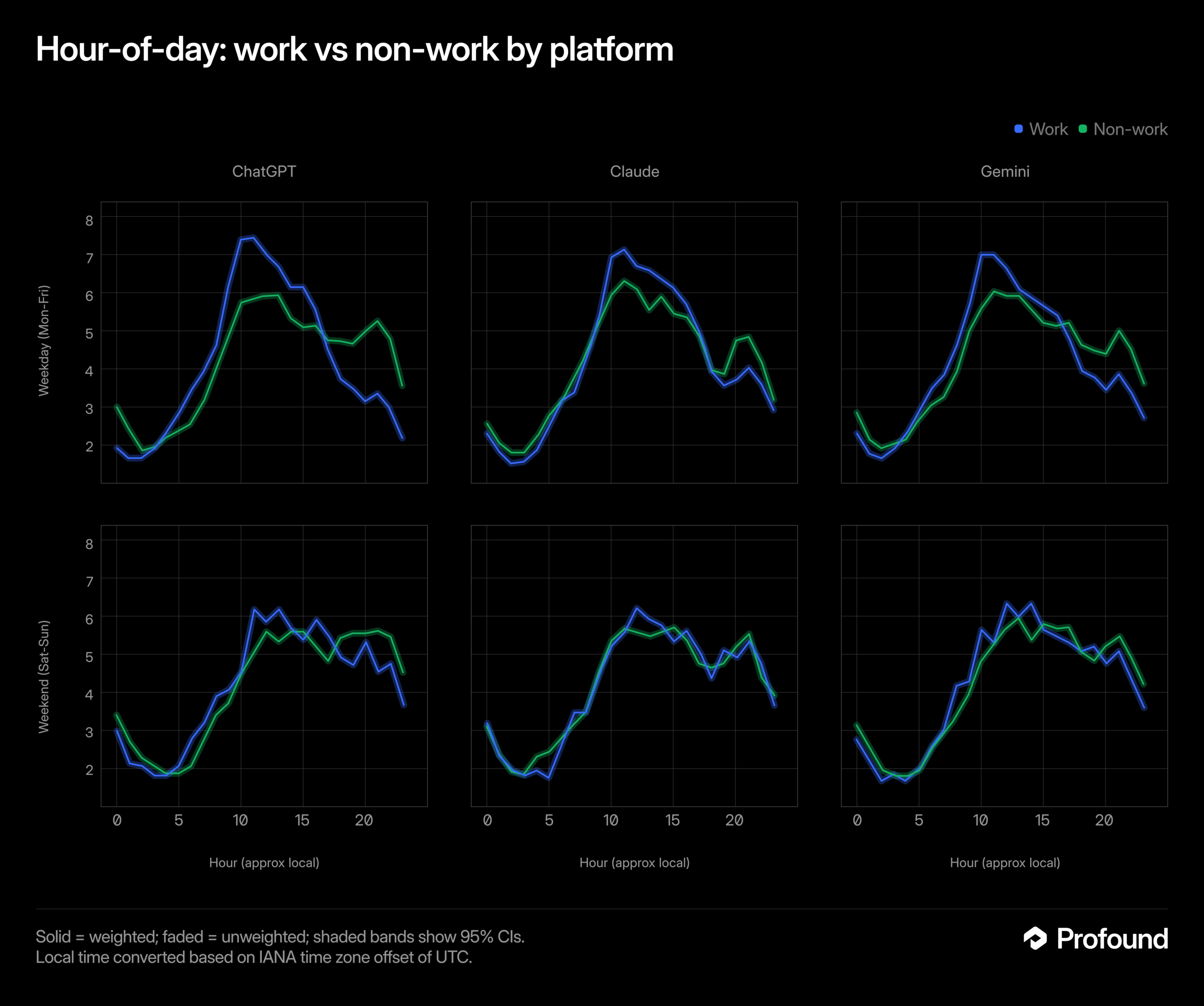
    Six line charts compare work and non-work hourly patterns for ChatGPT, Claude, and Gemini on weekdays and weekends.
    Blue work and green non-work lines show hourly patterns for ChatGPT, Claude, and Gemini, split into weekday and weekend rows, with most curves highest around late morning to afternoon.

    The rhythm belongs to usage, not the assistant

    An AI system does not begin a workday in the human sense. Any apparent schedule is more likely to reflect when people open a platform, what they use it for, and how it fits into their routines.

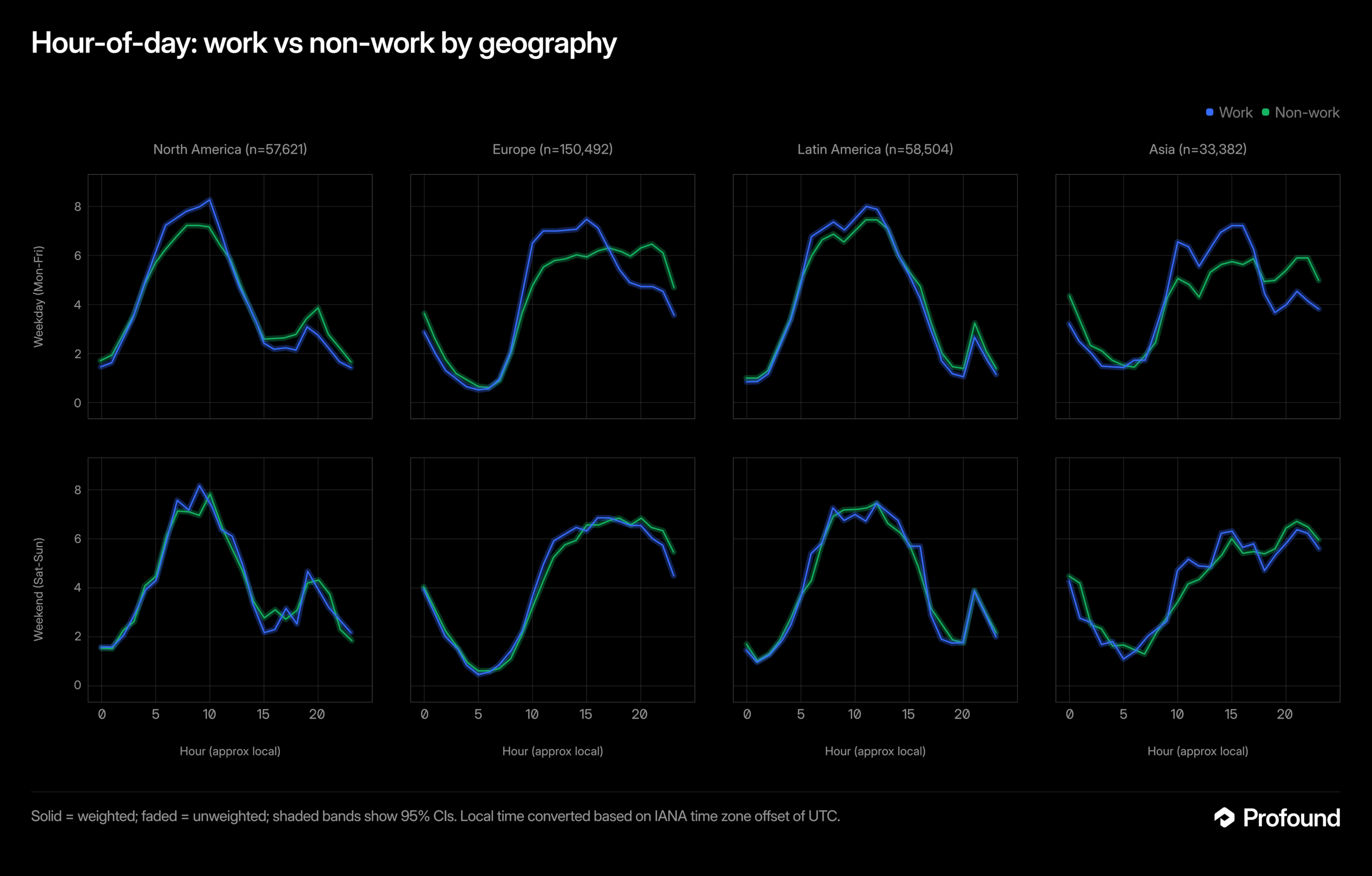
    Eight line charts compare hourly work and non-work patterns across four regions on weekdays and weekends.
    Blue work and green non-work lines trace hour-of-day patterns for North America, Europe, Latin America and Asia, split into weekday and weekend rows.

    A tool associated with professional tasks may see a different pattern from one used for personal questions. The distinction matters because a broad label such as “AI traffic” can hide meaningful differences among audiences and use cases.

    Four blue heatmaps compare hourly, weekday volume shares across age groups from 18-29 to 65+.
    Four heatmaps plot share by hour and day of week for ages 18-29, 30-49, 50-64 and 65+, with the darkest weekday bands around late morning.

    Why one schedule cannot describe every audience

    The source specifically cautions that timing is not consistent across platforms, regions, or users. Each dimension can change how an observed pattern should be interpreted:

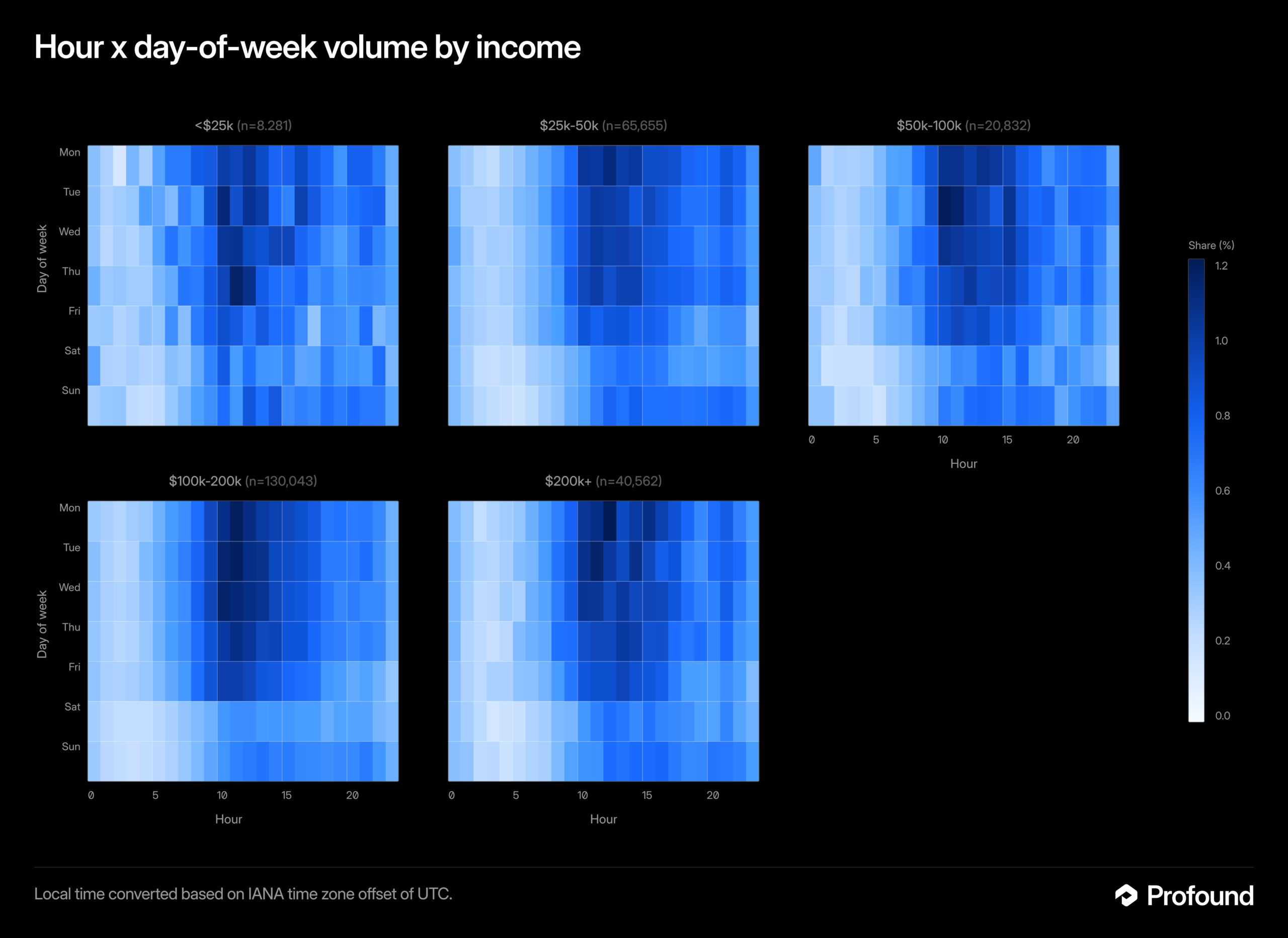
    Five heatmaps compare hourly, weekday volume shares across income brackets from under $25k to $200k+.
    The five blue heatmaps show share percentages by hour and day of week for income groups, with many darker cells appearing from late morning through afternoon.
    • Platform: Different products can serve different purposes and attract different usage habits.
    • Region: Local time, working patterns, and audience location can shift periods of activity.
    • User: Individual needs determine whether an assistant is used for work, study, research, planning, or another task.

    These variables make a single global “best time” an unreliable assumption. A pattern found in one segment should not automatically be applied to another.

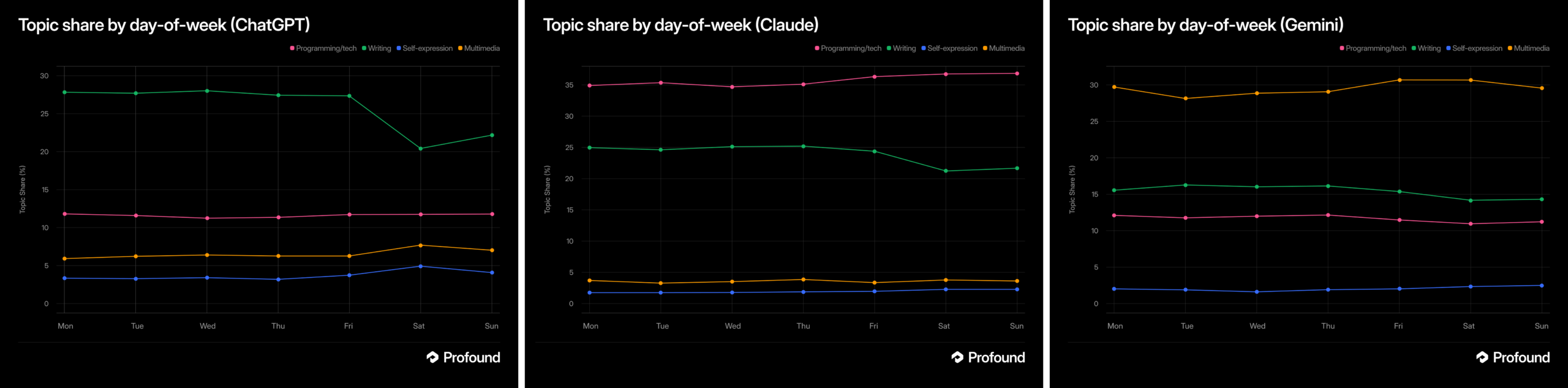
    Three line charts compare topic share by weekday for ChatGPT, Claude, and Gemini across four categories.
    Side-by-side weekday charts show writing highest for ChatGPT, programming/tech highest for Claude, and multimedia highest for Gemini, with weekend shifts.

    Key takeaways

    • AI assistant activity can form recurring daily and weekly patterns.
    • Those patterns may differ across platforms, regions, and individual users.
    • Timing should be evaluated within a defined audience and use case.
    • The source states the principle but does not supply data for specific hours or days.

    How teams can evaluate timing responsibly

    For marketers, publishers, and product teams, the practical response is to examine their own evidence. Analysis should begin with a clear question: which platform, audience, region, and outcome are being measured?

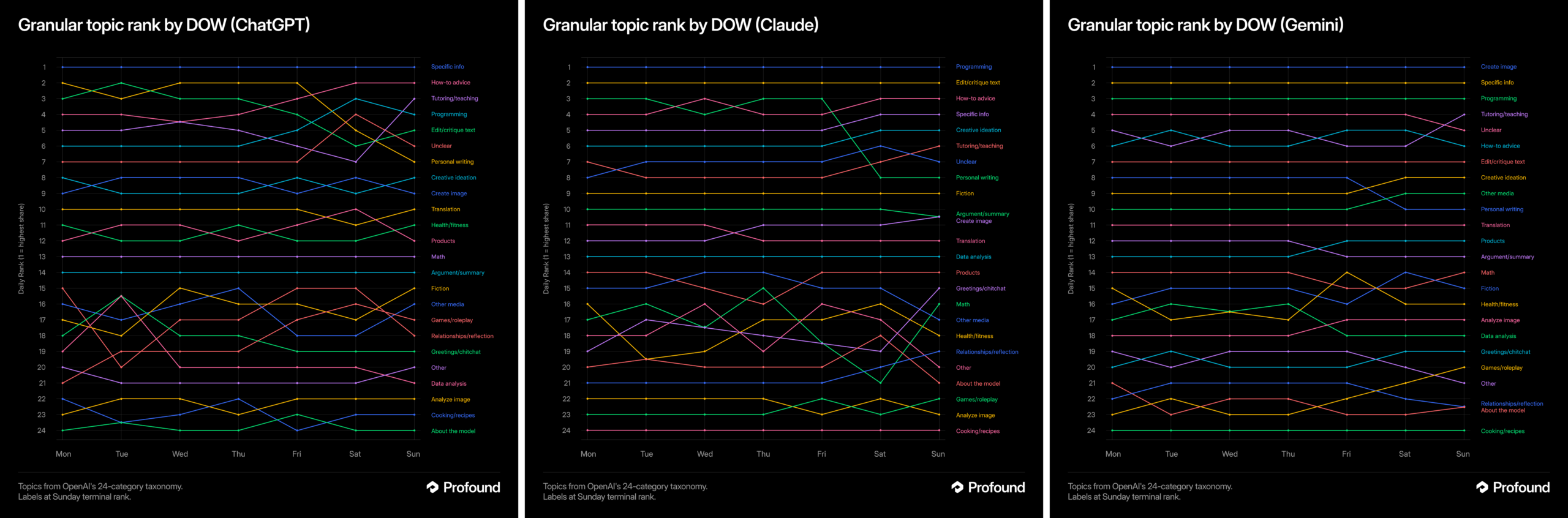
    Three dark line charts compare 24 topic rankings by day of week for ChatGPT, Claude, and Gemini.
    Side-by-side charts titled "Granular topic rank by DOW" trace colored topic rankings from Monday through Sunday for ChatGPT, Claude, and Gemini.

    Teams can then compare consistent time periods, use the relevant local time zone, and separate audience segments where possible. They should also distinguish between activity and impact. A busy period does not necessarily produce the most valuable visits, recommendations, conversions, or customer outcomes.

    Any apparent rhythm should be treated as a working pattern rather than a permanent rule. User behavior, product design, and the mix of use cases can change, so conclusions need periodic review.

    What the source does not establish

    Try Profound Blog does not identify peak hours, preferred weekdays, regional differences, or platform-specific results in the supplied material. It also does not describe a study or methodology. Claims about exact schedules would therefore go beyond the available evidence.

    The defensible conclusion is narrower: AI usage has timing patterns, and context determines what those patterns mean. Organizations that want actionable answers will need to measure the audiences and outcomes that matter to them.


    Inspired by this post on Try Profound Blog.


    crushpress.ai community screenshot
  • AI-Assisted SEO Content Operations: A Scalable Framework

    AI-Assisted SEO Content Operations: A Scalable Framework

    AI can make SEO production faster, but speed does not resolve the central challenge of content operations: ensuring that business economics, workflow systems and editorial judgment continue to support the same goal. If those elements drift apart, greater output can simply multiply weak decisions.

    A durable AI-assisted operation therefore begins with the publishing model, not the model prompt. The practical objective is to encode useful expertise into repeatable workflows while preserving human control over strategy, evidence, quality and investment.

    Key takeaways

    • Content volume should follow audience demand and unit economics rather than the availability of inexpensive AI production.
    • Generic AI output becomes more useful when an organization supplies its own customers, priorities, standards and SEO process as context.
    • Custom assistants are best treated as workflow infrastructure: they can apply a defined method repeatedly, but they do not replace editorial judgment.
    • Quality controls and performance feedback must be designed into the operation before production expands.

    Scalability starts with economic and editorial fit

    The first source describes a structural problem that appears when content businesses grow: economic objectives, operating systems and editorial decisions can become disconnected. A small team may coordinate through experience and close working relationships, while a large network needs explicit systems and data to keep production coherent. AI increases the importance of that distinction because it makes additional drafts easier to create without proving that additional publishing is warranted.

    Volume is also category-dependent. The scaling article contrasts a niche B2B product, where very high output could waste resources, with sports publishing, where games, teams, players and continuing developments can support frequent coverage. Its example of The Athletic reports $54 million in revenue during one quarter and says direct consumer subscriptions provided most of that revenue. In that model, editorial quality is closely connected to the value customers are purchasing.

    The same source presents a more fragile equation for advertising-supported publishing: revenue equals pageviews divided by 1,000, multiplied by revenue per thousand impressions, while profit subtracts production cost. It illustrates the pressure with an article receiving 4,000 pageviews at a $16 RPM, producing $64 before production costs. These figures are an example reported by the source, not a universal benchmark. Their operational lesson is broader: when expected value per article is constrained, producing more content can magnify both small efficiencies and small quality failures.

    DecisionQuestion to resolve before scalingOperational consequence
    DemandDoes the audience have enough distinct, continuing needs to justify more pages?Sets a defensible ceiling for publishing volume.
    RevenueHow is each content type expected to contribute to the business?Determines what production cost and quality level the model can support.
    DifferentiationWhat knowledge, evidence or perspective makes the content worth choosing?Defines what must remain intact when AI assists production.
    GovernanceWho can approve, revise, pause or retire content?Prevents workflow speed from becoming uncontrolled publication.

    AI is most useful when it carries a specific SEO process

    The second source examines the workflow side of the problem. It reports that general-purpose tools such as ChatGPT and Google’s Gemini can perform standard on-page reviews, but their initial recommendations often remain generic because they lack the organization’s business context. Broad advice about improving content or acquiring links may be reasonable in the abstract while still failing to identify the best action for a particular company.

    That limitation points to the appropriate role for AI in content operations. The model should not be expected to discover the business strategy from a bare keyword or URL. It should receive a defined method: who the customer is, what the page is meant to accomplish, which competitive conditions matter, how evidence should be handled and what an acceptable deliverable contains.

    The workflow article highlights GPTs, Gems and Claude Projects as accessible ways to package such context without extensive coding. Its central claim is that the organization’s expertise is the valuable input; the assistant helps apply that expertise repeatedly. Combined with the scaling article, this suggests a clear division of labor: systems preserve and distribute an approved process, while editors decide whether that process is appropriate for a particular topic and business objective.

    A controlled operating loop connects strategy to publication

    An isometric circular workspace shows people guiding content through research, drafting, editing, approval, publication and feedback stages.

    Define the assignment before invoking AI

    Each assignment needs a business purpose, intended audience, search need, content type and success criterion. This brief is the bridge between economics and execution: it prevents a production system from treating every keyword as equally valuable and gives the assistant enough context to apply the organization’s method.

    Encode the repeatable method

    A custom assistant can carry reusable instructions for research organization, page analysis, outlines, optimization checks and editorial formatting. Stable standards can be embedded in the workflow, while changing inputs such as the audience, offer, competitors and source material should be supplied with each assignment. This separates institutional knowledge from task-specific evidence.

    Place human judgment at consequential gates

    Editorial review should concentrate on decisions with business or reputational consequences: whether the premise deserves publication, whether claims are supported, whether the page adds something useful, whether it matches the intended voice and whether optimization compromises clarity. The goal is not human intervention in every mechanical step; it is accountable control where errors would matter most.

    Return outcomes to the system

    Publication completes a production cycle, not a learning cycle. Performance observations, recurring editorial corrections and failed assumptions should inform briefs, assistant instructions and topic selection. Otherwise, an organization may automate the same avoidable weakness across an expanding library.

    Measure the operation at three connected levels

    Three connected scenes show an editor assessing an article, a team monitoring a content workflow and a leader observing business outcomes.

    Production metrics reveal whether work moves efficiently, but they cannot establish whether the work was worth producing. Editorial indicators examine accuracy, usefulness, distinctiveness and the amount of correction required. Business outcomes then show whether the content contributes to the economic model, whether that contribution comes from subscriptions, advertising, leads or another defined purpose.

    These levels should be interpreted together. Faster drafting with heavier editorial repair is not an unqualified efficiency gain. Higher traffic with production costs that exceed the resulting value is not sustainable growth. Strong individual pages in a category with insufficient demand do not justify unlimited expansion. The two source articles approach the issue from different directions, but they converge here: scalable content requires operational systems and contextual expertise, not output capacity alone.

    The next stage of AI-assisted SEO will belong to organizations that can make their judgment explicit, test it against business outcomes and revise the system without lowering the editorial standard that gives the content value.

    References

  • Claude Code as an Agency Knowledge and Action Layer

    Claude Code as an Agency Knowledge and Action Layer

    Claude Code can give an agency more than another place to store information. When local memory, searchable history, connected work systems and focused automations are combined, agency knowledge can move directly from retrieval to a reviewed deliverable or next action.

    The supplied case study describes this as a second brain, but its results should be read as one practitioner’s experience rather than a general benchmark. The author reported that, after rebuilding the workflow over roughly six months, a Monday catch-up that previously involved several applications could be completed in about a minute.

    Key takeaways

    • The useful unit is not a saved note but a decision-ready packet of context that can support a draft or action.
    • Durable memory should remain small and curated, while detailed history can live in a separate search layer.
    • Focused skills turn retrieved knowledge into outputs such as briefs, proposals, meeting summaries and draft replies.
    • Monitoring becomes valuable only after memory, retrieval and task execution work reliably.
    • Read access, drafting authority and permission to act should be treated as separate stages of deployment.

    Treat the system as a decision pipeline, not a notebook

    Agency information moves through a staged pipeline while a strategist reviews a deliverable before release.

    Traditional second-brain systems are good at capture, but capture alone does not resolve the agency’s underlying workflow problem. Information may be preserved in meeting notes, email, messaging tools, a CRM and project files, yet a team member must still remember where it lives, find it, reconstruct the surrounding context and convert it into useful work.

    The source identifies three related failure modes: passive storage that depends on manual recall, context switching between applications, and the absence of an action layer. Claude Code changes that pattern in the reported setup through access to local project files, structured Markdown memory, MCP connections to services such as Gmail, Slack, Google Drive, HubSpot and Scoro, and the ability to draft or analyze material inside a working context.

    Viewed as an operating model, the source’s four layers form a pipeline in which each component answers a different question:

    LayerRole in the workflowQuestion it answers
    MemoryLoads a small set of curated Markdown files covering stable business context, client preferences and working conventions.What should consistently shape the response?
    SearchRetrieves detail from indexed daily logs without placing the entire history in permanent memory.What happened previously?
    SkillsApplies focused procedures for tasks such as drafting a brief, preparing a proposal or summarizing a meeting.What should be produced from the context?
    HeartbeatChecks connected systems on a schedule and surfaces situations that may require attention.What needs intervention now?

    The separation is important. A compact memory layer provides durable guidance, search restores case-specific detail, and a skill transforms both into an output. The heartbeat sits above that foundation: in the reported implementation, it checked email, calendars, Slack and pipeline activity hourly, then delivered a summarized Slack notification and a draft when intervention appeared necessary.

    Design around moments when context must become a deliverable

    The strongest agency use cases begin with a recurring moment of friction, not with a broad goal to automate knowledge work. The source highlights three moments in which scattered context normally has to be assembled before useful work can begin.

    Preparing a client update

    A request for an update may depend on call transcripts, internal notes and recent message threads. The reported system gathers those materials before drafting, reducing the preparation burden and the likelihood that an important discussion is missed. The practical value comes from combining sources around the client question rather than merely returning a list of search results.

    Interpreting performance data

    Analytics and rank-tracking data become more useful when reviewed alongside the decisions, expectations and previous observations that give them meaning. According to the source, the second-brain workflow compiles the needed context for analysis. This illustrates a broader design principle: retrieval should be scoped to the decision being made, so the system supplies relevant history without flooding the task with every stored note.

    Moving from discovery to scope

    Scoping a new engagement often requires translating discovery conversations into requirements and deliverables. The source reports using accumulated discovery context to formulate a scope, reducing repeated exchanges. Here, the skill is not simply summarization. It is a structured transformation from conversational evidence into a draft that a responsible team member can assess.

    These examples share a closed loop: collect the relevant evidence, apply stable business context, produce a defined artifact and place that artifact in front of a human reviewer. A narrow loop is easier to test and improve than an all-purpose agency agent because the expected inputs and acceptable output are clearer.

    Separate knowledge quality from permission level

    Two agency team members review an output within a layered system of knowledge access, drafting and controlled actions.

    An assistant can fail because it lacks the right context or because it has too much authority. Those are different risks and should be managed separately. Better retrieval may improve a draft, but it does not justify allowing the system to send that draft, alter a record or commit a decision without review.

    The source recommends beginning with read-only integrations. In that mode, the system can inspect connected services and prepare material without sending messages or committing changes. Write access is introduced selectively only after its behavior has been evaluated. This creates a practical progression from visibility, to recommendation, to drafting and finally to narrowly bounded execution where appropriate.

    Memory needs a similar constraint. The reported workflow does not treat every daily detail as permanent context. Daily logs can be searched, while only information likely to affect future behavior, such as pricing considerations, client preferences or established working methods, is distilled into long-term memory. This helps prevent outdated or incidental facts from silently steering later work.

    Human review remains the final control for consequential communication. The source’s rule is effectively to trust the drafting advantage while verifying the action. For agencies, that preserves professional judgment over tone, commercial commitments and client-facing claims while still removing much of the mechanical work that precedes a decision.

    Roll out by proving one closed knowledge loop

    A useful implementation sequence follows the flow of information rather than the number of available integrations:

    1. Map the systems that contain decision-relevant material, including email, calendars, messaging, CRM and task management.
    2. Add a transcript source where calls contain context that is not captured elsewhere.
    3. Create a small foundation of durable memory, beginning with business identity, working preferences and carefully distilled daily knowledge.
    4. Keep detailed history searchable so it can be retrieved when relevant without expanding permanent memory indefinitely.
    5. Build one focused skill around a repetitive, reviewable output such as a meeting summary, brief, proposal or draft reply.
    6. Add monitoring only after retrieval and output quality are dependable, beginning with notifications and introducing write permissions cautiously.

    The source presents the heartbeat as the final layer for good reason: proactive monitoring magnifies whatever sits beneath it. If retrieval is noisy or memory is poorly curated, more frequent alerts create more distraction. Once a single loop consistently produces relevant, reviewable work, the same pattern can be extended to another agency process without turning the system into an unrestricted general agent.

    The next stage for agency knowledge workflows is therefore likely to be controlled expansion rather than maximum autonomy: more well-defined loops, better-curated context and permissions that grow only as evidence of reliable performance accumulates.

    References

  • Google’s New Merchant Advisor: Revolutionizing Retail Management

    Google’s New Merchant Advisor: Revolutionizing Retail Management

    Recently, I’ve discovered that Google is stepping up its game in AI tools for advertisers and retailers.

    They’re testing something quite futuristic called Merchant Advisor, an AI assistant integrated directly into the Merchant Center. This tool aims to simplify the process of setup, troubleshooting, and optimization for us all.

    What’s happening. As someone who watches Google’s every move, I’ve noticed them testing Merchant Advisor, a cutting-edge AI-powered chatbot right within Google Merchant Center. Although in beta, its purpose is clear: to offer personalized recommendations and support, making my experience smoother than ever.

    How it works. The Merchant Advisor acts like a proactive assistant, offering tasks and suggestions like setting up a returns policy or finalizing account setup steps. It feels like having an assistant who is always available to enhance my feed quality and account health.

    The bigger trend. This development is part of Google’s strategy to weave AI assistants throughout its marketing products, reminding me of earlier launches like Google Ads Advisor and Analytics Advisor. The AI co-pilots are evidently becoming the norm for managing campaigns and analytics.

    ```json
{
  "alt": "Google Merchant Center Next interface showing Merchant Advisor Beta with a message prompt for completing account setup.",
  "caption": "Explore the Google Merchant Center Next's Merchant Advisor Beta, guiding users to complete their account setup seamlessly!",
  "description": "The image displays the Google Merchant Center Next interface, highlighting the Merchant Advisor in Beta. It features a sidebar with options like Products & store, Marketing, and Analytics. The main section prompts the user to complete account setup by configuring the returns policy. Options like 'Help me set up my returns policy' offer user guidance. This screenshot highlights the use of AI to assist merchants in optimizing their setup."
}
```

    Between the lines. Let’s face it, Merchant Center can be a technical labyrinth, especially for smaller retailers juggling feeds, policies, and diagnostics. But now, with an embedded AI guide, I’m finding it less daunting to get onboarded quickly and spot optimization opportunities I might have overlooked.

    Spotted by. This feature first caught the eye of Tamara Hellgren during a Google Ads Decoded podcast episode that focused on retail innovations.

    The bottom line. It’s clear to me that Google is transforming the Merchant Center into a more intuitive, AI-assisted environment, which reflects a larger trend towards automation within its advertising landscape.


    Inspired by this post on Search Engine Land.


    crushpress.ai community screenshot
  • Conversational AI for Data Analysis: A Practical Workflow

    Conversational AI for Data Analysis: A Practical Workflow

    You have an AI-search dashboard full of charts, but the decision in front of you is much smaller: Why did visibility change? Which competitor gained ground? What should your team investigate before it edits another page?

    Conversational AI can shorten the distance between that question and a useful slice of data. The catch is that a polished answer can hide ambiguous metrics, altered filters, weak evidence, or an unsupported explanation. You need a workflow that uses the conversation for speed without outsourcing analytical judgment.

    Key takeaways

    • Start with the decision you need to make, not a broad request to find insights.
    • Tell the assistant which dataset, period, filters, definitions, and comparison it may use.
    • Move from baseline to segments, exceptions, evidence, and possible actions in separate questions.
    • Require every important claim to be traceable to records, rows, prompts, or another inspectable result.
    • Save the validated analysis specification, not merely the chat transcript, so the work can be reproduced.

    Treat the conversation as an analysis interface

    Some AI-search platforms now provide a conversational layer that lets customers engage directly with their AI Search data. That can make a complex dataset easier to explore, especially when the question is still taking shape.

    The conversational layer is still an interface, not evidence in its own right. At its most useful, it translates your request into operations such as filtering, grouping, comparing, aggregating, and retrieving examples. The prose answer then explains the result. Your confidence should come from the operations and evidence beneath that prose.

    Before you ask a substantive question, establish four boundaries:

    • Access: Which datasets, tables, reports, or workspaces can the assistant actually query?
    • Meaning: How does the platform define visibility, mention, citation, sentiment, share, or any other metric you plan to use?
    • Grain: Does one record represent a prompt, response, model run, page, query cluster, market, or reporting period?
    • Allowed operation: Are you asking for a description, comparison, hypothesis, forecast, or recommendation?

    Those boundaries matter because the same sentence can conceal several different analyses. Consider the request: Why did our AI visibility fall? The word visibility might refer to brand appearances, linked citations, a weighted platform score, or another vendor-specific measure. Fall requires two comparable periods. Why asks for causation, even though the dataset may support only a description of where the change occurred.

    A better first question is: Using the platform’s documented visibility metric, identify where the measured change is concentrated between these two selected periods. Do not infer a cause. That phrasing gives you a defensible observation before anyone starts explaining it.

    Conversational analysis is particularly useful for exploration, segmentation, exception finding, evidence retrieval, and plain-language explanation. It is much less reliable when you ask it to certify causation, reconcile conflicting business definitions silently, or make a high-consequence decision without showing its work.

    Ask questions in a sequence that preserves context

    Connected translucent conversation bubbles guide abstract data through a sequence from an initial question to a focused evidence review.

    One giant prompt tends to mix discovery, interpretation, and action. Use a question ladder instead. Each answer becomes a checkpoint that you can inspect before moving to the next analytical operation.

    Write the decision sentence first: We need to determine whether the change is broad or isolated so we can choose what to investigate before changing content. Then work through this sequence:

    1. Set the scope. Name the permitted dataset, selected periods, market or locale, engine or model, brand, and exclusions. Ask the assistant to state any requested field it cannot access.
    2. Confirm definitions. Ask it to define the main metric, denominator, grouping level, and treatment of missing values before calculating anything.
    3. Establish the baseline. Request the overall result for the chosen scope, together with the filters and calculation used.
    4. Segment the result. Break it down by the dimensions that could change your decision, such as query cluster, market, competitor, content category, cited domain, or model.
    5. Find exceptions. Ask which segments moved against the overall pattern, which were unchanged, and which lack enough usable data for a conclusion.
    6. Retrieve evidence. Request the underlying prompts, responses, pages, records, or report views supporting each material claim.
    7. Separate explanations from facts. Ask for candidate hypotheses in a distinct section, with the additional evidence needed to confirm or reject each one.
    8. Choose the next action. Request actions that follow only from validated observations, with unresolved assumptions listed beside them.

    This sequence prevents a common analytical shortcut. If you begin with What caused the decline and what should we publish?, the assistant is invited to invent a coherent bridge between a measured change and an editorial recommendation. If you first locate the change, inspect examples, and test alternative explanations, the recommendation has a visible chain of support.

    A reusable opening prompt can be simple:

    Analysis brief: Use only the named AI Search dataset and the selected comparison periods. Restate the metric definition, denominator, grain, filters, and exclusions. Separate observed results from hypotheses. For every important result, identify the records or report view that supports it. If required data is unavailable, say what is missing instead of estimating it.

    Long chats can accumulate ambiguity. A later reference to our visibility may inherit an earlier competitor filter or a different period without making that scope obvious. After several analytical turns, use a checkpoint prompt: Restate the active dataset, periods, filters, metric definitions, groupings, and unresolved assumptions before continuing.

    Start a new conversation when you change the business decision, dataset, metric definition, or audience for the result. Carry the validated scope into the new thread explicitly. Do not rely on the assistant to decide which earlier context still applies.

    Verify every answer before you act on it

    An analyst verifies an abstract AI result using source tiles, a filter funnel, a balance scale, and a magnifying lens.

    A useful answer should let you distinguish three layers:

    • Observation: What the selected data shows under declared filters and definitions.
    • Hypothesis: A possible explanation that still needs evidence.
    • Recommendation: An action justified by the observation, the tested explanation, or both.

    Do not allow those layers to collapse into one paragraph. A concentrated decline in one query cluster is an observation. A competitor’s stronger coverage might be a hypothesis. Reviewing the affected prompts, competitor appearances, cited pages, and content differences is a reasonable next action. Rewriting an entire content library is not justified by the observation alone.

    For every answer that could change a report, roadmap, campaign, or content plan, complete this verification card:

    • Question: What exact decision was the analysis meant to inform?
    • Dataset: Which workspace, report, table, or connected system was queried?
    • Time scope: Which periods and timezone were used, and are the periods comparable?
    • Filters: Which brands, competitors, markets, models, prompt groups, content types, and exclusions were active?
    • Metric: What is the metric’s definition, numerator, denominator, and treatment of missing responses?
    • Grain: What does one underlying record represent, and at what level was the result grouped?
    • Evidence: Which rows, prompts, responses, URLs, or report views support the claim?
    • Uncertainty: What data is unavailable, ambiguous, or insufficient?
    • Next check: What independent query or manual inspection would challenge the conclusion?

    AI-search analysis deserves extra care around denominators. A visibility result can change because brand performance changed inside a stable tracked set, because the tracked prompt set changed, or because a filter, market, model, competitor list, or metric definition changed. Ask the assistant to distinguish those possibilities before you interpret the movement as a performance result.

    Definitions also need to travel with the answer. A brand mention is not necessarily a linked citation. A cited page is not necessarily the page you intended to rank. An overall score may combine components that behave differently. Ask for component-level results whenever the combined metric cannot tell you what action to take.

    Use reconciliation to catch silent mistakes. Run the same scoped calculation in the original report or with a trusted manual query. If the totals disagree, stop at the discrepancy. Check filters, date boundaries, grouping, duplicates, missing values, and denominators before requesting more interpretation.

    If the assistant cannot expose the evidence behind an answer, treat the output as a lead for investigation, not a conclusion. Fluency can help you understand a result, but it cannot compensate for missing lineage.

    Turn a useful conversation into repeatable analysis

    Save the specification, not just the transcript

    A chat log records what was said. It may not record the exact state of the dataset, inherited filters, calculation logic, or later corrections. For recurring work, save an analysis specification containing:

    • The decision and analytical question.
    • The dataset and required access.
    • The comparison periods and timezone.
    • The filters, exclusions, dimensions, and grouping level.
    • The approved definitions for every metric.
    • The required output fields and evidence links.
    • The checks used to reconcile the result.
    • The boundary between observations, hypotheses, and recommendations.

    Keep a human-approved metric glossary beside that specification. If visibility, citation, or share has a platform-specific meaning, copy the approved definition into the analytical brief. Do not ask the assistant to infer your team’s preferred meaning from earlier conversations.

    Record corrections as part of the recipe. If a reviewer discovers that a competitor filter was wrong or a prompt group was incomplete, update the reusable specification and rerun the analysis. A corrected answer trapped inside an old chat does not protect the next reporting cycle.

    Require evidence and control when choosing a tool

    If you are evaluating conversational analytics software, do not judge it by how confidently it answers a demo question. Give each candidate the same small analysis whose result you can already verify. Then look for operational capabilities:

    • Clear disclosure of the datasets and fields available to the assistant.
    • Visible filters, metric definitions, calculations, and grouping choices.
    • Drill-down access from a claim to the supporting records or report view.
    • A way to export the answer together with its scope and evidence.
    • Permission controls that respect the underlying dataset’s access rules.
    • A reliable way to reset context and begin a clean analysis.
    • Repeatable prompts or saved workflows that another analyst can inspect.
    • Explicit handling of missing, conflicting, or inaccessible data.

    A tool that produces elegant prose but hides its scope creates review work rather than removing it. A shorter answer with inspectable evidence is more valuable when the result will shape SEO, AEO, GEO, content, or competitive strategy.

    Begin with one narrow recurring decision

    Choose a question your team already answers repeatedly, such as identifying which tracked query clusters deserve manual review after a visibility change. Document the current method, run the conversational workflow against the same scope, and reconcile the two results.

    Keep the pilot narrow enough that a person can inspect the evidence. The aim is not to prove that the assistant can discuss the whole business. It is to determine whether the conversational layer helps your team reach a reproducible, reviewable answer with less friction.

    On your next reporting cycle, write one decision sentence, define one metric completely, and require one evidence path for every conclusion. Once that chain holds up under review, save it as a reusable analysis specification and expand from there.

    References