Category: LinkedIn

  • LinkedIn Ads CPC Benchmarks: What I Budget vs Google

    LinkedIn Ads CPC Benchmarks: What I Budget vs Google

    Linkedin Ads vs Google Ads

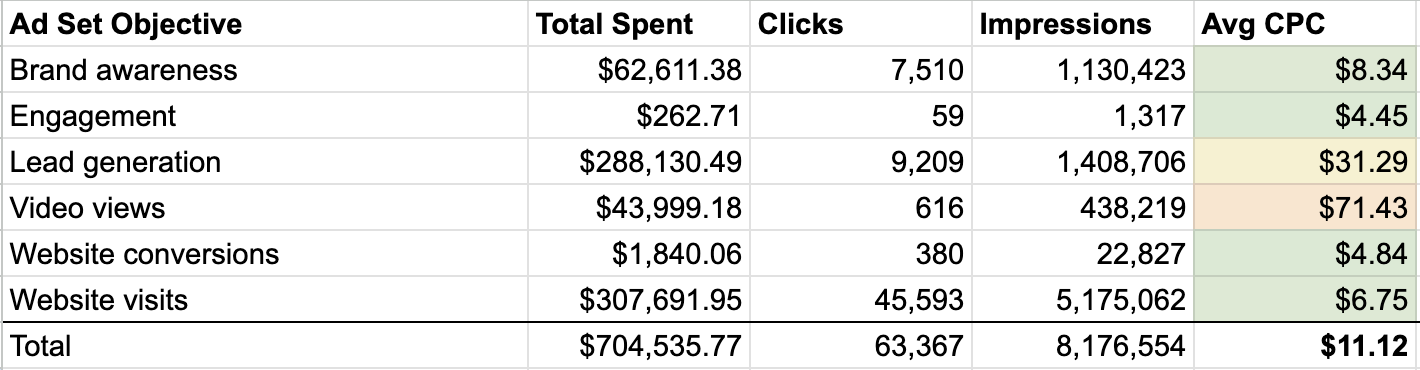
    I know LinkedIn Ads has a reputation for being expensive, and at first glance, the data backs that up. Across the client accounts I analyzed, LinkedIn’s average CPC was $11.12, compared with $5.45 on Google Ads.

    But that simple comparison misses the more useful story. When I compare the cost of reaching new, high-intent B2B buyers, the gap gets much smaller. Non-branded Google Search campaigns averaged a $12.48 CPC, while comparable LinkedIn prospecting campaigns averaged $13.94.

    To understand how LinkedIn CPCs really compare with Google Ads across campaign types and industries, I reviewed more than $700,000 in LinkedIn ad spend and compared it with CPC data from the same accounts on Google Ads.

    What I included in this analysis

    I focused on CPC and performance data from clients that had active campaigns on both LinkedIn Ads and Google Ads over the past year.

    The main questions I wanted to answer were straightforward: What CPCs are we actually seeing? Do CPCs change by ad objective and industry? And how do those costs compare with Google Ads?

    For LinkedIn Ads, I analyzed more than $700,000 in spend across 63,000+ clicks and 8.1 million impressions.

    The clients fell into two main business categories: B2B SaaS, which represented approximately 97% of spend, and professional services.

    I looked at LinkedIn CPCs by ad set objective and business category. For Google Ads, I pulled CPC data from the same client accounts across branded search, non-branded search, Demand Gen, and display campaigns.

    Client names are withheld. The date range for this analysis was May 2025 through May 2026.
    Image

    LinkedIn looks more expensive, but the comparison needs context

    LinkedIn’s blended average CPC across all objectives was $11.12. Google’s blended average CPC across all campaign types was $5.45. On the surface, LinkedIn costs about twice as much per click.

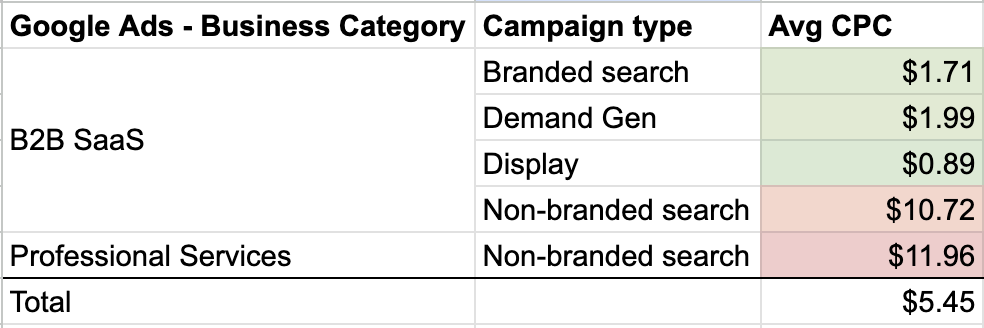
    There is an important caveat. In Google Ads, a large share of those lower-cost clicks came from display campaigns, which averaged $0.89 per click, and branded search, which averaged $1.71 per click. Both are naturally less expensive because display generally reaches lower-intent audiences, while branded search captures people already looking for your company.

    When I narrow the comparison to the cost of reaching new, high-intent audiences, the difference becomes much less dramatic.

    • Google Ads non-branded search averaged a $12.48 CPC across the clients in this study.
    • LinkedIn prospecting campaigns, excluding retargeting and using lead generation, website conversion, or website visit objectives, averaged a $13.94 CPC.

    I used those LinkedIn objectives because they most closely represent high-intent direct-response campaigns, which makes the comparison with non-branded search more useful.

    When I compare the cost of reaching a new audience, LinkedIn is still more expensive, but it is not twice as expensive. In practical terms, I am looking at roughly $12 CPCs on Google and $14 CPCs on LinkedIn.

    LinkedIn CPCs change a lot by objective

    One of the clearest findings in this data set is how widely LinkedIn CPCs vary by campaign objective.

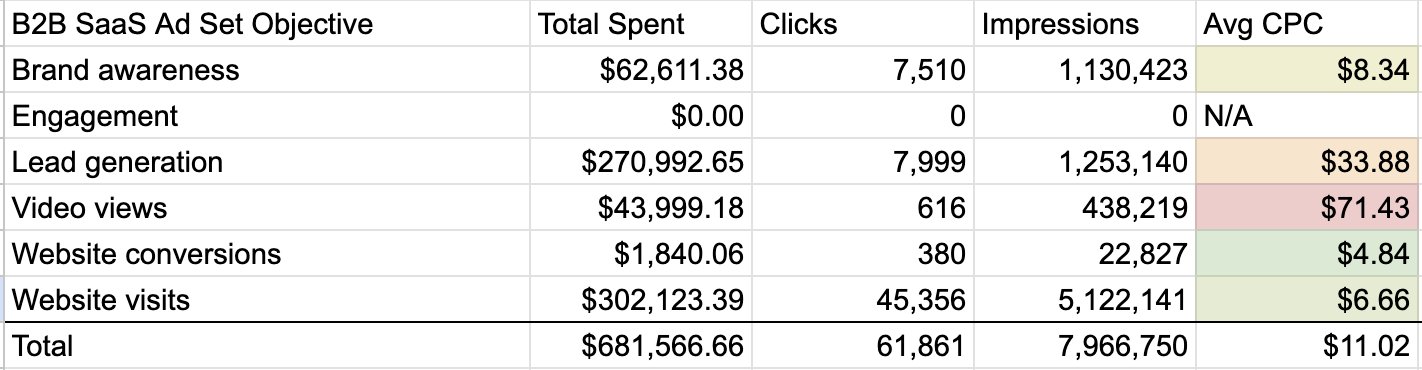
    • Website visits: $6.75
    • Brand awareness: $8.34
    • Website conversions: $4.84
    • Engagement: $4.45
    • Lead generation: $31.29
    • Video views: $71.43

    Lead generation campaigns, where LinkedIn lead gen forms capture contact information directly inside the platform, cost nearly five times more per click than website visit campaigns.

    That higher CPC can still make sense because these campaigns often convert at much higher rates than ads that send people to a website or landing page.
    Image

    Here is the full breakdown of CPCs by campaign objective:

    LinkedIn CPCs by campaign objective

    The number that jumps out most is video views. CPCs for those campaigns look extremely high, but cost per view is the more relevant metric there, so CPC alone can be misleading.

    If I were planning a LinkedIn campaign focused on click volume or site traffic, I would budget for CPCs in the $6-$8 range. For lead gen ads, which in my experience often produce stronger conversion rates and better lead quality, I would plan for $30+ CPCs.

    LinkedIn CPCs also change by industry

    The two business categories in this analysis showed noticeably different CPC profiles on LinkedIn.

    • B2B SaaS: $11.02 average CPC on $681,000 in spend
    • Professional services: $15.25 average CPC on $23,000 in spend

    I would be careful not to overstate that comparison because the spend levels were very different. B2B SaaS had a much broader mix of campaign types, which likely affected the average CPC. The professional services campaigns also used very specific targeting, which may have pushed CPCs higher.

    B2B SaaS CPCs by campaign objective:

    B2B SaaS LinkedIn CPCs by campaign objective

    Professional services CPCs by campaign objective:

    Professional services LinkedIn CPCs by campaign objective

    One interesting twist is that lead gen CPCs in professional services were lower than website visit CPCs. Lead gen CPCs were also much lower for professional services than they were for B2B SaaS.

    Image

    If I were budgeting for a professional services firm on LinkedIn, I would factor in $15-$20 CPCs. For B2B SaaS, I would plan for a wider range, roughly $7-$35, depending on the campaign objective.


    How this compares with Google Ads

    The pattern is fairly consistent across channels. Professional services had higher CPCs than B2B SaaS in this data set. Even when I compare only non-branded search between the two industries, the CPCs are closer, but professional services still comes out higher.

    Here is the breakdown of Google CPCs by campaign type:

    Google Ads CPCs by campaign type

    What I would budget for LinkedIn Ads

    Your targeting will have a major impact on CPCs and budget needs, but I use this data as a practical planning framework.

    Minimum viable budget: $3,000-$5,000 per month

    Below this level, I would not expect enough traffic to drive meaningful lead volume or conversions. You may still be able to get started, but trend-spotting will be slow, and you will probably be limited to one or two campaigns.

    Testing and learning: $5,000-$10,000 per month

    At this level, I would expect enough budget to run two or three objectives, launch more campaigns, test creative and audiences, and generate more meaningful lead volume.

    Scaling: $10,000+ per month

    With this budget, I can run always-on brand awareness and thought leadership campaigns alongside lead gen and website visit campaigns. I can also support event registrations, test more advanced list-targeted campaigns, and use retargeting without starving direct-response efforts.

    For B2B SaaS or professional services companies with an ACV above $20,000, I would rarely recommend starting LinkedIn with less than $5,000 per month. A single closed deal worth $30,000-$50,000 in ACV can justify meaningful investment, even at a $500+ CPL, as long as the pipeline quality is there.
    Image

    The B2B channel mix I recommend

    For most B2B clients, I do not see LinkedIn and Google as either-or channels. I use them for different jobs.

    Use Google Ads and Microsoft Ads for intent capture

    Non-branded search reaches buyers who are actively researching. Branded search and remarketing are lower-cost and essential. If someone is searching for your category keywords, I want your brand to be visible.

    I also use Demand Gen and Performance Max where they make sense to fill gaps and support brand awareness.

    Use LinkedIn Ads for audience-led demand generation

    If the ideal customer profile is highly specific, such as VP-level decision-makers at mid-market SaaS companies, LinkedIn’s targeting is hard to replace. No other platform gives me the same ability to reach that kind of professional audience at scale.

    Run both channels in parallel

    The strongest setup is to run both channels together. Google captures existing demand. LinkedIn helps create new demand and keeps the brand visible to the exact buyers I want in the pipeline.

    Why I still think LinkedIn is worth the higher CPCs

    LinkedIn is more expensive than Google on a raw CPC basis. But when I compare the platforms more fairly, with both reaching cold, qualified B2B buyers, the gap narrows significantly.

    Higher CPCs can still be worth paying if they put the brand in front of the right customers earlier in the decision-making process. Over time, that can be more valuable than relying only on high-intent keywords after buyers have already narrowed their list of options.

    The best scenario is for the brand to become an active part of the buyer’s decision, shaping the narrative before competitors do it instead.

    My take is simple: I use LinkedIn Ads to build intent and tell the story, and I use Google Ads and Microsoft Ads to capture intent. The right budget depends on targeting, but I want enough spend to generate at least 100 clicks per month. Anything less usually means spending money without giving the system enough data to learn from.


    Inspired by this post on Search Engine Land.


    crushpress.ai community screenshot
  • How to Make LinkedIn Recruitment Campaigns More Efficient

    How to Make LinkedIn Recruitment Campaigns More Efficient

    Your LinkedIn recruitment campaign can generate plenty of clicks and applications while still failing at the one outcome that matters: producing qualified hires at a sustainable cost. When interview volume stays flat as campaign activity rises, you are probably paying for attention rather than candidate fit.

    The remedy is not simply a narrower audience or a lower bid. You need a campaign system that identifies intent, filters candidates before expensive actions, separates different stages of demand, and connects media spend to interviews and hires.

    Define efficiency before you buy another click

    Recruitment efficiency is not a high click-through rate, a cheap click, or even a low cost per application. Those metrics describe parts of the journey. They do not tell you whether the campaign is helping the company hire suitable people.

    Start with a complete conversion chain. Every active campaign should be traceable through these stages:

    1. Ad click or lead interaction.
    2. Pre-qualification page visit.
    3. Application start.
    4. Completed application.
    5. Qualified application.
    6. Interview.
    7. Hire.

    Define a qualified application with the hiring team before launch. It might require a particular certification, a minimum level of relevant experience, permission to work in the required location, or another genuine condition of the role. If recruiters apply different definitions after applications arrive, campaign comparisons will be unreliable.

    Calculate cost per hire using one consistent scope: the spend assigned to a campaign divided by the hires attributed to it. If you include creative, agency, or platform costs, include them consistently across every campaign you compare. Apply the same attribution rule as well. A neat dashboard cannot rescue inconsistent definitions.

    Your working report should show spend, clicks, completed applications, qualified applications, interviews, and hires for each campaign. Add conversion rates and costs between stages. That makes the source of waste visible:

    • High click-through rate but few applications: the ad may be creating curiosity that the role cannot satisfy, or the application handoff may be too demanding.
    • Many applications but few interviews: your audience, creative, or landing page is not doing enough pre-qualification.
    • Qualified applicants and interviews but few hires: inspect the offer, recruiter follow-up, interview process, and hiring decision before changing the ads.
    • Hires from one segment but weak volume: increase that segment carefully instead of loosening the requirements across the whole account.

    The first two patterns are especially important because click and application volume can conceal poor alignment. Optimizing to the earliest available event encourages the campaign to find more of that event, not necessarily more people the hiring team wants to meet.

    For early testing, manual cost-per-click bidding can give you tighter control over how quickly the budget is exposed. Consider automated bidding after conversion tracking is working and the campaign has produced a stable enough mix of qualified applicants to judge. The purpose is not to defend manual bidding forever. It is to avoid paying an automated system to amplify an unproven audience or message.

    Build audiences from fit and intent, then keep them separate

    Diverse professionals move along separate teal and amber pathways while a translucent lens highlights people where fit and intent overlap.

    Job title, industry, and seniority tell you who a person is professionally. They do not tell you why that person might consider changing jobs. A more useful audience plan combines three layers:

    • Core fit: relevant titles, skills, certifications, and experience.
    • Behavioral intent: open-to-work status, recent job-seeking activity, relevant group membership, or engagement with industry content, where those signals are available in your campaign setup.
    • Career-friction hypotheses: roles associated with burnout, employers affected by layoffs, or environments where advancement may be limited.

    Use career friction to form a messaging hypothesis, not to pretend you know how an individual feels. An employee at a competitor is not automatically dissatisfied. A person in a demanding profession is not automatically burned out. Your ad can describe a credible alternative without making a personal claim about the viewer.

    Give each intent level its own campaign job

    Active candidates and cold passive candidates should not share the same budget, message, and success expectation. Separate them so that a high-intent audience cannot hide waste in a broad awareness campaign.

    Intent segmentUseful audience signalsMessageCampaign job
    High intentOpen-to-work users, recent job seekers, and retargeting audiencesRole specifics and a direct application invitationGenerate qualified applications now
    Warm passiveRelevant skills, competitor employers, and niche professional groupsA concrete career, schedule, compensation, or lifestyle improvementTurn openness into consideration
    Cold passiveBroader qualified audiences and lookalike audiencesEmployer reputation, culture, mission, and realistic day-in-the-life contentBuild a future talent pool

    This high-, warm-, and cold-intent structure also changes how you interpret performance. A cold employer-brand campaign should not be expected to match the immediate application rate of retargeting. Its job is to create an audience that a later campaign can convert more economically.

    Control overlap when you build these segments. Start with the most specific high-intent pool, then exclude it from warm campaigns where your setup allows. Exclude both from the cold campaign. Without those exclusions, the same promising candidate can appear in several campaigns, making cost and conversion comparisons harder to trust.

    Skill-based segmentation is often more actionable than one large professional audience. If a role accepts candidates from several disciplines, place each major skill group in a separate campaign and adapt the value proposition. You will see which background produces qualified applicants, rather than averaging unlike candidates into one result.

    Make the ad qualify candidates before they click

    A recruitment ad has two jobs: attract the right person and discourage the wrong person from spending your budget. If the ad hides hard requirements to maximize clicks, the application process has to reject those people later, after you have paid for their attention and consumed recruiter time.

    A practical recruitment ad contains four elements:

    1. A recognizable identity or friction: name the professional situation the role improves.
    2. A hard fit statement: specify the required role, skill, certification, or experience.
    3. A verified reason to move: state the real compensation, flexibility, schedule, growth path, mission, or working conditions.
    4. A clear boundary: say when the position is not entry-level or requires a specific background.

    Use this fill-in structure when drafting creative:

    [Professional identity]: If [specific, credible friction] is making you consider a change, [company] is hiring for [role]. You will need [must-have requirements]. The position offers [approved and verifiable benefits]. This role is not suitable for [clear exclusion]. [Direct next step].

    The exclusion is not an apologetic footnote. It is part of the offer. Phrases such as “requires enterprise account management experience” or “not an entry-level position” can reduce irrelevant responses and protect recruiter capacity. The same principle applies to licensed or specialist roles: put the non-negotiable credential in the ad, not halfway through the application.

    Only promote benefits the employer has confirmed. “Flexible schedule” is not useful filtering language if flexibility depends on the manager. A compensation claim should match the actual structure and conditions. An exaggerated promise may raise clicks, but the mismatch will surface in application abandonment, interviews, or offer rejection.

    Test the message against qualified outcomes

    Run creative tests that change one decision-relevant element at a time. You can compare an identity-led opening with a friction-led opening, test schedule against career growth as the primary value proposition, or move the hard qualification earlier in the copy. Keep the audience, role, and destination consistent while you test.

    Do not declare a winner because one variation earns more clicks. Compare completed applications, qualified-application rate, interview rate, and eventual hires. The more selective ad may have a lower click-through rate and still be the more efficient recruitment asset.

    For specialized or senior positions, a narrowly targeted Message Ad can carry more context than a short feed ad. Keep the outreach specific and easy to decline:

    Hi [First Name], your background in [relevant skill or field] stood out. We are hiring a [role] for people with [must-have experience]. The position offers [two verified benefits], and it is intended for [seniority or specialist profile], not entry-level candidates. Would you be open to a brief conversation? If not, thank you for considering it.

    Broad message campaigns can become expensive quickly. Reserve this format for audiences whose eligibility and likely value proposition are already well defined.

    Use a two-stage application path and retarget real interest

    A job seeker begins on a smartphone, passes through a qualification gateway, and reaches an interview table while glowing connections loop back to other interested candidates.

    Sending every click directly to a long applicant-tracking form forces candidates to do too much before they understand the role. It also prevents you from distinguishing between a poor offer and a difficult application experience.

    Use a two-stage path instead:

    1. Pre-qualification page: explain the work, expectations, location or schedule, compensation details, must-have criteria, and who should not apply.
    2. Short application: ask only for the information needed to evaluate the next step, or use LinkedIn Easy Apply when it suits the hiring workflow.

    The first stage should increase clarity, not create an obstacle course. A reported 30-50% reduction in cost per hire has been associated with this two-step structure, but treat that range as a directional campaign claim rather than a forecast. Your result will depend on the role, offer, audience, tracking, and existing application process.

    Instrument both stages separately. Track the proportion of ad visitors who reach the page, start the application, complete it, qualify, interview, and get hired. If many suitable-looking visitors leave before starting, inspect the offer and page. If many begin but do not finish, inspect the form. If completions are high but interview selection is low, strengthen the qualification language.

    Retarget people according to what they already did

    Not every qualified person applies during the first visit. Build retargeting audiences from career-page visitors, ad viewers, and people who watched at least 50% of a recruitment video. Their next message should move the decision forward rather than repeat the original ad.

    • Career-page visitor: restate the role’s main benefit and the most important qualification.
    • Substantial video viewer: show an employee outcome, realistic role detail, or day-in-the-life proof that answers a likely concern.
    • Application visitor who did not complete: return to the role and a shorter next step, if your tracking and campaign rules support that audience.
    • Interested candidate near a genuine deadline: communicate the real closing date. Do not manufacture urgency.

    Exclude people who have already applied unless the follow-up has a deliberate recruiting purpose. Otherwise, you keep paying to ask for an action they have completed and distort the apparent efficiency of the retargeting campaign.

    Once the core funnel is working, expand carefully. Competitor-employee targeting can emphasize a verified advantage without attacking another employer. Skill-specific campaigns can reveal which backgrounds convert. Targeted messages can reach a small pool of senior specialists. Each tactic should remain separate enough that you can identify its qualified applications, interviews, and hires.

    Key takeaways for your next recruitment campaign

    • Measure cost per qualified application, interview, and hire alongside clicks and completed applications.
    • Define qualification with recruiters before launch so campaign comparisons use the same standard.
    • Combine core professional fit with available intent signals instead of targeting job titles alone.
    • Separate high-intent, warm passive, and cold passive candidates because they need different messages and success criteria.
    • Put must-have requirements and meaningful exclusions in the ad to prevent avoidable clicks.
    • Use a clear pre-qualification page followed by a short application, then track the handoff between them.
    • Retarget demonstrated interest with a next-step message and exclude candidates who have already applied.
    • Move budget according to qualified applications, interviews, and hires, not the campaign with the busiest top-line metrics.

    Before increasing your next LinkedIn budget, rebuild one role from end to end. Separate active and passive audiences, add one hard qualifier to the creative, route candidates through a concise role page, and add qualified applications, interviews, and hires to the campaign report. That smaller redesign will show you where the waste actually begins.

    References


  • How LinkedIn’s LLM-Powered Feed Ranks Your Content

    How LinkedIn’s LLM-Powered Feed Ranks Your Content

    If your LinkedIn reach feels erratic, stop treating the feed like one global leaderboard. The platform is trying to predict relevance for each person, so two professionals with similar networks can still receive different candidates in a different order.

    The useful question isn’t, “How do I please the algorithm?” It is, “Can the system understand who this is for, and will the right readers behave as though it was worth their time?” LinkedIn’s new architecture gives you a practical way to improve both sides of that equation without pretending there is a secret score you can reverse-engineer.

    LinkedIn now makes two separate feed decisions

    Abstract content tiles pass through a broad selection gateway and then a second prism that orders different feeds for three viewers.

    Feed visibility begins with two distinct jobs: retrieval and ranking. Retrieval decides which posts could appear. Ranking decides which of those candidates should appear first. A post that fails the first decision never reaches the second, while a retrieved post can still lose its position to something that better matches the viewer’s current interests.

    Retrieval matches meaning, not just identical wording

    LinkedIn has consolidated previously separate discovery routes into a unified retrieval model. Large language models create embeddings: numerical representations that capture the meaning and context of a post. Those representations can be compared with a member’s professional interests even when the wording isn’t identical.

    Someone engaging with small modular reactor content, for example, may also receive material about renewable energy or a related professional field that uses different terminology. This semantic matching across related concepts matters more than repeating one phrase in every paragraph.

    The GPU-backed system processes millions of posts, can refresh content embeddings within minutes, and can retrieve candidates in less than 50 milliseconds. That speed means a fresh post can become semantically retrievable quickly. It does not guarantee that the post will be selected, ranked highly, or distributed widely.

    Ranking uses a sequence of viewer behavior

    After retrieval, a transformer-based sequential model orders the candidates. It doesn’t evaluate each post in isolation. It examines patterns in a member’s previous behavior, including likes, comments, and time spent viewing content, so the feed can adapt as professional interests change.

    This is an important limit on algorithm advice. A post does not have one universal rank. Its position depends partly on the person receiving it and the sequence of behavior that preceded that feed request. Strong results with one audience segment do not prove that the same post will rank the same way for everyone else.

    LLM-powered also doesn’t mean a chatbot is reading your prose like an editor and awarding points for style. One model represents meaning for retrieval; another uses interaction history to rank candidates. Human-readable quality still matters, but it matters because clear, useful content is easier to match and more likely to hold the right person’s attention.

    Make each post semantically legible

    A blank content card emits a focused constellation of topic symbols that connects with a matching group of professional readers.

    A vague post forces both the model and the reader to guess. A semantically legible post names the professional context, the problem, the affected audience, and the relationship between its main ideas. You can create that clarity without turning the copy into a keyword list.

    1. Write a private audience sentence before drafting: “This is for [role] deciding [specific decision].” If you can’t complete it cleanly, the topic is still too broad.
    2. Name the subject early. Don’t spend the opening on a generic tease that could introduce leadership, software, hiring, finance, or any other field.
    3. Explain the mechanism. State why the change happens, what it affects, or which constraint creates the problem. Adjectives such as “transformative” and “important” don’t supply that context.
    4. Connect the core topic to one relevant adjacent concept. Make the relationship explicit instead of dropping related terms into the copy without explanation.
    5. Show expertise through a process, tradeoff, decision rule, or concrete distinction. Claiming expertise is weaker than making knowledgeable reasoning visible.
    6. End with a question only when the answer can deepen the professional discussion. Ask about a decision, constraint, or experience, not whether readers agree.

    Compare “Big changes are coming. Thoughts?” with this structure: “For [role] deciding [decision], [named development] changes [specific constraint] because [mechanism].” The second version tells the retrieval system what the content concerns and tells the reader whether it deserves attention.

    Semantic retrieval is not permission to stuff a post with synonyms. Use the standard term your audience recognizes, explain it in plain language where necessary, and introduce adjacent terminology only when the relationship adds meaning. A keyword dump can mention everything while communicating almost nothing.

    A coherent series can help you explore a semantic neighborhood: the primary problem, its causes, its operational consequences, and the decisions around it. That does not prove LinkedIn grants account-level authority merely for repeating a topic. It does give each installment a clear chance to match similar professional interests, and it gives you a cleaner way to learn which angle resonates.

    Your network size is not the entire distribution story. Posts that demonstrate expertise and contribute to relevant professional conversations can travel beyond an author’s established connections. The practical move is not to chase every trending subject. It is to contribute when you have a specific connection between the timely topic and the work your intended audience actually does.

    Earn ranking signals without manufacturing them

    Because ranking considers likes, comments, and viewing time, it is tempting to treat every interaction as a lever. Resist that simplification. LinkedIn has not supplied a usable formula that tells you how much each action is worth in every context, and a pause on a post does not necessarily mean approval.

    Design for a meaningful reading experience instead. Give the opening enough information to qualify the audience. Build the body in a logical sequence. Make the promised point before asking for a response. If the subject needs depth, use depth; making a post artificially long in pursuit of viewing time only gives readers more opportunities to leave.

    • Use an opening that identifies the professional issue instead of withholding it behind suspense.
    • Break a complex explanation into distinct decisions, causes, or steps so the reader can follow the reasoning.
    • Ask for a response that requires professional judgment, such as which constraint changes the decision.
    • Reply manually and specifically when someone contributes. Continue the subject they raised instead of posting a generic thank-you.
    • Keep the text and any accompanying media on the same subject. An unrelated video may attract attention while weakening the content’s meaning.
    • Remove prompts whose only purpose is to inflate activity, including requests for a one-word comment with no substantive reason to answer.

    Automated comments and engagement pods are not clever shortcuts. LinkedIn has identified them as policy violations that create artificial discussion. The platform is also deprioritizing engagement bait, irrelevant text-and-video pairings, and generic recycled thought leadership.

    Don’t stretch that policy into a claim that every AI-assisted draft is automatically suppressed. The documented targets are automated engagement and low-value publishing patterns. Judge any drafting tool by the resulting content: Is the reasoning specific? Is the point accurate? Does the copy express a real professional distinction? Would the post still be worth reading if no engagement counter were visible?

    Test audience-topic fit instead of algorithm folklore

    A personalized feed makes casual testing unreliable. When one post performs better than another, the difference could involve the topic, the opening, the audience that received it, those viewers’ recent behavior, or the quality of the discussion. Changing several elements at once leaves you with a result but no useful explanation.

    1. Choose one business-relevant question that a recognizable professional audience needs to answer.
    2. Map the question into a core angle and adjacent angles, such as the cause, implementation constraint, common misreading, and decision tradeoff.
    3. Publish a coherent sequence in which every post stands on its own and names its subject clearly.
    4. Change one structural variable when you want to learn from a comparison: the opening, explanatory depth, example type, or closing question.
    5. Record more than reach. Note whether the people responding appear connected to the intended professional context and whether their comments engage with the actual issue.
    6. Use those observations to choose the next adjacent angle. Don’t turn one strong or weak result into a universal rule about length, timing, hashtags, or a supposed favorite interaction.

    Keep a simple brief beside each draft with these fields: intended reader, decision or problem, core concept, adjacent concept, mechanism or tradeoff, and response prompt. After publication, add what the discussion revealed. This turns a feed result into editorial information you can use rather than a number you can only admire or resent.

    Your own feed is also personalized evidence, not a neutral sample of LinkedIn as a whole. If you use it for topic research, remember that your likes, comments, and viewing behavior help shape what you see next. New members can make that preference-building more deliberate by choosing topics through the Interest Picker during signup. That helps customize the feed from the beginning, but it still does not reveal what every other audience sees.

    Key takeaways

    • Retrieval decides whether a post belongs in the candidate set; ranking decides where that candidate appears for a particular member.
    • Semantic embeddings make clear meaning and related concepts more important than exact-phrase repetition.
    • Ranking uses sequences of behavior, including likes, comments, and viewing time, but there is no dependable public formula for turning those actions into a universal score.
    • Expertise becomes visible through mechanisms, tradeoffs, processes, and useful distinctions, not through generic claims of authority.
    • Automated engagement, pods, bait, mismatched media, and recycled thought leadership create policy or quality risks instead of durable distribution.
    • The cleanest test is audience-topic fit: keep the subject coherent, change one structural variable at a time, and inspect who responds and what they discuss.

    Before your next LinkedIn post, write the private audience-and-decision sentence, rewrite the opening so the subject is unmistakable, and remove any question that can be answered without thought. Then use the quality of the resulting discussion to select the next relevant angle. That is a better compounding system than chasing a secret ranking trick.

    References

  • Transform B2B Success: Top LinkedIn Ads Tests for 2026

    Transform B2B Success: Top LinkedIn Ads Tests for 2026

    5 B2B LinkedIn Ads tests to run in 2026

    Short-form video, Thought Leader Ads, personalized creative, and Qualified Lead Optimization are showing promise. Here’s how I plan to test them.

    LinkedIn made some noteworthy moves last year with significant payoffs for our B2B clients. As we embrace 2026 and zero in on our yearly marketing goals, I’ve gathered some exciting insights from 2025 to help you maximize your strategies. Let’s dive into the top tests to run, including:

    • Video.
    • Thought Leader Ads.
    • Personalized creative.
    • Qualified Lead Optimization.
    • Ads duplication.

    Let’s explore each of these tests and the potential benefits they offer.

    LinkedIn video is a must

    Even though Meta and TikTok are more suited for videos, LinkedIn hasn’t shied away from the wave — especially with short-form videos (7-15 seconds). Crafting the right content is crucial for your marketing strategy. Here’s how you can leverage video effectively:

    Consider new placements like First Impression Ads. Compare the performance of video ads in the feed against other ads to gauge impact and engagement.

    The usual tips apply:

    • Avoid just repurposing videos from others. LinkedIn users interact differently — focus on content addressing professional challenges, testimonials, or tutorials.
    • Have a follow-up plan for users engaging with your video, as one video isn’t usually enough to convert immediately.
    • Define a strategy to measure video engagement value, from views to actions like “Comment X for the full guide.”

    Dig deeper: LinkedIn study reveals how B2B video ads can gain +129% engagement lift

    Your customers search everywhere. Make sure your brand shows up.

    The SEO toolkit you know, plus the AI visibility data you need.

    Start Free Trial
    Get started with
    Semrush One Logo

    People respond to people, so try Thought Leader Ads

    Engaging potential B2B clients can often be challenging, especially through a corporate lens. Thought Leader Ads (TLAs), which allow companies to boost employee content, have been around. Since I tested them rigorously in 2025, I’ve noticed they garner significantly higher engagement compared to typical business profile ads.

    TLAs also afford creativity. Humorous posts, for instance, feel more authentic when shared from a personal profile.

    As with all boosted content, selective investment is key. If a post organically gains traction and aligns with your business goals, it’s a prime TLA candidate.

    Caveats to consider:

    • Ensure employees whose content you boost have your brand prominent on their profiles. Activate creator mode so users can follow them, adding value to future content.
    • Per LinkedIn, repurposing content published less than 30 days ago works best. My experiences confirm this.

    Dig deeper: LinkedIn Ads retargeting: How to reach prospects at every funnel stage

    ```json
{
  "alt": "The CapmatchOne logo with a gradient circle and bold text.",
  "caption": "Discover innovation with the CapmatchOne logo, featuring sleek typography and a modern gradient circle.",
  "description": "The CapmatchOne logo features bold, modern typography coupled with a gradient circle, symbolizing connection and innovation. The sleek design conveys a sense of progress and creativity. This image can be used for branding or promotional purposes, appealing to audiences interested in innovative solutions and forward-thinking designs."
}
```

    Get the newsletter search marketers rely on.

    MktoForms2.loadForm(“https://app-sj02.marketo.com”, “727-ZQE-044”, 16298, function(form) {});

    Personalize your creative

    In late 2025, I experimented with personalized LinkedIn ads across various regions and campaigns. Globally, I witnessed a >20% improvement in cost per lead, paired with better CTR and lower CPC. U.S. campaigns were remarkable, showing a 33% drop in CPLs.

    According to my LinkedIn contacts, European users value privacy more than their U.S. counterparts, explaining why personalization resonated better stateside. Yet, even U.S. campaigns showed fatigue with personalized ads after a month.

    Combining personalized and non-personalized ads in one campaign decreased the frequency of personalized ads and facilitated side-by-side performance comparisons.

    Dig deeper: LinkedIn’s new playbook taps creators as the future of B2B marketing

    Test Qualified Lead Optimization

    Having experience with Conversions API (CAPI) and enhanced conversions in Meta and Google, the concept of Qualified Lead Optimization is familiar. LinkedIn’s take lets you merge your first-party data with its algorithm to target high-quality users more effectively.

    Though not as adept as Meta and Google yet, I’ve noted an increase in qualified leads through LinkedIn.

    Here’s how to test it:

    • Use LinkedIn’s CAPI to sync CRM data and define what constitutes a qualified lead.
    • Set up a CAPI conversion event for qualified leads and ensure data flow to Campaign Manager.

    Use the new ads duplication feature

    This tactical feature has saved me time across accounts, making it an essential tool. In March 2025, LinkedIn improved Campaign Manager with a feature for duplicating ads across campaigns and accounts, expediting our campaign launches — a win with no downsides.

    One more LinkedIn ad format to watch

    I’m still evaluating LinkedIn’s new CTV capability. It offers potential for testing brand messages and positioning through targeted niche audiences before committing to broader campaigns.

    LinkedIn introduced substantial updates last year, prompting us to boost client budgets there. Setting clear platform expectations and having a robust evaluation framework will maximize LinkedIn’s value.

    Armed with these strategies and a deep understanding of your ideal customer profile (ICP), LinkedIn could serve as a surprising source of growth in the coming months.


    Inspired by this post on Search Engine Land.


    crushpress.ai community screenshot
  • Master LinkedIn Targeting in Microsoft Advertising

    Master LinkedIn Targeting in Microsoft Advertising

    Here’s how LinkedIn professional attributes enhance intent, automation, and creative decisions in Microsoft Advertising.

    Using LinkedIn targeting within Microsoft Advertising allows me to align creative strategies with the perfect audience. By engaging with this thoughtfully, I can apply professional insights to intent-driven inventory without breaking the bank.

    The key is understanding how these targeting methods collaborate across different campaign types. In this guide, I’ll walk you through leveraging LinkedIn data within Microsoft Advertising, including:

    • LinkedIn in Search campaigns, including Multimedia ads.
    • Using LinkedIn insights for an enhanced audience strategy.
    • Performance Max targeting signals.
    • Audience reach and composition insights via Audience Planner.

    Disclosure: As a Microsoft employee, I’ve kept this article objective, focusing on LinkedIn targeting mechanisms, targeting action items, reporting, and message mapping strategies.

    LinkedIn Profile Targeting in Search

    Microsoft Advertising search campaigns fully support LinkedIn profile targeting, allowing me to layer professional attributes on top of keyword targeting. The supported attributes include:

    • Company
    • Industry
    • Job function

    These audiences can be utilized across Microsoft‑owned environments, such as Bing Search, Microsoft Edge, Microsoft Start, and other eligible search surfaces, provided users are signed in.

    ```json
{
  "alt": "Options for selecting targets in Company, Industry, and Job function with no targets selected.",
  "caption": "Explore potential by selecting targets in Company, Industry, and Job Function, and tailor your strategy to meet specific goals.",
  "description": "This image shows a user interface for selecting potential targets within three categories: Company, Industry, and Job function. Currently, no targets are selected, and an option to edit targets is available. Icons depict each category, offering a structured approach to refining goals or strategies within a platform. This interface is useful for customizing and targeting specific business or marketing objectives."
}
```

    In search, LinkedIn targeting works as a contextual guide rather than a standalone target. Keywords carry the main weight, while LinkedIn data helps me adjust my response when professional relevance is present.

    How to Approach It

    • Start with keywords that already convert: LinkedIn targeting enhances existing intent with proven keywords. I apply bid adjustments to campaigns or ad groups where search terms already demonstrate business value, potentially increasing bids by 10%-15% for aggressive bidding or more aggressive adjustments when impression share is lost to rank.
    • Choose one professional dimension first: I begin with either company, industry, or job function instead of applying all three simultaneously. This approach prevents double-bidding on potential customers.
    • Use bid-only mode to establish a baseline: Observation mode provides performance clarity before I make delivery decisions. This acts as audience research to identify who engages profitably.

    Dig deeper: LinkedIn Ads retargeting: How to reach prospects at every funnel stage

    LinkedIn Professional Demographics in Audience Ads

    Audience Ads leverage LinkedIn Professional Demographics as both a targeting and observation layer, introducing professional context into native, display, and video formats tailored for scalable reach.

    Audience Ads aren’t driven by keyword intent; however, Professional Demographics anchor delivery and insights in real-world business contexts, bridging broad reach with professional relevance.

    These ads let me apply company, industry, and job function as professional audience layers, which I can use to observe performance trends or influence delivery, depending on campaign objectives.

    ```json
{
  "alt": "Industry targeting settings in an ad platform, showing potential monthly impressions of 80.95 billion.",
  "caption": "Explore industry-specific ad targeting options to maximize your campaign's reach with an estimated 80.95 billion impressions.",
  "description": "The image displays an ad platform interface focused on industry targeting options. Users can specify or exclude industries like Manufacturing, Consumer Goods, and Health Care. A sidebar indicates potential monthly impressions of 80.95 billion, with options to adjust bid increments and targeting settings. Keywords: ad targeting, industry selection, impressions, bid adjustment."
}
```

    How to Approach It

    • Start in observation to understand natural performance: By observing performance trends in Professional Demographics, I learn which industries, job functions, or company types naturally engage with Audience Ads before imposing delivery constraints.
    • Let LinkedIn data inform creative, not just delivery: In content-rich environments, creative matters more than targeting alone. I use insights from high-performing professional segments to shape tone, examples, and value framing in my messaging.
    • Align format choice with professional mindset: Different formats perform distinct roles. For example, native and display formats excel in awareness and education within professional segments, while video supports storytelling and industry-specific narratives. Professional Demographic insights guide the most suitable formats for varied business audiences.

    LinkedIn Data in Performance Max: Guiding Automation with Purpose

    LinkedIn profile targeting is available within Performance Max campaigns, where it functions as an audience signal. These signals help the system identify professional profiles most likely to yield profit for my business and influence budget allocation.

    Within Performance Max, professional signals are most effective when representative and directional, rather than exhaustive, providing the system a strong starting point.

    How to Approach It

    • Select signals that reflect your best customers, not every customer: Using LinkedIn attributes to describe my most valuable segments is crucial, especially if different personas represent varying ROAS/CPA goals, as this affects PMax campaign asset groups’ shared ROAS/CPA bidding.
    • Pair LinkedIn signals with strong conversion definitions: Automation improves when reinforced by clear success metrics. Ensuring at least 30 conversions over a 30-day period is vital for autobidding effectiveness.
    • Allow time for learning: Audience signals need sufficient volume to influence delivery, so I avoid frequent changes during the initial learning period (two weeks). Afterward, budget adjustments up to 15% can be made without triggering learning period fluctuations.

    Dig deeper: Google and Microsoft: How their Performance Max approaches align and diverge

    Reporting: Turning Audience Data into Decisions

    Aggregated LinkedIn audience reporting is divided by company, industry, and job function, letting me analyze how professional segments contribute to campaign performance. This reporting, found under Reporting > Professional demographics, includes LinkedIn targeting or audiences applied through predictive targeting.

    How to Approach It

    • Look for consistency across time, not single spikes: Patterns emerging over weeks or months are more actionable than short-term anomalies. I allow “observation” audiences ample time to prove themselves or use Audience Planner for informed decisions at scale.
    • Use reporting to inform creative and bids together: Upon identifying outperforming professional segments, I scrutinize messaging and bidding before initiating changes. It’s crucial to confirm creative resonance without overbidding.
    • Avoid over-segmentation early: Excessive audience segmentation can weaken signal strength, especially when conversion scarcity is a concern.

    Bidding with LinkedIn Audiences

    In Microsoft Advertising, I use bid adjustments alongside automated strategies, enabling flexibility in how LinkedIn audiences influence auctions. Overlapping audiences can amplify bid adjustments, necessitating overlap awareness as part of my bid strategy.

    ```json
{
  "alt": "Interface for targeting users by company, industry, and job function with a search feature.",
  "caption": "Explore precise targeting options by company, industry, or job function, enhancing your marketing strategy with tailored user engagement.",
  "description": "This image showcases a digital interface for targeting users based on company affiliation, industry, and job function. It features search boxes for entering specific queries and lists various industries such as Manufacturing, Health Care, and Design. Job functions like Education and Media are highlighted, with a 'Target' option beside each. The interface emphasizes strategic ad placement while advising against using personal demographics for certain services. Keywords: targeting, industry, job function, company, advertising."
}
```

    Effective bidding adjustments should be incremental and reversible, aiming for calibration rather than acceleration.

    How to Approach It

    • Keep initial bid adjustments small: Single-digit percentage changes preserve learning while allowing differentiation.
    • Audit audience overlap before increasing bids: I review how company, industry, and job function audiences intersect within campaigns.
    • Apply bid changes gradually and sequentially: Adjusting one audience dimension at a time helps me understand its individual impact.
    • Reassess after enough volume accumulates: Decisions are based on performance reaching statistical relevance.

    Dig deeper: The future of remarketing? Microsoft bets on impressions, not clicks

    Creative Strategy: Professional Relevance Without Narrow Assumptions

    LinkedIn targeting controls ad visibility, but creative determines engagement. Professional cohorts encompass a variety of experiences, identities, and viewpoints. My aim is effective creative that respects diversity while remaining relevant to shared contexts.

    Effective creative exhibits professional empathy, addressing challenges, goals, and constraints without reliance on stereotypes.

    How to Approach It

    • Anchor creative in shared problems, not titles: I focus on challenges common to roles and seniority levels within a LinkedIn targeting segment.
    • Keep language inclusive and adaptable: I avoid assumptions about background, experience, or decision-making authority.
    • Use AI tools to localize, not homogenize: Adapting tone or examples by region or industry while preserving message intent is crucial.
    • Test creative alongside audience layers: I evaluate messaging performance within LinkedIn segments to refine both together.

    Extending LinkedIn Insights Across B2B Campaigns

    LinkedIn targeting in Microsoft Advertising provides an opportunity to combine professional expertise with intent-driven media scalably, in a privacy-conscious and economical manner.

    ```json
{
  "alt": "Screenshot of a professional demographics reporting interface with options for filters and column selections.",
  "caption": "Explore insights with the professional demographics reporting tool, offering customizable filters to analyze various data points effectively.",
  "description": "This image shows a screenshot of a professional demographics reporting interface. The interface includes options such as 'Add filter' and 'Add conditional formatting', alongside columns like Account, Campaign, Ad group, Company name, Industry name, and more. The 'Modify' button is present to alter settings. This tool is used for analyzing demographic data with focused filters, aiding in targeted analysis and reporting. Keywords: professional demographics, reporting interface, data analysis."
}
```

    Teams already using LinkedIn Ads can leverage this strategy to extend learnings into additional inventory via automation, amplifying reach and efficiency.

    The value lies not in complexity, but in alignment – aligning data, mechanics, and human behavior enhances results.

    Key takeaways:

    • LinkedIn profile targeting is fully accessible in Search and Performance Max on Microsoft surfaces.
    • Professional attributes act as targeting layers in search and optimization signals in Performance Max.
    • An observation-first approach fosters understanding before commitment.
    • Aggregated reporting aids informed optimization without revealing individual data.
    • Thoughtful, incremental bid adjustments maintain performance stability.
    • Empathy-anchored creative fosters professional relevance.

    When I use LinkedIn data with curiosity and care, it offers a way to view audiences more clearly rather than control them more tightly. For B2B advertisers navigating complex buying journeys, such clarity often becomes the most valuable optimization.

    Dig deeper: 5 LinkedIn Ads mistakes that could be hurting your campaigns


    Inspired by this post on Search Engine Land.


    crushpress.ai community screenshot
  • Elevate Your LinkedIn Ads: Reserved Slots Now Available

    Elevate Your LinkedIn Ads: Reserved Slots Now Available

    Recently, I’ve been exploring LinkedIn’s Reserved Ads feature, which is now open to all managed advertisers. This exciting update lets me secure the prized top-of-feed placement, fundamentally boosting visibility and engagement for my B2B campaigns.

    LinkedIn has now made Reserved Ads accessible to all managed accounts, allowing me to grab the first ad slot in the feed. This prime location guarantees premium visibility for my advertising efforts.

    What’s new. With Reserved Ads, I can secure top-of-feed placement at a consistent rate, ensuring predictable delivery and enhanced reach. According to LinkedIn, this format drives up to 75% higher dwell time, 88% higher view-through rates, and achieves 99% of forecasted impressions, making it a powerful choice for my marketing strategy.

    How it works. These ads appear in the most visible ad slot on LinkedIn’s feed and support a variety of Sponsored Content formats like Video, Single Image, and Carousel Ads. My LinkedIn account representative assists me in reserving this valuable inventory and setting the pricing strategy.

    Why we care. For me, LinkedIn Reserved Ads are a game-changer, providing guaranteed top-of-feed placement. This increases my campaign’s visibility and engagement, helping me stand out in the competitive B2B space. The premium positioning enhances brand recall and influences potential leads early in the funnel.

    LinkedIn feed showing a digital advertisement for a payment system called Oustia, with a visual of a card reader.
    Explore the future of payments with Oustia's sleek new card reader! Secure, stylish, and efficient — the perfect tool for modern businesses.

    The predictable delivery and fixed pricing models mean I can plan my campaigns with more certainty, while also building high-quality retargeting audiences for future conversions.

    The big picture. By utilizing Reserved Ads, I’m effectively bridging brand awareness and demand generation. Anchoring my campaigns at the top of LinkedIn’s feed enables me to create higher-quality retargeting pools, with LinkedIn reporting up to a 101% increase in mid-funnel engagement as a result.

    The bottom line. LinkedIn’s Reserved Ads provide me, as a B2B marketer, with a predictable way to command attention and transform it into significant demand.


    Inspired by this post on Search Engine Land.


    crushpress.ai community screenshot